USD
  • EUR
  • INR
  • USD
Cart
Cart 0
  • You have no items in your shopping cart.
    Cart
    Cart 0
    • You have no items in your shopping cart.
    Hire a Developer
    ×
    Contact Us!
    Send Again
    Close
    Please Login to Write Your Review

    Nodejs Food Delivery App

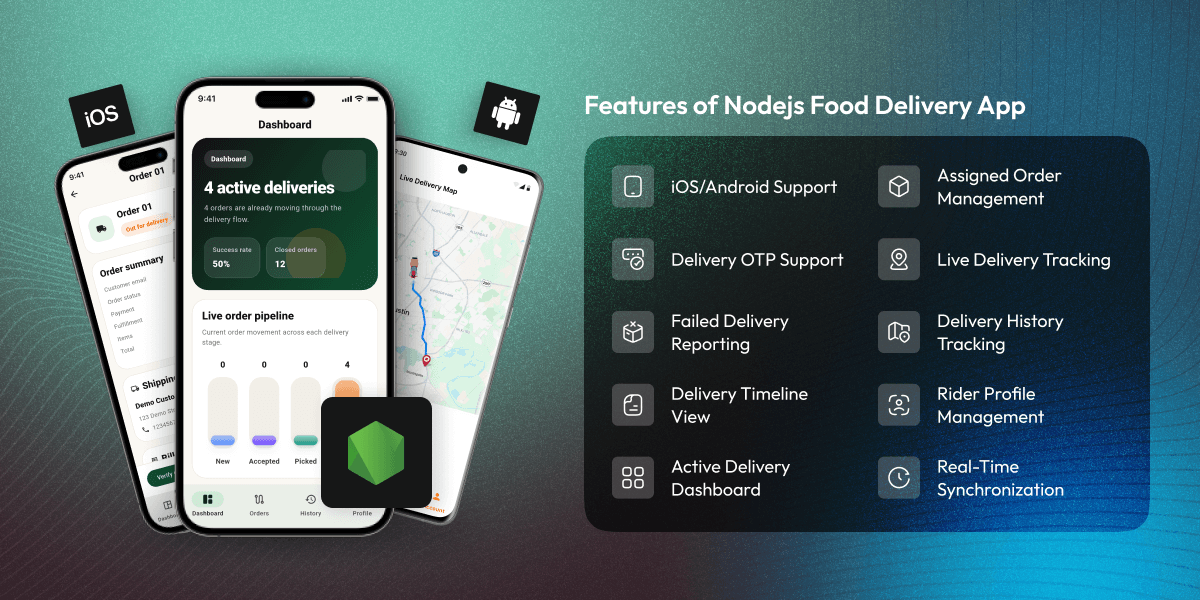
    Nodejs Food Delivery App uses Medusajs as a backend and helps delivery partners manage orders, pickup updates, OTP verification and live tracking from one mobile app.


    • Rider logs in to access assigned delivery orders securely.

    • View and manage assigned deliveries from a single screen.

    • Accept orders and update pickup and delivery status quickly.

    • Mark's orders are out for delivery with live tracking support.

    • Verify completed deliveries using OTP confirmation.

    • View detailed order, address, and payment information.

    • Report failed deliveries with the reasons for failure.

    • Track active, completed, and failed delivery orders.

    • Review delivery history with order status records.

    • Dashboard view for delivery progress and rider activity.

    • Real time location sharing during active deliveries.

    Screenshots
    Nodejs Food Delivery App Nodejs Food Delivery App Nodejs Food Delivery App Nodejs Food Delivery App Nodejs Food Delivery App Nodejs Food Delivery App Nodejs Food Delivery App Nodejs Food Delivery App Nodejs Food Delivery App Nodejs Food Delivery App
    Show More Hide All
    $699.00

    * Required Fields

    Add To Cart
    $699.00
    Configure and Buy
    • Description
    • Reviews
    • FAQ
    • Customers ()
    • Specifications
    • Cloud Hosting
    • Changelog

    Nodejs Food Delivery App helps delivery partners manage deliveries from a mobile device. Riders can manage assigned orders, use OTP checks, and share their location during deliveries.

    After login, riders can see all assigned orders on one screen. They can accept new orders, view active deliveries, and manage daily tasks from one place.

    Medusa food delivery E-commerce supports the full delivery flow. Riders can mark orders as picked up, out for delivery, delivered, or failed. This keeps order records up to date.

    Each order shows all delivery details in one place. Riders can view user details, delivery addresses, ordered items, payment details, and order status. OTP checks help confirm deliveries. Riders enter the user's OTP before marking an order as delivered. If a delivery fails, they can report the reason.

    Live tracking lets businesses see rider locations during deliveries. Teams can track order progress and follow active deliveries in real time. This app supports white label branding. Businesses can change the app name, logo, colours, and other design settings. This helps create a rider app that matches their brand.

    If you want a complete mobile shopping experience with product browsing, checkout, account management, and order tracking, check the Medusa Mobile App Builder.
    Nodejs Food Delivery App

    Highlighted Features of Nodejs Food Delivery App

     Assigned Order Management

    See all assigned orders in one place. Riders can check delivery tasks and manage orders from a single screen.

     Order Acceptance

    Accept delivery orders from the rider app. Riders can start deliveries as soon as an order is assigned.

     Detailed Order View

    See user information, delivery address, ordered products, payment details, and order status on one page.

     Pickup Status Updates

    Mark an order as picked up. The order status changes right away and shows the latest delivery stage.

     Out for Delivery Management

    Set the order status to out for delivery. Riders can follow the delivery steps until the order is completed.

     OTP Delivery Verification

    Enter the user's OTP before completing the delivery. This confirms that the order was delivered successfully.

    Why Do We Need Nodejs Food Delivery App?

    Nodejs Food Delivery App helps food stores manage delivery riders through a dedicated mobile app, allowing them to handle assigned orders. Many food stores still use calls and messages to manage orders. Riders may wait for order details. They may also wait for delivery updates. This can slow down delivery work

    Some systems do not have a rider app. They may not support OTP checks. They may not show rider location in real time. This can make delivery work harder. The rider app gives riders one place to manage orders. They can see assigned orders, view order details, update order status, and complete OTP checks.

    Riders can do their daily work from a mobile device. This helps reduce manual work. It also helps keep order updates in one place. This app is useful for food stores, cloud kitchens, and agencies. Medusajs Food Delivery Solution helps riders finish delivery tasks faster and with fewer steps.

    Use Cases

    • Food Delivery Businesses

      Give riders one app for daily order work. Riders can see orders, update status, and mark orders as delivered.

    • Multi Location Restaurant Chains

      Use one rider app for all store branches. Riders can handle orders from different areas in one place.

    • Cloud Kitchens

      Send new orders to riders through this app. Riders can pick orders, update status, and finish delivery tasks.

    • White Label Delivery Apps

      Add a business name and logo to this app. Use the same app for many food delivery brands.

    • Delivery Startups

      Start a food delivery business with a ready rider app. Save setup time and start work faster.

    • Agency Solutions

      Give rider apps to different clients. Use the same app for many client stores and brands.

    Dashboard Overview

    The Dashboard gives delivery partners a clear view of active deliveries, completed orders, and delivery performance from one screen. It helps riders track daily delivery tasks, reduce screen switching, and stay updated on order progress throughout the day.
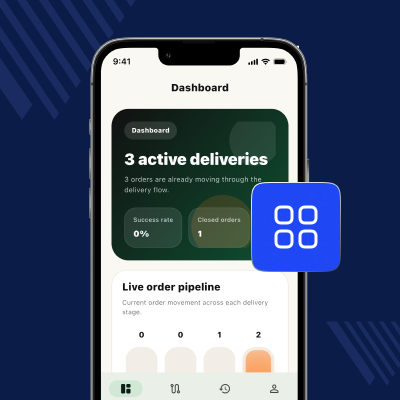
    • View active delivery count in real time
    • Monitor completed delivery statistics
    • Check the delivery success rate summary
    • Access delivery performance information
    • Rider focused dashboard interface
    • Quick visibility into daily operations
    Dashboard Overview

    Live Order Pipeline

    Food Delivery App for Medusa E-commerce displays orders across different delivery stages, including new, accepted, picked up, and out for delivery. It helps riders prioritise tasks and gives teams a clear view of order status and delivery progress from one screen.
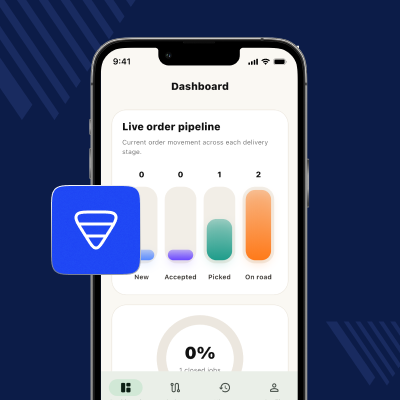
    • View orders across different delivery stages
    • See new, accepted, picked, and active orders
    • Quick view of current order workload status
    • Check order status updates in real time
    • Help riders focus on important active orders
    • Better view of delivery progress and order flow
    Live Order Pipeline

    Assigned Order Management

    The Assigned Orders section lets riders view and manage all assigned deliveries from one place. Riders can check order details, update delivery status, verify deliveries with OTP, report failed deliveries, and handle active orders throughout the delivery process.
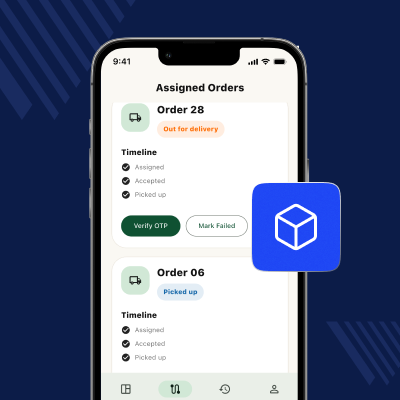
    • View all assigned orders from one screen
    • Check the status of each order
    • See order progress with a simple timeline
    • Confirm deliveries using OTP verification
    • Report failed deliveries with a reason
    • Get quick access to order updates
    Assigned Order Management

    Rider Profile Management

    In the Medusajs food delivery Mobile App, the Rider Profile section helps riders view their account details from one screen. Riders can check profile information, manage account access, stay signed in securely, and keep account details up to date.
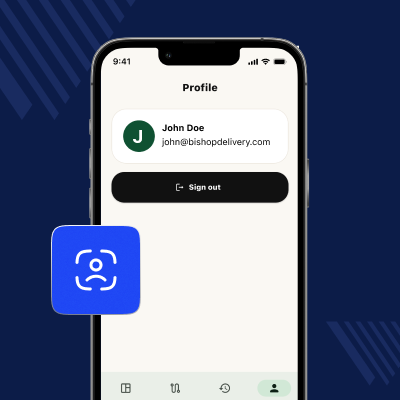
    • Dedicated rider profile page
    • View rider name and email
    • Manage account access
    • Secure login session
    • Quick sign out option
    • Easy profile information review
    Rider Profile Management

    Order Summary Details

    The Rider Profile section allows delivery partners to view and verify account details from a single screen. It helps riders manage account access, maintain a secure login session, and keep profile information updated for daily delivery activities.
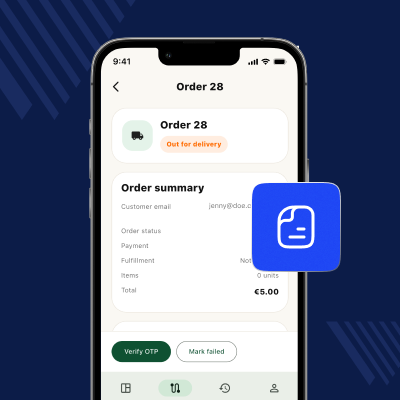
    • View user email and order information
    • Check order, payment, and fulfilment status
    • Access item quantity and order total details
    • Review delivery information from one screen
    • Quick visibility into assigned order status
    • Supports informed delivery decision making
    Order Summary Details

    Delivery Timeline

    Food Delivery App for Medusa E-commerce also shows each step of an order from assignment to delivery. Riders can check the current status, view time updates, and follow the order journey from one place.
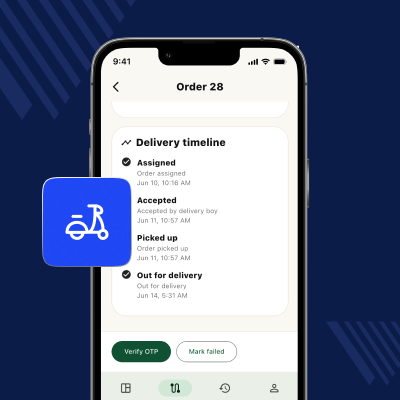
    • View the full delivery timeline
    • Track assigned and accepted orders
    • Check the picked up and delivered status
    • View the time for each delivery update
    • Follow the order progress step by step
    • See all delivery status changes
    Delivery Timeline

    Order Items and Payment Details

    The Order Items and Payment Details section displays products, quantities, shipping information, payment details, and order totals on one screen. It helps riders quickly review order information and access important details during the delivery process.
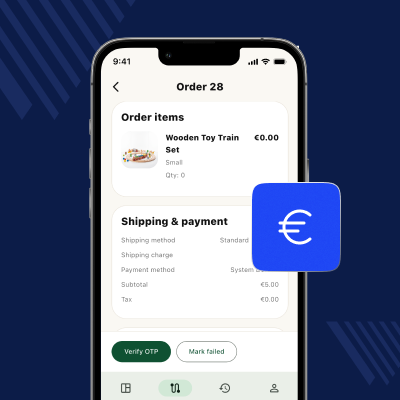
    • View products with item count details
    • See product options and item details
    • Check shipping type and shipping costs
    • View payment type and payment status
    • See tax, subtotal, and order total
    • Quick view of important order details
    Order Items and Payment Details

    Failed Delivery Reporting

    Nodejs food delivery mobile app provides a feature that allows riders to mark undelivered orders as failed and submit a reason from this app. It helps teams track delivery issues, maintain accurate records, and review failed deliveries when needed.
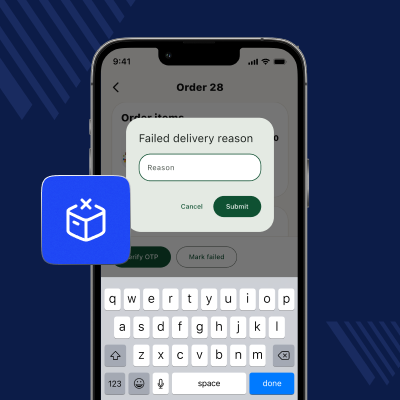
    • Mark an order as failed in this app
    • Add a reason for the failed delivery
    • Use a pop up form for quick updates
    • Keep order status records up to date
    • Track failed orders for later review
    • View delivery problems and issue records
    Failed Delivery Reporting

    OTP Delivery Verification

    The OTP Delivery Verification feature requires riders to enter the user's OTP before marking an order as delivered. Medusa food delivery E-commerce confirms successful delivery, reduces delivery errors, and verifies that the order reached the correct recipient.
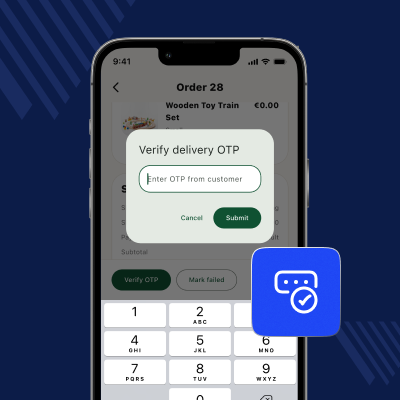
    • Enter the OTP before delivery closes
    • Confirm order handover with an OTP code
    • Simple number entry for OTP checks
    • Stop orders from closing by mistake
    • Update order status after OTP check
    • Help reduce delivery and order disputes
    OTP Delivery Verification

    Delivery History Details

    The Delivery History Details section displays delivered and failed orders, order information, and failure reasons on one screen. It helps riders review past deliveries, track delivery outcomes, and access previous order records whenever required.
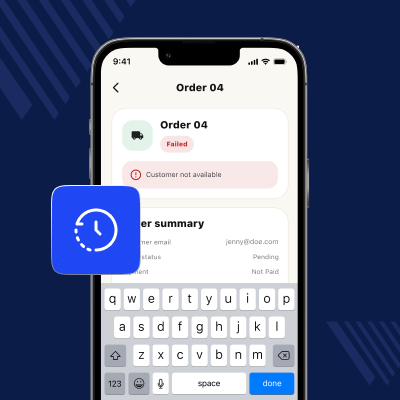
    • View delivered and failed orders
    • See order details from past orders
    • Check the fail status and fail reasons
    • View user and order details
    • Track past orders and status updates
    • Keep past delivery issue records
    Delivery History Details

    Live Delivery Tracking

    Nodejs food delivery mobile app provides a feature that lets users follow delivery progress by viewing the rider’s live location during active deliveries. Users can track the order from the order details page until the delivery is successfully completed.
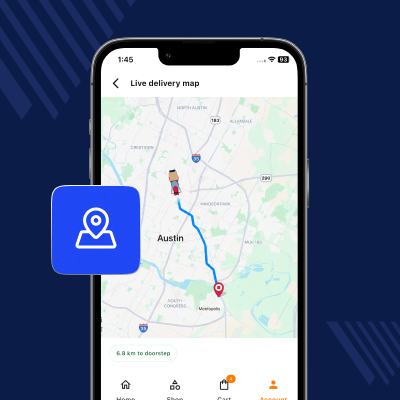
    • Real time rider location tracking during active deliveries
    • User order tracking from the order details page
    • Automatic tracking starts for out for delivery orders
    • Route visibility between the rider and the delivery destination
    • Automatic tracking stops after delivery completion
    Live Delivery Tracking

    Support

    For any query or issue, please create a support ticket here http://webkul.uvdesk.com/

    You may also check our top-quality Magento 2 Extensions.

    Specifications

    Product Version1.0.0
    ReleasedToday
    CategoryMobile Apps
    Last UpdatedJune 25, 2026 (1 day ago)
    Supported VersionsAndroid  16.0 and later  iOS  18.0 and later  
    Write a review

    Frequently Asked Questions

     What happens if a delivery cannot be completed?
    The rider can mark the order as failed. The rider can also add a reason so the issue can be checked later.
     
     Can riders review their past delivery orders?
    Riders can open the history page and view past orders. Both delivered and failed orders remain available for review.
     
     Does the Nodejs Food Delivery App work for multiple delivery partners?
    Each rider gets a separate account. Riders can sign in and manage only the orders given to them.
     
     Can riders log out while an active delivery is in progress?
    Medusajs Food Delivery App can stop riders from logging out during an order. This helps keep order updates and rider actions on track.
     
     What is the tech stack used for building this application?
    Technical details for the Flutter Native iOS & Android app - Android app codes are written in Dart with Flutter framework on the Android Studio framework, and iOS apps are coded in Dart with Flutter framework using Xcode.
     
     What are the minimum and maximum Android OS support?
    The Android OS is supported up to version 16.0 (SDK Level 36), with version 6 (SDK Level 23) being the lowest supported version.
     
     What design pattern is implemented in Android?
    This application follows the MVVM (Model-View-ViewModel) architecture pattern in Android, helping maintain a structured codebase, easier maintenance, and scalable app development.
     
     Does the latest iOS code support iOS 26.2?
    The code is compatible with the latest iOS 26.2. However, for the upcoming versions, the code will support the same once it is out for public use.
     
     What are the minimum and maximum iOS versions supported?
    The minimum supported iOS version is 15.0, while the maximum supported version is iOS 26.2, allowing this application to run across a wide range of Apple devices.
     
     What design pattern is implemented in iOS?
    This app uses the MVVM (Model-View-ViewModel) architecture pattern in iOS, helping organise code efficiently, simplify maintenance, and support scalable app development.
     
     Does the platform support live delivery tracking?
    The user can track the order from the order details page in the Medusa Mobile App. They can view the rider's live location and follow delivery progress while the order is on the way.

    Move to Cloud Today

    AWS Free tier hosting for one year by amazon web services, for more details please visit AWS Free Tier.

    GCP Free tier hosting for one year with 300 credit points by google cloud platform, for more details please visit GCP Free Tier.

    Azure free tier hosting for one year with 25+ always free services, for more details please visit Azure Free Tier.

    In our default configuration we will provide tremendous configuration for your eCommerce Website which is fast to load and response.

    Default Configuration Details of Server

    • 1 GB RAM
    • 1 Core Processor
    • 30 GB Hard Disk
    • DB with 1 GB RAM and 1 Core Processor

    * Server Configuration may vary as per application requirements.

    Want to know more how exactly we are going to power up your eCommerce Website with Cloud to fasten up your store. Please visit the Cloudkul Services.

    Get Started with Cloud
    • + Features
    • - Bugs
    Version 1.0.0

      Initial Release


