USD
  • EUR
  • INR
  • USD
Cart
Cart 0
  • You have no items in your shopping cart.
    Cart
    Cart 0
    • You have no items in your shopping cart.
    Hire a Developer
    ×
    Contact Us!
    Send Again
    Close
    Please Login to Write Your Review

    Odoo AI Business Card Reader App

    Odoo AI Business Card Reader App helps users turn business cards into digital contacts, manage leads, and keep contact information connected with Odoo.


    • Scan business cards and capture contact details quickly

    • Create digital contacts from business card information

    • Import business card images from the phone gallery

    • Add contact details manually whenever needed

    • Choose automatic or manual sync with Odoo

    • Manage multiple contact records at the same time

    • Add notes to keep contact details complete

    • Create leads or partners from scanned business cards

    • Track leads through the Odoo sales pipeline

    • Update profile images and user account settings

    • Store contact details for quick access anytime

    • Search and sort saved contacts with ease

    Screenshots
    $199.00

    * Required Fields

    Add To Cart
    $199.00
    Configure and Buy
    • Description
    • Reviews
    • FAQ
    • Customers ()
    • Specifications
    • Cloud Hosting
    • Changelog

    Odoo AI Business Card Reader App helps businesses turn paper business cards into digital contact records. It makes it easy to save, view, and manage contact details in one place.

    Users can scan business cards, import card images from the gallery, or add contact details manually. This offers multiple ways to create and organize contacts.

    This App organizes business card details and saves them in a clear format. Users can quickly find and use saved contact information whenever needed.

    This App works with Odoo and supports both automatic and manual data sync. Users can choose how contact records are sent to Odoo.

    Users can create Leads from captured contact details and track them in Odoo. This helps teams stay connected with potential customers.

    This app also lets users save contact records locally for quick access. Stored records remain easy to view and manage.

    Features such as notes, profile images, and location fields help users keep contact records complete and organized.

    Odoo AI Business Card Reader App is a useful solution for sales teams, marketing teams, event attendees, and businesses that collect contact information regularly.
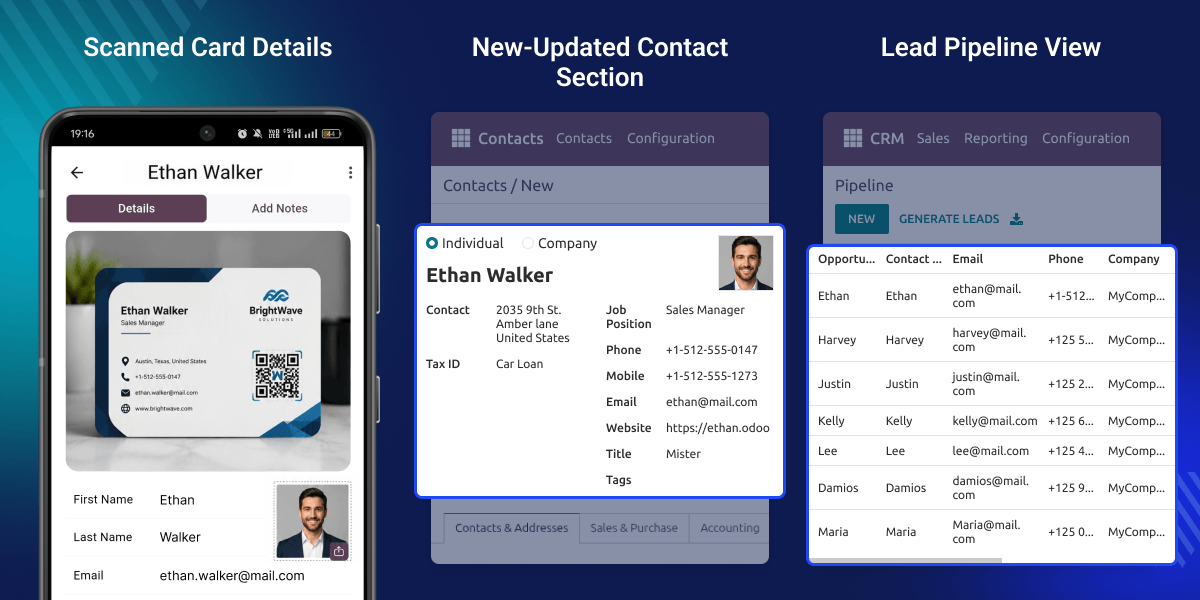
    Odoo AI Business Card Reader App

    Highlighted Features of Odoo AI Business Card Reader App

      Manual Business Card Entry

    Create contact records manually when a business card image is not available.

      Gallery Image Selection

    Import business card images directly from the device gallery for processing.

      Camera Controls

    Use flash, camera switch, and orientation for better scans.

      Auto and Manual Data Sync

    Choose whether contact records are synchronized automatically or manually.

      Local Card Storage

    Store contact records inside this app for quick access and review.

      Search and Sort Saved Cards

    Find and organize contact records using search and sorting options.

      Multi-select Card Actions

    Manage multiple contacts together through sharing and deletion actions.

      Add Notes for Contact

    Save additional information related to contacts and business interactions.

      Country and State Selection

    Maintain cleaner address information using searchable location fields.

      Draft Save Support

    Save unfinished contact information and complete it later.

      Profile Image Support

    Add and update profile image to contact records for easier identification.

      Logout With Data Choice

    Choose whether local records remain available after logout.

    Why do we need Odoo AI business Card Reader App?

    Businesses often collect contact details from business cards during meetings, events, and networking sessions. Entering this information by hand can take time and increase the chance of mistakes.

    Paper business cards can be difficult to organize and track. Businesses need a simple way to turn card details into digital contact records.

    Odoo AI Business Card Reader App helps users capture, save, and organize contact information with ease. It also helps teams create Leads and keep contact records up to date.

    This app is designed for everyday business use and makes contact management faster, simpler, and more organized.

    Use Cases

      Sales Lead Collection

    Turn business card details into Leads in just a few steps. This helps sales teams keep track of new opportunities and stay connected with potential customers.

      Trade Shows and Events

    Collect contact details during trade shows, exhibitions, and business events. Save the information in Odoo and access it whenever needed.

      Customer Contact Management

    Keep customer and company contact details in one place. This makes contact records easier to find, update, and use.

      Business Networking

    Save contact details gathered during meetings and networking events. Keep valuable business connections organized for future communication.

      Partner Record Creation

    Create Partner records from business card information with ease. Keep customer and company records clear, organized, and easy to manage.

      Sales Pipeline Tracking

    Create Leads from captured contact details and track them in Odoo. Follow each opportunity through different sales stages from a single screen.

      Team Contact Sharing

    Share contact records with team members when needed. This helps everyone work with the same information and stay informed.

      Digital Contact Organization

    Convert paper business cards into digital contact records. Keep contact information organized, searchable, and ready to use at any time.

    Business Card Settings

    Set up the AI tools used to read business cards. The settings page helps administrators control how card information is captured and processed in Odoo.
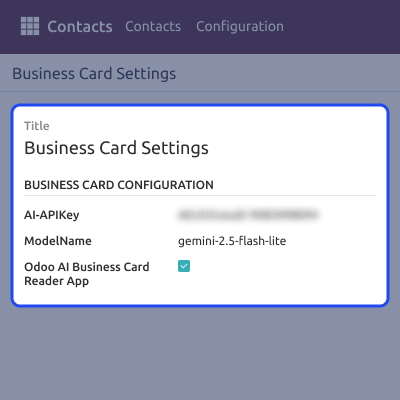
    • Add the AI API key required to read and process business card information.
    • Select the AI model used to read business card information.
    • Turn the business card reader on or off whenever needed.
    • Manage all card reader settings from a single location.
    Business Card Settings

    Create Leads or Partners

    Choose how scanned business card details are saved in Odoo. Users can create either Lead records or Partner records based on their workflow.

    • Decide whether scanned cards create leads or partner records.
    • Match business card details with the correct Odoo fields.
    • Follow the same record creation process across the business.
    • Keep contact information clear, consistent, and easy to manage.
    Create Leads or Partners

    Business Card Feed

    View all processed business card records from one place. The feed makes it easy to check recently captured contact information.
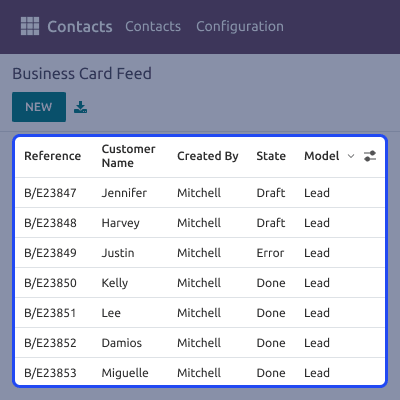
    • See all scanned business card records on a single screen.
    • View newly added contact details without extra steps.
    • Keep collected records organized and easy to review.
    • Access recent business contacts whenever required.
    Business Card Feed

    Partners Saved Contacts

    Access Partner records created from scanned business cards. This helps users keep customer and company information well organized.
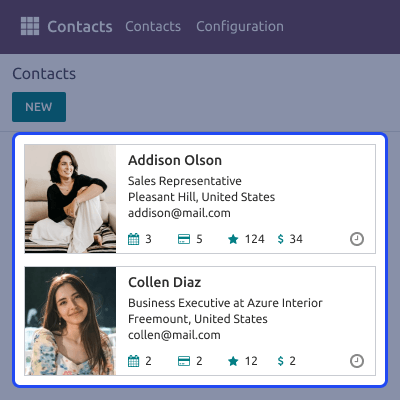
    • Open saved partner records quickly whenever needed.
    • View customer and company details in one place.
    • Keep contact information organized for future use.
    • Access business contacts easily from a central list.
    Partners Saved Contacts

    Lead Management Using Pipeline

    Turn business card details into sales opportunities. Track Leads through Odoo pipeline and manage follow-up activities with ease.

    • Create new leads directly from captured contact details.
    • Track lead movement through each stage of the sales process.
    • View and manage opportunities from a single pipeline.
    • Stay updated on potential customers and follow-up tasks.
    Lead Management Using Pipeline

    Support

    For any query or issue, please create a support ticket here CREATE A TICKET HERE

    You may also check our other top-quality Odoo Modules.

    Specifications

    Product Version1.1.1
    Released1 year ago
    CategoryOdoo AppsToolMobile
    Last UpdatedJune 18, 2026 (19 days ago)
    Supported VersionsOdoo  16.x  17.x  18.x  19.x  
    Write a review

    FAQ’s

     Can users create Leads from scanned business cards?
    Yes, users can turn scanned business card details into Leads and work with them directly in Odoo.
     Can users create Partner records from scanned business cards?
    Yes, users can save scanned business card details as Partner records and keep contact information in one place.
     Can users choose between Lead and Partner creation?
    Yes, users can choose whether a scanned business card creates a Lead or a Partner record.
     Does this App support automatic and manual data sync?
    Yes, users can choose to sync contact records automatically or send them to Odoo manually.
     Can users add contact details without scanning a business card?
    Yes, users can add contact information manually when a business card image is not available.
     Does this App support lead management?
    Yes, users can create Leads from business cards and track them through Odoo sales pipeline.
     Which Android versions does this App support?
    Odoo AI Business Card Reader App supports Android versions from Android 7.0 to Android 16.
     Which iOS versions does this App support?
    Odoo AI Business Card Reader App supports iOS versions from iOS 15.5 to iOS 26.

    Move to Cloud Today

    AWS Free tier hosting for one year by amazon web services, for more details please visit AWS Free Tier.

    GCP Free tier hosting for one year with 300 credit points by google cloud platform, for more details please visit GCP Free Tier.

    Azure free tier hosting for one year with 25+ always free services, for more details please visit Azure Free Tier.

    In our default configuration we will provide tremendous configuration for your eCommerce Website which is fast to load and response.

    Default Configuration Details of Server

    • 1 GB RAM
    • 1 Core Processor
    • 30 GB Hard Disk
    • DB with 1 GB RAM and 1 Core Processor

    * Server Configuration may vary as per application requirements.

    Want to know more how exactly we are going to power up your eCommerce Website with Cloud to fasten up your store. Please visit the Cloudkul Services.

    Get Started with Cloud
    Not Available


