USD
  • EUR
  • INR
  • USD
Cart
Cart 0
  • You have no items in your shopping cart.
    Odoo Apps Extensions
    Cart
    Cart 0
    • You have no items in your shopping cart.
    Hire a Developer
    ×
    Contact Us!
    Send Again
    Close
    Please Login to Write Your Review
    Odoo Extra Bank Charges in Payment

    Odoo Extra Bank Charges in Payment

    x
    Free

    * Required Fields

    $59.00
    Add To Cart

    Additional charges with Odoo Extra Bank Charges in Payment!


    • Enable or disable the extra bank fee in payments.

    • Select the debit and credit accounts for recording transactions.

    • Add charges on bank and cash transactions.

    • Automatically records journal entries of an additional fee.

    • You can add different bank charges for every transaction.

    Odoo Extra Bank Charges in Payment
    Odoo Extra Bank Charges in Payment
    $59.00
    Odoo Silver Partner
    Odoo Functional Certified Experts
    Check How It Works
    $59.00
    Configure and Buy
    X
    • Description
    • Reviews
    • FAQ
    • Customers ()
    • Specifications
    • Cloud Hosting
    • Changelog

    Extra Payment via Odoo Extra Bank Charges in Payments!

    On several occasions, the bank charges extra fees from the account holder or transactor for different purposes. These extra charges include monthly maintenance, out-of-network atm, overdraft, NSF, printed statement, wire transfer fee, and numerous other transaction fees.

    Odoo Extra Bank Charges in Payment permits you to charge extra fees from the customers or vendors on bank and cash transactions or when they cross a certain amount or according to need. Moreover, the Odoo app automatically adjusts the journal entries in the Odoo backend. For entry adjustment, you must add the debit and credit accounts in the journal.
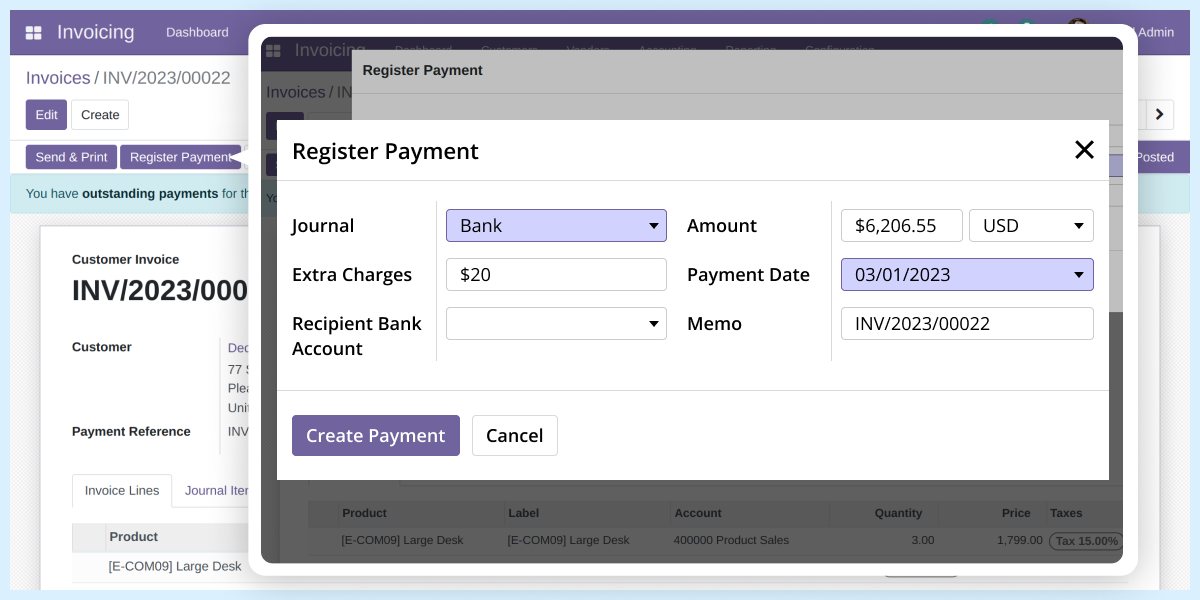
    Odoo Extra Bank Charges in Payment

     Odoo Extra Bank Charges in Payment Features

    Add Extra Bank Charges in Odoo

    • Easily enable or disable the module and charge an extra fee by enabling the module.
    • You must choose the debit and credit accounts for recording the journal entries.

     Add Extra Fees on Cash and Bank Payments

    • The Odoo app authorizes you to add bank changes on cash and bank payments.
    • The extra charge journal entries are maintained and recorded in the Odoo backend.

    Configuring Extra Bank Charges in Odoo Backend

    • The Odoo app allows you to add extra bank charges to payments.
    • You can enable/disable the module from the Odoo backend.
    • You need to provide credit and debit accounts for additional bank charges.
    • It allows you to add extra charges for each transaction separately.
    • You can add different amounts for each payment.
    • The Odoo backend records every extra charge.
    • You can check every entry with bank changes from the backend.
    Configuring Extra Bank Charges

     Check Journal Entries for the Odoo Backend

    Extra Bank Charges in Payment
    • Each extra charge entry is labeled as an 'Extra Charge.'
    • You can view every transaction and additional fee details in the backend.
    • Also, you can see the account and debit amount and quantity.
    • The journal entry also contains the date and due date.
    • The extra fee is recorded separately from the actual amount.
    • It helps maintain the accuracy of profit and loss accounts.
    • Further, you don’t need to make adjustments for missed entries because of extra fees.

    Odoo Extra Bank Charges in Payment

    Webkul's dedicated support provides you with the customizations and troubleshooting solutions for Odoo Extra Bank Charges in Payment.

    For any query or issue please CREATE A TICKET HERE

    Specifications

    Product Version1.0.0
    Released3 years ago
    Last UpdatedOctober 7, 2025 (10 months ago)
    Supported VersionsOdoo  13.x  14.x  15.x  16.x  17.x  18.x  19.x  

    Ratings

    We'd love to hear your thoughts! Share your feedback and help us craft an even better experience tailored just for you.

    Write a review

    Specification

    Detailed technical features and requirements to help you understand the module’s capabilities and ensure smooth integration with your system.

    Cloud Hosting

    Detailed technical features and requirements to help you understand the module’s capabilities and ensure smooth integration with your system.

    Default Configuration Details of Server

    1 GB
    RAM
    1 Core
    Processor
    30 GB
    Hard Disk
    1 GB RAM & 1 Core Processor
    Database

    Want to know more how exactly we are going to power up your eCommerce Website with Cloud to fasten up your store

    * Server Configuration may vary as per application requirements.

    Change Logs

    Not Available


