USD
  • EUR
  • INR
  • USD
Cart
Cart 0
  • You have no items in your shopping cart.
    Cart
    Cart 0
    • You have no items in your shopping cart.
    Hire a Developer
    ×
    Contact Us!
    Send Again
    Close
    Please Login to Write Your Review

    Odoo Hotel Booking Channel Manager

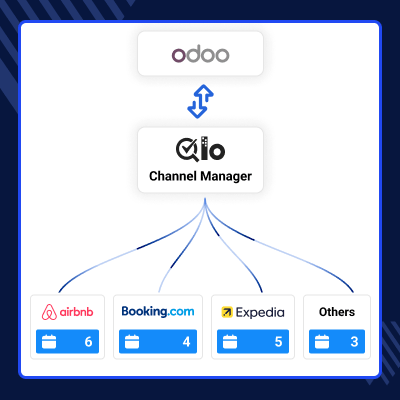
    Odoo Hotel Booking Channel Manager acts as a bridge between QloApps Channel Manager and Odoo Hotel Management System. When a booking is made, it is sent to Odoo and synced automatically, so all booking data stays updated in one place.


    • Connect Odoo HMS with OTA platforms through QloApps Channel Manager

    • Sync hotel bookings from different platforms automatically in one place

    • Get booking data in Odoo using the QloApps Channel Manager connection

    • Edit booking details like check-in and check-out dates easily

    • Create logs for each booking request received in the system

    • Track booking status clearly using a simple logging system

    Screenshots
    $0.00
    $0.00
    Configure and Buy
    • Description
    • Reviews
    • FAQ
    • Customers ()
    • Specifications
    • Cloud Hosting
    • Changelog

    Odoo Hotel Booking Channel Manager connects OTA platforms with Odoo Hotel Management System. It helps bring all hotel bookings into a single system.

    When a customer books a room on any OTA platform, the booking is received through QloApps Channel Manager. Then it is sent to Odoo automatically.

    This helps hotel staff manage all bookings from one place. They do not need to check each platform again and again.

    The module keeps booking data updated inside Odoo Hotel Management System. This helps avoid confusion and keeps everything consistent.

    Bookings created or updated in Odoo Hotel Management System or on OTA platforms are synced automatically through the Channel Manager, so data stays updated in both systems.

    A booking log is created for each request in the system. This helps track booking status in a simple way. The logs show if the booking is successful or if there is any issue. This makes tracking clear and easy.

    Overall, the module makes hotel booking management simple, efficient, and reliable for daily operations.
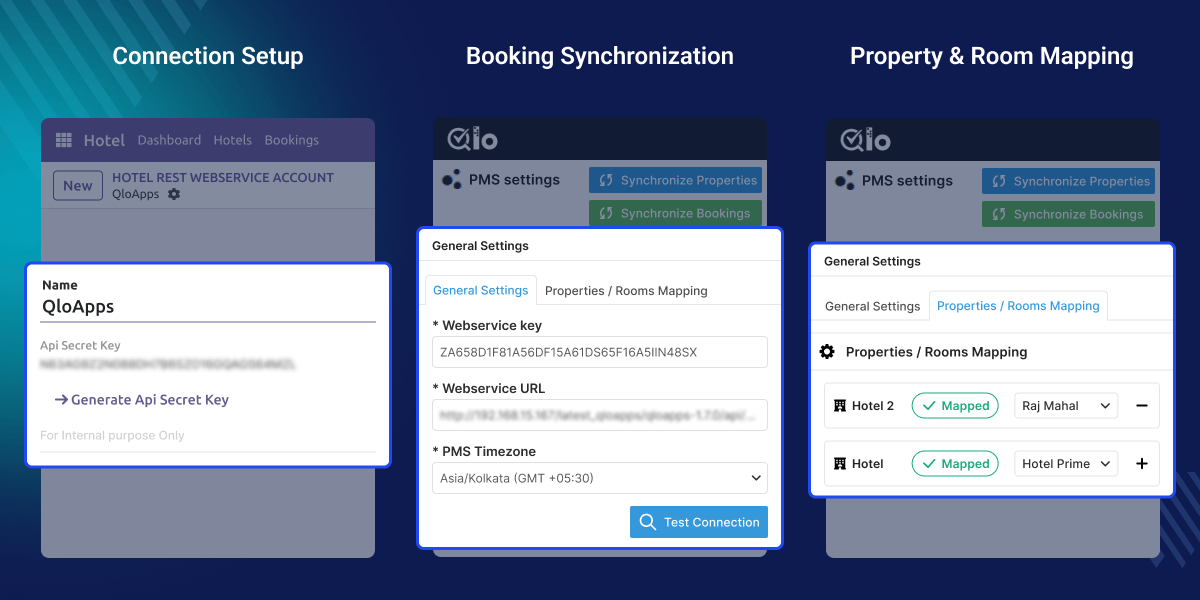
    Odoo Hotel Booking Channel Manager

    Prerequisites for using Odoo Hotel Booking Channel Manager

    Odoo Hotel Booking Channel Manager works with the following module:

    Odoo Hotel Management System

    You need to install the required module before using this module.

    Highlighted Features of Odoo Hotel Booking Channel Manager

      OTA Booking Synchronization

    Sync bookings from OTA platforms into Odoo HMS automatically, so all bookings come in one place without manual work.

      QloApps Channel Manager Integration

    Get booking data from QloApps Channel Manager directly into Odoo, making it easy to manage all reservations in one system.

      Booking Edit Option

    Easily change check-in and check-out dates anytime without affecting the rest of the booking process.

      Booking Log System

    Track all booking requests with automatic logs, so you can see what happened and when in a simple way.

      Centralized Booking Management

    Manage all hotel bookings from different platforms in one place inside Odoo without switching systems.

      Real-Time Data Synchronization

    Booking and availability updates happen instantly, so data stays accurate across all platforms.

      Error Reduction in Bookings

    Automatic syncing reduces manual work and helps avoid mistakes like double bookings.

      Seamless OTA Connectivity

    Easily connect with multiple OTA platforms and manage their bookings smoothly from Odoo.

    Why do we need Odoo Hotel Booking Channel Manager?

    Hotels get bookings from many OTA platforms every day. Managing them one by one in Odoo takes time and creates confusion.

    The default system does not connect OTA platforms directly. This makes booking updates manual and can cause mistakes.

    Hotels need a system that connects everything and works automatically. This helps reduce manual work and keeps data accurate.

    With this module, bookings sync automatically from QloApps Channel Manager to Odoo Hotel Management System. It makes hotel work simple and reliable.

    Use Cases

    This module helps hotels manage bookings across multiple platforms easily.

      Hotels Using Multiple OTA Platforms

    Manage all bookings from different platforms in one place.

      Booking Flow via QloApps Channel Manager

    Handle booking flow from OTA to Odoo through QloApps Channel Manager.

      Hotels Tracking Booking Status

    Track booking requests and status using the log system.

      Hotels Needing Booking Updates

    Edit booking details like check-in and check-out easily.

    Connection Setup

    We connect the system by copying the API key and pasting it into the Webservice Key, and also pasting the PMS URL into the Webservice URL.
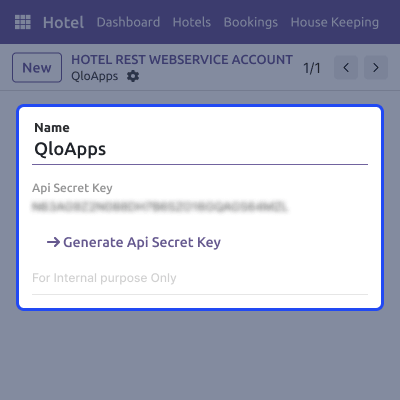
    • Copy the API key and paste it into the Webservice Key
    • Paste the PMS URL in the Webservice URL
    • Connection is established between both platforms
    • Sync and manage bookings in one place easily
    Connection Setup

    Booking Synchronization

    After adding the required details, you need to test the connection to make sure both systems are properly linked in Odoo Hotel Booking Channel Manager.
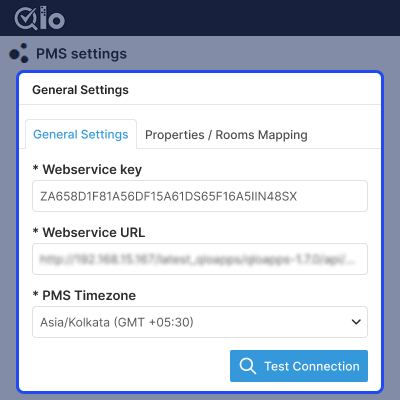
    • Add the Webservice Key in QloApps Channel Manager settings
    • Enter the Webservice URL (PMS URL) correctly
    • Select the correct timezone for your system
    • Click on Test Connection to establish a successful connection
    Booking Synchronization

    Property and Room Mapping

    This mapping is used to map properties and room types between QloApps Channel Manager and Odoo PMS, so bookings sync to the correct hotel and rooms.
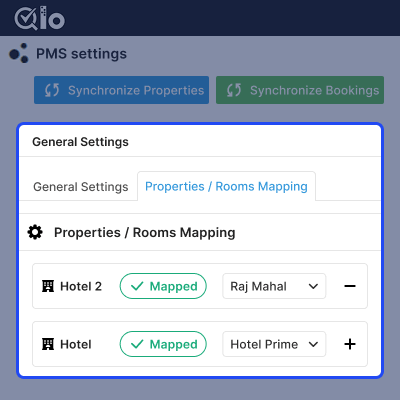
    • Map hotel properties between QloApps Channel Manager and Odoo PMS
    • Link room types with the correct rooms in the system
    • A cross icon shows when mapping is not done yet
    • A tick icon appears once the room type is mapped successfully
    Property and Room Mapping

    Subscription & Pricing

    Note: This module works with OTA platforms through the QloApps Channel Manager (Webkul’s hotel booking platform). To use it, you need an active QloApps Channel Manager subscription.

    Pricing Plans:
    • Monthly: USD 30/month per property (USD 25/month for 6+ properties)
    • Yearly: USD 300/year per property (USD 250/year for 6+ properties)
    odoo-hotel-booking-channel-manager-integration with the OTA platforms

    Support

    For any query or issue, please create a support ticket here CREATE A TICKET HERE

    You may also check our other top-quality Odoo Modules.

    Specifications

    Product Version1.0.8
    Released10 days ago
    Last UpdatedMay 14, 2026 (2 days ago)
    Supported VersionsOdoo  16.x  17.x  18.x  19.x  
    Write a review

    FAQ’s

      How does this module connect with OTA platforms?
    Odoo Hotel Booking Channel Manager module connects Odoo with OTA platforms using QloApps Channel Manager, which syncs bookings and availability automatically.
     How are bookings synced into Odoo HMS?
    Bookings come from OTA platforms to QloApps Channel Manager and are then automatically sent and created inside Odoo HMS.
     Can I manage booking details from Odoo?
    Yes, you can edit booking details like check-in and check-out directly from Odoo without affecting the sync process.
     Does this module support multiple OTA platforms?
    Yes, it supports multiple OTA platforms like Booking.com, Expedia, Airbnb, and more via QloApps Channel Manager.
     Why SaaS Based Pricing for QloApps Channel Manager?
    Yes, It uses SaaS pricing because it runs on cloud servers, provides updates, ensures uptime, and handles OTA integrations easily.
     What are the subscription plans for QloApps Channel Manager?
    Yes, It offers monthly ($30/property, $25 for 6+ properties) and yearly ($300/property, $250 for 6+ properties) plans, based on the number of properties managed.
     Is there a trial period available for this module?
    Yes, a 10-day trial is available to test the connection with Odoo, but OTA platform integrations are not enabled during the trial period.

    Move to Cloud Today

    AWS Free tier hosting for one year by amazon web services, for more details please visit AWS Free Tier.

    GCP Free tier hosting for one year with 300 credit points by google cloud platform, for more details please visit GCP Free Tier.

    Azure free tier hosting for one year with 25+ always free services, for more details please visit Azure Free Tier.

    In our default configuration we will provide tremendous configuration for your eCommerce Website which is fast to load and response.

    Default Configuration Details of Server

    • 1 GB RAM
    • 1 Core Processor
    • 30 GB Hard Disk
    • DB with 1 GB RAM and 1 Core Processor

    * Server Configuration may vary as per application requirements.

    Want to know more how exactly we are going to power up your eCommerce Website with Cloud to fasten up your store. Please visit the Cloudkul Services.

    Get Started with Cloud
    Not Available


