Odoo HubSpot CRM Connector connects multiple HubSpot accounts to a single Odoo. Admins import and export contacts, companies, leads, and users from one screen.
- Connect multiple HubSpot CRM accounts to a single Odoo database.
- Import HubSpot records for every connection with one button.
- Export selected Odoo records to any connected HubSpot account.
- Run a cron scheduler to sync feeds and clear old sync history.
- Choose the object and the HubSpot filter before an import runs.
- Track companies, contacts, leads, and users on one dashboard.
- Open the dashboard of any connection by clicking its data card.
- Read lead status across all connections from a donut chart.
- Compare connection data by week or month on a line graph.
- View mapped Odoo and HubSpot records from the Mapping menu.
- Set the API limit, connection color, and default salesperson.
- Description
- Reviews
- FAQ
- Customers ()
- Specifications
- Cloud Hosting
- Changelog
Odoo HubSpot CRM Connector is an Odoo app that links one or more HubSpot CRM accounts to a single Odoo database. Sales teams work on HubSpot data without leaving Odoo.
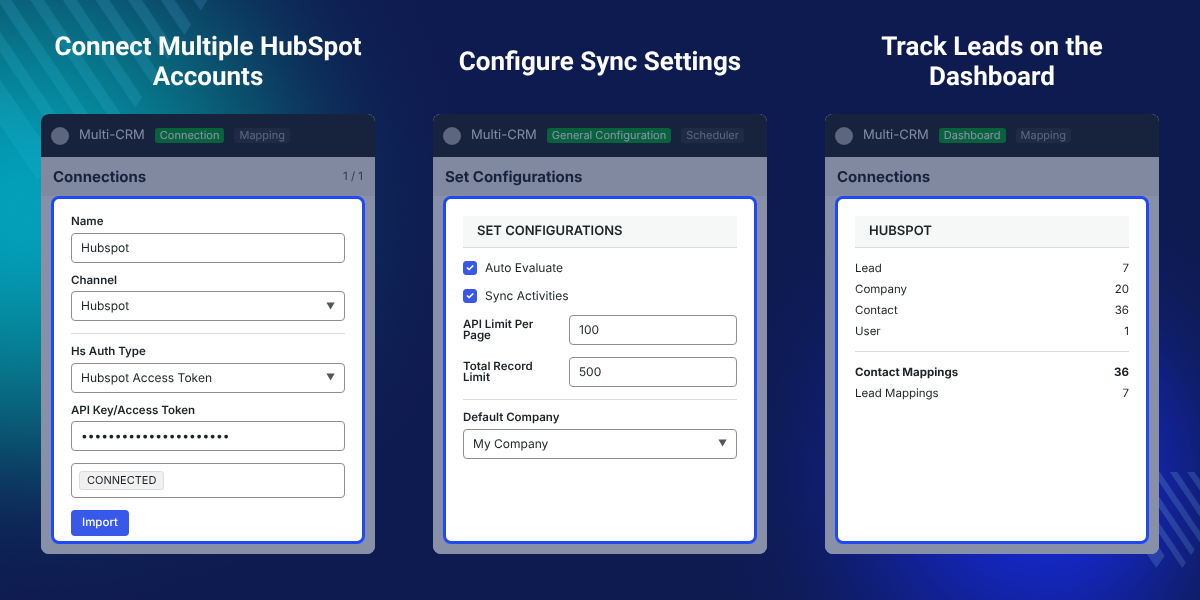
Admins add each account under Multi-CRM > Connection > Hubspot and paste the API Key in the Credentials tab. The States tab then lists the CRM details fetched from HubSpot.
Imported data lands as a feed in text form. Odoo creates the matching company, contact, lead, or user record, then deletes the feed, so the database keeps records and not raw payloads.
The Scheduler tab sets what the cron job imports and when it runs. Cron also clears old synchronization history, and the dashboard reports the result on data cards, a donut chart, and a line graph.
Export runs the other way. Select records in the CRM menu, click Action > Export to CRM, then pick the Connection and the Operation. The app needs Odoo Multi CRM Solution installed first.
Additionally, if your team runs a deal pipeline on Pipedrive as well, then check Odoo Multi CRM Pipedrive Solution.
Benefits of Hubspot CRM
- Hubspot offers its services both on a free and paid basis.
- Link your social media handles and promote and manage them conveniently.
- Enables you to integrate your website with Hubspot.
- You can track all the communication with potential customers.
- Easily customizable and real-time update of the pipeline.
Prerequisites For Using Odoo Multi CRM Hubspot Solution Module
Odoo Multi CRM Hubspot Solution Module works in conjunction with the following:
You need to install these modules to use Odoo Multi CRM Hubspot Solution module.
Odoo Multi CRM Hubspot Solution Features
Integrate Hubspot CRM with Odoo
- Connect your Odoo with as many Hubspot solutions as you want.
- Manage each CRM in the pipeline conveniently.
Schedule the Functions with Cron
- Cron runs to evaluate the feeds in the scheduled time.
- After a scheduled time, the cron automatically deletes the synchronization history.
Simplified Import Function
- Common Import Button for all Connections.
- All you need to do is select the Connection and Object (you want to import).
Streamlined Export Function to All the Connections
- Sync all connections with a single button.
- Select the records and export them to the desired connections.
Clickable Data Cards for the Details in Odoo Backend
- Dynamic dashboard with clickable data cards.
- Data cards direct you to the dashboard of the selected connection.
Store Data at a Centralized Location in Simplified Form
- Introduced Feeds to Store Data in Text Form.
- Feeds get automatically deleted once the related record is created in Odoo.
Analyze the Data of All Connections with Donut Chart
- Track the data of all connections from the chart.
- View the status of Leads in the donut chart.
Interpret the Data of Every Connection
- Analyze and track the data of all connections from the line graph..
- Select the time to show data (Weekly or monthly).
View all the Data Easily from the Dashboard
- The module has a dynamic dashboard with clickable data cards.
- View the data easily by clicking any data card.
- Examine the customers' data with the graph and chart.
- Choose the period to view data on the line graph.
- View the data of the company, leads, users, and contact.
- View the list of mapped data individually.
- Or view each mapped record in a detailed view.

Configure the Multi CRM in your Odoo

- Connect or disconnect Hubspot any time.
- View the connection status from the connection menu.
- Import data easily with the import button present on the connection page.
- Enter the API limit and choose the connection color.
- Select the default salesperson to handle the customers.
- Choose what to import when the cron performs the scheduled import.
- Easily select which data to export to the connection.
Other Odoo Apps-
Odoo Multi CRM Hubspot Solution -
Webkul's dedicated support provides you with the customizations and troubleshooting solutions for Odoo Multi CRM Hubspot Solution.
For any query or issue please CREATE A TICKET HERE
You may also check our other top-quality Odoo Modules.
Specifications
Specification
Detailed technical features and requirements to help you understand the module’s capabilities and ensure smooth integration with your system.
Cloud Hosting
Detailed technical features and requirements to help you understand the module’s capabilities and ensure smooth integration with your system.
Move to Cloud Today
We’re partnered with top-tier, trusted providers!
Default Configuration Details of Server
RAM 1 Core
Processor 30 GB
Hard Disk
Database
Want to know more how exactly we are going to power up your eCommerce Website with Cloud to fasten up your store
* Server Configuration may vary as per application requirements.


