USD
  • EUR
  • INR
  • USD
Cart
Cart 0
  • You have no items in your shopping cart.
    Odoo Apps Extensions
    Cart
    Cart 0
    • You have no items in your shopping cart.
    Hire a Developer
    ×
    Contact Us!
    Send Again
    Close
    Please Login to Write Your Review
    Odoo POS Survey Feedback

    Odoo POS Survey Feedback

    x
    Free

    * Required Fields

    $149.00
    Add To Cart

    Odoo POS Survey Feedback module lets store owners collect checkout feedback via QR code or email, right after payment, measuring customer satisfaction directly in Odoo.


    • Share survey links fast through a scan-ready receipt QR code image.

    • Send POS survey links by email from the receipt screen or POS order form.

    • Automate survey emails on their own the moment a POS order is set.

    • Send reminder emails automatically for any surveys left unread.

    • Set a custom wait time before each survey reminder email goes out.

    • Track survey share status and response state directly from the POS.

    • Track how many times each single survey link has gone out so far.

    • Link every survey reply to its own associated POS order record.

    Odoo POS Survey Feedback
    Odoo POS Survey Feedback
    $149.00
    Check How It Works

    Need Help Deciding?

    Support answers within one business day.

    Open a ticket
    $149.00
    Configure and Buy
    X
    • Description
    • Reviews
    • FAQ
    • Customers ()
    • Specifications
    • Cloud Hosting
    • Changelog

    Odoo POS Survey Feedback adds a simple survey flow to your point of sale system. Customers can receive and submit the survey feedback right after they check out.

    The surveys go out in two easy ways for your team. Scan the QR code on the printed receipt, or send a link via email from the receipt screen or the order form itself. If a customer skips the survey, an automated survey reminder email can be sent to them later. You pick the exact wait time. That means fewer surveys sit unread for long.

    Every reply links back to the exact order that sent it out. That gives your team real context for reports, staff training, or fixing a bad visit fast. This module works right inside your current point of sale setup, with real ease. It requires no code to run, so it works well for one store or many.
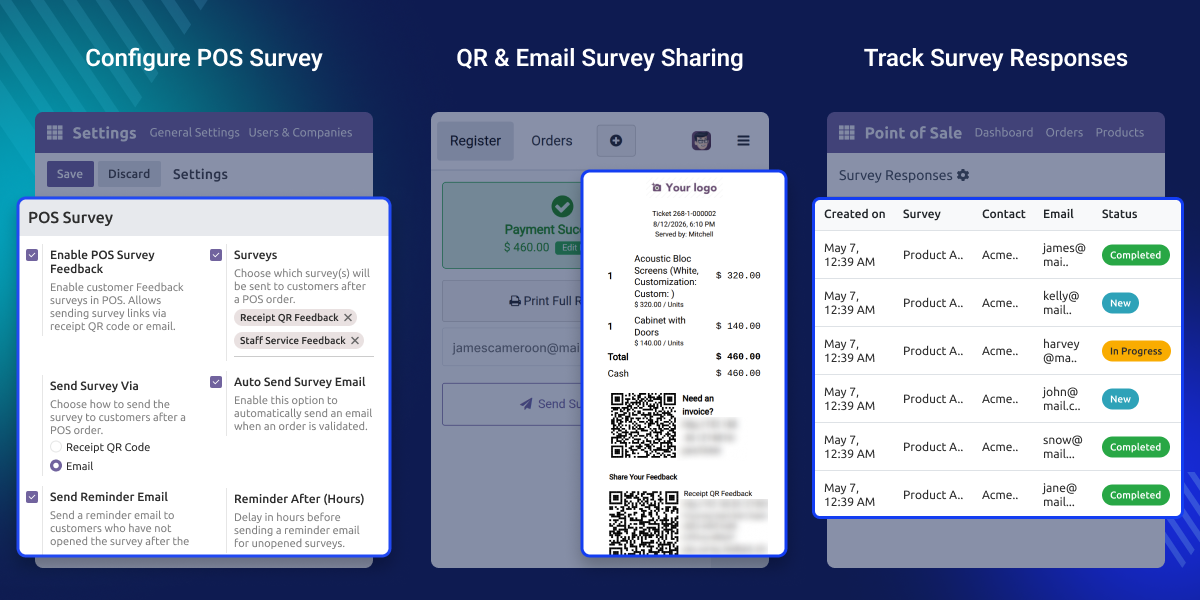
    Odoo POS Survey Feedback

    Highlighted Features

    QR Code Survey Sharing

    Print a scan-ready QR code on the receipt to provide your customers with quick, easy survey access.

    Email Survey Sharing

    Send survey links via email from the receipt screen or the order form to your customer's inbox.

    Auto Survey Emails

    Automate survey emails on their own the moment an order is set. The email links are sent to the customers.

    Smart Reminder Emails

    Send a gentle nudge to customers if they miss the first survey and make sure the survey isn’t left unread.

    Survey Status Tracking

    Track survey statuses by clicking survey records, and view send count and reply status on each order.

    Order-Linked Replies

    Tie each survey reply to the associated order that sent it, giving employees context to customer responses.

    Why Do We Need Odoo POS Survey Feedback?

    Most checkouts end the moment the POS receipt prints. Store owners rarely learn how a visit felt, unless a customer speaks up right at the moment.

    Plain POS setups have no built-in way to ask for feedback. There's no QR flow or auto-email system to see who has replied. And chasing feedback manually does not scale well. Staff stay busy, and follow-up emails often get missed during a long line or a rushed shift.

    Odoo POS Survey Feedback fixes this with a built-in flow in your POS. It runs on its own, so feedback comes in without extra work. In real stores, teams who ask for feedback right after checkout tend to catch problems early. That builds trust and brings customers back.

    Use Cases

    Cafes and Quick-Service Shops

    Use the receipt QR code so guests can leave feedback fast, right at the counter.

    Retail Chains

    Compare customers' checkout feedback across stores. Check share survey status and reply rates for each store.

    Boutique and Specialty Shops

    Send a warm follow-up survey by email from the order form after a big sale.

    Pop-Up and Event Retail

    Run Odoo POS Survey Feedback during a short event. Check replies once it wraps up.

    QR and Email Survey Sharing

    Turn each printed receipt into a feedback tool your guests can use right away, or share the survey with guests who prefer email more.
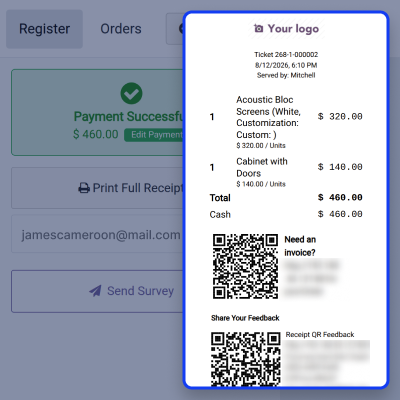
    • Adds a scan-ready QR code right on the POS receipt.
    • Send survey links by email from the POS order form.
    • Needs no app, login, or account from the guest.
    • Keep a record of each email sent per order.
    QR and Email Survey Sharing

    Auto Survey Emails

    Let each set order automatically send out its own survey. This frees up your cashier to focus on the line, not follow-up work.
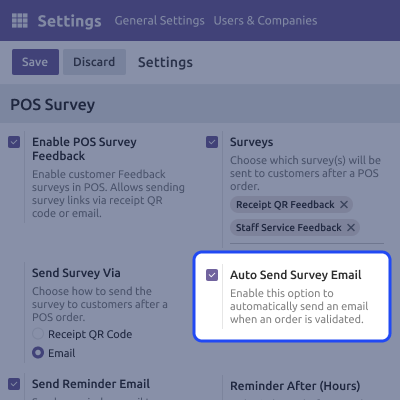
    • Sends the survey on its own once an order is set.
    • Cuts the need for staff to send emails by hand.
    • Give a survey one more shot with a timed reminder email.
    • Sends the reminder on its own once that time passes.
    Auto Survey Emails

    Live Status Tracking

    See where each survey stands, right from the point of sale order screen. This helps store leads spot low reply rates fast.
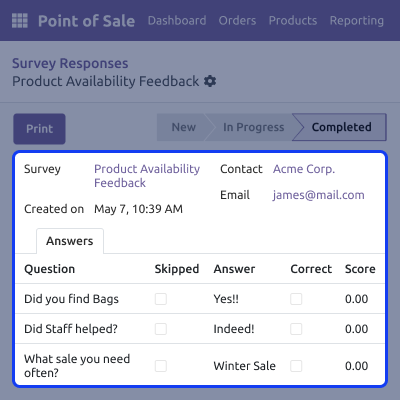
    • Shows share status on each single POS order.
    • Shows total send count for each survey.
    • Flags reply state as done or still open.
    • Updates on its own as guests reply.
    Live Status Tracking

    Order-Linked Replies

    Keep each piece of feedback tied to the sale that made it. Making reports and fixes much easier for your team.
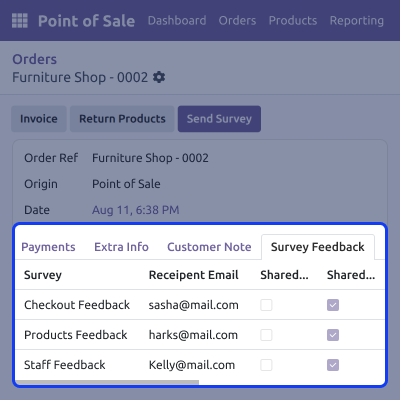
    • Links each reply to the order that sent it.
    • Backs clean, order-level reports for your team.
    • Helps you trace trends back to real sales.
    • Aids fast follow-up when a visit went wrong.
    Order-Linked Replies

    Support

    For any query or issue, please create a support ticket here CREATE A TICKET HERE

    You may also check our other top-quality Odoo Modules.

    Specifications

    Product Version1.0.0
    Released20 days ago
    Last UpdatedSeptember 9, 2026 (20 days ago)
    Supported Versions8.x  9.x  10.x  11.x  12.x  13.x  14.x  15.x  16.x  17.x  18.x  19.x  20.x  

    Ratings

    We'd love to hear your thoughts! Share your feedback and help us craft an even better experience tailored just for you.

    Write a review

    FAQs

     What does Odoo POS Survey Feedback do?
    It adds a survey flow to your POS checkout. Guests can rate their shopping visit through a QR code or an email link right after they pay and leave.
     Does the survey email go out on its own?
    Yes. Once a POS order is set, the module can send the survey email on its own, with no extra step needed for your busy front-of-store staff.
     What happens if a guest skips the survey shared on email?
    You can set a wait time right in the app settings. Once that time ends, a reminder email is sent automatically with the missed survey reply link.
     Can I see which surveys went out and got a reply?
    Yes, each POS order shows its share status, total send count, and reply state, so tracking survey feedback stays quick, clear, and simple to follow.
     How do survey replies link back to orders?
    Each survey reply links right back to the order that sent it out. This gives your team real context for reports and fast, useful follow-up work.
     Do I need to know how to code to set up POS survey feedback module?
    No, the whole survey feedback module runs from your POS setup screen. No code, no script, and no extra dev help is needed at any step of the way.
     Can POS survey work across many store spots?
    Yes, it runs per POS setup, so multi-store or multi-till spots can each run their own separate survey flow with zero clash at all times of day.
     Will sharing the survey slow down my checkout line?
    No, survey sharing starts only once the sale is set, so checkout speed and your staff's daily flow stay just as fast as they were before checkout.

    Specification

    Detailed technical features and requirements to help you understand the module’s capabilities and ensure smooth integration with your system.

    Cloud Hosting

    Detailed technical features and requirements to help you understand the module’s capabilities and ensure smooth integration with your system.

    Default Configuration Details of Server

    1 GB
    RAM
    1 Core
    Processor
    30 GB
    Hard Disk
    1 GB RAM & 1 Core Processor
    Database

    Want to know more how exactly we are going to power up your eCommerce Website with Cloud to fasten up your store

    * Server Configuration may vary as per application requirements.

    Change Logs

    Not Available


