USD
  • EUR
  • INR
  • USD
Cart
Cart 0
  • You have no items in your shopping cart.
    Cart
    Cart 0
    • You have no items in your shopping cart.
    Hire a Developer
    ×
    Contact Us!
    Send Again
    Close
    Please Login to Write Your Review

    Odoo S3 Backup


    Odoo S3 Backup safely saves your data in the cloud, is easy to set up, and lets you quickly restore data so work never stops


    • Quickly restore your data anytime without delays.

    • Backups run in the background without disturbing your work.

    • Set backup frequency daily, weekly, or at custom times.

    • Odoo S3 Backup keeps your backups safe and secure on Amazon S3.

    • Track all backup activity with logs to see progress and any issues

    • Access past backups instantly whenever you need to restore data.

    • Organize backups easily in folders for quick access and management.

    Screenshots
    Odoo S3 Backup Odoo S3 Backup Odoo S3 Backup Odoo S3 Backup Odoo S3 Backup Odoo S3 Backup Odoo S3 Backup Odoo S3 Backup
    Show More Hide All
    $199.00

    * Required Fields

    Add To Cart
    $199.00
    Configure and Buy
    • Description
    • Reviews
    • FAQ
    • Customers ()
    • Specifications
    • Cloud Hosting
    • Changelog

    Odoo S3 Backup lets you quickly set up your Amazon S3 account directly in Odoo for secure cloud storage.

    It automates backups using cron jobs, running at scheduled times so your data is always updated and protected.

    Odoo S3 Backup supports retention count, letting you define how many previous backups to keep. This prevents storage overload.
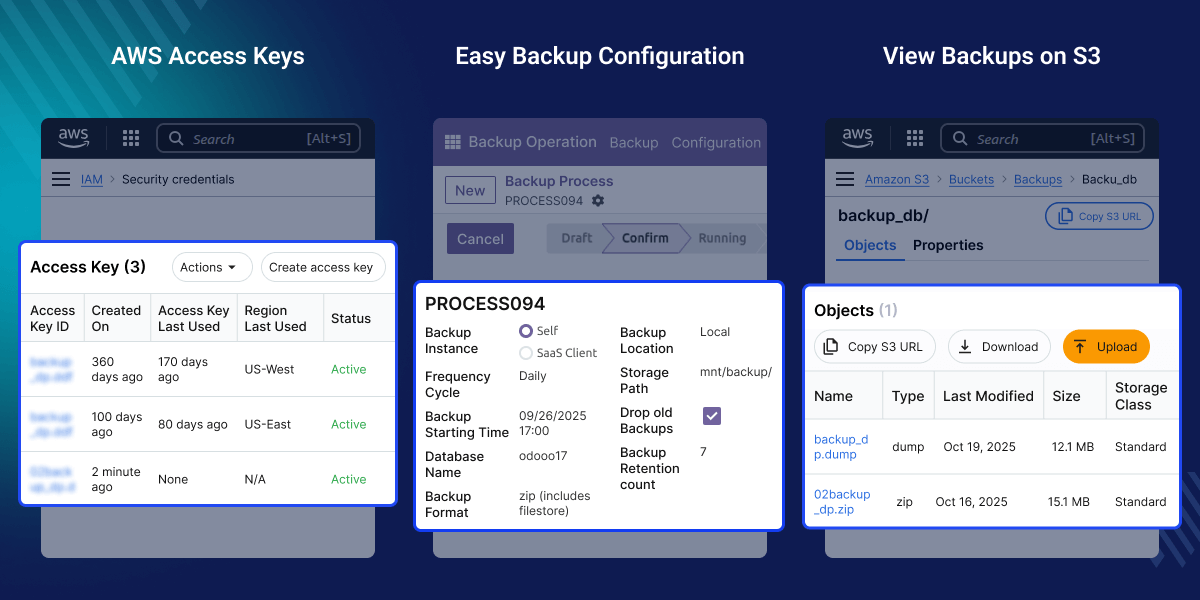
    Odoo S3 Backup

    Why do we need an Odoo S3 Backup ?

    Managing manual backups is time-consuming and risky, often leading to data loss, storage issues, or failed recovery during system crashes.

    It automates secure data backups directly to Amazon S3, ensuring reliable cloud storage with scheduled backup options and easy restoration.

    Enhances data security, simplifies disaster recovery, and provides flexible cloud storage with seamless access anytime, anywhere.

    Prerequisites for using Odoo S3 Backup

    Odoo S3 Backup works in conjunction with Odoo Database Backup module, which you can download from our Odoo App Store.

    Highlighted Features of Odoo S3 Backup

    Secure Odoo S3 Integrations

    With Odoo S3 integration, your data is protected and stored securely using Amazon S3 security standards.

    Set Backup Retention Count

    Set the Backup Retention Count to automate the process of dropping your older backups without managing it manually.

    Backup Status Tracking

    Track every stage of your backups with Odoo S3 Backup, whether your backups are success, failed, or dropped

    No Technical Knowledge Required

    Easily set up and manage Odoo backups without any technical knowledge, allowing quick and simple configuration for anyone

    Create multiple S3 servers

    You can connect multiple Amazon S3 servers and define each backup process to which server the backups should be created.

    Cancel the Backup process

    You can directly cancel any backup process that is currently running within Odoo Database backup module.

    Automatic Running State

    When a backup process is triggered at its scheduled start time, Odoo’s cron automatically sets it to the running state.

    Create a Backup for the SaaS client

    Easily create backups for your SaaS clients (If you are using Odoo SaaS Kit module) in Odoo by selecting the desired client in the Backup Instance field.

    Easy Backup Process Configurations

    Easily set up backup processes in Odoo S3 Backup using predefined fields tailored for your SaaS client’s needs.
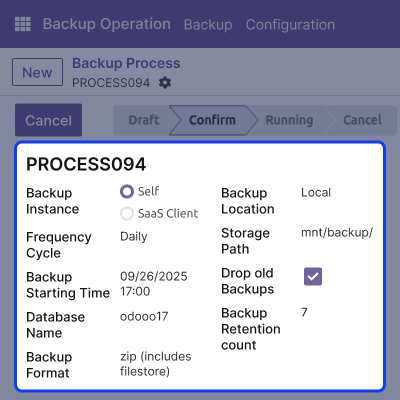
    • Set backups to run daily, weekly, or twice a day
    • Set when the backup process should start
    • Choose the location where the backup will be stored
    • Choose a backup format for your backup files
     Easy Backup Process Configurations

    Smart Backup Automation

    Odoo S3 Backup has its own automation for creating backups and clearing old ones, so you never need to worry about starting or cleaning them yourself.
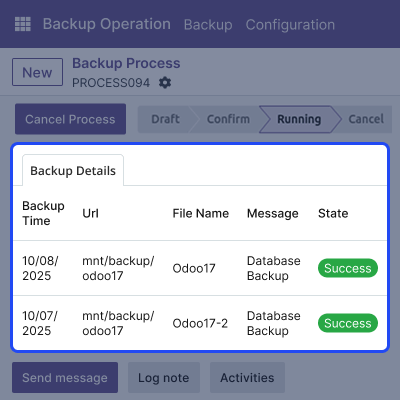
    • Schedule Backup Starting Time When the backup should start
    • The backup process starts automatically when the cron is triggered.
    • Once started, it moves to a running state and creates new backups.
    • Set the Backup Retention Count so that backups will be dropped automatically
    • Cron automatically deletes older backups that exceed the defined retention count.
    Smart Backup Automation

    Access Backups on Amazon S3

    Access and download your backup files directly and easily on S3. Check what backups are available and save them whenever you need
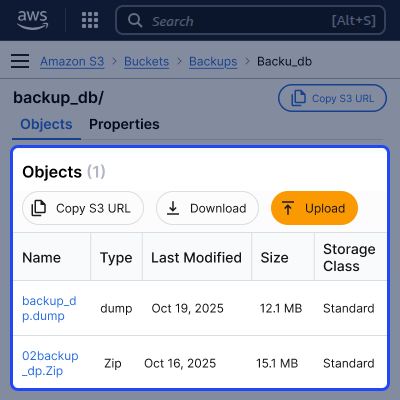
    • See and manage all your backups at Amazon S3.
    • Download your backups directly from S3.
    • Older backups are removed from S3 by using Odoo cron.
    • Automatic creation of a backup folder on S3.
    Access Backups on Amazon S3

    Dedicated Support For Your Odoo S3 Backup Module

    Webkul's dedicated support provides you with the customizations and troubleshooting solutions for your Odoo S3 BackupModule.

    For any query or issue please CREATE A TICKET HERE

    You may also check our other top-quality Odoo Plugins.

    Specifications

    Product Version
    Released4 months ago
    Last UpdatedOctober 28, 2025 (4 months ago)
    Supported VersionsOdoo  17.x  18.x  19.x  
    Write a review

    Frequently Asked Questions

     Can I connect multiple Amazon S3 servers?
    Yes, Odoo S3 Backup allows connecting multiple S3 servers and assigning each backup process to a specific server
     How does the retention count work?
    You can define how many previous backups to keep, and Odoo automatically deletes older backups exceeding this count to save storage
     What happens when a backup process is triggered?
    Once triggered, the backup process automatically moves to a running state and creates new backups without manual intervention.
     Can I cancel a running backup?
    Yes, any backup process currently running can be directly canceled from within Odoo.
     How are old backups managed?
    Odoo S3 Backup uses cron jobs to automatically drop backups that exceed the defined retention count, keeping storage organized.
     Can I restore backups from Amazon S3?
    Yes, you can access, download, and restore any backup stored on Amazon S3 directly from Odoo.
     Do I need technical knowledge to set up Odoo S3 Backup?
    No technical knowledge is required; the module is easy to configure, schedule, and manage backups for SaaS clients and Odoo databases.

    Move to Cloud Today

    AWS Free tier hosting for one year by amazon web services, for more details please visit AWS Free Tier.

    GCP Free tier hosting for one year with 300 credit points by google cloud platform, for more details please visit GCP Free Tier.

    Azure free tier hosting for one year with 25+ always free services, for more details please visit Azure Free Tier.

    In our default configuration we will provide tremendous configuration for your eCommerce Website which is fast to load and response.

    Default Configuration Details of Server

    • 1 GB RAM
    • 1 Core Processor
    • 30 GB Hard Disk
    • DB with 1 GB RAM and 1 Core Processor

    * Server Configuration may vary as per application requirements.

    Want to know more how exactly we are going to power up your eCommerce Website with Cloud to fasten up your store. Please visit the Cloudkul Services.

    Get Started with Cloud
    Not Available


