Odoo Veyora Fashion and Apparel theme is an Odoo website theme for fashion and apparel stores, with editorial blocks, fashion mega menus and a size and care guide.
- Add 10 fashion blocks from a Veyora group in the Odoo Website Builder.
- Pick from 5 Veyora header templates and 5 Veyora footer templates.
- Build navigation with 5 Veyora mega menu templates, including Lookbook.
- Publish a Size & Care block with a size table and fabric care rows.
- Launch with ready-made Home, About, The Edit and Lookbook pages.
- Show products in a 3-column shop grid with 4:5 portrait images.
- Reveal a second product image on hover in the shop grid.
- Keep wishlist and product comparison on every shop tile.
- Show a delivery, returns and support trust strip on product pages.
- Switch block layouts between Default, Compact and Wide with no code.
- Description
- Reviews
- FAQ
- Customers ()
- Specifications
- Cloud Hosting
- Changelog
Odoo Veyora Fashion and Apparel theme is an Odoo fashion theme for boutiques, apparel labels and accessory shops. It restyles the Odoo website and eCommerce pages with an editorial look.
After activation, the theme builds an editorial homepage with 9 sections. Shoppers move from a hero banner to category tiles, featured products, brand story, styling stories, press quotes and a new season block.
Every clothing store page keeps Odoo data. Products, prices, variants, cart and checkout come from Odoo eCommerce, and the theme changes how those pages look and read.
Store admins edit the design in the Website Builder. A Veyora block group, template pickers for header, footer and mega menu, and layout options on each block need no code.
This Odoo eCommerce theme uses Fraunces for headings and Jost for body text. It depends on the Odoo Website Sale, Wishlist, Product Comparison, Stock and Signup apps.
Additionally, if you want more wishlist options for your shoppers, then check Odoo Website Advanced Wishlist.
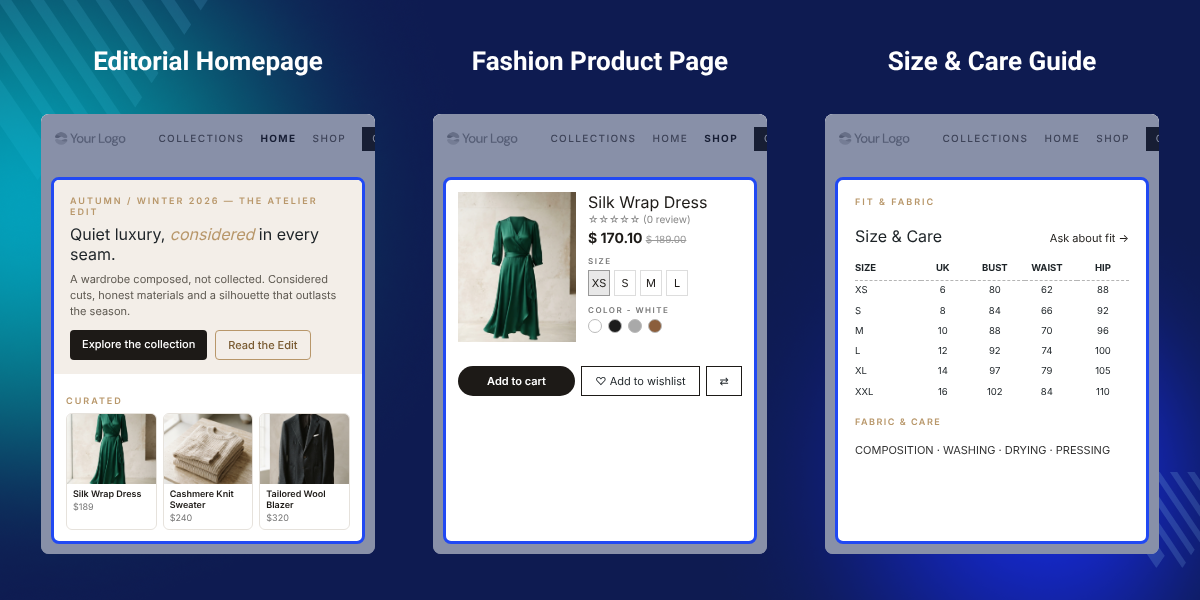
Highlighted Features of Odoo Fashion Theme Veyora
Editorial Homepage Blocks
Hero, Shop by Category, The Atelier, The Edit and Press & Words blocks give the homepage a magazine layout.
Header And Footer Templates
Five header and five footer templates appear in the Website Builder template pickers, ready to switch.
Fashion Mega Menus
Categories, Collections, Occasions, Lookbook and Client Services templates organise large apparel menus.
Size And Care Guide
A size table from XS to XXL sits beside composition, washing, drying and pressing notes in one block.
Portrait Shop Grid
The shop page shows 3 products per row in 4:5 portrait frames, with a second image on hover.
Ready-Made Lookbook Pages
Three content pages for the brand story, styling stories and seasonal looks install with content and join the main menu.
Why Do We Need Odoo Fashion Theme Veyora?
A default Odoo website uses general blocks built for any business. A fashion label has to assemble lookbooks, size guides and collection menus from those blocks by hand.
That work takes design time for every season. Fit details also end up in plain text, which buyers skim past when they choose a size.
Odoo Fashion Theme Veyora ships these pieces as ready Odoo apparel theme blocks. Admins drag in a Size & Care block, pick a mega menu template and publish a lookbook page.
The Size & Care table lists Size, UK, Bust, Waist and Hip in centimetres, and a note reminds admins to replace it with their own grading before going live.
Also, if you want a separate size chart on each product, you can check our module Odoo Website Product Size Chart.
Odoo Fashion Theme Veyora Use Cases
-
Seasonal Collection Launches
Brands open a new season with the New Season block and a lookbook page that links straight to the shop.
-
Boutique Brand Storytelling
Boutiques tell their atelier story with The Atelier split block, press quotes and brand figures on the About page.
-
Multi-Category Apparel Catalogs
An Odoo clothing store with many categories groups them into a 4-column mega menu for ready to wear, wardrobe and accessories.
-
Fit-Sensitive Clothing Lines
Tailoring and dress labels publish measurements and fabric care next to the collection, so buyers check fit first.
-
Accessories And Footwear Shops
Leather goods and shoe sellers use portrait product frames and story cards to show items the way they are worn.
Editorial Homepage Blocks For Fashion Stores
The editorial homepage installs with 9 sections in a fixed reading order. Each section is a normal Website Builder block, so admins can edit, move or delete it.
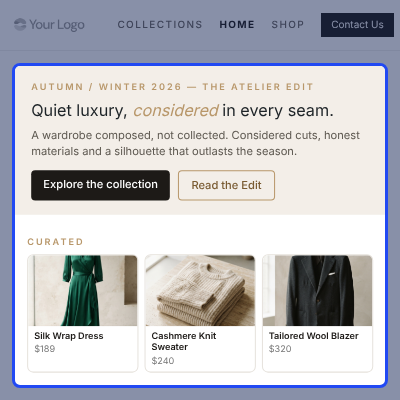
- Open with the Veyora Hero, a season label, a large headline and two buttons.
- Show Shop by Category tiles for Women, Men, Accessories and New In.
- List Featured Products from the Odoo catalog with name and price.
- Tell the brand story in The Atelier block with an image and text split.
- Add press and customer quotes in Press & Words, and figures in Veyora in Numbers.
- Close with the Join the Inner Circle sign-up band and the New Season block.

Header, Footer And Mega Menu Templates
Veyora adds its own entries to the Template pickers for the header, the footer and the mega menu. Admins click the header or footer in edit mode and choose a new design.
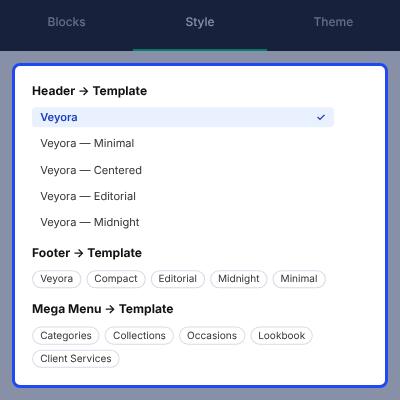
- Choose a header: Veyora, Minimal, Centered, Editorial or Midnight.
- Choose a footer: Veyora, Compact, Editorial, Midnight or Minimal.
- Choose a mega menu: Categories, Collections, Occasions, Lookbook or Client Services.
- Show an announcement bar above the Veyora header for shipping or season notes.
- Keep sign-in, wishlist, cart count and a Contact Us button in the header.
- Add a newsletter field and Shop, House and Care link columns in the Veyora footer.

Portrait Shop Grid And Product Page
On activation, Veyora sets the shop and product page options for clothing. Admins can still change every value in the Style panel of the Website Builder.
Also, if you want shoppers to rotate a product before they buy, you can check Odoo Website 360° Product View.
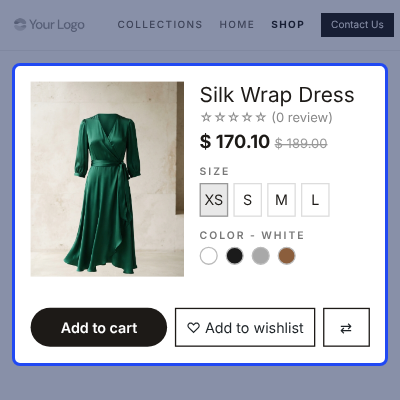
- List 24 products per page, 3 per row, in 4:5 portrait frames with square corners.
- Show the second product image on hover with a light zoom.
- Keep the wishlist heart and product comparison on each shop tile.
- Give product images a fixed 66% area in 4:5 portrait ratio.
- Enable customer reviews on the product page.
- Add a trust strip for Fast delivery, Easy returns and Expert support.

Size And Care Guide Block
The Size & Care block puts a size guide and fabric care notes in one section. Admins drop it on any page from the Veyora group and type their own values.
Also, if you want to answer common buyer questions on each product, you can check Odoo Website Product FAQ.
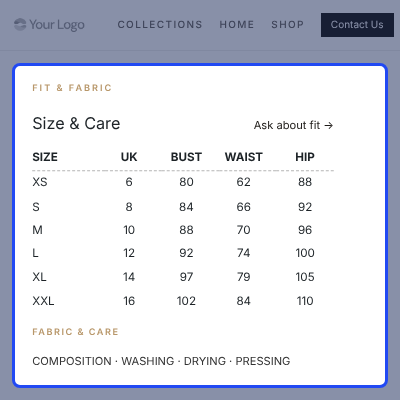
- List sizes XS, S, M, L, XL and XXL against UK, Bust, Waist and Hip columns.
- Add Composition, Washing, Drying and Pressing notes under Fabric & Care.
- Show an Ask about fit link in the block header.
- Set Rows to Comfortable, Dense or Banded for table spacing.
- Set Layout to Default, Compact or Wide for the section width.

Veyora Blocks In Odoo Website Builder
Veyora adds a block group named Veyora at the top of the Blocks tab. The group holds 10 Odoo Website Builder blocks that share the theme fonts and colours.
Also, if you run several brands from one database, you can check Odoo Multi Website.
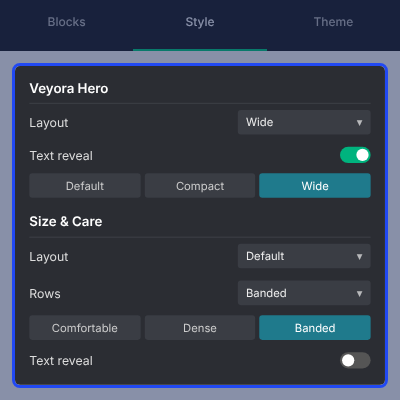
- Insert Veyora Hero, Shop by Category, The Atelier, The Edit and Press & Words.
- Insert Veyora in Numbers, Join the Inner Circle, Size & Care, New Season and Lookbook.
- Set Layout to Default, Compact or Wide on 8 of the Veyora blocks.
- Turn Text reveal on to fade and raise block text into view.
- Show text in its final state for visitors who choose reduced motion.

Ready-Made About, The Edit And Lookbook Pages
The theme creates three content pages and adds them to the main menu. Each page is built from Veyora blocks, so the text and images are editable.
Additionally, if you want to group products into named collections, then check Odoo Website Product Collection.
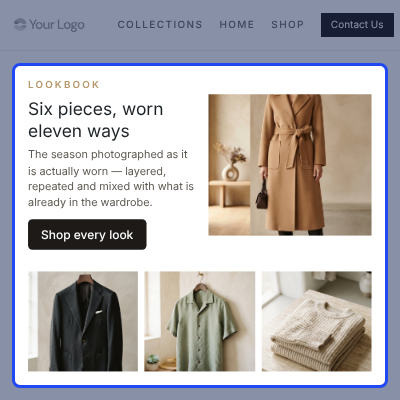
- Publish an About page at /about with the atelier story, press quotes and brand figures.
- Publish The Edit at /the-edit with 3 story cards and a Shop the Look link on each.
- Show Pieces from this Edit, a product row, under the stories.
- Publish a lookbook page at /lookbook with an intro, a Shop every look button and 3 look cards.
- Add a menu entry for each of the three pages to the main menu.

Complete Odoo Fashion Theme Veyora Feature List
Storefront Design And Typography
- Theme colour palette with 3 main colours plus light and dark colours in the Theme tab
- Fraunces for headings and Jost for paragraphs and buttons
- Announcement bar above the header for shipping or season messages
- Text reveal animation that respects the reduced motion setting
- Styled cart summary, checkout steps and address form
Homepage And Content Blocks
- Editorial homepage with 9 sections installed on activation
- Veyora Hero, Shop by Category, The Atelier and The Edit blocks
- Press & Words quotes and Veyora in Numbers brand figures
- Join the Inner Circle sign-up band and New Season landing block
- Featured Products block that lists catalog products with prices
- Size & Care block with a size table and fabric care rows
Navigation, Header And Footer
- Header templates: Veyora, Minimal, Centered, Editorial and Midnight
- Footer templates: Veyora, Compact, Editorial, Midnight and Minimal
- Mega menu templates: Categories, Collections, Occasions, Lookbook and Client Services
- Fixed header with sign-in, wishlist, cart count and Contact Us button
- Footer newsletter field, link columns and social icons
Shop And Product Pages
- Shop grid of 24 products per page and 3 per row with a 40px gap
- 4:5 portrait product images, square corners and a second image on hover
- Wishlist and product comparison actions on every shop tile
- Product image area fixed at 66% with a 4:5 portrait ratio
- Customer reviews and a delivery, returns and support trust strip on product pages
Website Builder Controls
- Veyora block group at the top of the Blocks tab with 10 blocks
- Layout option with Default, Compact and Wide on 8 Veyora blocks
- Rows option with Comfortable, Dense and Banded on the Size & Care block
- Text reveal switch on each block that carries the Layout option
- Standard Odoo shop, product, header and block options stay available
Pages, Account And Menu
- About, The Edit and Lookbook pages created with the theme and added to the main menu
- Welcome back band above the customer account cards on /my
- Depends on Odoo Website Sale, Wishlist, Product Comparison, Stock and Signup apps
Support
For any query or issue, please create a support ticket here http://webkul.uvdesk.com/.
You may also check our top-quality Odoo Apps.
Specifications
Frequently Asked Questions
Specification
Detailed technical features and requirements to help you understand the module’s capabilities and ensure smooth integration with your system.
Cloud Hosting
Detailed technical features and requirements to help you understand the module’s capabilities and ensure smooth integration with your system.
Move to Cloud Today
We’re partnered with top-tier, trusted providers!
Default Configuration Details of Server
RAM 1 Core
Processor 30 GB
Hard Disk
Database
Want to know more how exactly we are going to power up your eCommerce Website with Cloud to fasten up your store
* Server Configuration may vary as per application requirements.


