USD
  • EUR
  • INR
  • USD
Cart
Cart 0
  • You have no items in your shopping cart.
    Cart
    Cart 0
    • You have no items in your shopping cart.
    Hire a Developer
    ×
    Contact Us!
    Send Again
    Close
    Please Login to Write Your Review

    Odoo Zid Connector

    Odoo Zid Connector helps you connect Zid with Odoo. It automatically syncs products, customers, orders, stock, and shipment updates between both platforms.


    • Sync products between Zid and Odoo.

    • Sync categories using filter options.

    • Import customers and orders easily.

    • Run automatic sync jobs with cron.

    • Update stock and shipment status instantly.

    • Manage multiple Zid stores from Odoo.


    Screenshots
    $199.00

    * Required Fields

    Add To Cart
    $199.00
    Configure and Buy
    • Description
    • Reviews
    • FAQ
    • Customers ()
    • Specifications
    • Cloud Hosting
    • Changelog

    Odoo Zid Connector helps you connect your Zid store with Odoo. It keeps products, customers, orders, stock, and shipment details updated between both platforms. You can manage your store data from one place without doing the same work again and again. This helps save time and makes daily work easier.

    The connector can update information automatically. This helps keep your Zid store and Odoo data correct and up to date. It also helps reduce mistakes and makes it easier to manage your online store.

    It is easy to set up and use for daily store operations. The connector helps keep product, customer, and order information updated between Zid and Odoo. Businesses can reduce manual work and save time with automated synchronization. This makes store management easier and more efficient.

    Odoo Zid Connector

    Highlighted Features of Odoo Zid Connector

      Selective Data Sync

    Admins can choose which products, customers, categories, and orders they want to sync. This helps keep data clean and avoids extra work.

      Automated Sync Jobs

    The connector can sync data automatically using cron jobs. This saves time and reduces manual work every day.

      Real-Time Updates

    Stock, shipment details, and canceled order status are updated instantly between Zid and Odoo. This helps keep information correct everywhere.

      Multi-Store Support

    Businesses can connect and manage multiple Zid stores from one Odoo dashboard. This makes store management simple and easy.

      Easy Order Management

    Admins can manage and track orders directly from Odoo. This helps businesses handle orders quickly and easily.

      Fast Product Sync

    Products and categories are updated quickly between Zid and Odoo. This helps keep product information updated on both platforms.

    Why do we need Odoo Zid Connector ?

    Updating Zid stores manually every day can be hard. Businesses may need to update products, stock, and orders again and again.

    Doing all this work manually can take a lot of time. It can also create mistakes in stock and order details. Odoo Zid Connector helps sync products, customers, categories, and orders automatically between Zid and Odoo. This means businesses do not need to update everything manually.

    Admins can also choose which records they want to sync. The connector can update stock, shipment details, and canceled orders instantly. This helps businesses save time and manage work more easily.

    Prerequisites for Using Odoo Zid Connector

    Odoo Zid Connector needs Odoo Multichannel Sale to run. Install it first to enable basic setup and allow smooth sync between Zid connector and Odoo.

    Odoo Zid Connector works in conjunction with the following module:

    Odoo Multichannel Sale

    You need to install this module mentioned above to use Odoo Zid Connector.

    Zid to Odoo Synchronization

    Import products, categories, customers, and orders from Zid to Odoo. This helps keep all your store data in one place.

    • Sync categories from Zid to Odoo.
    • Import products using sync filters.
    • Sync customers from Zid stores.
    • Import orders using date filters.
    • Manage all synchronization activities from a single dashboard.
    Zid to Odoo Synchronization

    Odoo to Zid Synchronization

    Send products and categories from Odoo to Zid easily. This helps keep your store updated with the latest information.

    • Export products from Odoo to Zid.
    • Sync categories to Zid stores.
    • Run bulk synchronization easily.
    • Start manual synchronization anytime.
    • Keep product listings updated.
    Odoo to Zid Synchronization

    Automated Synchronization

    Set up automatic sync jobs to update data regularly. This saves time and reduces manual work.
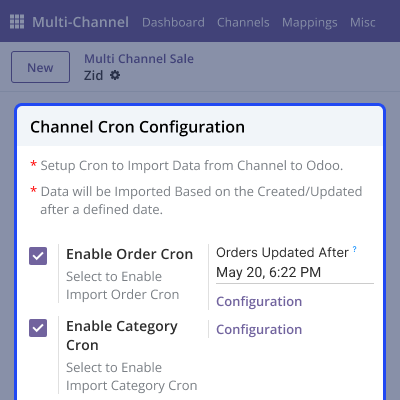
    • Configure automatic sync cron jobs.
    • Sync orders automatically using the scheduler.
    • Reduce manual work and effort.
    • Keep synchronization running continuously.
    • Improve synchronization management.
    Automated Synchronization

    Real-Time Operational Updates

    The connector updates stock quantities, shipment details, and order status in real time. This helps maintain accurate records across both Zid and Odoo.
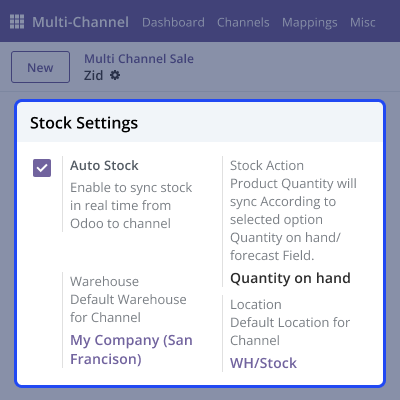
    • Sync stock quantities in real time.
    • Update shipment status without delay.
    • Sync canceled order status instantly.
    • Maintain accurate inventory records.
    • Improve operational tracking easily.
    Real-Time Operational Updates

    Support

    For any query or issue, please create a support ticket here CREATE A TICKET HERE

    You may also check our other top-quality Odoo Modules.

    Specifications

    Product Version1.0.0
    Released23 days ago
    Last UpdatedJune 16, 2026 (9 days ago)
    Supported VersionsOdoo  17.x  18.x  19.x  
    Write a review

    FAQ’s

     Can I sync only selected records?
    Yes, admins can choose which products, customers, categories, and orders they want to sync. This helps save time and reduces extra work.
     Does the module support real-time updates?
    Yes, the connector updates stock quantities, shipment details, and canceled order statuses instantly. This helps keep data synchronized between Zid and Odoo at all times.
     Can synchronization run automatically?
    Yes, admins can set cron jobs for automatic synchronization. This helps reduce manual work and saves time every day.
     How many Zid stores can I connect?
    You can connect and manage up to three Zid stores. All connected stores can be monitored and managed from a single Odoo dashboard.
     Is Odoo Multichannel Sale module required?
    Yes, Odoo Multichannel Sale module is required to use this connector. The connector works together with this module properly.
     Can I manually start synchronization?
    Yes, admins can manually run synchronization anytime from Odoo. This helps update products, customers, and orders quickly.
     Does the connector support Product Sync and Order Sync?
    Yes, the connector supports Product Sync and Order Sync automatically. This helps businesses manage products and orders more easily.

    Move to Cloud Today

    AWS Free tier hosting for one year by amazon web services, for more details please visit AWS Free Tier.

    GCP Free tier hosting for one year with 300 credit points by google cloud platform, for more details please visit GCP Free Tier.

    Azure free tier hosting for one year with 25+ always free services, for more details please visit Azure Free Tier.

    In our default configuration we will provide tremendous configuration for your eCommerce Website which is fast to load and response.

    Default Configuration Details of Server

    • 1 GB RAM
    • 1 Core Processor
    • 30 GB Hard Disk
    • DB with 1 GB RAM and 1 Core Processor

    * Server Configuration may vary as per application requirements.

    Want to know more how exactly we are going to power up your eCommerce Website with Cloud to fasten up your store. Please visit the Cloudkul Services.

    Get Started with Cloud
    Not Available


