USD
  • INR
  • USD
Cart
Cart 0
  • You have no items in your shopping cart.
    Cart
    Cart 0
    • You have no items in your shopping cart.
    Hire a Developer
    ×
    Contact Us!
    Send Again
    Close
    Please Login to Write Your Review

    ONDC Odoo Connector


    ONDC Odoo Connector bridges Odoo with ONDC through Webkul's eComviser seller app for seamless product, inventory, and order management.


    • Easy seller onboarding on the ONDC platform

    • Connect Odoo with the seller app seamlessly

    • Export/Import products between Odoo and ONDC

    • Real-time inventory updates from Odoo to ONDC

    • Manual product listing on the eComwiser seller app

    • You can import orders via Cron and Webhooks

    • You can easily accept or reject orders in Odoo


    Screenshots
    $99.00

    * Required Fields

    Add To Cart
    $99.00
    Configure and Buy
    • Description
    • Reviews
    • FAQ
    • Customers ()
    • Specifications
    • Cloud Hosting
    • Changelog

    ONDC Odoo Connector serves as a bridge between Odoo and ONDC. It connects your Odoo system to ONDC. With this connector, you can sell your products on ONDC easily and manage everything directly from Odoo.

    Odoo is your business command center, where you manage products, stock, and orders. ONDC (Open Network for Digital Commerce) is like a big online shopping network that connects you to reach more customers.

    The connector gives you easy ONDC sign-up with simple ways to list your products that work well. It helps keep your customers happy and helps your business grow bigger on ONDC without any trouble.
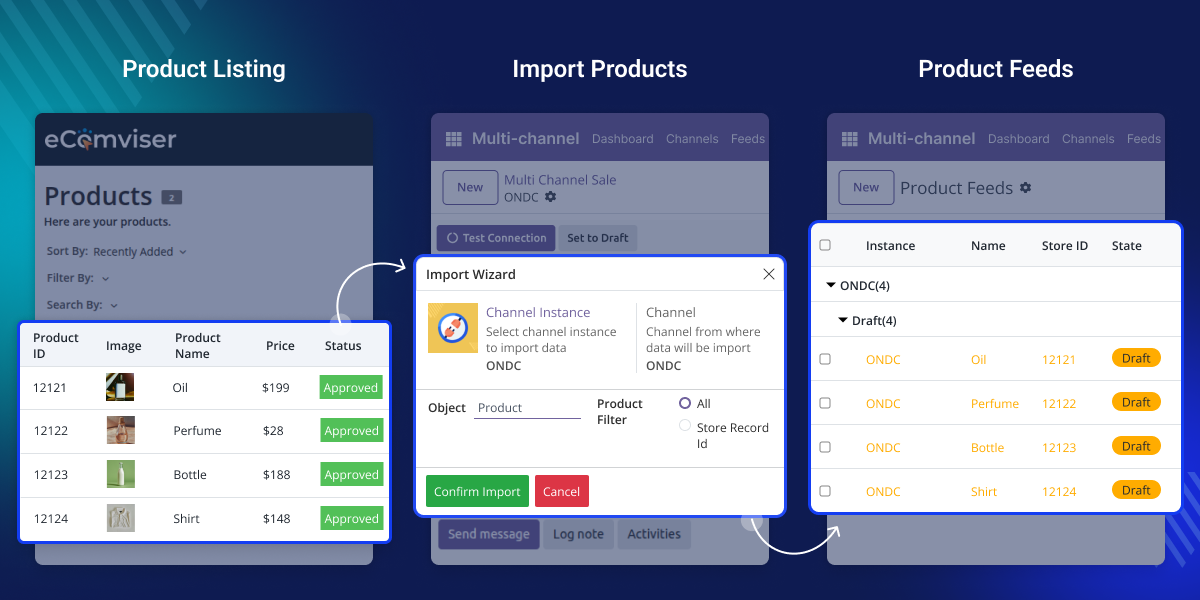
    ondc odoo connector

    Why do we need ONDC Odoo Connector?

    Webkul Ecomviser helps shops join ONDC. It makes joining simple for various selling apps such as Odoo, Bagisto, Shopify, or even those who don't have their own online shop.

    Ecomviser helps you show your products and handle orders easily. This connector keeps all your shop work in one place.

    With this connector, you can easily add or remove products and manage orders directly from Odoo. It saves time, reduces mistakes, prevents you from selling more than you have, and makes orders quicker to do, keeping buyers happy and helping your store expansion on ONDC.

    Prerequisites for using ONDC Odoo Connector

    Sellers must be registered on the Webkul eComviser App before using ONDC Odoo Connector.

    Note :-

    A commission fee of 1% will be applied to each sale order processed through the eComviser platform.

    Ondc Odoo Connector is a dependent module on Odoo Multi-Channel Sale  Module, which is the framework module to provide the structure to integrate ONDC with Odoo. The base module must be installed first for the Ondc Odoo Connector to function properly.

    Highlighted Features of Odoo S3 Backup

    Easy ONDC Onboarding

    Sign up as a seller on ONDC using Webkul’s eComviser app easily.

    Seamless Odoo Integration

    Connect Odoo directly with the seller app for unified business management.

    Real-time Inventory Sync

    Synchronize inventory levels from Odoo to ONDC instantly and effortlessly

    Easy Order Management

    Import orders manually or via cron scheduler with automated processing.

    Webhook Integration Automation

    Enable real-time order and order update synchronization through webhooks.

    Effective Cancel Management

    You can easily accept or cancel orders directly in Odoo or on the seller app.

    Easy Onboarding as a Seller

    To start selling on the ONDC Odoo connector network, you need to sign up your shop using the Webkul eComviser Seller App. Complete KYC and set up ONDC login details quickly.
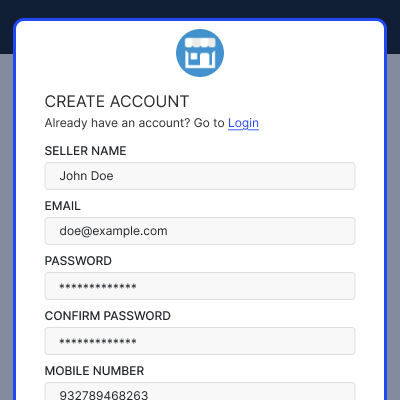
    • Sign up your shop through Webkul eComviser Seller App
    • Complete KYC checking with quick setup steps
    • Start selling your product right away after signing up
    • Easily manage and update your shop details anytime.
    Easy Onboarding as a Seller

    Product Export and Import

    Webkul Ecomviser ONDC Connector allows you bring product listings from the ONDC Seller. Handle product information on both Odoo and Seller App easily.
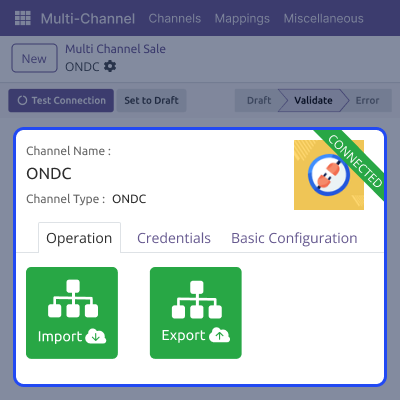
    • You can bring product listings from ONDC to Odoo
    • Send product information from Odoo to eComviser
    • Keep product information updated on ondc and ecomviser
    • You can export product from Odoo to ONDC manually
    Product Export and Import

    Real-time Inventory Synchronization

    You can easily manage real-time stock updates using this connector, which will reduce minimal efforts, and help in updating stocks from odoo to ondc.
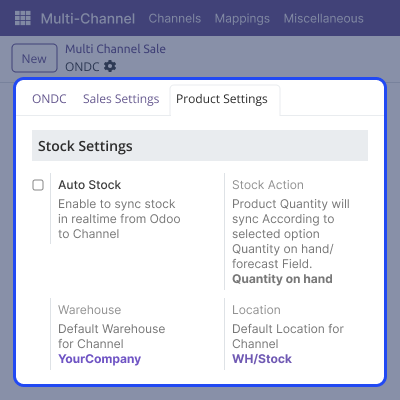
    • You can enable and disable the auto stock feature configuration
    • Stock quantity is updated to ONDC via manual product export.
    • You can update the stock quantity to ONDC instantly
    • Keep correct stock information on both platforms.
    Real-time Inventory Synchronization

    Easy Order Management

    Import orders in three ways: manually, via cron, or using webhooks for real-time import. Webhooks give you instant order updates. Accept or cancel orders directly in Odoo or through the seller app.
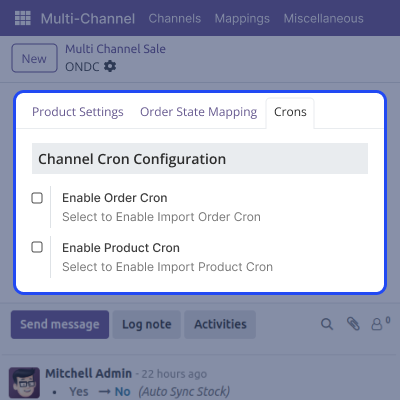
    • Import orders manually or via cron scheduler
    • Import orders using a webhook in real-time
    • Accept or cancel orders directly in Odoo
    • Process orders smoothly for successful acceptance
    Easy Order Management

    Support

    For any query or issue, please create a support ticket here CREATE A TICKET HERE

    You may also check our other top-quality Odoo Modules.

    Specifications

    Product Version1.0.0
    Released3 months ago
    Last UpdatedNovember 20, 2025 (3 months ago)
    Supported VersionsOdoo  17.x  18.x  19.x  
    Write a review

    FAQs

      What commission fee applies to sales through the eComviser platform?
    A commission fee of 1% will be applied to each sale order processed through the eComviser platform.
      How does the connector stop selling more items than you have in Odoo and ONDC?
    ONDC Odoo connector keeps real-time stock updates between Odoo and ONDC.
      Can I manage orders from both Odoo and the seller app?
    Yes, you can accept or reject orders directly in Odoo or at the seller app. The system automatically updates order status between both platforms with instant synchronization.
      What's the difference between automatic and manual order import?
    You can bring in orders automatically using webhook for real-time and manually by a cron scheduler (at set times).

    Move to Cloud Today

    AWS Free tier hosting for one year by amazon web services, for more details please visit AWS Free Tier.

    GCP Free tier hosting for one year with 300 credit points by google cloud platform, for more details please visit GCP Free Tier.

    Azure free tier hosting for one year with 25+ always free services, for more details please visit Azure Free Tier.

    In our default configuration we will provide tremendous configuration for your eCommerce Website which is fast to load and response.

    Default Configuration Details of Server

    • 1 GB RAM
    • 1 Core Processor
    • 30 GB Hard Disk
    • DB with 1 GB RAM and 1 Core Processor

    * Server Configuration may vary as per application requirements.

    Want to know more how exactly we are going to power up your eCommerce Website with Cloud to fasten up your store. Please visit the Cloudkul Services.

    Get Started with Cloud
    Not Available


