USD
  • EUR
  • INR
  • USD
Cart
Cart 0
  • You have no items in your shopping cart.
    Cart
    Cart 0
    • You have no items in your shopping cart.
    Hire a Developer
    ×
    Contact Us!
    Send Again
    Close
    Please Login to Write Your Review

    Pimcore BigCommerce Connector

    Pimcore BigCommerce Connector links Pimcore and BigCommerce. It keeps products, categories, variants, and more in sync across both platform.


    • Sync products, categories, brands, and variants both ways.

    • Connect Pimcore with BigCommerce using secure APIs.

    • Map Pimcore objects and fields to your store data.

    • Import and export catalog data with background jobs.

    • Sync channels, locales, and translated content.

    • Keep images, videos, and custom fields up to date.

    • Prevent duplicate data with smart ID mapping.

    • Track every sync job with live status and history.

    • Control connector access with role-based permissions.

    Screenshots
    $499.00

    * Required Fields

    Add To Cart
    Only One Time Payment
    $499.00
    Configure and Buy
    • Description
    • Reviews
    • FAQ
    • Customers ()
    • Specifications
    • Cloud Hosting
    • Changelog

    Pimcore BigCommerce Connector gives you one place to manage your BigCommerce catalog. Instead of updating catalog data in different systems, you can organize product information in Pimcore and send the latest changes to your BigCommerce store.

    This connector works inside Pimcore and provides a simple way to manage your BigCommerce connection. You can map objects and fields, manage channels and locales, and control catalog data from a single interface.

    You can sync products, categories, brands, variants, images, videos, custom fields, and translated content. This helps keep catalog information consistent across every connected BigCommerce storefront.

    Every import and export job runs in the background, so you can continue working while data is processed. Live job status and detailed history help you track each sync, reduce manual work, and keep your catalog accurate as it grows.

    Apart from this, if you need to connect Pimcore with PrestaShop, you can explore Pimcore PrestaShop Connector. It lets you sync products, categories, brands, and variants through a two-way sync.
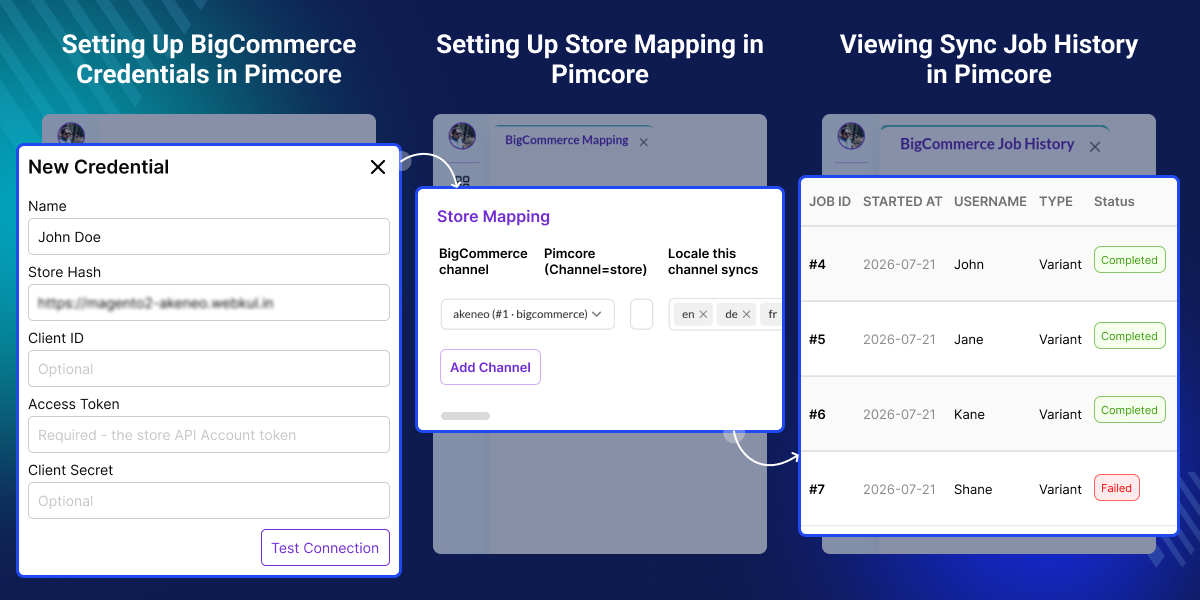
    Pimcore BigCommerce Connector

    Highlighted Features of Pimcore BigCommerce Connector

     Two-Way Catalog Sync

    Keep products, categories, brands, and variants synchronized between Pimcore and BigCommerce.

     Flexible Object & Field Mapping

    Map Pimcore objects and fields to BigCommerce while preserving your existing data structure.

     Background Import & Export

    Run import and export jobs in the background without interrupting your daily work.

     Live Progress & Job History

    Monitor every sync with real-time progress updates and detailed job history.

    Why Do You Need Pimcore BigCommerce Connector?

    Managing catalog data separately in Pimcore and BigCommerce often leads to duplicate work, inconsistent product information, and outdated listings. As product catalogs grow, updating products, categories, brands, variants, images, and translations across multiple storefronts becomes increasingly difficult.

    Pimcore BigCommerce Connector solves this by synchronizing catalog data between both platforms through automated import and export jobs. With support for products, categories, brands, variants, media, custom fields, translated content, channels, and locales, businesses can manage everything from a single interface while reducing manual effort and keeping every connected BigCommerce storefront consistent.

    Use Cases

     Centralized Product Management

    Manage products, categories, brands, and variants from Pimcore while keeping BigCommerce updated.

     Multi-Store Catalog Management

    Maintain multiple channels, locales, and storefronts with synchronized catalog data.

     Large Catalog Synchronization

    Run background import and export jobs for large product catalogs without disrupting business operations.

     Automated Catalog Updates

    Replace repetitive manual updates with automated synchronization to improve catalog accuracy.

    Map Pimcore Data to BigCommerce

    Link your Pimcore catalog with BigCommerce before synchronization. Configure mapping for products, brands, channels, custom fields, and currencies so both platforms maintain consistent catalog information.
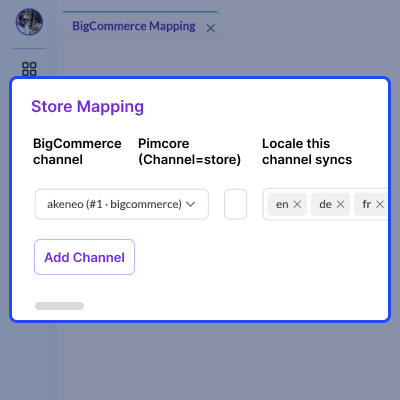
    • Map BigCommerce stores and channels.
    • Link brands between both platforms.
    • Match custom fields with Pimcore data.
    • Map product images to the correct records.
    • Configure modifier field mapping.
    • Assign locales and currencies for every channel.
    Map Pimcore Data to BigCommerce

    Import BigCommerce Data into Pimcore

    Import your complete BigCommerce catalog into Pimcore and manage products, categories, brands, variants, media, and translated content from a centralized product information system.
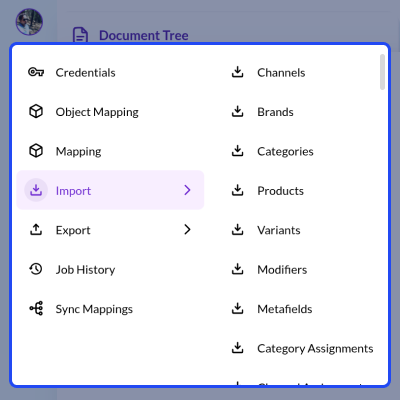
    • Import products, categories, and brands.
    • Bring product variants and modifiers into Pimcore.
    • Import custom fields and metafields.
    • Maintain channel assignments.
    • Import translated catalog content.
    • Keep catalog information up to date.
    Import BigCommerce Data into Pimcore

    Export Pimcore Data to BigCommerce

    Export the latest Pimcore catalog to BigCommerce whenever product information changes. Keep storefront listings synchronized with accurate products, media, and translated content.
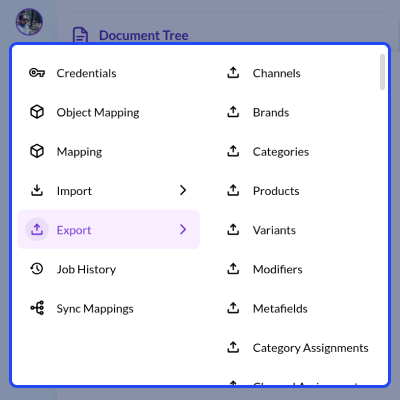
    • Export complete product information.
    • Sync categories and brands.
    • Export variants and product images.
    • Transfer custom fields and media.
    • Maintain channel assignments.
    • Export translated storefront content.
    Export Pimcore Data to BigCommerce

    Track Import and Export Jobs

    Monitor every synchronization job from one dashboard. Review completed imports and exports, monitor progress, and quickly identify warnings or failed tasks.
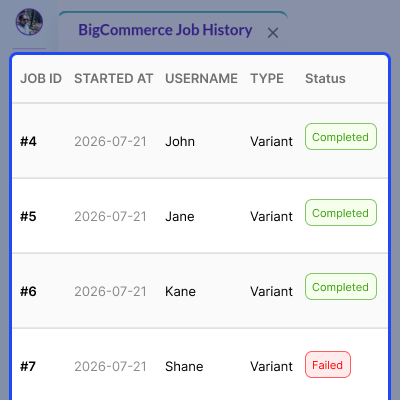
    • View all import and export jobs.
    • Check live synchronization status.
    • Review warnings after every sync.
    • Filter jobs by entity or job type.
    • Open detailed job information.
    • Refresh job history anytime.
    Track Import and Export Jobs

    Keep Data in Sync Across Both Platforms

    Automatic ID mapping keeps Pimcore and BigCommerce records connected. This prevents duplicate entries and ensures every synchronization updates the correct catalog records.
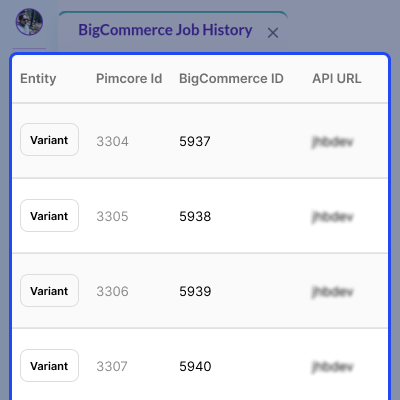
    • Match Pimcore and BigCommerce IDs.
    • Maintain linked records after every sync.
    • Search mapped records with filters.
    • Find data using BigCommerce IDs.
    • Review mapping details for each record.
    • Refresh mappings whenever required.
    Keep Data in Sync Across Both Platforms

    Support

    For any query or issue, please create a support ticket here http://webkul.uvdesk.com/

    You may also check our quality WooCommerce Plugins.

    Specifications

    Product Version1.0.0
    ReleasedToday
    Last UpdatedJuly 24, 2026 (Today)
    Supported VersionsPimcore  2026.1.x  12.x  
    Write a review

    Frequently Asked Questions

      How does this connector handle large catalog updates?
    This connector runs large catalog updates as background jobs. You can track live progress and view the job history in Pimcore Studio.
     
      Does this connector support channels and locales?
    Yes, you can map BigCommerce channels with Pimcore locales and currencies. This connector also supports per-channel and per-locale content synchronization.
     
      Can I map Pimcore objects and fields to BigCommerce?
    Yes, you can map BigCommerce entities to your existing Pimcore classes and configure field mapping for standard writable BigCommerce fields.
     
      Does this connector support images, videos, and custom fields?
    Yes, this connector imports and exports product images, videos, and custom fields. These are synchronized as part of the product synchronization process.
     
      How can I track import and export jobs?
    You can monitor every synchronization from the Job History page in Pimcore Studio. It shows live progress, job status, logs, and step-wise details for each import and export job.

    Move to Cloud Today

    AWS Free tier hosting for one year by amazon web services, for more details please visit AWS Free Tier.

    GCP Free tier hosting for one year with 300 credit points by google cloud platform, for more details please visit GCP Free Tier.

    Azure free tier hosting for one year with 25+ always free services, for more details please visit Azure Free Tier.

    In our default configuration we will provide tremendous configuration for your eCommerce Website which is fast to load and response.

    Default Configuration Details of Server

    • 1 GB RAM
    • 1 Core Processor
    • 30 GB Hard Disk
    • DB with 1 GB RAM and 1 Core Processor

    * Server Configuration may vary as per application requirements.

    Want to know more how exactly we are going to power up your eCommerce Website with Cloud to fasten up your store. Please visit the Cloudkul Services.

    Get Started with Cloud
    • - Feature Add (+)
    • - Feature Remove (-)
    • - Bug Fixed (!)
    • - Modification (*)
    Version 1.0.0
    • + Initial release for Pimcore 12 / Platform 2026.x with BigCommerce V3 REST Catalog API integration and GraphQL Admin support for channel locales and translations.
    • + Added Pimcore Studio plugin with Credentials, Object Mapping, Field Mapping, Channel Mapping, Import, Export, Job History, and Sync Mappings.
    • + Added import support for channels, brands, categories, products, variants, modifiers, metafields, category assignments, channel assignments, and translations.
    • + Added export support for channels, brands, categories, products, variants, modifiers, metafields, category assignments, channel assignments, and translations.
    • + Added native Pimcore product variant tree with bidirectional synchronization.
    • + Added support for product options, option values, modifiers, custom fields, videos, images, and metafields.
    • + Added category and channel assignment synchronization with non-destructive updates.
    • + Added per-channel and per-locale content synchronization using the GraphQL Admin API.
    • + Added fully configurable object and field mapping without hard-coded class references.
    • + Added multi-channel and multi-locale catalog management.
    • + Added role-based permissions with Studio navigation controls and CLI permission installer.
    • + Added asynchronous background import and export jobs with live progress, warnings, stop control, job history, and recovery.
    • + Added self-healing ID mapping to prevent duplicate records during repeated synchronizations.
    • + Added one-command installer for classes, mappings, queues, permissions, Studio plugin, and database setup.


