Send Again
Close
Pimcore Product Enrichment Agent module helps teams add AI-based product enrichment to Pimcore. It turns product data into structured field values while keeping product updates under human control.
This module connects Pimcore with OpenAI, Anthropic, Gemini, and Azure OpenAI through one neutral service layer. You can select the provider and credential that fit each enrichment profile.
Create prompt templates for common tasks such as long descriptions, short descriptions, SEO data, attributes, categories, image alt text, brand voice, and localized copy.
Before a batch run, use Inline Preview to test one product. The preview writes nothing, so teams can tune prompts and field mappings before starting a larger enrichment job.
Batch enrichment runs in the background with live progress, item counts, warnings, logs, and recovery tools. The system supports enriching all products or only products that have changed.
Generated values first go to a review stage. Reviewers can compare current and proposed values, edit them, then approve or reject each change. Only approved values are written to products.
Apart from this, to sync Pimcore products, categories, and variants with commercetools, check out Pimcore Commercetools Connector.
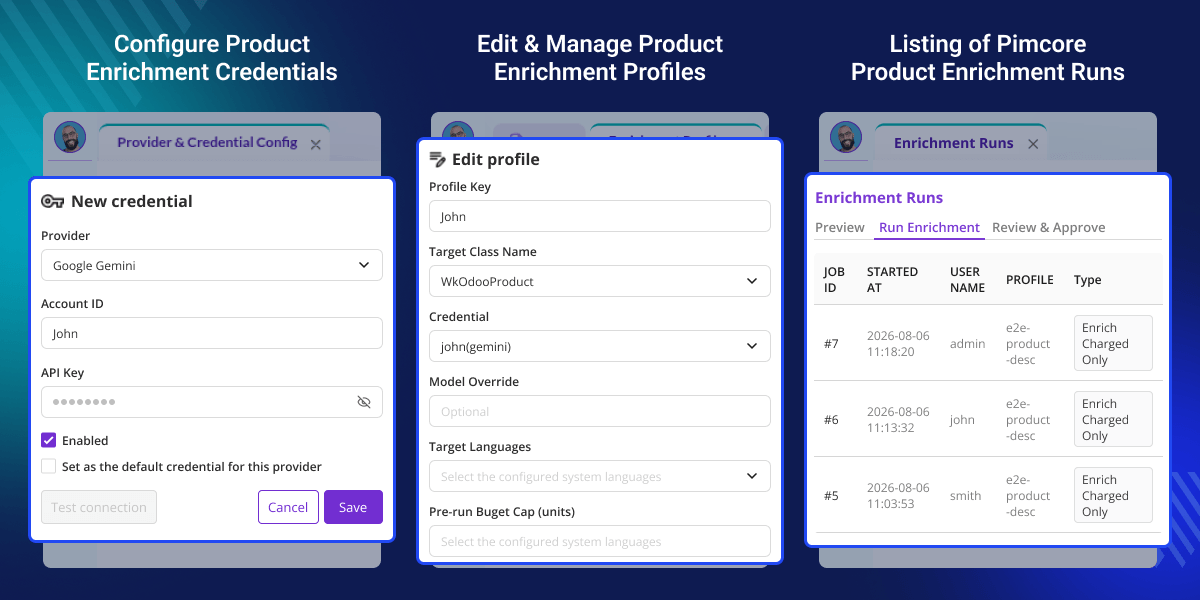
Generate product field values using defined schemas that match the required Pimcore fields.
Create profiles with product classes, field mappings, credentials, and prompt templates for each enrichment task.
Review, edit, approve, or reject generated values before they are applied to Pimcore products.
Run large catalog updates as background jobs while tracking progress, logs, warnings, and stopped jobs.
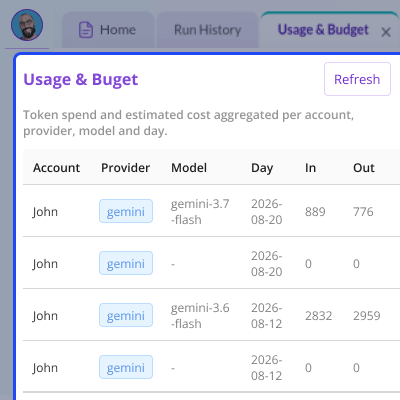
Set usage limits for runs, jobs, daily activity, and operators while tracking AI usage through a neutral ledger.
Store multiple encrypted provider credentials, validate them on save, block duplicates, and enforce one default credential per provider.
Large Pimcore catalogs often contain fields that need manual writing, cleanup, or completion. Creating this data one product at a time can slow down catalog work.
Default product workflows do not provide a controlled AI layer for generating structured values, testing prompts, reviewing results, and applying approved changes.
Pimcore Product Enrichment Agent adds this workflow without giving an AI model direct control over product records. Generated values stay pending until they are approved.
This approach gives catalog teams more control over AI-generated content while reducing repetitive enrichment work. In real catalog operations, review-based updates also help limit unwanted changes.
Create long and short product descriptions from existing product data. Review the proposed copy before adding it to the catalog.
Generate SEO meta content from product information and map the result to selected Pimcore fields.
Use AI to identify structured product attributes from existing product content and return values in the required output format.
Use product information to suggest a suitable category. Teams can review the suggestion before applying it.
Generate image alt text through supported vision models. If the selected model has no vision support, the task is skipped without an API call.
Rewrite product copy to match a defined brand voice while keeping the output inside the configured enrichment workflow.
Use translation profiles to send existing content to a neutral translation contract and keep the result within the same review process.
Run enrichment only for products that have changed. This helps reduce repeated processing across large product catalogs.
This module uses one neutral provider interface for all supported LLM services. Provider-specific code stays inside its own directory, making the architecture easier to extend.
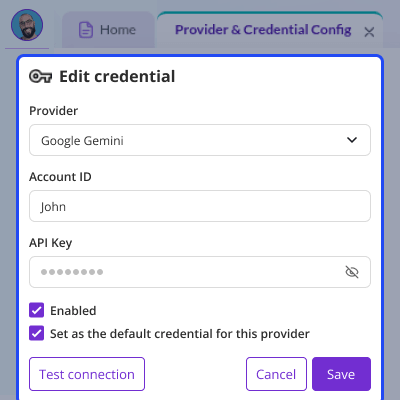
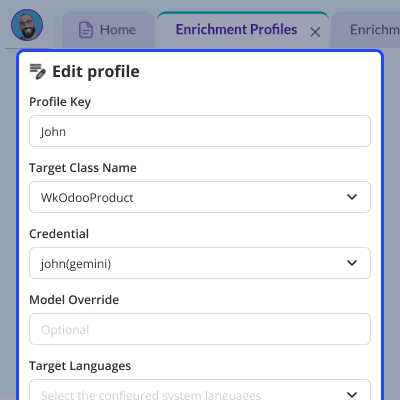
Prompt templates define the system prompt, user prompt, output schema, and enrichment task. Profiles connect these templates to a product class, field mappings, and a selected credential.
This module provides budget controls for teams that need limits on AI enrichment. Limits can be set at run, job, hard, daily, and operator levels.
For any query or issue, please create a support ticket here http://webkul.uvdesk.com/
You may also check our quality Magento 2 Extensions.
Detailed technical features and requirements to help you understand the module’s capabilities and ensure smooth integration with your system.
Detailed technical features and requirements to help you understand the module’s capabilities and ensure smooth integration with your system.
We’re partnered with top-tier, trusted providers!
Want to know more how exactly we are going to power up your eCommerce Website with Cloud to fasten up your store
* Server Configuration may vary as per application requirements.



