Send Again
Close
Pimcore Commercetools Connector links Pimcore 12 with Commercetools. It keeps catalog data updated in both systems through the commercetools HTTP API. You can import categories, families, products, variants, attributes, links, and images into Pimcore.
Product images are saved as Pimcore assets for later use, and Pimcore catalog data is also exported to commercetools. This includes products, variants, attributes, prices, categories, images, and publishing data.
Field mapping helps match data between both systems. Admin can map scalar and localized fields to the right Pimcore class fields.
In addition, the connector shows job progress and step counts. Admin can view failed rows and commercetools messages during each job. They can also stop a running job.
Access control adds another layer of control. Separate permissions are available for credentials, mapping, imports, and exports.
Additionally, if you need to connect Pimcore with PrestaShop, you can explore Pimcore PrestaShop Connector. It lets you sync products, categories, brands, and variants through a two-way sync.
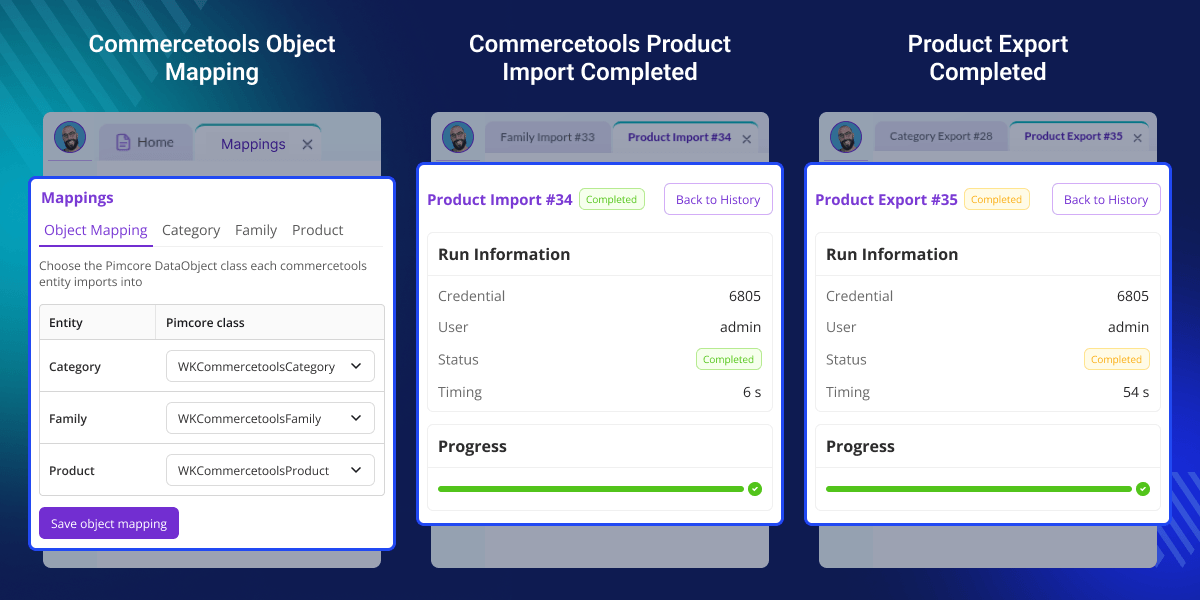
Sync catalog data from commercetools to Pimcore or from Pimcore to commercetools. This makes catalog updates easier to manage.
Import categories, families, products, variants, attributes, links, and images into Pimcore. This brings commercetools catalog data into one place.
Send products, prices, variants, categories, attributes, images, and publishing data to commercetools. This helps keep your catalog current.
Map scalar and localized fields between commercetools and Pimcore. This helps when both systems use different field names.
Send Pimcore gallery images to commercetools. During export, old images can also be removed from the gallery.
Use SKU filters to select products for export. This lets admins send only the products they need.
Track job progress, step counts, failed rows, and commercetools messages in Pimcore Studio. Admins can check issues as jobs run.
Set permissions for credentials, field mapping, imports, and exports. This lets teams control access by admin role.
Managing product data in two systems can take time. Manual updates can also cause missing data or old images.Without a connector, teams may move products, categories, images, and attributes by hand.
This makes regular updates slower. Pimcore Commercetools Connector links both systems through import and export jobs. As a result, teams can reduce manual catalog work.
Field mapping helps when the systems use different field names. Teams can match each value with the right Pimcore field.SKU filters give admins more control over exports.
They can select specific products instead of sending the full catalog. Overall, the connector helps keep catalog data aligned. It also makes regular updates easier to manage.
Apart from this, to translate Pimcore data objects, documents, shared translations, and Office files into multiple languages, check out Pimcore DeepL Translation Connector.
Move categories, product families, products, variants, attributes, and images from commercetools into Pimcore. This keeps catalog data in one place.
Send products from Pimcore to commercetools with prices, variants, categories, attributes, images, and publishing data. This keeps the catalog updated.
Use SKU filters when only selected products need to be exported. This gives admins better control over each export.
Map scalar and localized fields when both systems use different field names. This keeps product data in the right Pimcore fields.
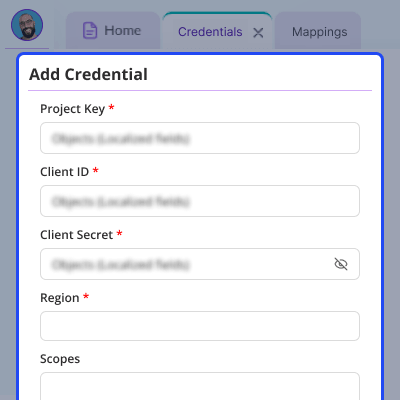
Connect Pimcore with commercetools in a simple and secure way. Manage your commercetools credentials from one place.
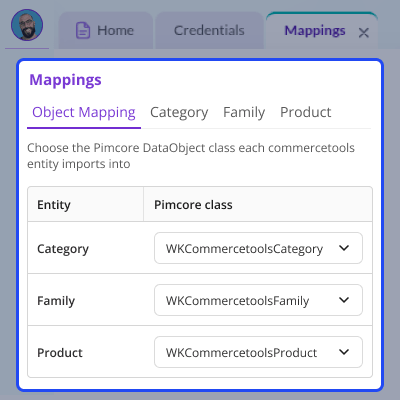
Object mapping links commercetools entities with Pimcore DataObject classes. This keeps imported data in the right Pimcore structure.
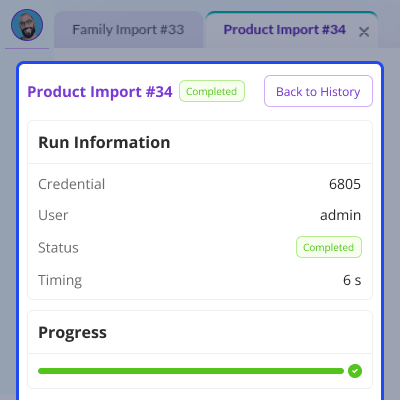
The import feature brings commercetools catalog data into Pimcore. It helps teams manage product data and images in one system.
Import category trees, product families, products, variants, attributes, and images. Product images are saved in the Pimcore asset catalog.
For any query or issue, please create a support ticket here http://webkul.uvdesk.com/
It links Pimcore 12 with commercetools. It syncs catalog data through the commercetools HTTP API in both directions.
Yes, you can export products, variants, attributes, prices, categories, images, and publishing data from Pimcore to commercetools. This helps keep both catalogs in sync.
Yes, categories keep their parent links and tree order during import. As a result, Pimcore keeps the same catalog structure and hierarchy as commercetools.
Yes, you can import product data into Pimcore and export products from Pimcore to commercetools. This helps keep data synced across both systems.
Yes, SKU filters let you select products for export. This way, you can send only the products you need instead of exporting the full catalog.
Yes, Pimcore Studio shows job progress, step counts, failed rows, and commercetools messages. You can track import and export jobs from one place.
Yes, Pimcore Studio has a Stop control for active jobs. Admins can stop an import or export when the synchronization needs to end early.
Yes, you can set permissions for credentials, field mapping, imports, and exports. This lets admins control access to connector features by user role.
The connector supports Pimcore 12 for catalog synchronization with commercetools. It uses the commercetools HTTP API for import and export jobs.
Detailed technical features and requirements to help you understand the module’s capabilities and ensure smooth integration with your system.
Detailed technical features and requirements to help you understand the module’s capabilities and ensure smooth integration with your system.
We’re partnered with top-tier, trusted providers!
Want to know more how exactly we are going to power up your eCommerce Website with Cloud to fasten up your store
* Server Configuration may vary as per application requirements.



