USD
  • EUR
  • INR
  • USD
Cart
Cart 0
  • You have no items in your shopping cart.
    Pimcore Extensions
    Cart
    Cart 0
    • You have no items in your shopping cart.
    Hire a Developer
    ×
    Contact Us!
    Send Again
    Close
    Please Login to Write Your Review
    Pimcore DeepL Translation Connector

    Pimcore DeepL Translation Connector

    x
    Free

    * Required Fields

    $499.00
    Add To Cart
    Only One Time Payment

    Pimcore DeepL Translation Connector helps translate Pimcore data objects, documents, shared translations, and Office files into multiple languages using DeepL API.


    • Translate Pimcore data objects, documents, and shared translations.

    • Run translation jobs in the background and track progress live.

    • Create and sync DeepL glossaries for multiple languages.

    • Rewrite content with DeepL Write and choose the style you want.

    • Use multiple DeepL API accounts with secure, encrypted storage.

    • Review and approve translations before they go live.

    • Track translation usage, API quotas, and spending in one place.

    • Translate Office documents with automatic upload and download.

    • Manage all Pimcore languages from one settings page.

    • Add new translation providers with the flexible translation engine.

    Pimcore DeepL Translation Connector
    Pimcore DeepL Translation Connector
    $499.00
    Check How It Works
    $499.00
    Configure and Buy
    Only One Time Payment
    X
    • Description
    • Reviews
    • FAQ
    • Customers ()
    • Specifications
    • Cloud Hosting
    • Changelog

    Pimcore DeepL Translation Connector helps businesses translate product catalogues, websites, and documents directly from Pimcore. It connects Pimcore with DeepL to make translation simple.

    Teams can translate Data Objects, documents, and files without using other tools. This saves time, reduces manual work, and helps manage content in different languages. This connector supports background jobs for large translation tasks.

    Users can check progress, view job status, and manage tasks from Pimcore Studio without affecting daily work. Glossary support helps keep product names, technical words, and brand terms the same in all languages. This helps businesses provide clear and accurate translations.

    This connector is useful for global businesses, eCommerce stores, and teams managing multilingual content. It makes translation management easier.

    Additionally, to manage in store sales, customers, inventory, and orders with seamless synchronisation using Point of Sale System for Pimcore.
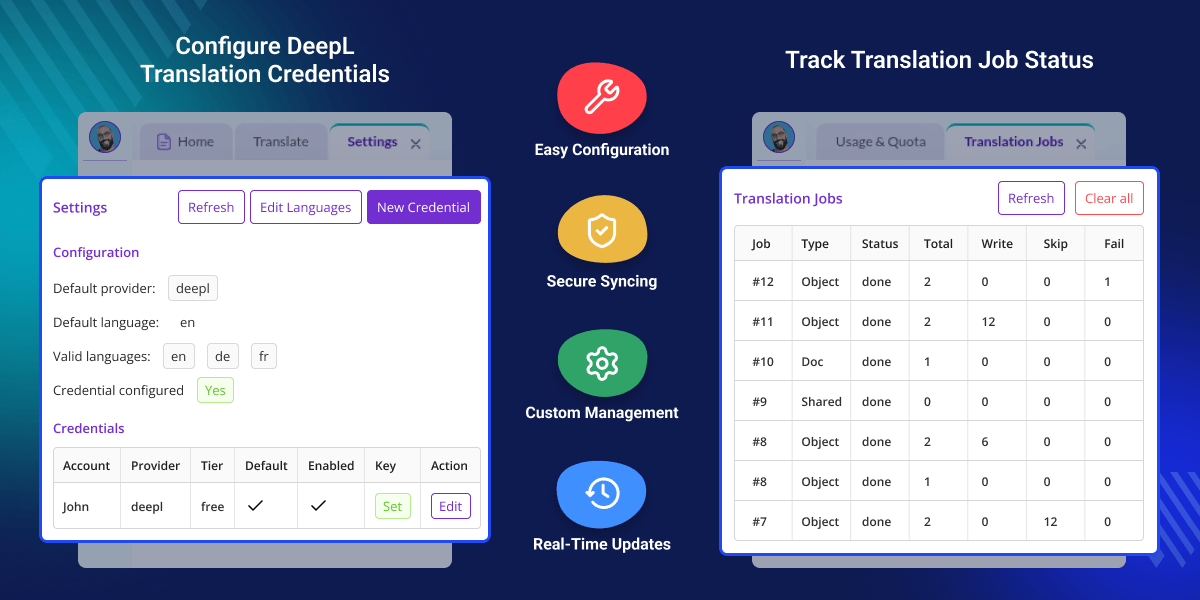
    Pimcore DeepL Translation Connector

    Highlighted Features

     Translate Pimcore Content

    Translate data objects, documents, shared translations, and office files from one place.

     Background Translation Jobs

    Run translation jobs in the background while users keep working in Pimcore Studio.

     Live Job Tracking

    Track translation progress, job status, and results in real time.

     DeepL Glossary Support

    Create and sync glossaries to keep product and business terms consistent.

     DeepL Write Rephrase

    Rewrite existing content with different writing styles and tone options.

     Secure API Credentials

    Store DeepL API keys securely with encrypted protection.

     Budget and Usage Control

    Monitor translation usage and stay within your defined limits.

     Translation Approval Workflow

    Review and approve translated content before publishing.

    Why Do We Need the Pimcore DeepL Translation Connector?

    Pimcore DeepL Translation Connector helps you translate Pimcore content with DeepL from one place without switching between different tools.

    Many translation tasks still need manual work, which takes time, can cause errors, and makes it difficult to keep terms consistent, review translations, and manage large translation projects.

    This module automates translation with background jobs, glossaries, usage tracking, and content approval to help Pimcore users save time and deliver accurate multilingual content.

    Apart from this, export products, categories, attributes, and images from Pimcore to WooCommerce with seamless integration using Pimcore WooCommerce Connector.

    Use Cases

    • Multilingual Product Catalogues

      Translate product content into multiple languages to keep every product page clear and consistent across all markets.

    • Global Corporate Websites

      Localise website pages and Pimcore documents to deliver region-specific content to customers worldwide.

    • Marketing Content Translation

      Adapt ads, landing pages, and campaigns for different markets while maintaining consistent terminology with glossaries.

    • Technical Documentation

      Convert guides, manuals, presentations, and office files into multiple languages for global teams and customers.

    • Enterprise Content Approval

      Check translated content before publishing and approve changes to keep it accurate and ready to use.

    • Large Translation Projects

      Manage large volumes of content in the background and track job progress and translation usage from one place.

    Usage and Quota Monitoring

    In Pimcore DeepL Integration, monitor DeepL API usage, used units, remaining quota, and translation costs in Pimcore Studio to plan jobs and manage limits.
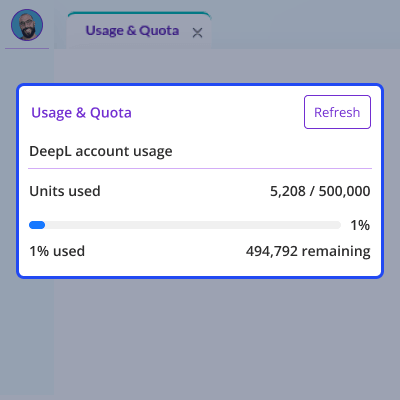
    • View used and remaining DeepL translation quota.
    • Track translated character units live.
    • See usage with a clear progress bar.
    • Refresh usage data with one click.
    • Plan translation jobs based on your remaining quota.
    • Keep translation costs under control.
    Usage and Quota Monitoring

    Configure Translation Settings

    Pimcore Language Translation helps configure DeepL settings, manage languages, API keys, providers, and accounts from one place for smooth translation setup.
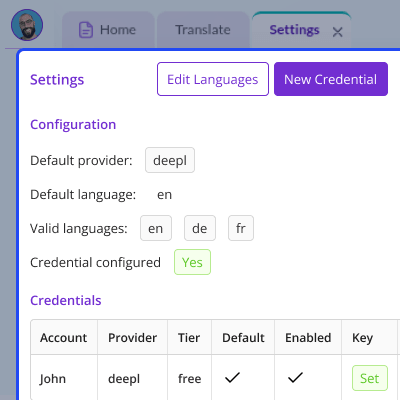
    • Set DeepL as the default translation provider.
    • Choose the default source language.
    • Select the languages you want to translate.
    • Add new API keys.
    • Edit existing API keys.
    • Turn translation accounts on or off.
    • Choose the default API key for translation.
    Configure Translation Settings

    Create Translation Jobs

    Pimcore AI Translation lets users create translation jobs, select content and languages, translate records or classes, and publish results.
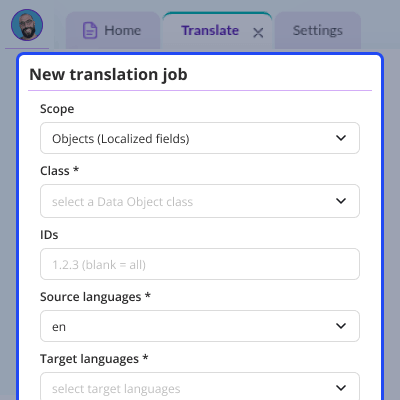
    • Create translation jobs for localised data objects.
    • Choose the source language.
    • Select one or more target languages.
    • Translate selected records.
    • Translate full object classes.
    • Replace old translations when needed.
    • Publish translated content after translation.
    • Start a translation job with one click.
    Create Translation Jobs

    Create And Manage Translation Glossaries

    Automated Pimcore Translation creates DeepL glossaries, adds terms, sets translations, and maintains consistent wording across languages and projects.
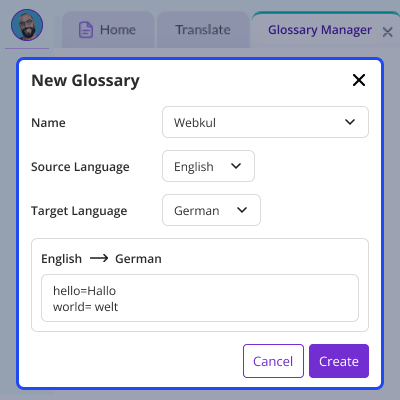
    • Create glossaries for language pairs.
    • Add your own words and phrases.
    • Choose the source language.
    • Choose the target language.
    • Keep the same words in all translations.
    • Use different glossaries for different projects.
    • Improve translation with glossary rules.
    Create And Manage Translation Glossaries

    Track Translation Job Progress

    DeepL API Integration for Pimcore Translation Jobs dashboard helps monitor translation jobs, track status, view progress, and review completed tasks.
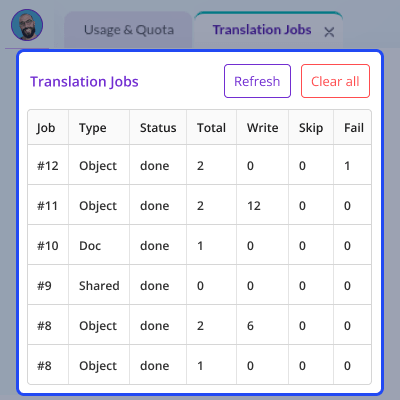
    • View all translation jobs from one dashboard.
    • Check running, completed, and failed jobs.
    • See translated, skipped, and pending records.
    • Track object, document, shared content, and glossary jobs.
    • Refresh the dashboard to see the latest job status.
    • Remove completed jobs to keep the dashboard clean.
    Track Translation Job Progress

    Test And Rephrase Content

    Pimcore DeepL Translation Connector provides a Test and Rephrase Sandbox for translating text, adjusting tone, and reviewing quality before publishing.
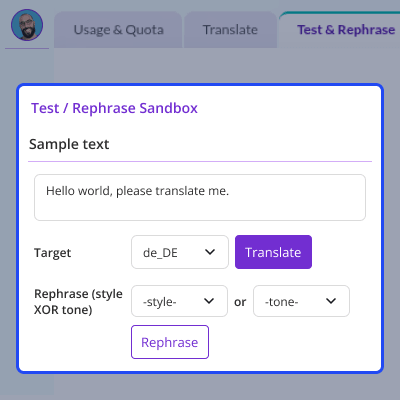
    • Translate sample text into supported languages.
    • Rephrase text with DeepL Write.
    • Choose different writing styles and tones.
    • Preview the result before publishing.
    • Test translations without changing live content.
    • Make multilingual content clear and consistent.
    Test And Rephrase Content

    Support

    For any query or issue, please create a support ticket here http://webkul.uvdesk.com/

    Specifications

    Product Version1.0.0
    Released9 days ago
    CategoryPimcoreMultichannel
    Last UpdatedAugust 7, 2026 (1 day ago)
    Supported VersionsPimcore  2026.x  12.x  

    Ratings

    We'd love to hear your thoughts! Share your feedback and help us craft an even better experience tailored just for you.

    Write a review

    Frequently Asked Questions

     Can I translate multiple items together?
    Yes, batch jobs can translate multiple objects, documents, or translations at the same time. This saves time and reduces manual work.
     
     Can I stop an active translation job?
    Yes, you can stop active jobs from the monitoring panel. This helps control translation tasks and avoid extra API usage.
     
     Are glossaries applied automatically?
    Yes, matching glossaries are used during translation. They help keep terms the same across different languages.
     
     Can I configure translation budgets?
    Yes, you can set usage limits to control DeepL API costs and manage your translation budget.
     
     What happens if my DeepL quota is reached?
    Jobs pause when the quota limit is reached. They can continue later without losing progress or starting again.
     
     Can I use more than one DeepL account?
    Yes, you can add multiple DeepL API accounts. All account details are stored securely with encryption.
     
     How are DeepL API keys protected?
    API keys are encrypted before they are saved. The system also checks keys during setup for secure access.
     
     Can I manage languages from Pimcore?
    Yes, admins can add, remove, and manage languages from Pimcore Studio settings in the DeepL Translation Connector.
     
     Can large translation jobs be processed?
    Yes, large translation tasks run in the background. This helps complete big jobs without slowing down daily work.

    Specification

    Detailed technical features and requirements to help you understand the module’s capabilities and ensure smooth integration with your system.

    Cloud Hosting

    Detailed technical features and requirements to help you understand the module’s capabilities and ensure smooth integration with your system.

    Default Configuration Details of Server

    1 GB
    RAM
    1 Core
    Processor
    30 GB
    Hard Disk
    1 GB RAM & 1 Core Processor
    Database

    Want to know more how exactly we are going to power up your eCommerce Website with Cloud to fasten up your store

    * Server Configuration may vary as per application requirements.

    Change Logs

    • - Feature Add (+)
    • - Feature remove (-)
    • - Bug Fixed (!)
    • - Modification (*)
    Version 1.0.0
    • + Initial release for Pimcore 12 / Platform 2026.x with a provider agnostic DeepL translation bundle built on the official DeepL PHP SDK.
    • + Added Pimcore Studio plugin with dedicated DeepL Translation navigation and screens for translation, jobs, shared translations, usage, glossary management, test and rephrase, and settings.
    • + Added asynchronous translation engine with background job processing, live progress tracking, stop control, and automatic reindexing.
    • + Added translation support for localized object fields, documents, shared translations, binary document files, glossary synchronization, and usage polling.
    • + Added DeepL v3 multilingual glossary management with automatic glossary application during translation.
    • + Added DeepL Write support for text rephrasing with style and tone options.
    • + Added usage monitoring, translation budget controls, and approval workflow before publishing translations.
    • + Added encrypted multi account DeepL API credential management with automatic key validation and tier detection.
    • + Added global language management with automatic class rebuild and search index updates.
    • + Added provider agnostic translation engine with isolated DeepL integration architecture.
    • + Added stable public Integration API supporting inline, asynchronous, and event based translation workflows.
    • + Added REST API with 24 JSON endpoints across multiple controllers using session authentication and permission based access.
    • + Added one command installer for bundle installation, database setup, Studio plugin registration, permissions, DataObject classes, and worker configuration.
    • + Added 16 console commands for installation, translation dispatching, glossary synchronization, usage polling, credential management, document processing, approval handling, and development utilities.
    • * Built for Pimcore 12 / Platform 2026.x with PHP 8.4+ compatibility.
    • * Added support for DeepL API Free and Pro accounts with automatic tier detection.
    • * Added glossary support optimized for terminology consistency across translations.


