USD
  • EUR
  • INR
  • USD
Cart
Cart 0
  • You have no items in your shopping cart.
    PrestaShop Extensions
    Cart
    Cart 0
    • You have no items in your shopping cart.
    Hire a Developer
    ×
    Contact Us!
    Send Again
    Close
    Please Login to Write Your Review
    PrestaShop Sticky Add to Cart Bar

    PrestaShop Sticky Add to Cart Bar

    x
    Free

    * Required Fields

    $49.00
    Add To Cart

    PrestaShop Sticky Add to Cart Bar module offers shop owners to show the add to cart button with product name, image & price in a bar on the product page of the shop.


    • Show add to cart bar only when the actual add to cart button of the product page disappears on scrolling down the page.

    • Choose to show add to cart bar either on top or bottom of the page.

    • Customize the sticky add to cart bar.

    • Either show the product's attribute in the bar itself or in a separate popup.

    • Choose to show the sticky add to cart bar in certain devices only.

    • Hide sticky add to cart bar from some selected categories/product pages.

    • It helps to increase customer convenience.

    PrestaShop Sticky Add to Cart Bar
    PrestaShop Sticky Add to Cart Bar
    $49.00
    PrestaShop Expert Partner
    PrestaShop Superhero Seller
    PrestaShop Expert Certification Core Skills
    Check How It Works
    $49.00
    Configure and Buy
    X
    • Description
    • Reviews
    • FAQ
    • Customers ()
    • Specifications
    • Cloud Hosting
    • Changelog

    PrestaShop Sticky Add to Cart Bar - - The module helps to show the add to cart bar on the product pages of the shop.

    However, the add to cart bar only starts appearing when the actual add to cart button disappears from the page when a user scrolls down the page. The add to cart bar contains the product name, price, attributes, quantity selector and add to cart button.

    This feature will help in increasing user convenience and will allow users to use the add to cart button even when he/she has scrolled down at the end of the page.
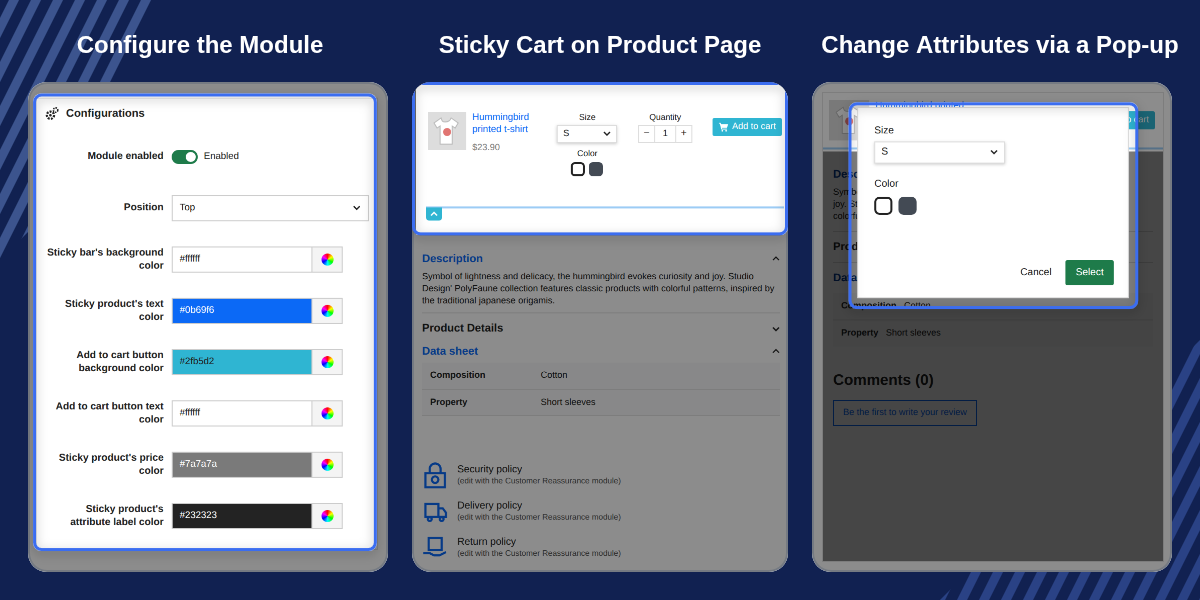
    Highlighted Features

     Sticky Add To Cart Bar

    Start showing add to cart bar to customers when they scroll down the page & add to cart button disappearing from the page.

     User Convenience

    An option to add the product to the cart is always visible even when the user scrolls down the page.

     Customize Appearance

    Use various options to personalise the appearance of the sticky add to cart bar.

     Multi-Shop Compatibility

    The module is multi-shop compatible.

    Multiple Cart Customization Options

    The configuration settings of the module offer you multiple options to customize the appearance of the shopping cart. The options available to customize the appearance are:

    • Select the position (i.e., either at the top or bottom of the product page) to show the sticky add to cart bar to customers.
    • The background colour of the sticky add to cart bar.
    • The colour of the text shown on the add to cart bar.
    • Option to choose the add to cart button text & background colour.
    • The colour of the attribute label & price of the product.
    • The colour of the border shown around the sticky add to cart bar.
    moduleconfig

    Device Compatibility & Attribute Display

    The module offers two very unique features to a shop owner.

    • The first one is the ability to choose the devices in which they want the sticky add to cart bar to display. This helps a shop owner to decide whether a sticky add to cart bar is necessary for certain kinds of users(i.e., desktop, tablet, mobile etc.) or not.
    • And, the other one is whether to show the attributes of a product is the sticky add to cart bar or not. In case, if a shop owner wants to display the attributes in a bar then he/she can also choose whether to show attributes in a popup or in the bar itself.
    moduleconfig

    PrestaShop Sticky Add to Cart Bar Features

    • Enable or disable the module.
    • Set the position of sticky add to cart bar either to the top or bottom.
    • Choose the background colour for the sticky add to cart bar.
    • Select the colour for the product name text.
    • Choose the background colour of the add to cart button.
    • Select the colour of the “Add to Cart” text shown on the add to cart button.
    • Choose the colour of the product price.
    • Select the attribute label & the border colour.
    • Also, choose the border width to show around the sticky add to cart bar.
    • Select the device compatibility for the sticky add to cart bar.
    • Choose the product types on whose product pages you want to show the sticky add to cart bar.
    • Choose to exclude categories & products on which you don’t want to show the sticky add to cart bar.
    • The module is multi-shop compatible.

    PrestaShop Sticky Add to Cart Bar Support

    For any query or issue, please create a support ticket here http://webkul.uvdesk.com

    You may also check our other top-quality PrestaShop Add-ons.

    Specifications

    Product Version4.0.3
    Released4 years ago
    CategoryPrestaShop
    Last UpdatedMay 4, 2026 (3 months ago)
    Supported VersionsPrestaShop  1.7.x.x​  8.x.x  9.x.x  

    Ratings

    We'd love to hear your thoughts! Share your feedback and help us craft an even better experience tailored just for you.

    5.0
    2 Reviews
    based on verified customer feedback
    Write a review
    https://suministrointec.com
    🇪🇸 Spain

    I recommend buying this module

    Posted On - July 31, 2023

    The module works perfectly and also the service of its technicians adjusting it to my Prestashop has been formidable. I recommend buying this module or any with these developers because they respond in a formidable and fast way.

    Ayoub Mitxelena
    🇪🇸 Spain

    Quick Support and service

    Posted On - July 17, 2023

    Asistencia rapida y efectiva, muy bien.

    Translation:

    Quick and effective assistance, very good.

    Frequently Asked Questions

     Is this module multishop compatible?
    Yes, this module is multishop compatible.
     
     Can we change the position of the sticky add to cart bar?
    Yes, the admin can choose the position of sticky add to cart bar from top or bottom.
     
     Is this module works in mobile devices?
    Yes, the module is made responsive as per the Prestashop Standard.
     
     Can we customize this sticky bar?
    Yes, the admin can customize the product’s text color, background color, add-to-cart text color, border color, border width, etc as per their requirement.
     
     Can we restrict this add to cart bar for specific products?
    Yes, the admin can restrict this add-to-cart bar for specific products and category.
     

    Specification

    Detailed technical features and requirements to help you understand the module’s capabilities and ensure smooth integration with your system.

    Cloud Hosting

    Detailed technical features and requirements to help you understand the module’s capabilities and ensure smooth integration with your system.

    Default Configuration Details of Server

    1 GB
    RAM
    1 Core
    Processor
    30 GB
    Hard Disk
    1 GB RAM & 1 Core Processor
    Database

    Want to know more how exactly we are going to power up your eCommerce Website with Cloud to fasten up your store

    * Server Configuration may vary as per application requirements.

    Change Logs

    Not Available


