USD
  • EUR
  • INR
  • USD
Cart
Cart 0
  • You have no items in your shopping cart.
    WooCommerce Extensions
    Cart
    Cart 0
    • You have no items in your shopping cart.
    Hire a Developer
    ×
    Contact Us!
    Send Again
    Close
    Please Login to Write Your Review
     Punchout Gateway for WooCommerce

    Punchout Gateway for WooCommerce

    x

    * Required Fields

    $999.00
    Add To Cart
    30 Days Money Back Guarantee*
    Lifetime Free Upgrade
    Only One Time Payment

    Punchout Gateway for WooCommerce connects your store to SAP Ariba, so B2B buyers can shop your catalogue from their procurement system and send carts back as orders.


    • Connect your WooCommerce store to your SAP Ariba procurement system

    • Exchange cart and order data with the procurement system using cXML

    • Buyers browse and buy without leaving the procurement interface

    • Create a WooCommerce cart automatically from procurement selections

    • Lock product quantities once items are added to the procurement cart

    • Process punchout orders for guest, existing and new customers

    • Set shipping method, payment method and order status for punchout orders

    • Send automatic acknowledgements for received purchase orders

    • Connect multiple buyers through one gateway to cut integration work

    • Track every request and response in transaction logs for audits

    • View punchout orders and their carts from the WordPress dashboard

    • Choose UNSPSC or NIGP classification for order message items


    Additional Info

    Please note: WordPress: 6.6.2, WooCommerce: 9.1.2 and PHP v7.4.3 or above.

     Punchout Gateway for WooCommerce
    Punchout Gateway for WooCommerce
    $999.00
    Check How It Works

    Need Help Deciding?

    Support answers within one business day.

    Open a ticket
    $999.00
    Configure and Buy
    30 Days Money Back Guarantee*
    Lifetime Free Upgrade
    Only One Time Payment
    X
    • Description
    • Reviews
    • FAQ
    • Customers ()
    • Specifications
    • Cloud Hosting
    • Changelog

    Punchout Gateway for WooCommerce connects your store to a procurement system such as SAP Ariba, so buyers can open your catalogue from their own interface and shop without ever leaving it.

    When a buyer selects products, the plugin creates a cart in your store, and once the buyer approves the request in SAP Ariba, your store receives the final order automatically.

    It is built for B2B businesses that sell to companies using procurement software, which removes manual purchase order entry and helps orders reach your team much faster.

    Data moves between the two systems in cXML, and you can set the shipping method, payment method and order status for punchout orders so that they follow your usual workflow.

    Orders can come from a guest, from an existing customer who logs in, or from a new customer who registers while ordering, and guest users are supported for e-procurement orders as well.

    Every request and response is stored in transaction logs, so your team can find and fix errors, keep a record for audits, and choose how many days the logs stay in the database.

    Additionally, one gateway can serve several buyers, which reduces the integration work for each new procurement customer, and if you also run a Magento 2 store you can use Punchout Gateway for Magento 2 for the same purpose.
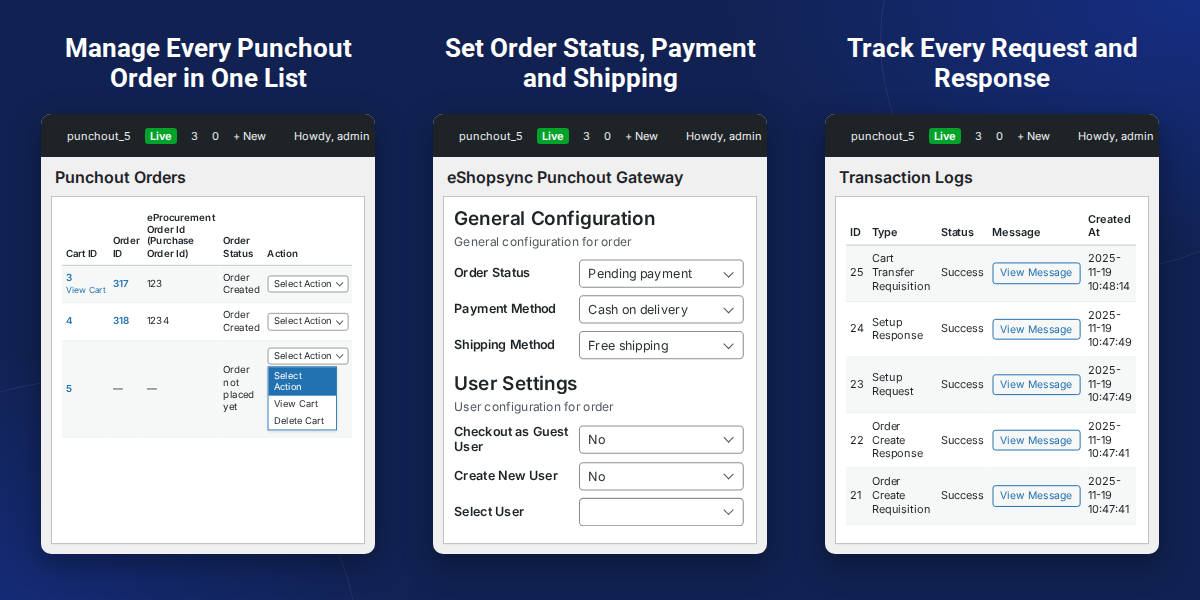
    Punchout Gateway for WooCommerce

    Highlighted Features of Punchout Gateway for WooCommerce

     SAP Ariba Connection

    Link your store to your procurement system so buyers can open your catalogue from there.

     cXML Data Exchange

    Carts and orders travel between SAP Ariba and WooCommerce in cXML.

     Automatic Cart Creation

    Items picked in the procurement system appear as a cart in your WooCommerce store.

     Locked Product Quantities

    Quantities are locked once items are added to the cart in the procurement system.

     Guest and Registered Orders

    Buyers can order as a guest, log in as an existing customer, or register as a new one.

     Multi-Buyer Gateway

    Connect many buyers through a single gateway instead of building one integration each.

     Order Setup Controls

    Set shipping method, payment method and order status for e-procurement orders.

     Request and Response Tracking

    Keep a record of every request and response for troubleshooting and audits.

    Why Do We Need Punchout Gateway for WooCommerce

    Punchout Gateway for WooCommerce connects your store with procurement software, allowing B2B buyers to browse products and place orders without manually copying product details or entering purchase orders.

    A standard WooCommerce store does not include a punchout connection to SAP Ariba, which means carts cannot move between the two systems and every order needs manual entry.

    Manual entry is slow and easy to get wrong, and buyers also need flexibility because some order as guests, some have accounts, and each business has its own shipping, payment and order status rules.

    This plugin adds the missing bridge by passing carts from SAP Ariba into WooCommerce, applying your order settings automatically, and recording what happened at each step in the transaction logs.

    Apart from this, you can also check the step-by-step guide covering installation, SAP endpoint setup and configuration, and if you also want to connect your store data with SAP you can explore the SAP WordPress WooCommerce Connector.

    Use Cases

    • B2B Supplier Selling Through SAP Ariba

      Business customers open your WooCommerce catalogue from SAP Ariba, pick products and send the cart back for approval.

    • Supplier With Many Procurement Buyers

      Use one gateway for several buyers instead of building a new integration for each one.

    • Store With Guest and Account Customers

      Accept punchout orders from guests, logged-in customers and first-time buyers who register at checkout.

    • Team That Audits Procurement Orders

      Use transaction logs to trace each request and response, and to find the cause of a failed order.

    Punchout Order and User Configuration

    Orders land in WooCommerce the way your team already handles them, whether the buyer is a guest, an existing customer or a new one.
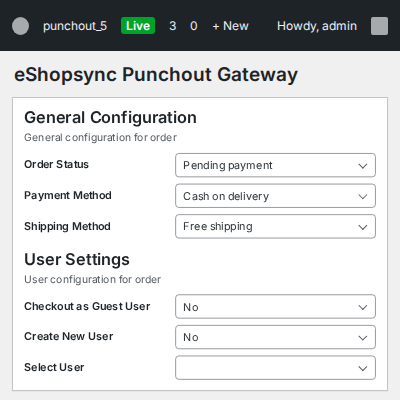
    • Select the order status for e-procurement orders
    • Choose the payment method
    • Choose the shipping method
    • Place orders with Checkout as Guest User
    • Register new customers with Create New User
    • Place orders for an existing account with Select User
    Punchout Order and User Configuration

    Message Header Settings for Punchout Gateway

    Correct header details keep messages flowing to the buyer's procurement system, and a restock job frees items that were never ordered.
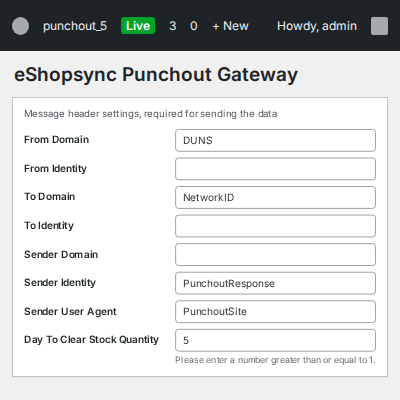
    • Enter the details needed to send data to the eProcurement system
    • Lock product quantities after items are added to the procurement cart
    • Restock products not ordered after a set number of days with a crontab job
    • Configure everything from the WordPress dashboard
    Message Header Settings for Punchout Gateway

    Order Message Classification Settings (UNSPSC and NIGP)

    In Order Message Setting, pick the classification domain for order message items from a dropdown. You can also enter a default classification code.
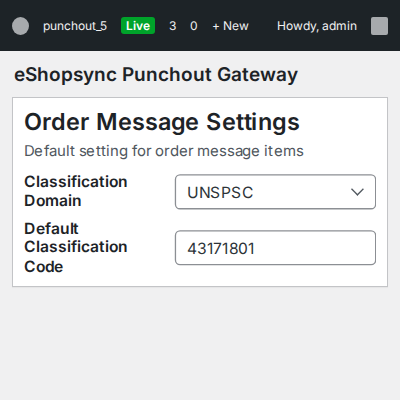
    • Choose UNSPSC or NIGP as the classification domain
    • UNSPSC is selected by default
    • Set a default classification code for order message items
    • Send product ID, name, price, currency, quantity and UNSPSC domain to SAP Ariba
    Order Message Classification Settings UNSPSC and NIGP

    Punchout Transaction Log Settings

    Turn each type of data on or off for the custom log, and set how many days logs stay in the database.
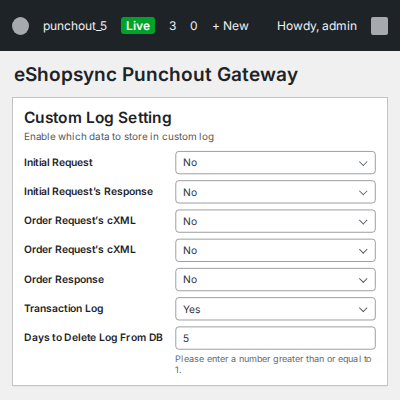
    • Enable or disable the data stored in the custom log
    • Set the number of days to keep logs
    • Clear logs older than that period automatically with a crontab job
    • Track requests and responses for troubleshooting and auditing
    Punchout Transaction Log Settings

    Punchout Orders List in WooCommerce

    Open Punchout Orders from the left menu to see every punchout order with its Cart ID, Order ID, eProcurement Order Id and current status. Use the Action menu to open or delete a cart.
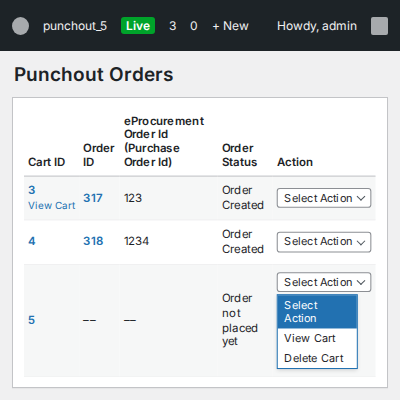
    • View all punchout orders with their current status
    • See the eProcurement Order ID (Purchase Order ID) next to each order
    • Open the cart of any order with View Cart
    • Remove unwanted purchase orders with Delete Cart
    • Send auto acknowledgements for received purchase orders
    Punchout Orders List in WooCommerce

    Punchout Cart View

    Support and sales staff can check what the buyer selected before they act on an order.
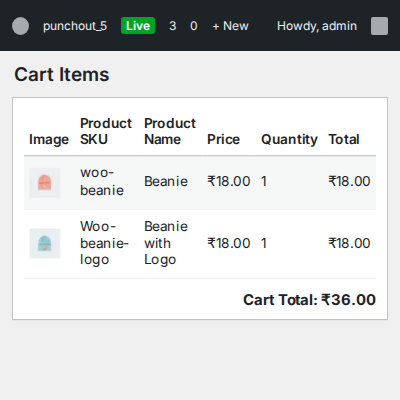
    • See every item in a punchout order
    • Carts are created automatically from items chosen in the procurement system
    • Quantities stay locked after items are added in the procurement system
    • View all carts and orders created through punchout
    Punchout Cart View

    Punchout Transaction Logs

    Open Transaction Logs from the menu bar to review logged requests and responses, identify order failures, and quickly locate errors for resolution.
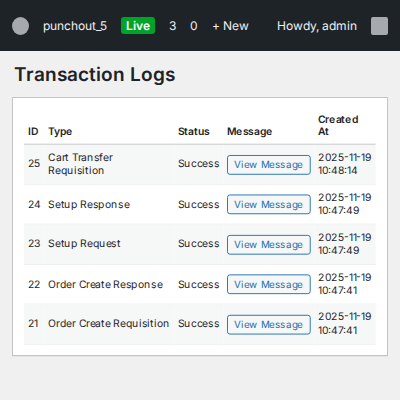
    • View all transaction logs in one place
    • Troubleshoot errors faster
    • Track all requests and responses
    • Keep an audit trail of punchout activity
    • Logs are cleared after the number of days you set
    Punchout Transaction Logs

      Punchout Gateway for WooCommerce - Support

    For any query or issue, please create a support ticket here http://webkul.uvdesk.com

    Specifications

    Product Version1.1
    Released1 year ago
    CategoryWooCommerce, SAP, 
    Last UpdatedNovember 2, 2026 (12 days ago)
    Supported VersionsWooCommerce  9.x.x  

    Ratings

    We'd love to hear your thoughts! Share your feedback and help us craft an even better experience tailored just for you.

    Write a review

    Frequently Asked Questions

     What does the WooCommerce plugin do?
    It connects your WooCommerce store with SAP Ariba, allowing buyers to select products and submit approved orders.
     
     Who needs this procurement plugin?
    B2B sellers whose customers use procurement software to place orders and want to reduce manual purchase order entry.
     
     Which protocol does the plugin support?
    It uses cXML to exchange data between your WooCommerce store and the procurement system.
     
     Which product details are sent to SAP Ariba?
    It sends product ID, name, price, currency, quantity, and UNSPSC domain to SAP Ariba.
     
     Which product classification domains are supported?
    This plugin supports UNSPSC and NIGP. UNSPSC is the default, and you can set a default classification code.
     
     Can guest users place procurement orders?
    Yes, Guests, existing customers, and new customers can place e-procurement orders through the plugin.
     
     Can multiple buyers connect through one gateway?
    Yes, Multiple buyers can connect to your WooCommerce store through a single gateway.
     
     How are product quantities managed after cart addition?
    Quantities are locked after cart addition. A crontab job restocks unordered products after your configured number of days.
     
     Can I view procurement requests and responses?
    Yes, Transaction Logs record requests and responses. You can choose which data to store and set its retention period.
     
     How do I install the WooCommerce plugin?
    Go to Plugins in WordPress, select Add New Plugin, then Upload Plugin. Choose the ZIP file and click Install Now.

    Specification

    Detailed technical features and requirements to help you understand the module’s capabilities and ensure smooth integration with your system.

    Cloud Hosting

    Detailed technical features and requirements to help you understand the module’s capabilities and ensure smooth integration with your system.

    Default Configuration Details of Server

    1 GB
    RAM
    1 Core
    Processor
    30 GB
    Hard Disk
    1 GB RAM & 1 Core Processor
    Database

    Want to know more how exactly we are going to power up your eCommerce Website with Cloud to fasten up your store

    * Server Configuration may vary as per application requirements.

    Change Logs

    Not Available