USD
  • EUR
  • INR
  • USD
Cart
Cart 0
  • You have no items in your shopping cart.
    Pimcore Extensions
    Cart
    Cart 0
    • You have no items in your shopping cart.
    Hire a Developer
    ×
    Contact Us!
    Send Again
    Close
    Please Login to Write Your Review
    Pimcore Connector for Shopify

    Pimcore Connector for Shopify

    x
    Free

    * Required Fields

    $499.00
    Add To Cart
    Annual Billing

    Pimcore Shopify Connector syncs products, collections, variants, images, prices, and translations between Pimcore 12 and Shopify using the Shopify GraphQL API.


    • Connect Pimcore and Shopify with a two way sync.

    • Use the Shopify Admin GraphQL API for fast data transfer.

    • Import and export products, variants, collections, images, and stock.

    • Keep product translations the same in Pimcore and Shopify.

    • Map Shopify data to custom Pimcore DataObject classes.

    • Store Shopify metafields in Pimcore.

    • Export prices for different sales channels and currencies.

    • Upload Pimcore images and other assets to Shopify.

    • Track sync jobs with logs and status updates.

    • Stop duplicate records with ID based mapping.

    • Publish Pimcore products to one or more Shopify sales channels.

    Pimcore Connector for Shopify
    Pimcore Connector for Shopify
    $499.00
    Check How It Works
    $499.00
    Configure and Buy
    Annual Billing
    X
    • Description
    • Reviews
    • FAQ
    • Customers ()
    • Specifications
    • Cloud Hosting
    • Changelog

    Pimcore Shopify Connector connects Pimcore 12 with Shopify for two way product data sync. It keeps both platforms up to date without manual CSV imports. Manage products, collections, variants, images, and stock from Pimcore. Changes sync to your Shopify store automatically. This saves time and reduces errors.

    Keep product content, translations, SEO fields, option values, and metafields in sync between Pimcore and Shopify with the Shopify Translation API. Import and export data with background jobs. Track each sync with live progress, clear logs, and error reports. This makes it easy to find and fix problems.

    Built in ID mapping helps stop duplicate records. Safe create and update actions keep your product data accurate and reliable. This connector manages multiple Shopify stores, sales channels, and currencies with secure authentication.

    Additionally, to manage in store orders, customers, agents, outlets, and synchronise orders, inventory, and customer data seamlessly, check out Pimcore POS System.
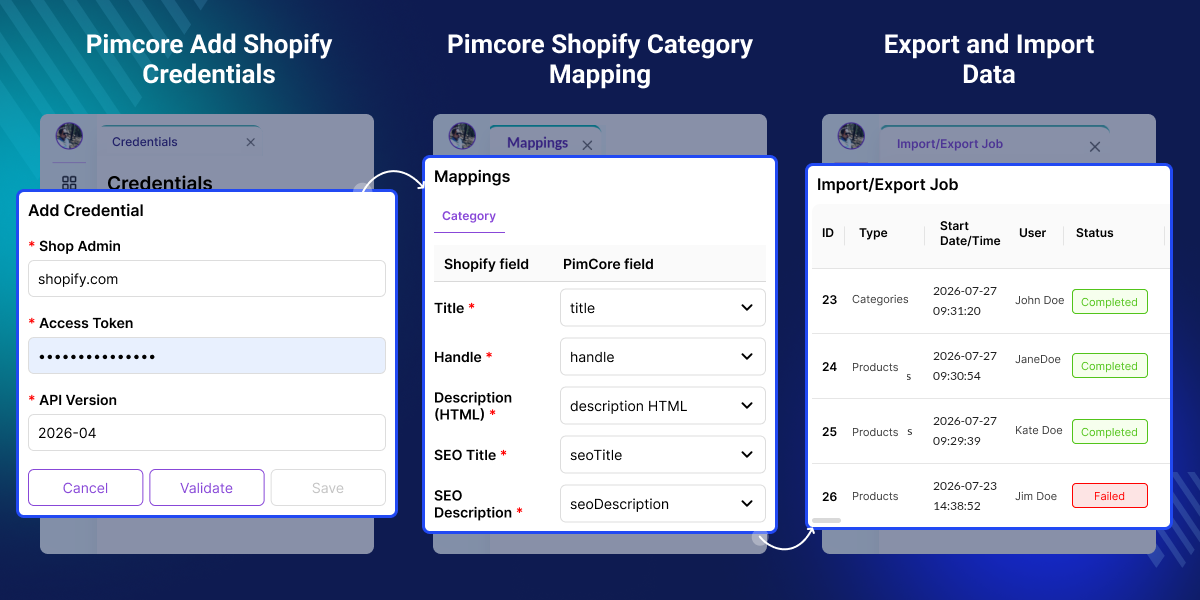
    Pimcore Connector for Shopify

    Highlighted Features of Pimcore Connector for Shopify

     Two Way Product Sync

    Sync products, collections, variants, images, and stock between Pimcore and Shopify.

     Shopify GraphQL API Support

    Connect Pimcore 12 to Shopify with the Shopify Admin GraphQL API.

     Multi Language Sync

    Keep product details, SEO data, and translations the same in every language.

     Pimcore Data Mapping

    Map Shopify data to custom Pimcore DataObject classes and fields.

     Shopify Metafield Sync

    Import Shopify metafields into Pimcore and manage them with ease.

     Price Management

    Manage product prices for different sales channels and currencies.

     Background Job Tracking

    Track import and export jobs with progress, status, and logs.

     Duplicate Record Prevention

    Use ID mapping to stop duplicate records during every sync.

    Why Do We Need Pimcore Shopify Connector?

    Pimcore Shopify Connector keeps product data synced between Pimcore and Shopify, reducing manual updates and data inconsistencies. Default systems rely on manual edits or CSV files, making product, price, and inventory updates slow and error prone.

    The connector automates two way synchronisation with accurate product data, faster updates, and efficient catalogue management across both platforms.

    Apart from this, to enable customers to raise support tickets, receive responses from Shopify Admin, and streamline customer service with Shopify UVdesk.

    Use Cases

    Large Product List Management

    Manage large product lists in Pimcore and sync products, options, and collections with Shopify to keep your product list up to date.

    Online Stores in Multiple Languages

    Sell in different countries by syncing product details, SEO data, and translations between Pimcore and Shopify.

    Sales Across All Channels

    Use Pimcore as your product hub and send product data to all Shopify sales channels.

    Custom Product Data

    Map Shopify fields, custom fields, and product details to Pimcore classes, so your product data stays organised and easy to manage.

    Stock and Price Sync

    Manage stock, prices, and product costs in Pimcore, then sync every change with Shopify to keep your data accurate.

    Multiple Shopify Stores

    Manage multiple Shopify stores from one Pimcore system by saving separate login details for each store.

    Manage Shopify Credentials

    Pimcore Shopify integration helps you manage Shopify API credentials in one place. Connect your Shopify store securely, reduce setup errors, and keep data synchronised.
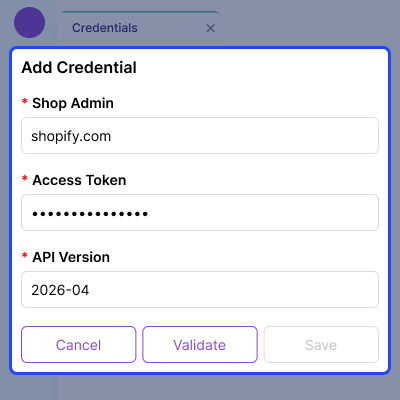
    • Add your Shopify store using the Shop Domain and Access Token.
    • Select the Shopify API version for your store.
    • Check your credentials before saving.
    • Keep one active credential for secure synchronisation.
    • Edit or remove saved credentials at any time.
    • Hide access tokens and show them only when needed.
    Manage Shopify Credentials

    Save and Manage Mapping Configuration

    Shopify Pimcore integration lets you save object mappings and match keys in one place. Update your settings at any time and keep every import and export job consistent.
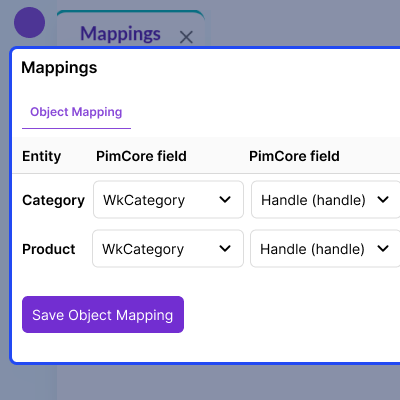
    • Save mapping settings with one click.
    • Change mappings whenever you need.
    • Use the same mapping for every import and export job.
    • Reduce setup errors during data synchronisation.
    • Keep your integration simple and easy to manage.
    Save and Manage Mapping Configuration

    Start and Manage Import Jobs

    Pimcore 12 Shopify integration lets you import data from Shopify into Pimcore, start import jobs anytime, monitor progress, and review results to quickly identify and resolve issues.
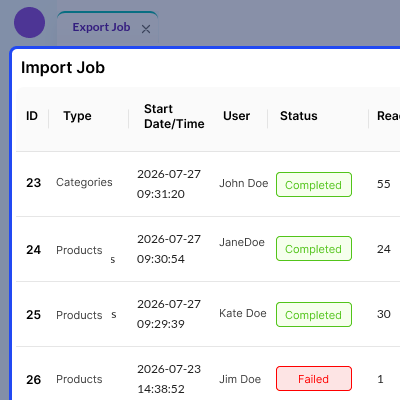
    • Import products, categories, attributes, and metafields.
    • Start import jobs with a single click.
    • View the status of every import job.
    • See how many records were read, created, updated, or failed.
    • Check the full import history for easy tracking.
    • Refresh the job list to see the latest progress.
    Start and Manage Import Jobs

    Export and Track Shopify Data

    Shopify Admin GraphQL API export maps Pimcore data to Shopify in a few clicks, letting you start export jobs, monitor progress, review results, and quickly resolve synchronisation issues.
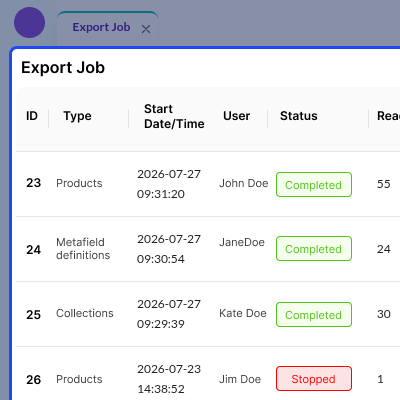
    • Export products, collections, and metafield definitions to Shopify.
    • Start export jobs with a single click.
    • View the status of completed, stopped, and failed jobs.
    • See how many records were read, created, updated, or failed.
    • Check the full export history for easy tracking.
    • Refresh the job list to see the latest status.
    Export and Track Shopify Data

    Manage Shopify Metafield Definitions

    Shopify data synchronisation lets you manage Shopify metafields in one place, update metafield details with ease, and keep Shopify and Pimcore data synchronised.
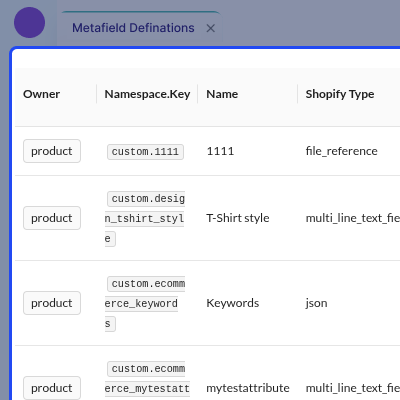
    • View all Shopify metafield definitions.
    • Edit metafield names and descriptions.
    • See field types for Shopify and Pimcore.
    • Pin key metafields for quick access.
    • Organise namespaces and owners.
    • Refresh metafields to keep data up to date.
    Manage Shopify Metafield Definitions

    Configure Category Field Mapping

    Pimcore PIM for Shopify lets you map Shopify category fields to Pimcore, keeping category data accurate, synchronised, and easy to manage while reducing manual work.
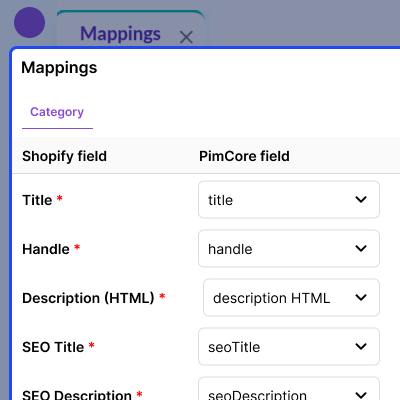
    • Map Shopify category fields to Pimcore fields.
    • Use the category handle as the match key.
    • Map SEO title and SEO description fields.
    • Map category images to Pimcore media fields.
    • Save or update field mappings at any time.
    • Keep category data in sync between Shopify and Pimcore.
    Configure Category Field Mapping

     Monitor Export Job Progress and Results

    Pimcore eCommerce integration lets you track Shopify export jobs, monitor progress in real time, review job results, and quickly identify and resolve synchronisation issues.
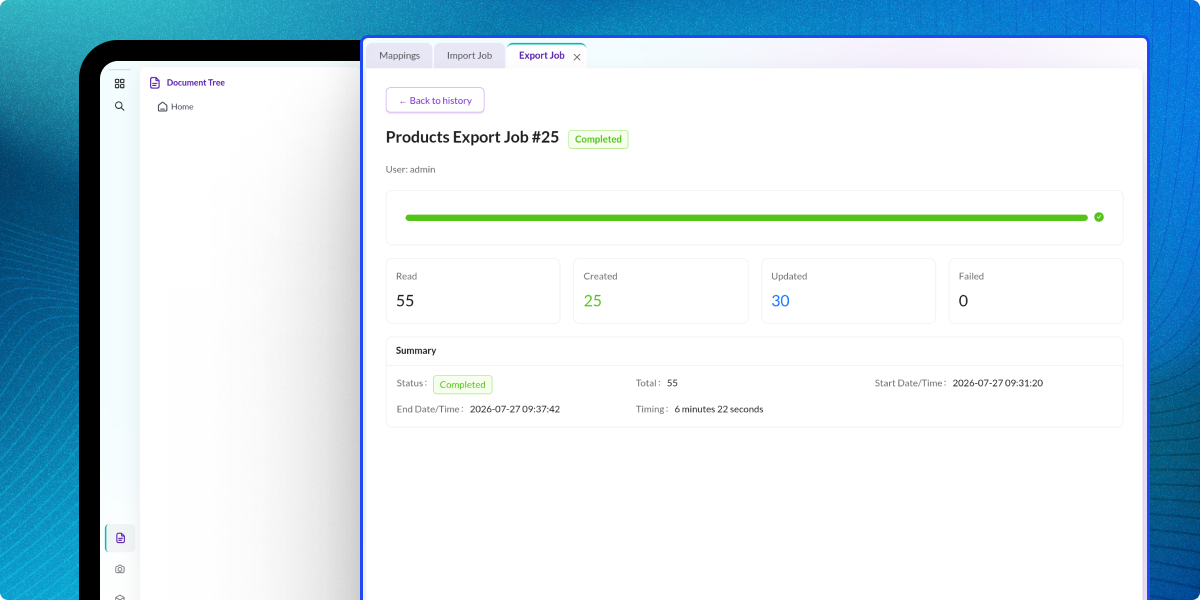
    • View export progress with a real time progress bar.
    • See records that were read, created, updated, or failed.
    • Check the status of each export job.
    • View the start time, end time, and total run time.
    • Review job details to find and fix errors.
    • Open the export history to view past jobs.
    Monitor Export Job Progress and Results

    Configure Shopify Credentials and Sync Settings

    Manage your Shopify connection and sync settings in one place to securely connect Shopify with Pimcore and keep your data in sync.
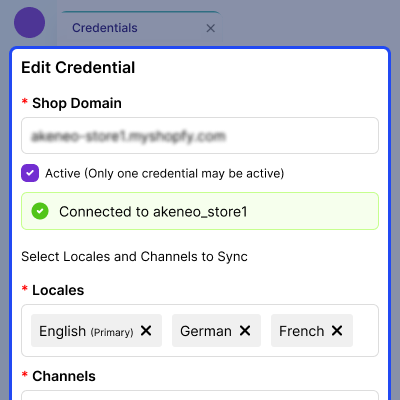
    • Add or update your Shopify store domain, access token, and API version.
    • Test the Shopify connection before you save.
    • Select locales, sales channels, and inventory locations.
    • Match Shopify locales with Pimcore languages.
    • Keep one Shopify store active for syncing.
    • Save all connection and sync settings in one place.
    Configure Shopify Credentials and Sync Settings

     View Import Job Summary

    Import job summary provides complete visibility into each synchronisation task, including progress, processing statistics, timestamps, and execution status.
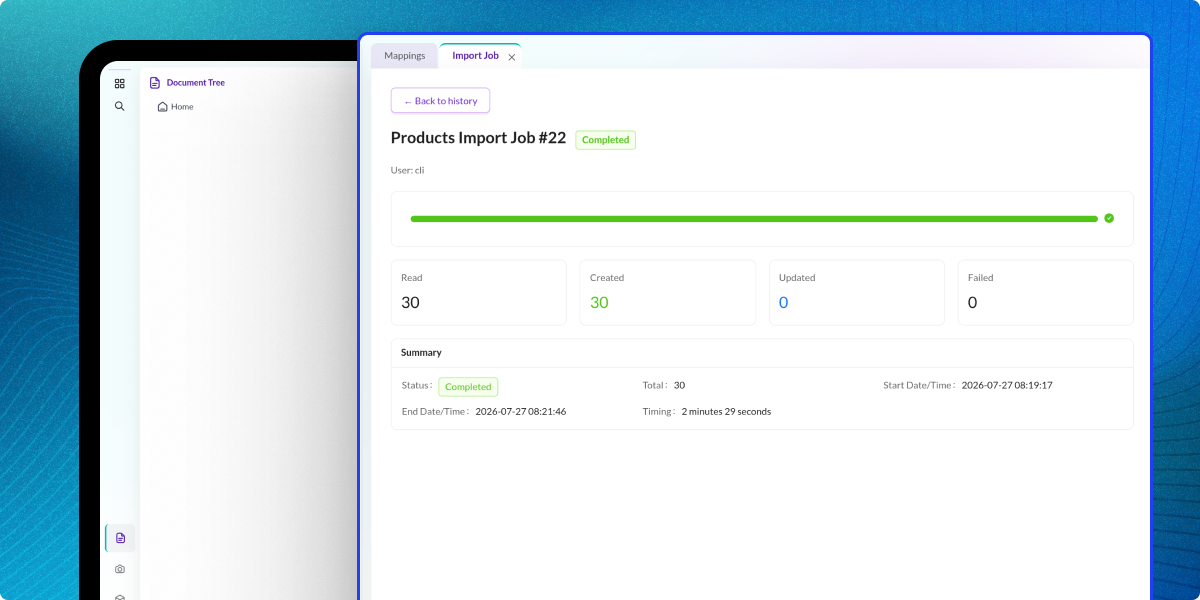
    • Monitor records read, created, updated, and failed.
    • Review job start time, end time, and execution duration.
    • Access a detailed summary of processed records.
    • Verify successful Shopify-to-Pimcore data synchronisation.
    View Import Job Summary

    Marks & Spencer Harnesses Pimcore and Shopify for Seamless Multichannel Connectivity

    Marks & Spencer (also known as M&S) is a prominent British brand that has been in operation for over 130 years. It is renowned for providing high-quality clothing, homeware, and food products. It is a trusted name in the retail industry, serving millions of consumers worldwide.

    Marks & Spencer utilizes Shopify, a popular SaaS-based eCommerce platform, for its Philippines online store, benefiting from Shopify's well-developed retail ecosystem and ease of use.

    By integrating the Webkul Pimcore Shopify Connector, Marks & Spencer successfully reduced time and improved speed to market, enabling easy synchronization of product information between Pimcore and the Shopify shop. Read Marks & Spencer case study to know more.

    Marks & Spencer Harnesses Pimcore and Shopify for Seamless Multichannel Connectivity

    Support

    For any query or issue, please create a support ticket here http://webkul.uvdesk.com/

    Specifications

    Product Version1.0.0
    Released7 years ago
    CategoryPimcoreMultichannel
    Last UpdatedAugust 11, 2026 (5 days ago)
    Supported VersionsShopify  Pimcore  12.x  

    Ratings

    We'd love to hear your thoughts! Share your feedback and help us craft an even better experience tailored just for you.

    5.0
    1 Reviews
    based on verified customer feedback
    Write a review
     Hilbert Gutierrez
    Hilbert Gutierrez
    🇵🇭 Philippines

    EXCELLENT SUPPORT | TRUSTED | HIGHLY RECOMMENDED!

    Posted On - February 27, 2020

    Very accommodating support team. Thanks Adarsh and Avneesh. They can resolve the issues for a very minimal amount of time.

    Frequently Asked Questions

     How does the Pimcore Shopify Connector sync data?

    The connector uses the Shopify Admin GraphQL API to import and export catalogue data between Pimcore and Shopify.

     
     Does the connector support Shopify collections?

    Yes, import Shopify collections into Pimcore and export them back to Shopify. This keeps collection data the same in both systems.

     
     Can I map Shopify fields to custom Pimcore classes?

    Yes, map Shopify data to custom Pimcore DataObject classes and fields. This gives you full control over your data structure.

     
     Does the connector support private Pimcore images?

    Yes, images upload as files instead of links. This lets you use private Pimcore assets in Shopify without public image URLs.

     
     Can I publish products to different Shopify sales channels?

    Yes, export products from Pimcore to the Shopify sales channels you choose and manage product availability from one place.

     
     How does the connector prevent duplicate products?

    This connector uses Pimcore to Shopify ID mapping to find existing products, and it updates them instead of creating duplicate records.

     
     What happens if a sync job fails?

    Failed records are logged with error details, and other records keep processing, so the sync job does not stop.

     
     Can I stop or re-run a sync job?

    Yes, stop a sync job at any time and run it again without creating duplicate products because the connector updates existing records.

     
     Can I connect multiple Shopify stores?

    Yes, save credentials for multiple Shopify stores, but only one store can be active for synchronisation at a time.

     
     What happens if a Shopify product is deleted?

    This connector detects deleted Shopify products. It updates the Pimcore to Shopify mapping during the next synchronisation.

     
     Is the Pimcore Shopify Connector suitable for large catalogues?

    Yes, background processing, field mapping, and job monitoring help manage large product catalogues with ease.

    Specification

    Detailed technical features and requirements to help you understand the module’s capabilities and ensure smooth integration with your system.

    Cloud Hosting

    Detailed technical features and requirements to help you understand the module’s capabilities and ensure smooth integration with your system.

    Default Configuration Details of Server

    1 GB
    RAM
    1 Core
    Processor
    30 GB
    Hard Disk
    1 GB RAM & 1 Core Processor
    Database

    Want to know more how exactly we are going to power up your eCommerce Website with Cloud to fasten up your store

    * Server Configuration may vary as per application requirements.

    Change Logs

    • + Features
    • - Bugs
    Version 2.0.0
    • + Added two-way synchronization with the Shopify Admin GraphQL API for categories, product options and values, metafield definitions, and products, including fields, variants, metafields, images, and collections with create-or-update support and no duplicate records.
    • + Added per-locale translation synchronization through the Shopify Translation API for product and collection titles, descriptions, SEO fields, product option names and values, and metafield values.
    • + Added support for product families using WkFamily objects with configurable metafield definitions and optional family selection during product import.
    • + Added multi-currency pricing with WkChannel objects, allowing channel-specific currencies and automatic price export with base price fallback.
    • + Added the ability to publish exported products directly to selected Shopify sales channels using Shopify Publications.
    • + Added granular role-based permissions for credentials, mappings, metafields, imports, and exports.
    • * Updated compatibility with Shopify Admin GraphQL API version 2026-04.
    Version 1.0.0
    • +Connect Multiple Shopify 2 Instances By providing Credential.
    • +Export categories as custom collections
    • +Export products
    • +Map and export meta field and images for product


