- Description
- Reviews
- FAQ
- Customers ()
- Specifications
- Cloud Hosting
- Changelog
UnoPim Auto SKU Generator creates product SKUs automatically. It removes manual work and improves SKU management across the catalog. Managing SKUs manually leads to errors. It can create duplicate or missing values, which makes tracking difficult.
Default systems do not offer a simple way to manage SKU formats. Teams use manual methods, and these become hard as catalog data grows. Admin can set prefix, attributes, sequence, and suffix. This builds a clear item code format for each entry.
The sequence increases for each new entry. SKUs stay unique for simple and configurable items. It supports read only mode and keeps values safe. This improves product identification and keeps catalog automation simple.
You can also generate product documents easily using the UnoPim PDF Generatorfor exporting product data in PDF format..
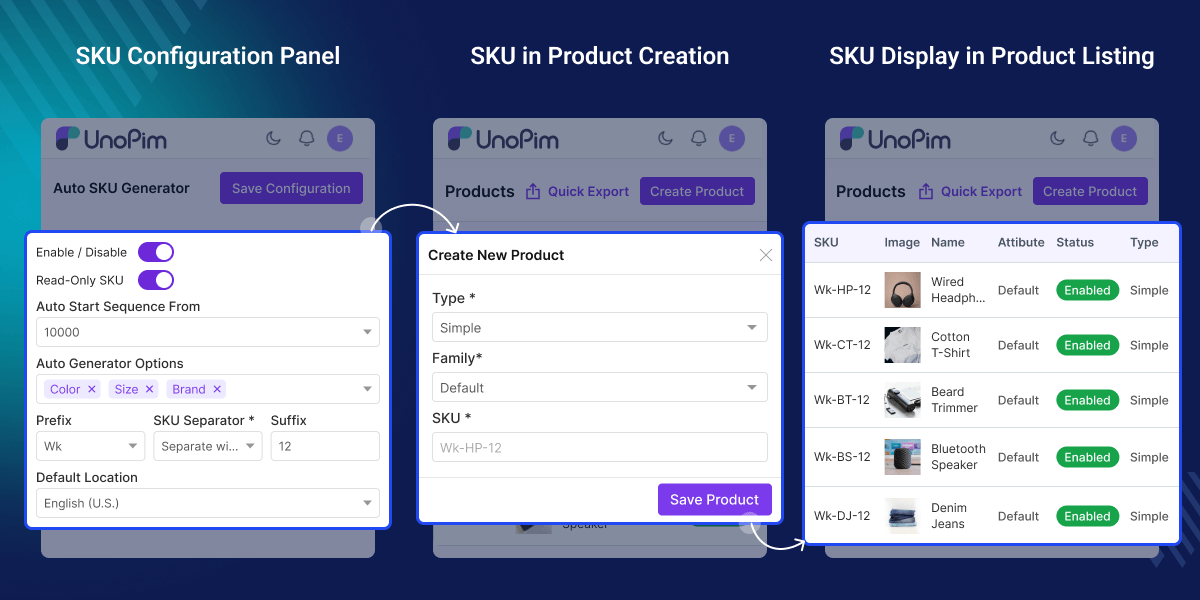
Highlighted Features Of UnoPim Auto SKU Generator
Automatic Code Generation
Create SKUs during creation, and keep the setup fast and easy
Attribute Based Values
Use color and size to build values, and keep data clear
Auto Increment Sequence
Increase the sequence for each item, and keep values unique
Manual Value Protection
Keep manual values safe, and avoid changes after creation
Why do we need the UnoPim Auto SKU Generator?
UnoPim Auto SKU Generator solves the problem of manual SKU creation. Creating values one by one takes time and also causes errors in large catalog data. Default systems do not provide clear SKU formats or simple item code patterns. So teams use manual methods, and these become hard to manage as data grows.
When many users manage entries, formats become inconsistent. This makes tracking hard and also affects identification. It provides a simple way to generate identifiers, so every item follows the same format across the catalog.
It reduces manual work and also improves SKU management. Teams can manage catalog data in a clear and easy way. This solution is based on real workflows, and it supports catalog automation in daily work.
You can also use the UnoPim AI Product Feed for OpenAI Search to enhance product search with AI-based suggestions and better matching.
Common Use Cases for SKU Generation
UnoPim Auto SKU Generator helps manage catalog data in daily work. It keeps identifiers clear across all items and helps teams handle data in a simple and consistent way.
-
Large Catalog Management
Manage many items at once and keep values clear. This makes data easy to use
-
Admin Creation Flow
Create SKUs during setup and save time while adding new entries
-
Configurable Variants
Assign unique values to each variant. This keeps tracking simple and clear
-
Consistent Identification
Keep values uniform across entries. This improves catalog clarity and control
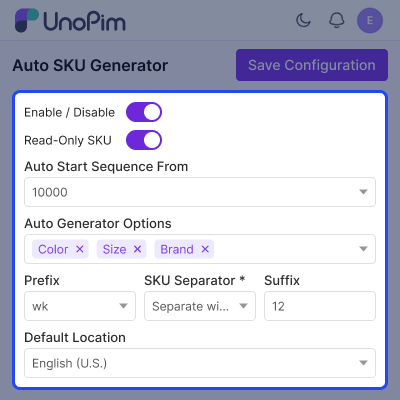
SKU Configuration and Format Settings
Set up identifier generation from one screen, and manage all settings in one place to keep control simple and easy.
This setup helps create values and keeps each format clear, while all entries follow the same pattern.
- Enable or disable generation with a simple toggle
- Lock the field after creation, and prevent manual edits
- Set the start number and keep the sequence in order
- Define format with prefix, separator, and suffix
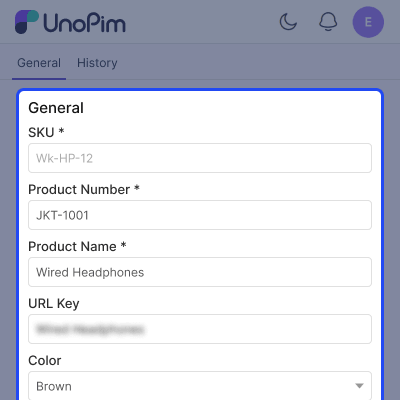
Product SKU Generation
Identifiers are generated during creation, and values appear directly in the form.
This reduces manual work and helps teams create entries faster with better accuracy.
- Auto fill values during creation
- Display the generated value in the edit page
- Apply format based on saved configuration
- Works for simple and configurable items
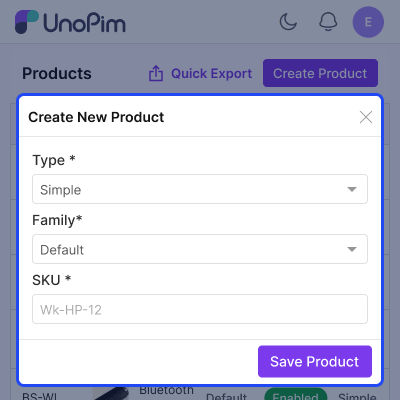
SKU in Product Creation Popup
Identifier values are shown while creating a new entry, and they follow the defined format automatically.
This keeps data consistent and ensures every new item follows the same structure.
- Show the field in the creation popup
- Generate value based on configuration settings
- Use the same format for all new entries
- Reduce manual entry effort
Support
For any query or issue, please create a support ticket here http://webkul.uvdesk.com/. You may also check our all UnoPim Extensions.
Specifications
Frequently Asked Questions
Specification
Detailed technical features and requirements to help you understand the module’s capabilities and ensure smooth integration with your system.
Cloud Hosting
Detailed technical features and requirements to help you understand the module’s capabilities and ensure smooth integration with your system.
Move to Cloud Today
We’re partnered with top-tier, trusted providers!



Default Configuration Details of Server
RAM 1 Core
Processor 30 GB
Hard Disk
Database
Want to know more how exactly we are going to power up your eCommerce Website with Cloud to fasten up your store
* Server Configuration may vary as per application requirements.
Change Logs
- - Feature Add (+)
- - Feature remove (-)
- - Bug Fixed (!)
- - Modification (*)
- ! Generated SKUs no longer contain empty separators when a selected attribute (such as colour or size) has no value on an imported row.
- ! Attribute values are trimmed, so stray spaces around an option no longer leak into the generated SKU.
- Configurable products (and their sub-parents) can now get their own code instead of a product SKU — a configurable is a grouping, not a stock item, so only its real variants and sub-variants get SKUs. The code uses a free-text + auto-number pattern you set on the settings screen (for example
MODEL-{number:4}→MODEL-0001), with its own counter. - The tool now works with the latest UnoPim (3.0). Automatic codes still fill in during product creation and file uploads, the settings screen works the same, and your existing settings carry over unchanged.
- Product uploads keep filling in blank codes correctly even now that UnoPim can attach measurement details to products — the two features work side by side instead of getting in each other's way.
- File uploads now fill in blank codes for variants and two-level sub-variants, and no longer reject a file just because the parent row already has a code — the parent keeps its code while the blank variant rows are filled in. Verified end to end together with export.
- Read-only mode now also locks the code box inside the add-variant and add-sub-variant popups, not just the main product form.
- The settings screen saves the way the rest of UnoPim does — the floating "unsaved changes" bar — and the field spacing and menu icon now match the core screens.
- Access to the Auto SKU Generator settings can now be granted or held back per role. People without permission no longer see the Save button on the settings screen, and the screen itself stays out of reach unless their role allows it.
- + Compatible with UnoPim v2.1.6
- + Product variations now each get their own unique code automatically even when you add several variations to the same product one after another. Before this, the code box could open empty or repeat a code that was already used.
- + The tool now stops you from adding the same variation twice, and from giving two variations the same code so your catalogue stays clean and every product remains easy to find.
- + First-time setup is smoother: the settings screen now opens ready to save, with a sensible default already selected.
- + Added an admin configuration panel for the Auto SKU Generator module.
- + Added an enable/disable toggle to control automatic SKU generation globally.
- + Added configurable start sequence support for increment-based SKU generation.
- + Added prefix and suffix configuration to match custom catalog naming formats.
- + Added separator configuration for generated SKU parts.
- + Added locale selection support for SKU generation settings.
- + Added attribute-based SKU generation using selectable product attributes.
- + Added live SKU preview support on the configuration and product creation flows.
- + Added automatic SKU generation for simple products when the SKU field is left blank.
- + Added automatic SKU generation for newly added configurable product variants when variant SKUs are empty.
- + Added protection for manually entered SKUs so auto-generation does not overwrite user-defined values.
- + Added database persistence for Auto SKU Generator settings.
- + Added admin routes, validation, and configuration save handling for module settings.
- + Added Pest feature tests for configuration saving, SKU preview generation, simple product SKU generation, variant SKU generation, and manual SKU protection.
- + Added Playwright end-to-end coverage for admin configuration and product workflow scenarios.
- + Supported UnoPim version: v2.0.0 or later.
