- Description
- Reviews
- FAQ
- Customers ()
- Specifications
- Cloud Hosting
- Changelog
UnoPim DeepL Translation Module helps businesses automate product translation inside UnoPim. It connects UnoPim with DeepL. This allows automatic translation of product data into multiple languages.
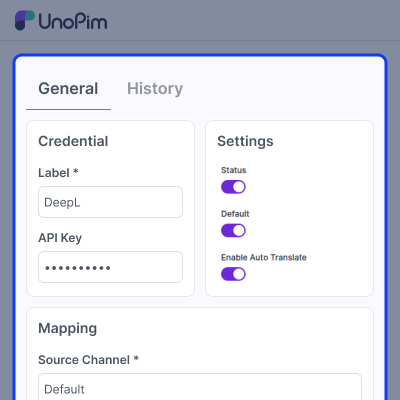
Admins can add API credentials and set source and target languages. The module supports auto translation when a product is created, updated, or imported. This reduces manual work and saves time.
Admins can also translate products in bulk. They can also translate products using the SKU. A field-level translation option is available on the product edit page.
Admins can choose specific fields for translation. This helps reduce API usage and control costs. All translation jobs run in the background. The system also provides logs and notifications & helps businesses manage multilingual product catalogs from one place.
Apart from this, if you want to manage multilingual WooCommerce stores with product translations across multiple languages, then you can also check UnoPim WooCommerce WPML Connector.
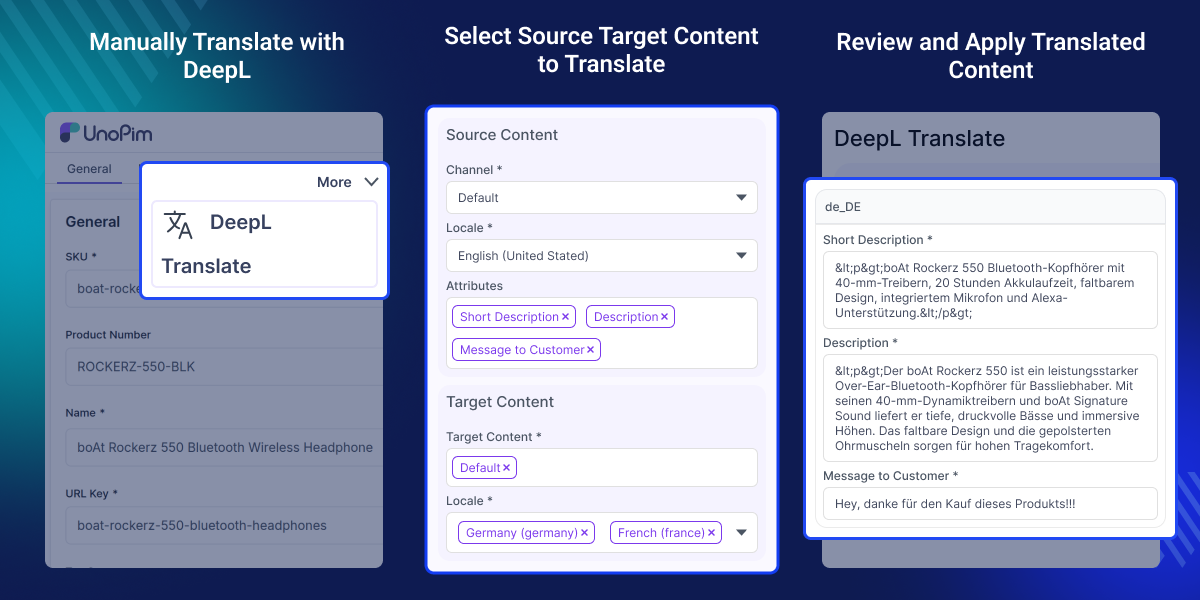
Highlighted Features of UnoPim DeepL Translation
AI Product Translation
Translate product content using DeepL AI.
Bulk and Manual Translation
Translate one product or many products together.
Automatic Translation Workflow
Run translation on create, update, and import.
Job Tracking
Track all translation jobs with logs and notifications.
Why Do we Need UnoPim DeepL Translation Module?
Managing product data in many languages takes time. Manual translation is slow and can lead to errors. Global businesses need faster workflows. This module automates translation inside UnoPim.
It saves time and reduces manual work. Teams can manage all languages from one platform. It also works well for large product catalogs and helps businesses launch multilingual catalogs faster.
Use Cases for UnoPim DeepL Translation Module
Global eCommerce Catalog Management
Translate product catalogs for different countries.
Automated Import Translation
Auto translate products after import.
Bulk Product Translation
Translate many products at once.
Centralized Product Data
Manage all translations in one system.
Automated Translation Workflow
This feature automates translation tasks. It reduces manual work and speeds up localization.
- Auto translate products on create and update.
- Run translation after import.
- Set source and target languages.
- Replace existing translations if needed.
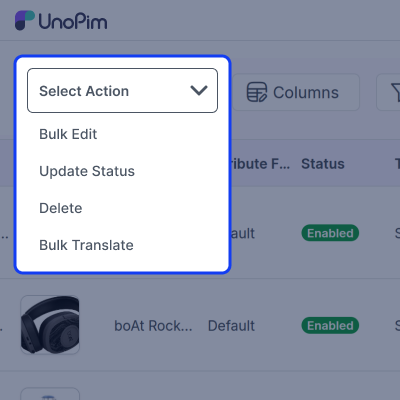
Bulk Translation using DeepL
You can translate products in different ways.
- Translate multiple selected products.
- Translate products using SKU.
- Translate individual fields.
- Review and apply translated results.
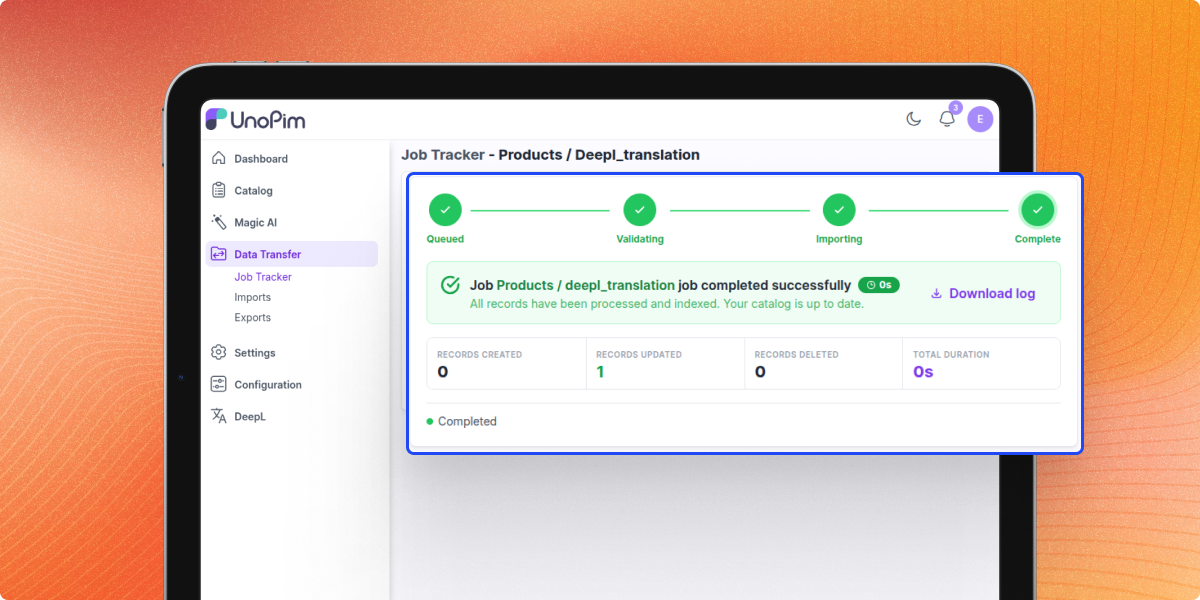
Job Tracking and Notifications
You can track all translation activity. This improves visibility for admins.
- See job progress in real time.
- Download log files for each job.
- Get notifications when jobs finish.
- View full translation history.
Support
For any query or issue, please create a support ticket here http://webkul.uvdesk.com/. You may also check our all UnoPim Extensions.
Specifications
Frequently Asked Questions
Specification
Detailed technical features and requirements to help you understand the module’s capabilities and ensure smooth integration with your system.
Cloud Hosting
Detailed technical features and requirements to help you understand the module’s capabilities and ensure smooth integration with your system.
Move to Cloud Today
We’re partnered with top-tier, trusted providers!



Default Configuration Details of Server
RAM 1 Core
Processor 30 GB
Hard Disk
Database
Want to know more how exactly we are going to power up your eCommerce Website with Cloud to fasten up your store
* Server Configuration may vary as per application requirements.
Change Logs
- - Feature Add (+)
- - Feature remove (-)
- - Bug Fixed (!)
- - Modification (*)
- - Agentic PIM tool crashed on UnoPim 3.0 and took the AI Agent chat down with it.
- - DeepL SDK was never declared as a dependency, so every translation failed at runtime.
- - Bulk translate progress always showed 0%.
- - Clicking a credential row in the datagrid did nothing.
- - Product edit form used outdated markup, breaking dark mode.
- - Static analysis errors in job track and admin lookups.
- * Credential create and edit no longer reload the page.
- * Credential edit page now uses UnoPim's global save bar instead of its own save button.
- - Missing menu and permissions for the Credentials section.
- - Permission checks now work correctly for restricted admin roles.
- - Browser tests no longer fail on login and page navigation.
- + Added CI pipeline for automated testing.
- + Credentials management (multiple, default, encrypted, status, verify-on-save).
- + Per-field DeepL Translate button on translatable text/textarea attributes.
- + Product edit → More → DeepL Translate (multi-attribute, multi-locale wizard).
- + Bulk Translate mass action on the products datagrid.
- + Manual translate page (translate any product by SKU).
- + Auto-translate after import.
- + Auto-translate prompt after product save.
- + Agentic PIM tool + Capabilities tile.
- + Job tracker integration for bulk and Apply flows.
