- Description
- Reviews
- FAQ
- Customers ()
- Specifications
- Cloud Hosting
- Changelog
UnoPim Icecat Connector connects your PIM to the Icecat catalog, allowing you to quickly access and enrich Icecat product data with accurate and up-to-date information.
Accurate product data is important, and this module helps by mapping UnoPim fields to Icecat fields for a precise match. Data stays clean and well-structured through proper mapping.
With attribute import jobs, you can decide which Icecat features are stored in which type of UnoPim attributes. For multilingual support, the connector lets you map Icecat locale to UnoPim locales. During import jobs, you can select a specific locale to enrich product data in the required language.
The module supports both single and bulk updates, helping you keep your catalog up to date. Manual work takes time and can cause errors. This connector reduces that effort and improves data reliability.
For scheduled export and import jobs in UnoPim, you can use the UnoPim Job Scheduler.
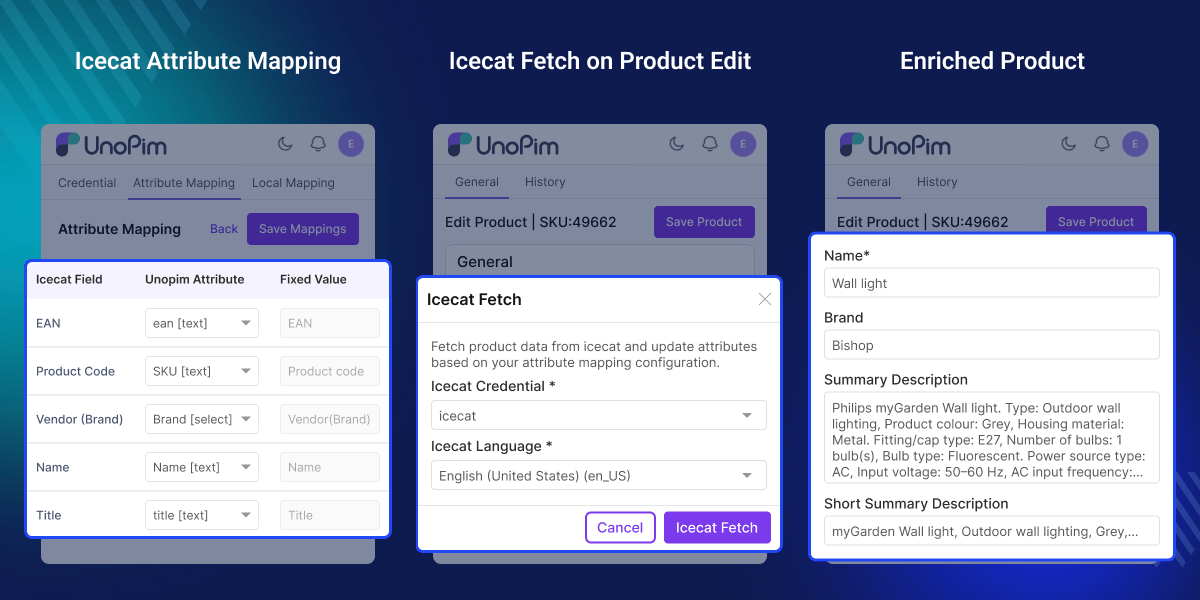
Highlighted Features of UnoPim Icecat Connector
Automated Data Enrichment
Enrich product data with descriptions and images from the Icecat catalog.
Core Icecat Field Mapping
Map fields like EAN, product code, and brand for accurate matching.
Bulk Feature Import
Import Icecat feature attributes in bulk for faster catalog setup.
Dynamic Attribute Creation
Create UnoPim attributes dynamically with specific data types.
Multilingual Locale Sync
Sync multilingual product data using Icecat locale mapping.
Technical Feature Linking
Link Icecat technical features with UnoPim attributes for better structure.
Automated Catalog Updates
Automate catalog updates using import and enrichment jobs.
Flexible Enrichment Options
Support for both individual and bulk product enrichment.
Why do we need this Icecat Connector?
Keeping technical product data updated is time-consuming and can lead to errors. Without direct access to manufacturer data, teams often spend hours manually adding information.
UnoPim Icecat Connector solves this by allowing you to enrich product data automatically using Icecat jobs. This improves accuracy, saves time, and reduces manual work.
Use Cases
Explore how businesses can use this connector to manage product data more efficiently.
-
Automated Electronics Cataloging
Get product images and specifications quickly to improve product pages.
-
Industrial Component Enrichment
Update technical product data easily and keep information accurate.
-
Global Marketplace Localization
Map product data to multiple languages for global selling.
-
Multi-Product Enrichment
Update multiple products at once and save time.
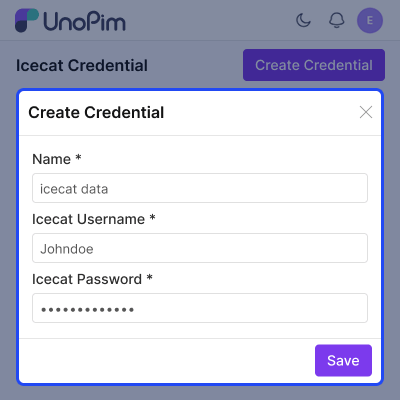
Icecat Credential Setup
Configure your Icecat account details in UnoPim to enable secure data access.
- Create and add Icecat credentials
- Enter account details correctly
- Save credentials to enable access
- Secure API connection for data fetching
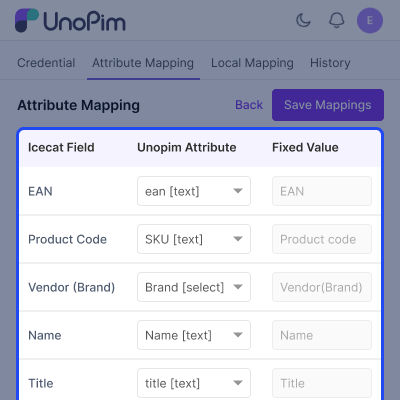
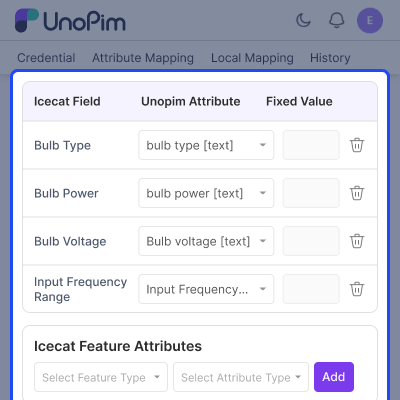
Common Attribute Mapping
Map core product fields between Icecat and UnoPim for accurate data matching.
- Map EAN, product code, and brand
- Include product titles and descriptions
- Improve catalog quality with correct mapping
- Save mappings for reuse
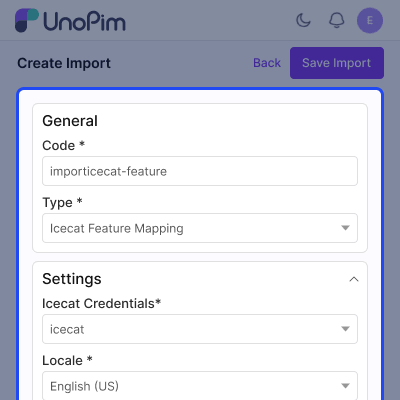
Icecat Feature Attribute Import
Import technical attributes directly from Icecat to speed up catalog setup.
- Run feature mapping import job
- Fetch large sets of technical attributes
- Monitor progress easily
- Reduce manual attribute creation
Feature Selection & Assignment
Define how imported attributes are structured and displayed.
- Select required product features
- Assign attribute types like text or select
- Control how data is stored
- Maintain structured product information
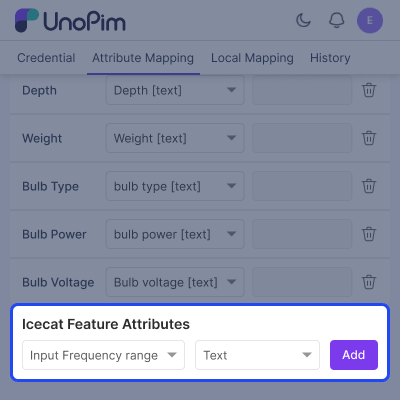
Attribute Import & Mapping
Automate attribute creation and ensure correct data mapping.
- Run attribute import jobs
- Create attributes automatically
- Map attributes with Icecat features
- Ensure correct data flow
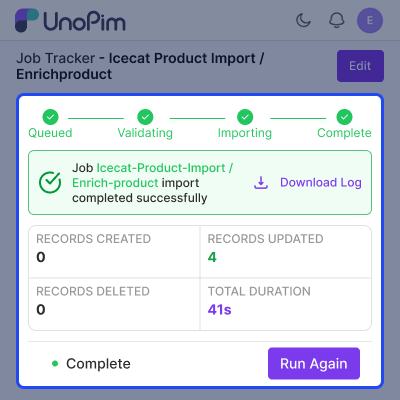
Product Enrichment
Enrich products with images, descriptions, and technical specifications.
- Use EAN or product code with brand
- Run enrichment job for bulk updates
- Fetch data for single products
- Improve product pages with detailed data
Support
For any query or issue, please create a support ticket here http://webkul.uvdesk.com/. You may also check our all UnoPim Extensions.
Specifications
Frequently Asked Questions
Specification
Detailed technical features and requirements to help you understand the module’s capabilities and ensure smooth integration with your system.
Cloud Hosting
Detailed technical features and requirements to help you understand the module’s capabilities and ensure smooth integration with your system.
Move to Cloud Today
We’re partnered with top-tier, trusted providers!



Default Configuration Details of Server
RAM 1 Core
Processor 30 GB
Hard Disk
Database
Want to know more how exactly we are going to power up your eCommerce Website with Cloud to fasten up your store
* Server Configuration may vary as per application requirements.
Change Logs
- - Feature Add (+)
- - Feature remove (-)
- - Bug Fixed (!)
- - Modification (*)
- Added compatibility with UnoPim v3.0.x
- Fixed pagination on async list endpoints so DataGrids no longer stall after the first page.
- Fixed row-click navigation on the credentials DataGrid.
- Fixed a stale ACL route reference so permission checks resolve correctly.
- Product-value resolution is now variant-aware, using core's resolvedValues() where available.
- Fixed a dual-save-path bug on the attribute mapping form that could save mappings inconsistently.
- Replaced hard page reloads with SPA navigation across the credential and mapping screens.
- The dangling locale-mapping and mapping-history standalone routes now redirect to the credential edit page instead of erroring with a 500.
- * Compatibility with UnoPIM 2.1.6, Laravel 12, and PHP 8.4.
- * Improved locale handling for Icecat product imports.
- * Enhanced ACL coverage for all protected routes.
- + Added validation for credential forms with live Icecat connection testing.
- + Added missing locale column to feature mapping table.
- - Removed broken fetch-all feature mapping route.
- - Removed unused IcecatClient singleton binding.
- ! Fixed ProductController error when locale is missing.
- ! Fixed insecure credential attribute validation.
- ! Fixed feature mapping database schema issues.
- ! Fixed Icecat language code handling during product imports.
- Compatibility bump — now supports UnoPim 2.0+, Laravel 12+, and PHP ^8.3.
- Updated installation instructions to align with the latest UnoPim structure.
- Service provider registration updated — now requires adding provider in bootstrap/providers.php (replacing legacy config/app.php method).
- Module registration flow improved as per UnoPim 2.x conventions.
- + Add and manage multiple Icecat credentials.
- + Import product data (descriptions, images) from Icecat into UnoPIM.
- + Map Icecat features to UnoPIM attributes (feature mapping).
- + Map Icecat locales to UnoPIM locales (locale mapping).
- + Import product attributes and attribute values from Icecat.
- + View import history and mapping change history.
- + Command-line installer and ability to fetch product details from the product details page.
