Send Again
Close
UVdesk Open Source WhatsApp Integration makes support easier by letting users raise tickets directly or reply to an existing ticket by sharing the ticket ID on WhatsApp.
Instead of logging into the helpdesk or sending emails, users can just send a message to your WhatsApp Business number.
That message is quickly turned into a UVdesk support ticket, which the support team can manage from the same dashboard they already use for email, web forms, and other channels.
With Twilio as the link, connecting WhatsApp to UVdesk is safe, smooth, and reliable, while also being easy to set up.
Check out UVdesk Open Source Report Insights to track tickets, agent performance, and customer service in real time.
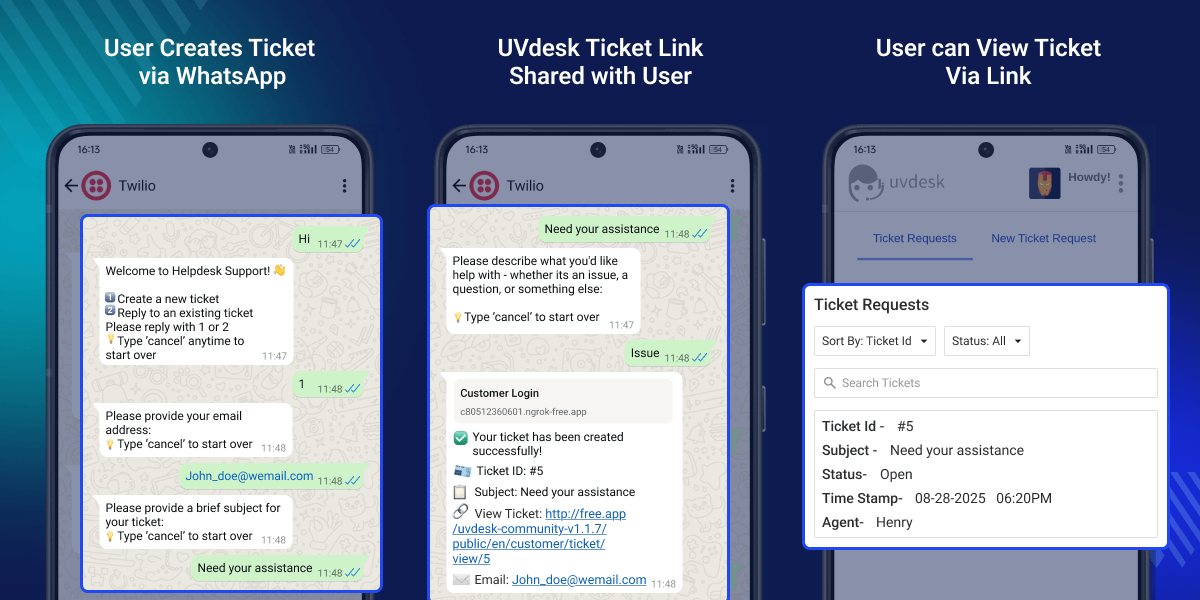
No login or email needed, just send a WhatsApp message.
Handle WhatsApp, email, and web tickets all in one place.
Secure and reliable WhatsApp connection.
Reduce delays with instant ticket generation.
Simplify the way customers connect with you.
Manage WhatsApp alongside email, forms, and social media.
UVdesk Open Source WhatsApp Integration allows users to raise tickets through WhatsApp messages without logging into UVdesk.
Users can raise tickets directly from WhatsApp without logging in or sending emails, and the support team can manage them from a single dashboard.
Traditional support requires users to log in or send emails to create tickets, which can be slow and inconvenient.
With UVdesk Open Source WhatsApp Integration, users can make tickets just by sending a message. This makes it easier for users and faster for the support team to track.
Check out UVdesk Open Source Ticket Time Tracking to let agents add time while solving tickets.
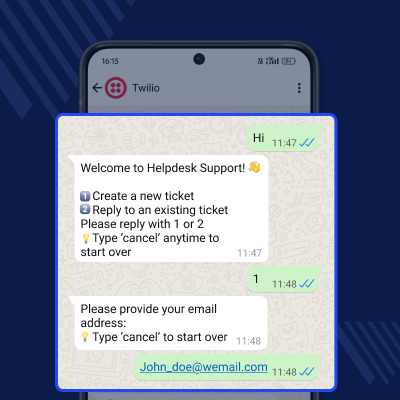
Users can create tickets on WhatsApp by starting a chat or scanning a QR code.
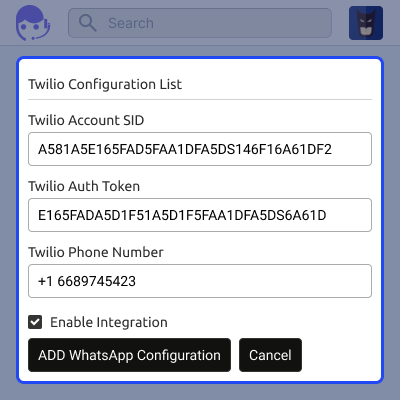
Admins enter Twilio details to connect WhatsApp with UVdesk, turning user queries into UVdesk tickets.
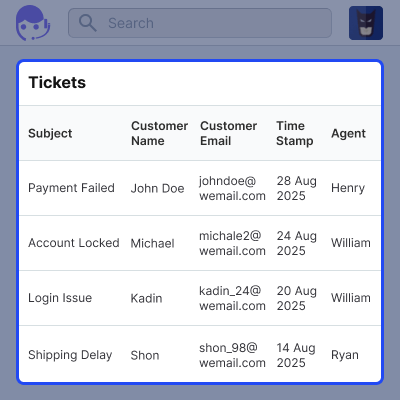
Admin can keep a track of the tickets that are created on WhatsApp messages directly from UVdesk.
For any query or issue, please create a support ticket here http://webkul.uvdesk.com
You may also check our other top-quality UVdesk Apps.
Detailed technical features and requirements to help you understand the module’s capabilities and ensure smooth integration with your system.
Detailed technical features and requirements to help you understand the module’s capabilities and ensure smooth integration with your system.
We’re partnered with top-tier, trusted providers!
Want to know more how exactly we are going to power up your eCommerce Website with Cloud to fasten up your store
* Server Configuration may vary as per application requirements.



