WooCommerce Advanced Auction Plugin
WooCommerce Advanced Auction Plugin helps you run product auctions with real-time bidding, wallet payments, and 11 auction types in WooCommerce.
- Run 11 auction types from one WooCommerce setup
- Enable real-time bidding without page refresh
- Set starting bid, reserve price, and buy now price
- Use proxy and absentee bidding for better bid control
- Apply fixed, variable, percentage, or custom increments
- Enable anti-sniping with automatic time extension
- Manage bids, winners, relists, and auction status
- Send 21 auction email notifications automatically
- Allow users to watch, compare, and track auctions
- Support wallet payments and pay-all-wins checkout
- Customize auction pages with built-in design studio
- Use 23 shortcodes and 8 widgets for auction display
- Support HPOS, checkout blocks, REST API, and gateways
- Extend to vendor auctions with marketplace integration
- Description
- Reviews
- FAQ
- Customers ()
- Specifications
- Cloud Hosting
- Changelog
WooCommerce Auction Plugin for Product Bidding
WooCommerce Advanced Auction Plugin adds auction and bidding features to your WooCommerce store. You can create product auctions without changing your normal store flow.
You can run 11 auction types, set bid rules, manage timers, and control pricing from the WooCommerce admin. It works for single auctions and large auction events.
Real-time bidding shows live price, bid, and countdown updates. Proxy bidding helps buyers stay active without placing every bid by hand.
The plugin supports wallet payments, WooCommerce checkout, payment reminders, and pay-all-won-auctions flow. This makes payment handling easier for frequent bidders.
Admins get tools for bid logs, reports, design control, email templates, security checks, and performance settings. The plugin also works on standard WordPress hosting.
It is built mainly for default WooCommerce stores. It can also support vendor auctions when used with Webkul Multi Vendor Marketplace or another supported marketplace setup.
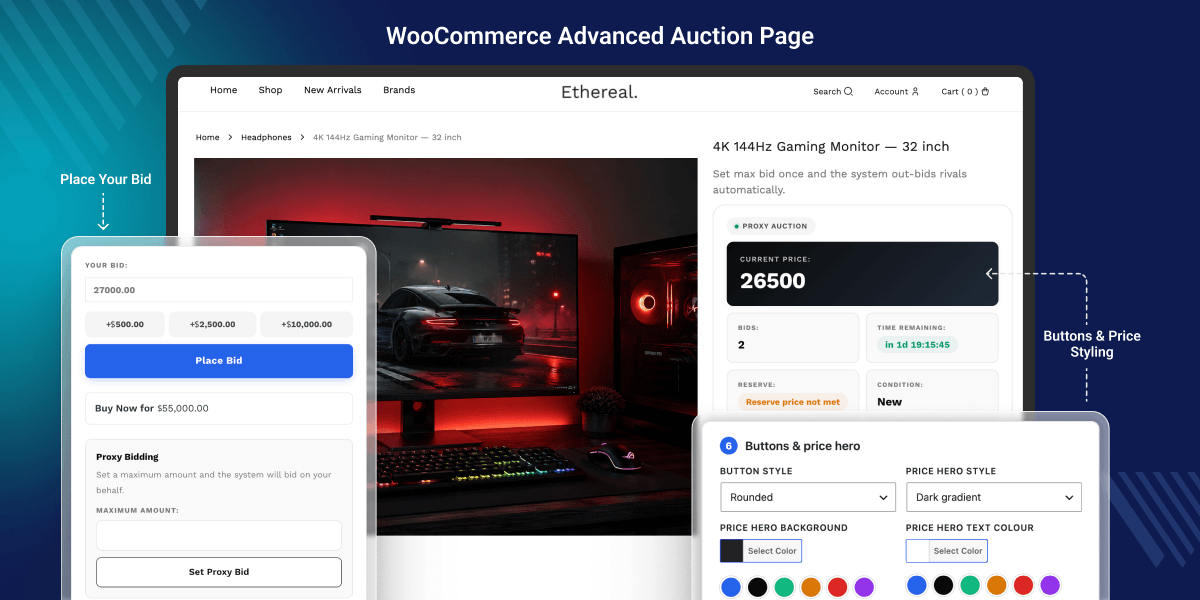
Advanced WooCommerce Auction & Bidding Features
11 Auction Types
Run standard, reverse, sealed, proxy, penny, Dutch, unique bid, seated, silent, no-reserve, and charity auctions.
Real-Time Auction Bidding
Update bids, prices, and countdown timers without page refresh.
Proxy & Absentee Bidding
Let buyers set a maximum bid or place bids before the auction starts.
Anti-Sniping Protection
Extend auction time when a bid is placed near closing.
Pricing & Bid Rules
Set reserve price, buy now price, and custom bid increments.
Built-in Wallet Payments
Allow users to top up wallet balance and pay for won auctions.
Buyer Dashboard & Watchlist
Show active bids, won auctions, lost auctions, and payment status.
Email & SMS Notifications
Send auction alerts for bids, outbid status, reminders, wins, losses, and relists.
Design Studio
Customize auction page layout, colors, spacing, and typography without code.
Analytics & Reports
Track revenue, bid count, auction status, user activity, and seller performance.
Security & Audit Logs
Validate bids, mask bidder names, log activity, and detect suspicious bidding.
WooCommerce Compatibility
Use WooCommerce products, checkout, gateways, HPOS, REST API, and checkout blocks.
Why do we need this bidding module
WooCommerce does not include auction or bidding features by default. Store owners can sell at fixed prices, but they cannot run timed bids or winner-based checkout.
This limits sales models like liquidation, collectibles, charity events, B2B reverse auctions, and limited product drops. Manual bidding is hard to track and easy to get wrong.
This module adds a structured auction system to WooCommerce. It automates bid rules, timing, payments, emails, reports, fraud checks, and admin actions.
The plugin is built for real WooCommerce workflows. It supports product data, customer accounts, payment gateways, orders, and scalable auction management.
Real-World Use Cases for WooCommerce Auction System
-
Liquidation & Clearance Sales
Sell excess or slow-moving stock using bids instead of fixed discounts.
-
Collectibles & Antique Auctions
Run timed product auctions with reserve price, bid history, and buyer premium.
-
High-Demand Product Drops
Let users compete for limited products and increase final sale value.
-
Charity & Fundraising Auctions
Use silent or charity auctions with donation tracking, tax receipts, and donor records.
-
B2B Reverse Auctions
Allow vendors or suppliers to compete where the lowest bid wins.
-
Art, Vehicle, and Event-Based Auctions
Group many lots into auction events with catalogs, countdowns, and entry fees.
-
Subscription-Gated Premium Auctions
Use WooCommerce Subscriptions or access rules to limit premium auctions.
-
Vendor-Based Auction Stores
Enable seller auctions through Webkul Marketplace or supported marketplace flows.
Best for: WooCommerce stores that sell collectibles, antiques, clearance stock, limited products, charity items, B2B deals, event lots, and high-value products.
Auction Types Management
The plugin supports 11 auction formats in one WooCommerce auction system. Sellers can choose the right format based on product type, buyer demand, and pricing goal.
This helps stores run public auctions, private bids, charity events, supplier bids, and limited access auctions without using separate tools.
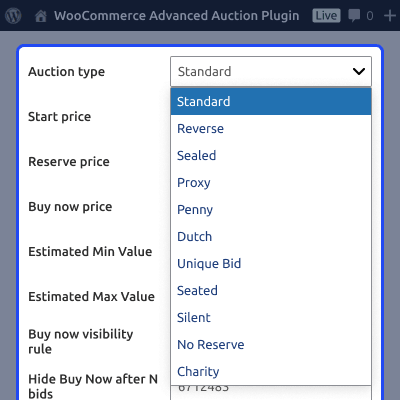
- Standard auction – highest bidder wins after the countdown ends
- Reverse auction – lowest bidder wins, useful for procurement
- Sealed auction – bids stay hidden until the auction ends
- Proxy bidding – system bids up to the buyer’s limit
- Penny auction – each bid raises the price by a small amount
- Dutch auction – price drops until a buyer accepts it
- Unique bid auction – lowest unique bid wins
- Seated auction – only users with seats can join
- Silent auction – private bidding for restricted or charity sales
- No-reserve auction – product sells without a minimum price
- Charity auction – supports donation-based auction selling

Real-Time Bidding Engine
Real-time bidding updates price, timer, and bid status without page refresh. Users can react faster when they are outbid or when the auction is close to ending. The engine uses bid queueing, smart polling, server-side checks, and bid history. This helps reduce conflicts during busy auctions.
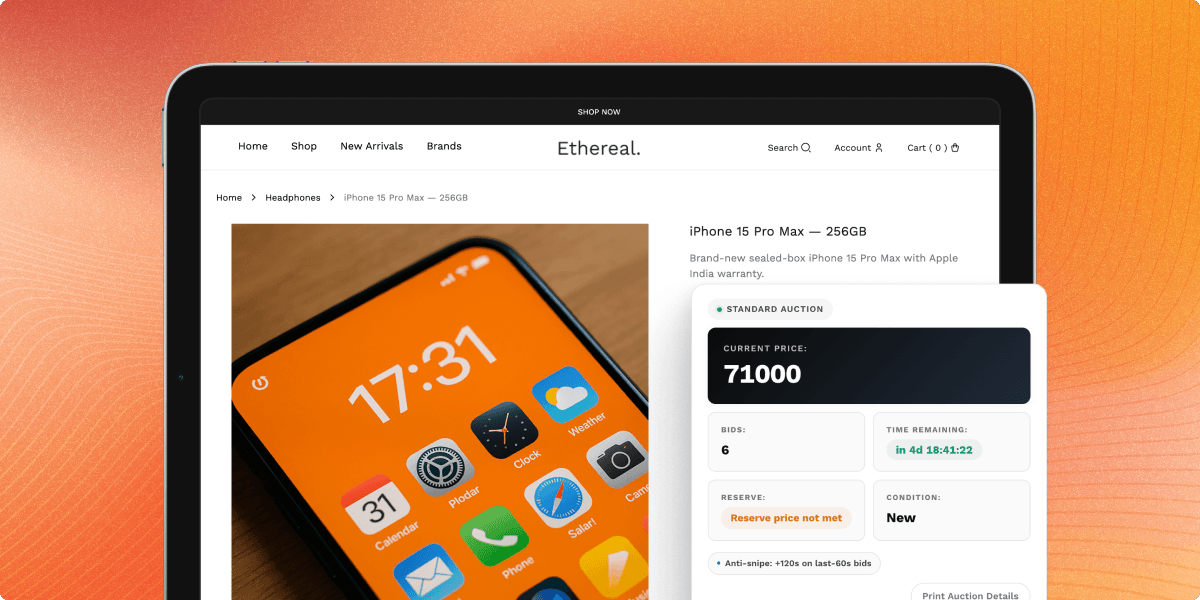
- Live AJAX bid updates
- Smart polling based on auction activity
- Bid queueing for high-traffic auctions
- Race-condition protection
- Server-side bid validation
- Full bid history with timestamp and bidder

Pricing & Bid Rules Configuration
Pricing controls define how each auction starts, grows, and closes. Admins can set starting price, reserve price, buy now price, and bid increments.
These rules keep bidding clear for buyers. They also help sellers protect product value and control buy now behavior.
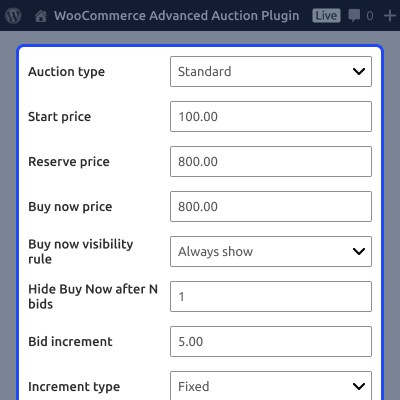
- Starting bid and reserve price
- Buy now price and auto-disable rules
- Fixed bid increments
- Variable increments by price band
- Percentage-based bid increments
- Custom increment table
- Reserve met and reserve not met indicator

Anti-Sniping & Auction Timing
Anti-sniping helps stop unfair last-second wins. If a bid lands near the end, the auction can extend so other bidders can respond.
Admins can set the trigger window, extension time, and extension cap. This keeps bidding fair and avoids endless extensions.
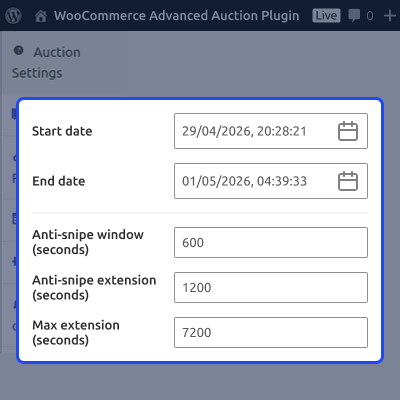
- Soft close time extension
- Custom trigger window
- Custom extension duration
- Unlimited extension option
- Optional cap for extensions
- Manual and automatic relist rules

Auction Management Dashboard
The admin dashboard gives full control over auctions, bids, users, and results. Store teams can view active, upcoming, finished, failed, paid, and unpaid auctions in one grid. Admins can also take manual action when needed. They can pause, extend, end, cancel, relist, export, and correct auctions.
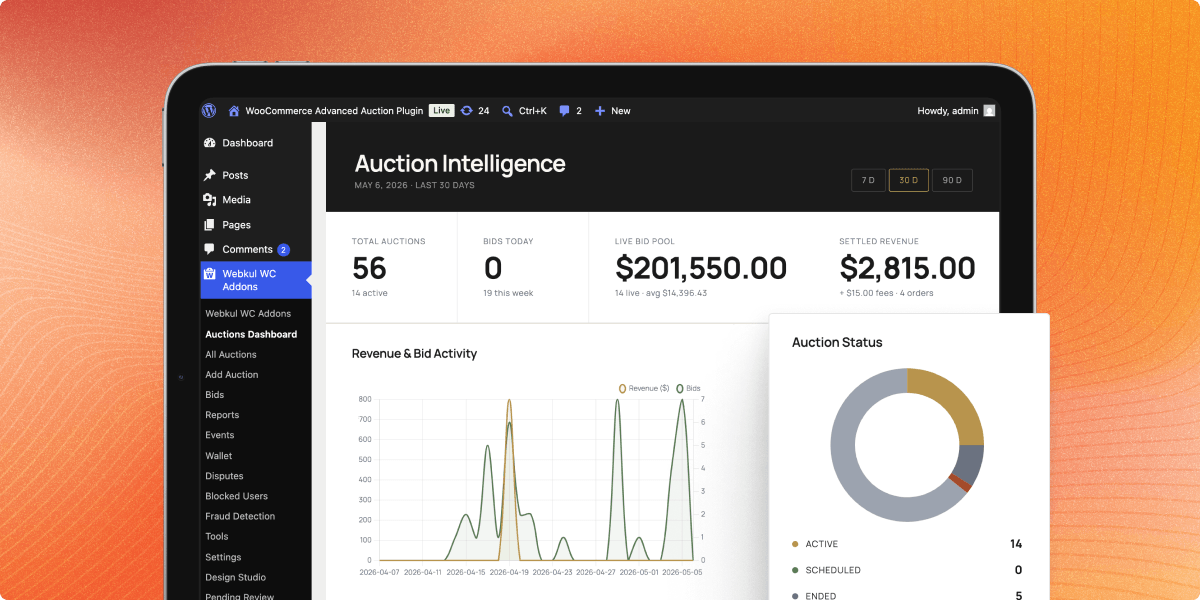
- Centralized auction grid
- Status filters and icons
- Start, pause, extend, end, or cancel auctions
- View, edit, or delete bids
- Auto-promote next bidder when needed
- Winner override and second-bidder assignment
- Bulk start, end, delete, relist, and export
- Audit trail for admin actions

Buyer Dashboard & Watchlist
The buyer dashboard makes auction activity easy to follow. Users can check where they are winning, where they were outbid, and which auctions need payment. Watchlists and saved views help users return to products they care about. This supports repeat bidding and faster payment after a win.
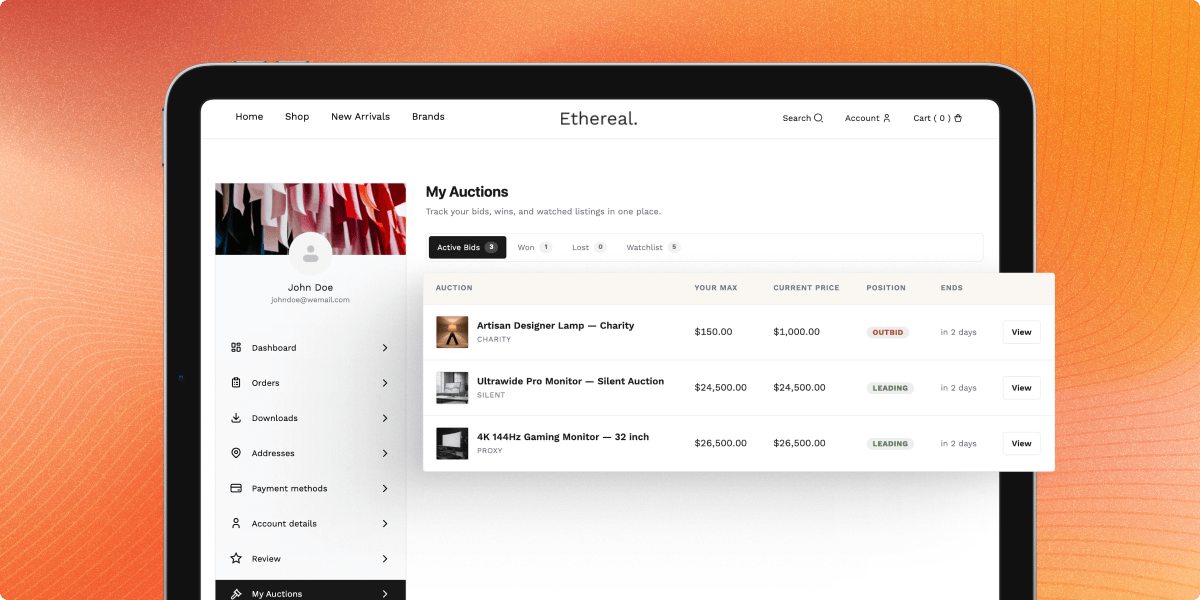
- My Auctions tab in WooCommerce My Account
- Active bids, won auctions, and lost auctions
- Payment status for won auctions
- Watchlist for saved auctions
- Winning, Outbid, Won, Lost, and Payment Pending badges
- Pay all won auctions in one checkout
- Saved searches and email alerts
- Side-by-side auction comparison

Premium Buyer Experience
The buyer experience includes tools that make bidding faster. Users can bid again, stay anonymous, track auction movement, and contact sellers when needed. These tools reduce friction during competitive auctions.
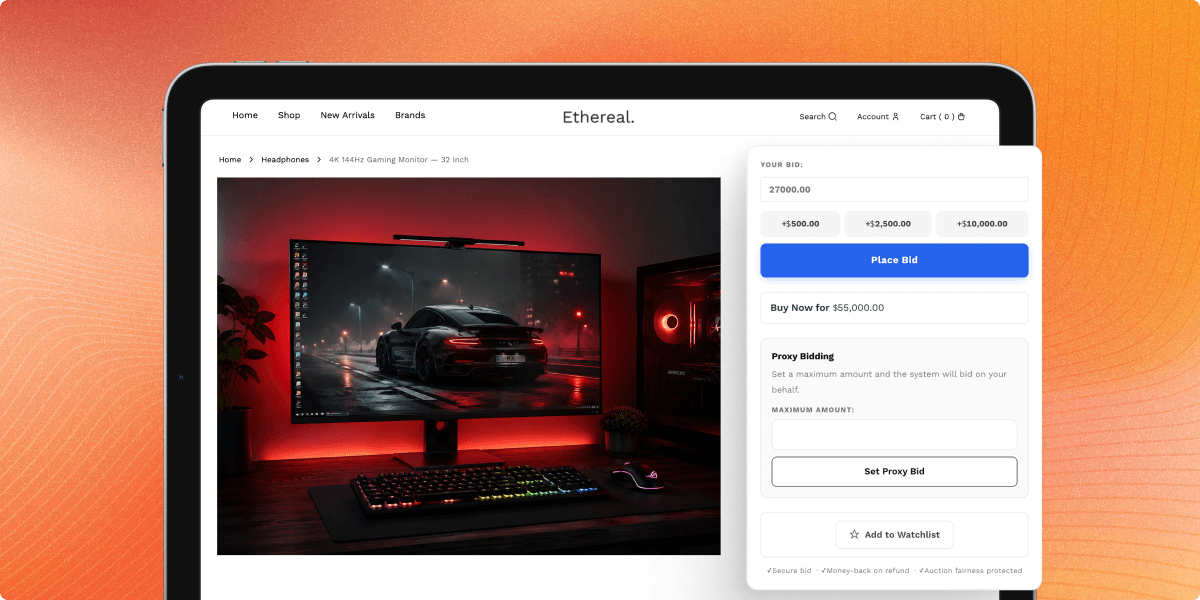
- One-click quick bid buttons
- One-click rebid when outbid
- Anonymous bidding option
- Bid cooldown timer
- Maximum bids per user or auction
- Absentee bidding before auction starts
- Bid retraction within admin-defined rules
- Shipping estimate calculator
- Contact seller or ask question option
- Social sharing and print-friendly view

Wallet System for Auction Payments
The built-in wallet helps frequent bidders pay faster. Users can add funds through WooCommerce checkout and use wallet balance for won auctions or auction fees. Admins can credit or debit wallet balances for refunds, fixes, or promotions. Full history keeps wallet activity clear.
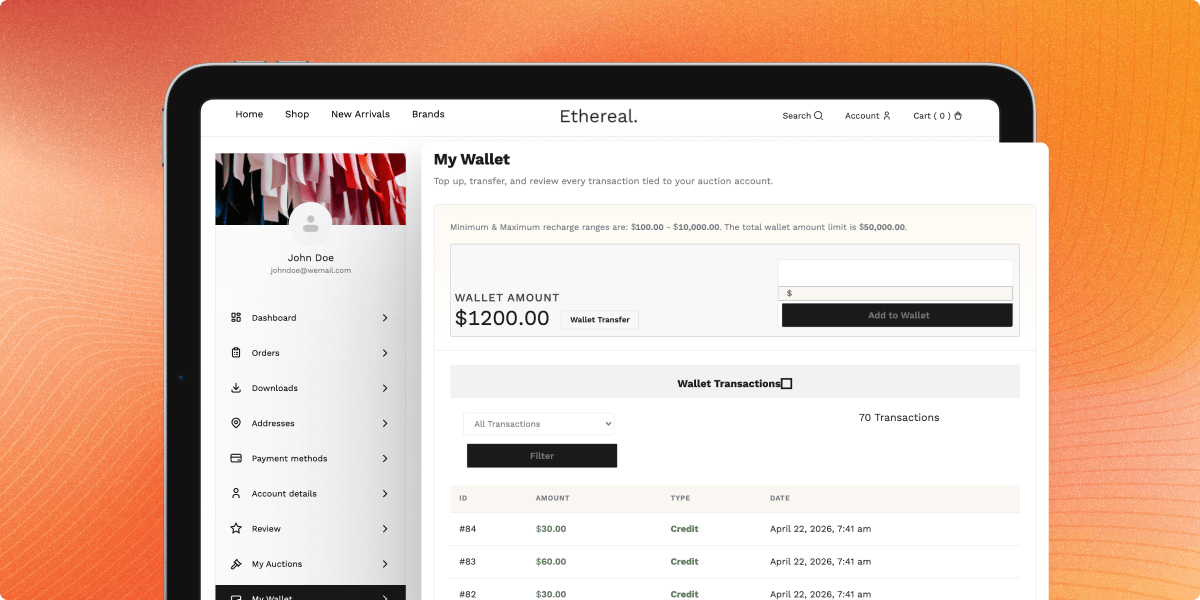
- Per-user wallet balance
- Wallet top-up through WooCommerce checkout
- Pay for won auctions using wallet balance
- Deduct entry, listing, and bid fees
- Admin credit and debit controls
- Full wallet transaction history

Email, SMS & Push Notifications
Auction alerts keep bidders, watchers, sellers, and admins updated. The plugin includes 21 ready-made email triggers with editable HTML and plain-text templates.
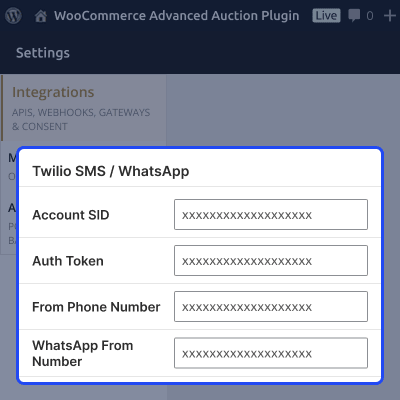
These alerts reduce manual follow-up and help winners pay on time. SMS, WhatsApp, and push alerts can also support urgent auction updates.
- Bid placed notification
- Outbid alert
- Auction starting soon alert
- Auction started notification
- Auction ending soon alert
- Auction won and lost emails
- Payment reminder, confirmation, and overdue alerts
- Reserve not met and auction failed alerts
- Relist and watchlist activity alerts
- Seller and vendor approval notifications
- Twilio SMS and WhatsApp support
- Firebase mobile push notifications

Auction Countdown Timer Styling
Admins can choose how the auction countdown appears on the product page. The timer can be shown as a capsule, big digits, segmented boxes, progress bar, or minimal text. A clear countdown adds urgency and helps bidders act before the auction ends.
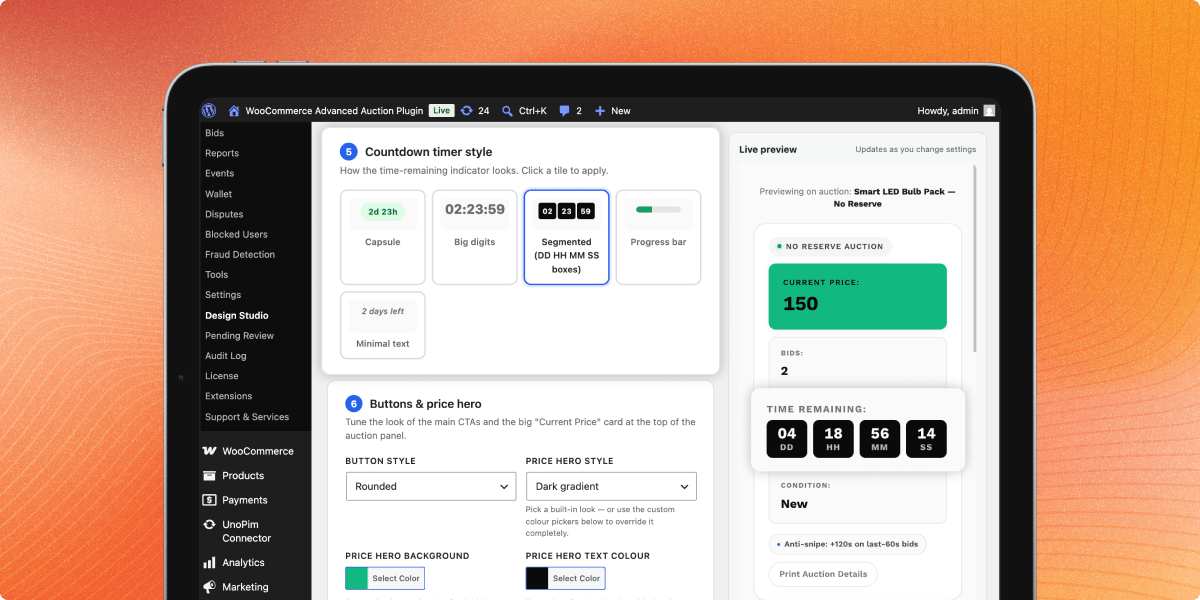
- Choose capsule, big digits, segmented, progress bar, or minimal text timer
- Show time remaining in a clean and readable format
- Match countdown style with the auction page design
- Improve urgency during active auctions
- Preview timer changes before saving

Auction Buttons & Price Hero Styling
Admins can control the look of the main bidding button and the current price card from the design panel. This helps highlight key auction actions and price details on the product page. These settings are useful when stores want stronger branding on auction pages.
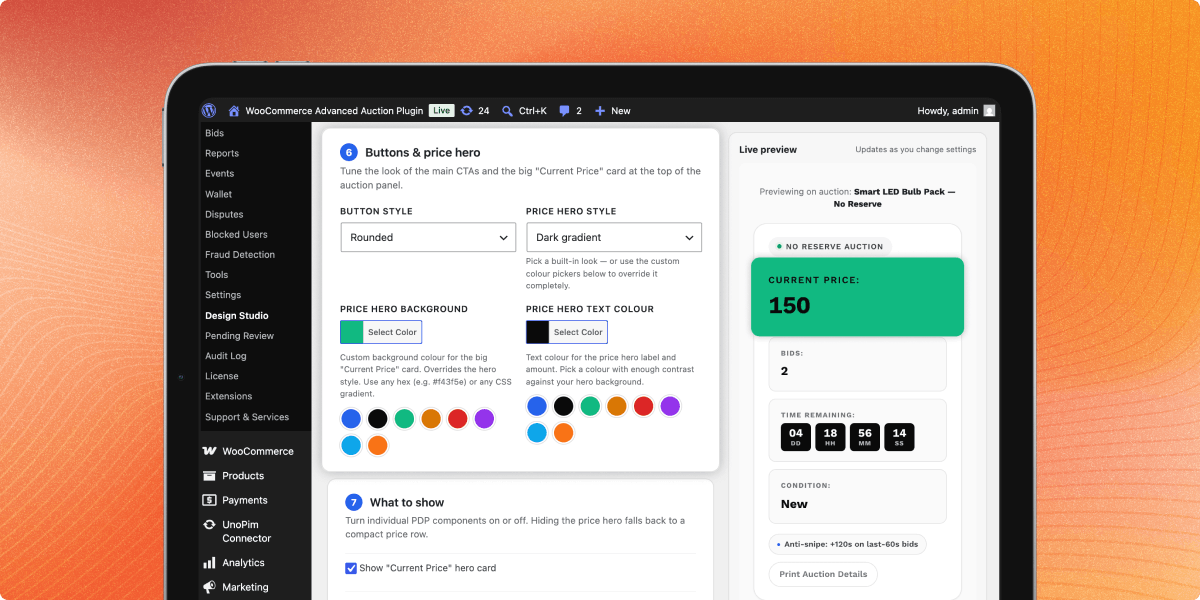
- Set button style for auction call-to-action areas
- Choose price hero style for the current price section
- Apply custom background color for the price hero card
- Set custom text color for the price hero content
- Make the auction price area more visible and branded
- Adjust button and price card appearance from one panel

Auction Display Controls, Custom CSS & Presets
Admins can choose which auction page elements should appear on the product detail page. This helps keep the auction layout focused and relevant for different store needs. Advanced users can also add scoped custom CSS and save the current design as a reusable preset.
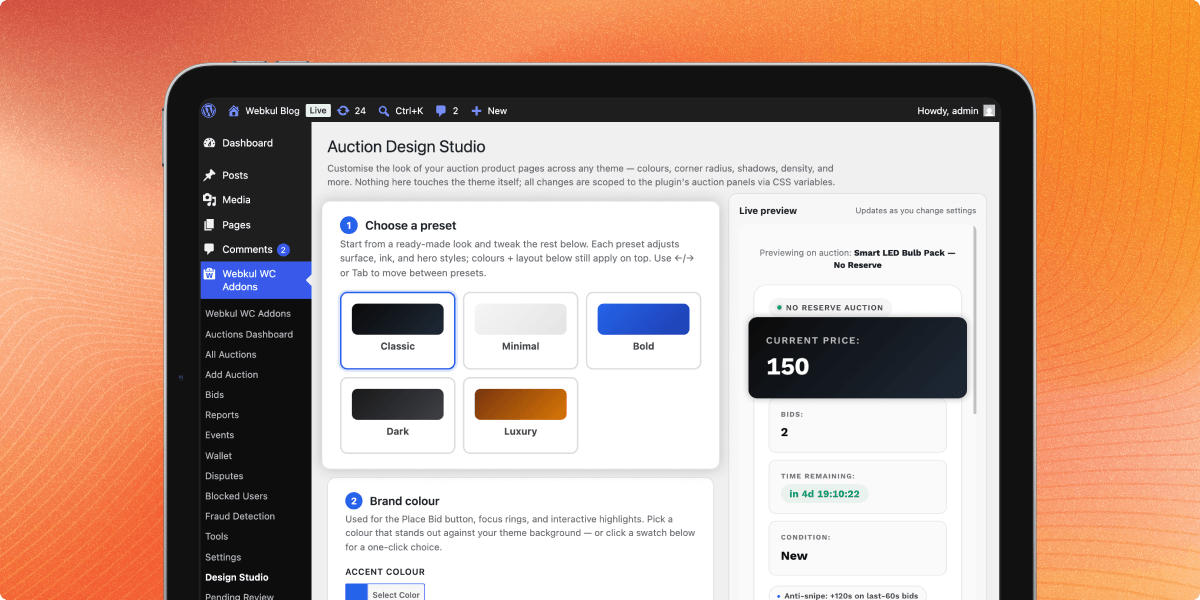
- Show or hide the current price hero card
- Show auction policy chips like anti-snipe and buy now rules
- Show trust badges under the bid form
- Enable sticky Buy/Bid bar on mobile
- Add scoped custom CSS for auction page styling
- Save current settings as a reusable custom preset

Analytics & Reporting Dashboard
The analytics dashboard shows how auctions perform over time. Admins can track revenue, bid count, auction status, seller activity, and user behavior. Reports help teams find strong products, weak auctions, payment gaps, and high-value bidders.
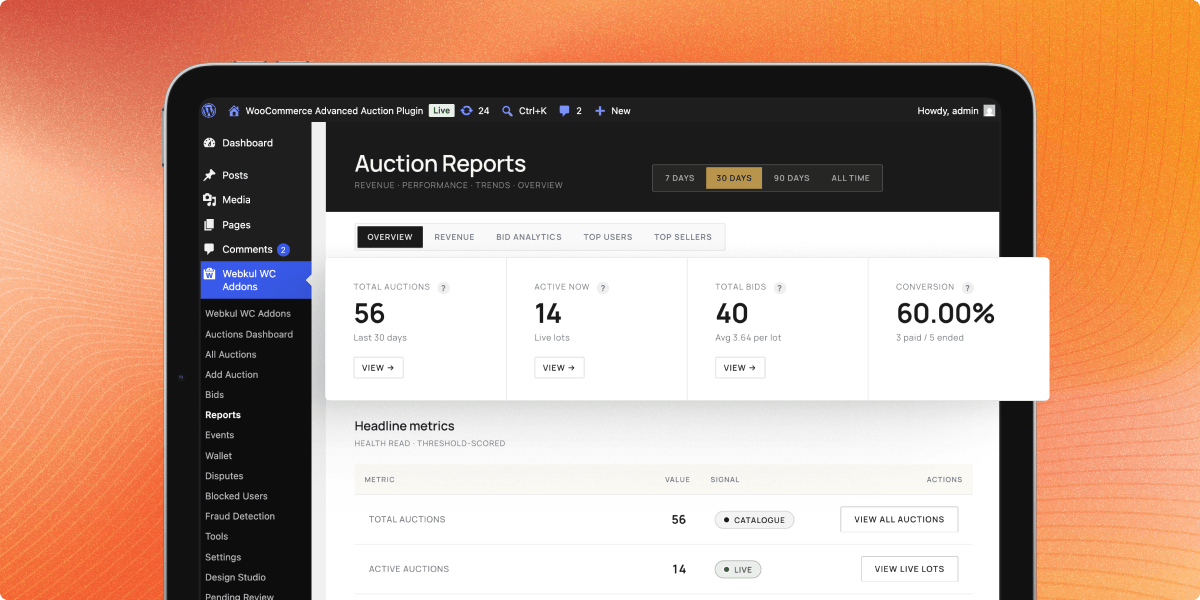
- Revenue and bid-count trend chart
- Auction status donut chart
- Top auctions by bid count
- User and seller analytics
- Auction performance dashboard widget
- CSV report export
- Facebook Pixel integration

Auction Events & Lot Management
Auction events let admins group many lots under one named sale. This works well for seasonal auctions, antique fairs, charity events, gallery sales, and liquidation campaigns. Buyers can browse related lots in one place.
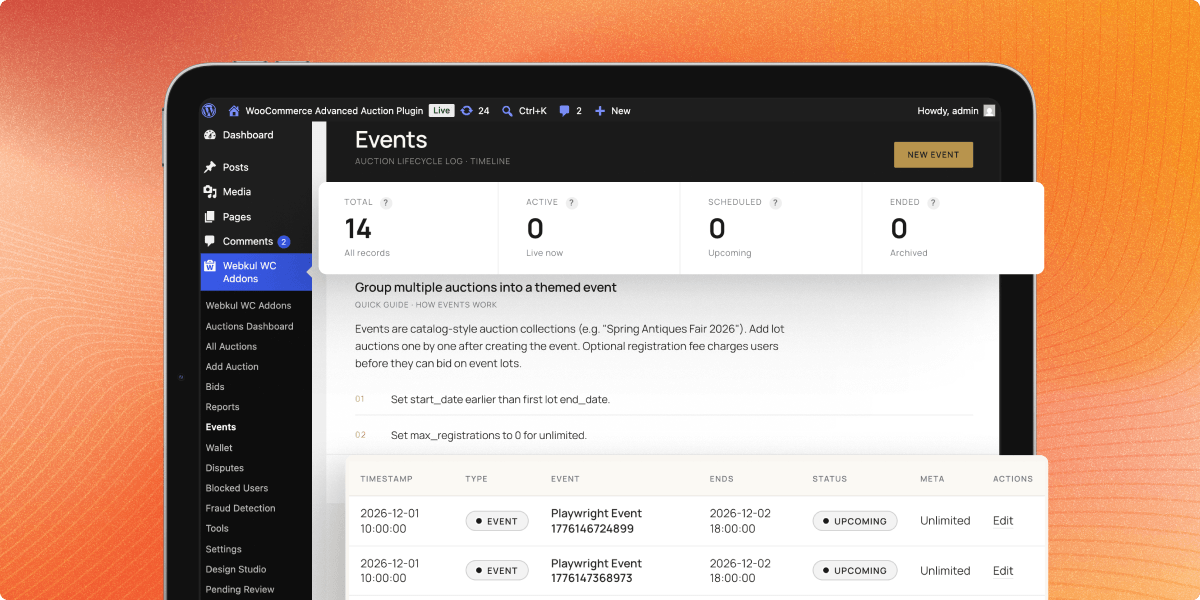
- Dedicated event landing page
- Catalog-style lot grid
- Lot thumbnails and current bid display
- Event-level countdown
- Optional event registration fee
- Multiple lots under one auction event

WooCommerce Integration
The plugin works inside the standard WooCommerce product and order flow. Auctions are registered as a WooCommerce product type, so stores can use existing product tools.
It also supports HPOS, Cart and Checkout Blocks, REST API, subscriptions, tax, shipping, and all payment gateways supported by the store.
- WooCommerce auction product type
- HPOS compatibility
- Cart and Checkout Blocks support
- Stripe, Razorpay, Square, and other gateways
- Stripe Connect, and Escrow support
- WooCommerce REST API support
- WooCommerce Subscriptions support
- Shipping, tax, categories, and product attributes

Security, Trust & Compliance
The security layer helps protect auction fairness. It checks bid activity, records key actions, and gives admins controls for risky users or high-value auctions.
Compliance tools also support privacy, restricted products, dispute handling, and charity records. This improves trust for buyers and sellers.
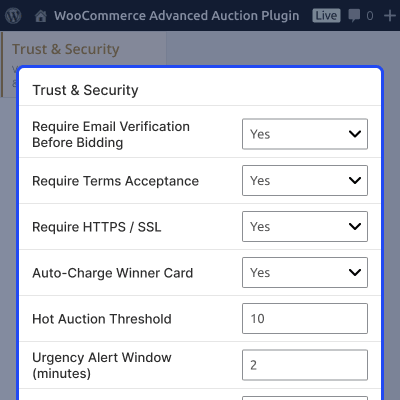
- Email verification gate
- Manual KYC for high-value auctions
- Stored card tokenization with supported gateways
- Auto-charge winner on auction close
- reCAPTCHA and hCaptcha support
- IP logging on every bid
- Masked bidder and winner identity
- Rule-based fraud detection
- Duplicate-account checks by IP
- Tamper-evident bid audit chain
- Per-user rate limiting
- Two-factor authentication bridge
- Terms and conditions gate
- Age verification for restricted items
- GDPR data export and deletion
- Dispute resolution workflow

Social Login for Faster Auction Access
Social login allows users to sign in using Google, Facebook, or Apple before they place bids. This helps reduce account creation steps for new bidders.
It is useful for auction stores where users need quick access during live bidding. A faster login flow can reduce drop-offs and help users join auctions on time.
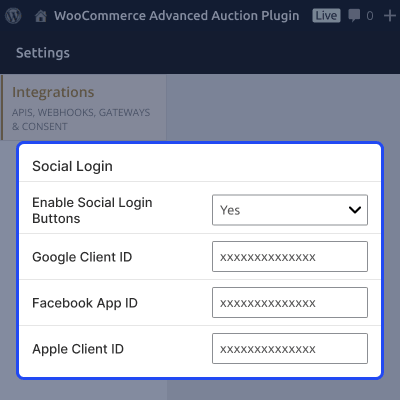
- Allow login through Google, Facebook, and Apple
- Reduce manual registration steps for bidders
- Help users access auctions faster
- Support smoother bidding on mobile devices
- Improve participation during live auctions
- Works with the plugin’s login and bidding flow

Gamification Features
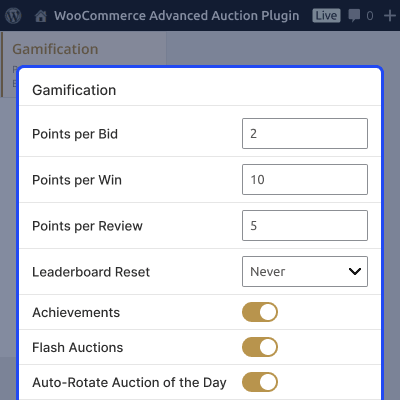
Gamification adds light rewards and activity signals to the bidding flow. It helps bring users back without making the auction process complex.
These tools are useful for frequent campaigns, flash auctions, and community bidding events.
- First Bid badge
- Power Bidder badge
- Auction Winner badge
- Win streak badges
- Public leaderboard
- Monthly leaderboard reset
- Points for bidding, winning, and reviewing
- Flash auctions from 5 to 30 minutes
- Color-coded urgency indicators

Internationalisation & Localization
Auction stores often serve buyers across regions. The plugin supports translation, RTL layouts, local countdowns, and multi-currency display.
This helps merchants run auctions for global buyers without rebuilding the store for each language or region.
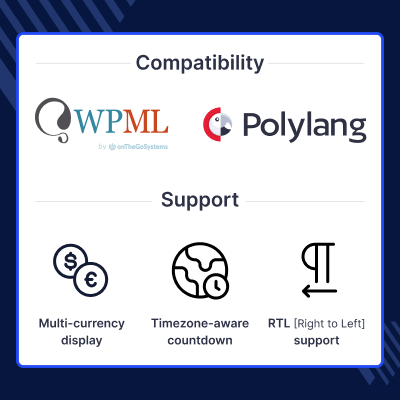
- WPML compatibility
- Polylang compatibility
- LocoTranslate compatibility
- Translation-ready PO/MO files
- Full RTL layout support
- Timezone-aware countdown
- Multi-currency display

Power-User Tools
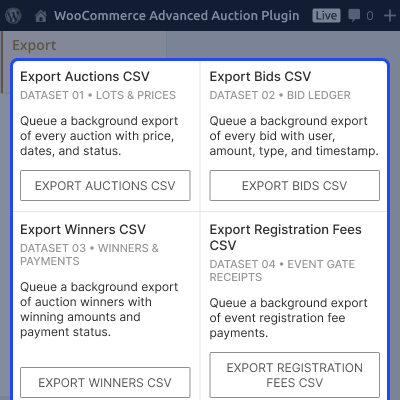
Power-user tools help admins manage large catalogs, demo data, cleanup tasks, and repeated auction setups. These tools reduce manual work for active auction stores.
They are useful for store testing, product migration, auction cleanup, and repeated campaign setup.
- WP-CLI demo seeder
- Maintenance page
- Orphan cleanup
- Cache purge tools
- Scheduled-action inspector
- Module toggle for heavy features
- CSV and XLSX import/export
- Auction templates
- Auction duplication

Complete WooCommerce Auction Plugin Feature List
Auction Formats & Bidding Modes
- Run 11 auction types, including standard, reverse, sealed, proxy, penny, Dutch, unique bid, seated, silent, no-reserve, and charity auctions
- Enable real-time AJAX bidding with live price, bid, and countdown updates without page refresh
- Support proxy and absentee bidding so buyers can auto-bid or place bids before auction starts
- Use smart polling, bid queueing, and race-condition protection for busy auction activity
- Keep bid history with bidder details, timestamps, and server-side validation
- Support direct bid, custom bid, quick bid, rebid, anonymous bidding, and bid retraction rules
Pricing, Timing & Auction Controls
- Set starting bid, reserve price, buy now price, and reserve status indicators
- Apply fixed, variable, percentage, and custom bid increments by auction value
- Control buy now visibility after first bid, reserve met status, or custom rules
- Use anti-sniping with soft close, trigger window, duration, and optional cap
- Schedule future, live, expired, failed, paid, and unpaid auction states
- Relist auctions when no bids are placed, reserve is not met, or payment fails
Buyer Experience & Engagement
- Provide My Auctions dashboard with active bids, won auctions, lost auctions, and payment status
- Let buyers save auctions with watchlist, favorites, saved searches, and email alerts
- Show bid status badges such as Winning, Outbid, Won, Lost, and Payment Pending
- Allow buyers to pay all won auctions together using one checkout flow
- Add product comparison, shipping estimate, seller contact, social sharing, and print view
- Use watcher counters, live bidder count, bid speed, hot auction badge, and suggested bid amount
- Add bid animation, win confetti, urgency bars, countdown colors, and optional bid sounds
Payments, Wallet & Revenue Tools
- Use built-in wallet for top-up, auction payments, fee deductions, refunds, and history
- Support WooCommerce gateways, including Stripe, Razorpay, Square, and Escrow flows
- Enable Stripe Connect, stored card tokens, payment hold, and auto-charge where supported
- Add buyer premium, seller commission, listing fees, entry fees, unlock fees, and registration fees
- Charge bid fees, featured boosts, late-payment penalties, and premium auction membership access
- Generate PDF invoices, calculate WooCommerce tax, and support charity tax receipts
Admin, Vendor & Auction Management
- Manage auctions from an admin grid with status, bids, users, price, and payment data
- Filter auctions by active, upcoming, finished, failed, paid, unpaid, high-activity, and relisted states
- Start, pause, extend, end, cancel, delete, relist, export, or bulk manage auctions
- View, edit, delete, or correct bids and promote the next bidder when needed
- Override winners, assign second-highest bidder, block users, and control role access
- Support 14 admin screens, 80+ settings, audit trail, templates, duplication, and module toggles
- Extend auctions to vendors through Webkul Marketplace, WCFM, Dokan, WC Vendors, and YITH flows
Design, Analytics & Event Auctions
- Customize auction pages with Design Studio and Classic, Minimal, Bold, Dark, and Luxury presets
- Adjust colors, border radius, density, typography, and layout with live preview
- Keep styling safe with saved presets, non-destructive changes, and template overrides
- Track revenue, bid count, auction status, top auctions, user activity, and seller performance
- Create auction events with landing pages, lot grids, event countdown, and registration fees
Notifications, Communication & Marketing
- Use 21 email triggers for bid placed, outbid, start, ending soon, won, lost, failed, relist, watchlist, and payment events
- Send editable HTML and plain-text emails to bidders, watchers, sellers, vendors, admins, and applicants
- Support payment reminders, overdue notices, seller approval, lot approval, and follower alerts
- Send SMS, WhatsApp, and mobile push alerts using Twilio and Firebase where configured
- Connect auction activity with Mailchimp, Klaviyo, and Facebook Pixel
- Support social login, seller questions, private messages, and external communication flows
Security, Compliance & Trust
- Protect bids with email checks, CAPTCHA, hCaptcha, IP logs, rate limits, and server-side validation
- Support manual KYC, stored card tokens, auto-charge winner, and high-value auction checks
- Mask bidder names and winner identity while keeping admin audit logs available
- Detect suspicious bidding with fraud rules, shill-bid alerts, duplicate-account checks, and audit chain
- Enforce terms, age checks, auction rules page, cookie consent, and dispute flow
- Support GDPR export and deletion, donor wall, and tax receipts for charity auctions
Integrations, Localization & Developer Tools
- Build layouts with Elementor, Gutenberg, Divi, Beaver Builder, WPBakery, shortcodes, widgets, and templates
- Use 23 shortcodes and 8 widgets for auction lists, countdowns, search, watchlist, featured, future, recent, and ending soon views
- Support WPML, Polylang, LocoTranslate, RTL layouts, local countdowns, and multi-currency display
- Extend workflows with REST API, webhooks, hooks, filters, JavaScript events, and modular add-ons
- Connect with WooCommerce Subscriptions, HPOS, Cart and Checkout Blocks, shipping, tax, and product attributes
- Use developer docs, template overrides, and integration-ready tools for custom auction flows
Performance, Scalability & Power Tools
- Use custom database tables, indexed columns, and optimized auction data storage for high-volume bidding
- Support object cache, Redis, Memcached, Action Scheduler, CDN assets, and lazy-loaded bid history
- Run heavy tasks through scheduled actions to avoid cron pile-ups during busy events
- Keep frontend assets lighter with minimal JavaScript and no jQuery UI or moment.js dependency
- Manage catalogs with CSV/XLSX import-export, bid log export, winner export, and reports
- Use WP-CLI demo seeder, maintenance page, orphan cleanup, cache purge, and scheduled-action inspector
- Run on standard WordPress hosting without Node.js, Redis requirement, or monthly SaaS dependency
Support
For any query or issue, please create a support ticket here http://webkul.uvdesk.com/
You may also check our quality WooCommerce Plugins.
Specifications
Frequently Asked Questions
Move to Cloud Today
AWS Free tier hosting for one year by amazon web services, for more details please visit AWS Free Tier.
GCP Free tier hosting for one year with 300 credit points by google cloud platform, for more details please visit GCP Free Tier.
Azure free tier hosting for one year with 25+ always free services, for more details please visit Azure Free Tier.
In our default configuration we will provide tremendous configuration for your eCommerce Website which is fast to load and response.
Default Configuration Details of Server
- 1 GB RAM
- 1 Core Processor
- 30 GB Hard Disk
- DB with 1 GB RAM and 1 Core Processor
* Server Configuration may vary as per application requirements.
Want to know more how exactly we are going to power up your eCommerce Website with Cloud to fasten up your store. Please visit the Cloudkul Services.
Get Started with Cloud- + Features
- - Bugs
- Initial Release


