USD
  • EUR
  • INR
  • USD
Cart
Cart 0
  • You have no items in your shopping cart.
    WooCommerce Extensions
    Cart
    Cart 0
    • You have no items in your shopping cart.
    Hire a Developer
    ×
    Contact Us!
    Send Again
    Close
    Please Login to Write Your Review
    WooCommerce Marketplace ACF

    WooCommerce Marketplace ACF

    x

    * Required Fields

    $49.00
    Add To Cart
    30 Days Money Back Guarantee*
    Only One Time Payment

    WooCommerce Marketplace ACF Plugin lets sellers manage Advanced Custom Fields for products from the WooCommerce marketplace seller dashboard.


    • Add ACF field groups to vendor product creation and edit pages.

    • Display custom product fields without giving vendors wp admin access.

    • Create dedicated tabs for assigned ACF field groups.

    • Exclude ACF fields for selected product categories.

    • Support parent and child category exclusion rules.

    • Exclude individual WooCommerce marketplace products.

    • Keep vendor media uploads isolated from other sellers.

    • Support ACF fields during product creation and editing.

    • Reinitialize advanced ACF controls when sellers switch tabs.

    • Work with WooCommerce HPOS and block based themes.

    • Support WordPress Multisite and WPML environments.

    • Support a wide range of standard ACF field types.

    WooCommerce Marketplace ACF
    WooCommerce Marketplace ACF
    $49.00
    Check How It Works
    $49.00
    Configure and Buy
    30 Days Money Back Guarantee*
    Only One Time Payment
    X
    • Description
    • Reviews
    • FAQ
    • Customers ()
    • Specifications
    • Cloud Hosting
    • Changelog

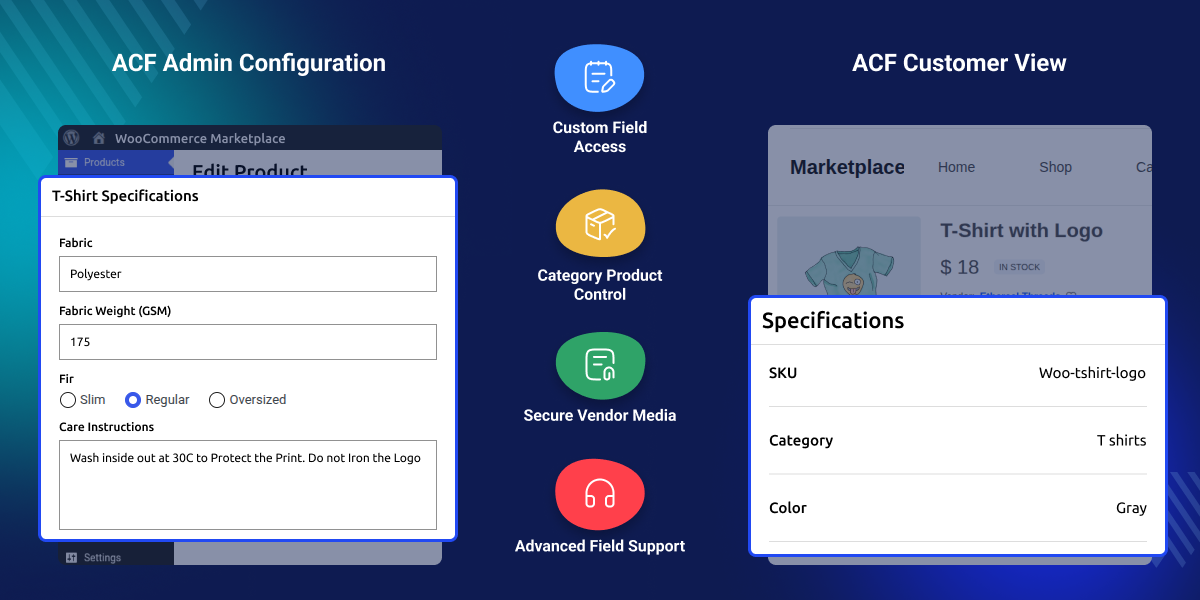
    WooCommerce Marketplace ACF Plugin connects Advanced Custom Fields with the Marketplace for WooCommerce seller dashboard. Sellers can add custom product data when they create or edit products.

    This plugin shows ACF field groups in the seller dashboard based on the product. Sellers can add extra details without opening the WordPress admin panel.

    WooCommerce Advanced Custom Fields supports different types of product data. Sellers can add technical details, dimensions, materials, documents, links, badges, and other product information.

    Sellers can use ACF fields based on their product needs. Marketplace owners can create field groups for size, material, warranty, technical data, and product documents. This plugin also supports media fields for seller products.

    Sellers can upload and manage product files from the vendor dashboard. WooCommerce ACF works with product creation and editing. Sellers can add custom data when they create products and update it later when they edit them.

    Marketplace Advanced Custom Fields keeps custom product data in the seller workflow. Sellers can manage extra product details from the marketplace dashboard, while owners control the field groups and display rules.

    Additionally, if you are looking for a preorder solution for your marketplace store, you can check Marketplace Pre Order for WooCommerce plugin to let sellers manage preorder products from their own panels.
    WooCommerce Marketplace ACF Plugin

    Highlighted Features of WooCommerce Marketplace ACF

     ACF Fields in Seller Dashboard

    This plugin shows ACF field groups in the seller product area. Vendors can fill in custom fields when they create or edit WooCommerce products.

     Dedicated Field Group Tabs

    Each assigned ACF field group can appear in its own dynamic tab. This keeps custom product data organized and makes it easier for sellers to manage.

     Category Based Exclusions

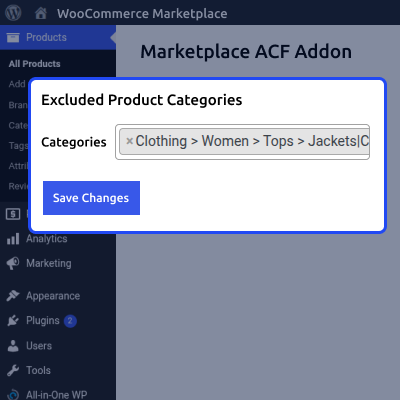
    Admin can exclude ACF fields from the vendor panel category-wise using the Marketplace ACF Plugin’s Excluded Categories tab.

     Product Based Exclusions

    Admin can exclude ACF fields from the vendor panel product-wise using the Marketplace ACF Plugin’s Excluded Products tab.

     Secure Vendor Media Access

    Media access is limited to the vendor's own uploaded files. This helps prevent sellers from viewing or selecting files owned by other marketplace users.

     Support for Advanced ACF Controls

    This Plugin supports advanced ACF controls and reinitializes them when sellers switch tabs, keeping fields functional in the seller dashboard.

     Automatic Field Group Detection

    Sellers do not need to set ACF location rules. The plugin finds active field groups for WooCommerce products and shows them in the Vendor Fields dashboard.

     Product Creation and Editing Support

    ACF fields are available when sellers add new products or edit existing products. The custom data works with the standard WooCommerce product information.

    Why do we need WooCommerce Marketplace ACF?

    WooCommerce Marketplace ACF Plugin helps multi vendor marketplaces collect product data beyond the default WooCommerce fields, including technical details, documents, links, materials, and other custom information.

    Giving every seller access to the WordPress admin area can create access and management issues. Sellers may also see backend tools that they do not need for daily product management.

    WooCommerce Advanced Custom Fields Plugin brings product based ACF fields to the seller dashboard. Vendors can add and manage custom product data from the same place where they create and edit products.

    Administrator can control which categories and products show these fields. This helps them manage custom product data and display only the fields needed for each product in the marketplace fields catalog.

    Apart from this, if you want to run daily product offers, you can explore Daily Deals Plugin for WooCommerce. It helps you create and manage deals, set deal dates, and display countdown timers on your store.

    Use Cases

    • Automotive Parts Marketplace

      Sellers can add part details, fitment data, dimensions, and other key product information through custom fields.

    • Digital Product Marketplace

      Vendors can add file links, version details, document URLs, and other useful data for digital products.

    • Electronics Marketplace

      Sellers can add product specs, key features, technical data, and other details that default fields do not cover.

    • Fashion and Apparel Marketplace

      Custom fields can collect material, care, size, and other product details needed for fashion and apparel items.

    • Custom Goods Marketplace

      Sellers can add lead times, dimensions, materials, custom options, and other details needed for made to order products.

    • Multi Category Marketplace

      Each product category can use its own ACF field group, allowing vendors to manage relevant custom data while admins can hide fields where needed.

    Display ACF Fields in Vendor Product Forms

    This automatically finds ACF field groups assigned to WooCommerce products. These fields appear in the vendor product creation and editing workflow.
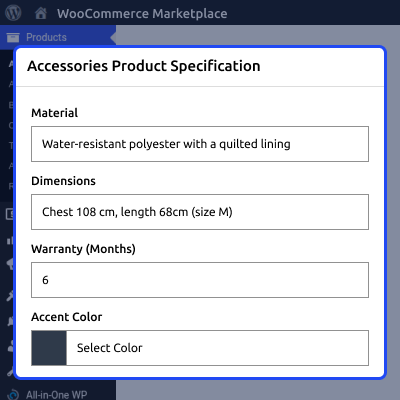
    • Display product based ACF field groups for vendors.
    • Support the Add Product seller workflow.
    • Support the Edit Product seller workflow.
    • Create dedicated tabs for assigned field groups.
    • Keep custom data separate from standard product fields.
    • Detect active product related field groups automatically.
    Display ACF Fields in Vendor Product Forms

    Control ACF Fields by Product and Category

    Marketplace owners can control where ACF fields appear and choose the products or categories that need custom data.
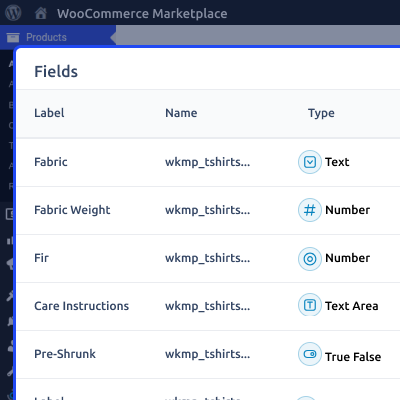
    • Exclude selected product categories.
    • Support parent and child categories.
    • Exclude individual WooCommerce products.
    • Use a simple category selection interface.
    • Search and select products to exclude.
    • Manage all exclusions from one settings page.
    Control ACF Fields by Product and Category

     Secure Media Management for Marketplace Vendors

    Some ACF fields let sellers upload or select files and images. This adds vendor based controls to these media actions.
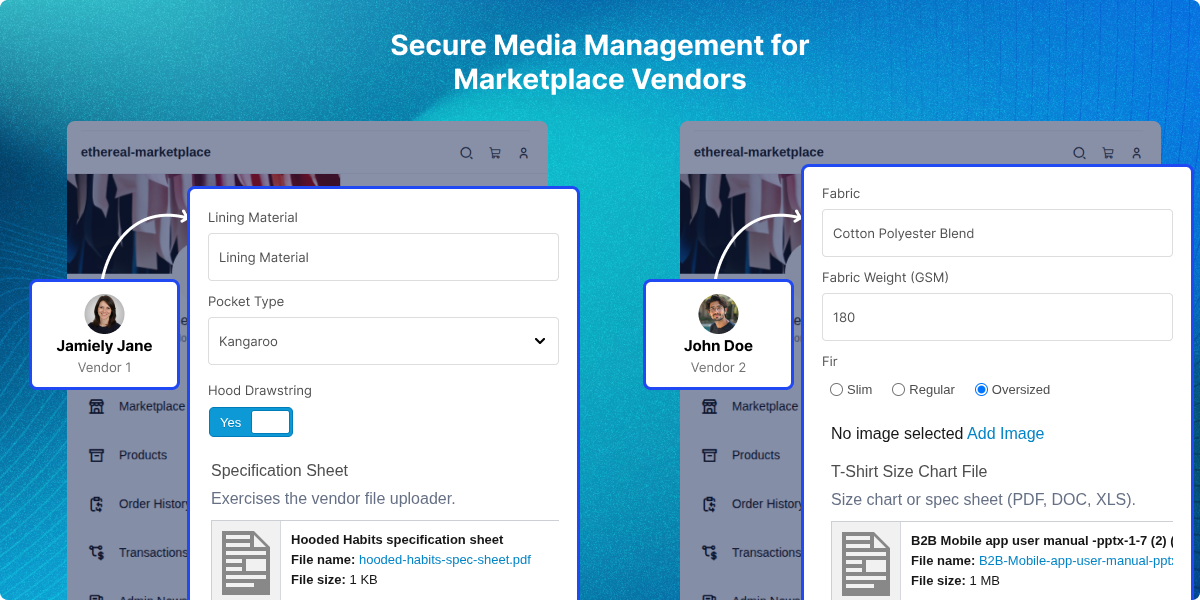
    • Restrict access to files owned by other vendors.
    • Stop vendors from selecting competitor media files.
    • Support secure image input handling.
    • Support secure file input handling.
    • Keep media management within the seller workflow.
    • Control attachment access for marketplace users.
    Secure Media Management for Marketplace Vendors

    Support Multiple Advanced Custom Field Types

    Field groups can include basic inputs, content fields, choice fields, relational fields, advanced controls, and layout elements.
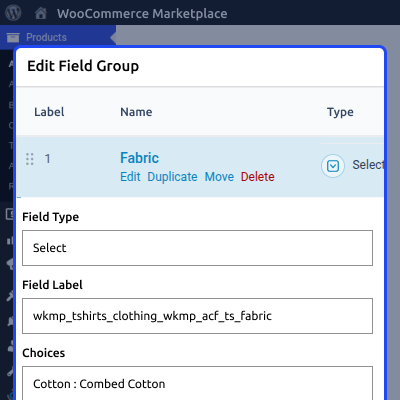
    • Text, text area, number, and range fields.
    • Email, URL, and password fields.
    • Select, checkbox, radio, and button group fields.
    • Link, relationship, taxonomy, and user fields.
    • Message, accordion, tab, and group layout fields.
    Support Multiple Advanced Custom Field Types

    Smooth ACF Controls Across Seller Dashboard Tabs

    Some advanced ACF controls need to load when their tab becomes visible. The Plugin manages tab changes so these controls keep working as sellers move between tabs.
    • Reinitialize ACF controls when sellers switch tabs.
    • Support color picker controls.
    • Keep fields working correctly inside dynamic tabs.
    • Keep the product management interface organized.
    Smooth ACF Controls Across Seller Dashboard Tabs

     Support

    For any query or issue please create a support ticket here http://webkul.uvdesk.comYou may also check our other top-quality WooCommerce Plugins.

    Specifications

    Product Version1.0.0
    Released2 days ago
    CategoryWooCommerce
    Last UpdatedAugust 25, 2026 (2 days ago)
    Supported VersionsWordPress  6.x.x  7.x.x  WooCommerce  10.x.x  

    Ratings

    We'd love to hear your thoughts! Share your feedback and help us craft an even better experience tailored just for you.

    Write a review

    Frequently Asked Questions

     How can sellers add custom product details without accessing WordPress admin?
    WooCommerce ACF shows ACF field groups in the seller dashboard, so vendors can add and update custom product data while creating or editing products.
     
     How does this Plugin control which products display ACF fields?
    Store owners can exclude specific products or categories from ACF fields shown to sellers, with category rules controlling field visibility.
     
     Can sellers manage images and files through ACF fields securely?
    Yes, sellers can upload and select their own media files through supported ACF fields without accessing attachments owned by other WooCommerce Vendors or admin.
     
     What happens when advanced ACF fields are placed in separate tabs?
    Marketplace ACF Plugin handles tab changes and reloads supported ACF controls, helping color pickers work correctly.
     
     Does the Plugin support different ACF field types and WooCommerce setups?
    WooCommerce ACF supports many standard ACF field types and works with HPOS, block based themes, Multisite, WPML, ACF, ACF Pro, and PHP 7.4+.

    Specification

    Detailed technical features and requirements to help you understand the module’s capabilities and ensure smooth integration with your system.

    Cloud Hosting

    Detailed technical features and requirements to help you understand the module’s capabilities and ensure smooth integration with your system.

    Default Configuration Details of Server

    1 GB
    RAM
    1 Core
    Processor
    30 GB
    Hard Disk
    1 GB RAM & 1 Core Processor
    Database

    Want to know more how exactly we are going to power up your eCommerce Website with Cloud to fasten up your store

    * Server Configuration may vary as per application requirements.

    Change Logs

    • - Feature Add (+)
    • - Feature remove (-)
    • - Bug Fixed (!)
    • - Modification (*)
    Version 1.0.0
    • + Intial Release


