Odoo to Akeneo Product Export Connector sends Odoo products to Akeneo PIM. Admins export products in bulk or one by one and track each job in Odoo.
- Connect Odoo ERP with Akeneo PIM using its API credentials.
- Export Odoo products to Akeneo from the product list Action menu.
- Send products to Akeneo in bulk or pick only the products you need.
- Create a PIM job for every product export from Odoo.
- Fetch the latest export job status from Akeneo with one click.
- Track jobs as Starting, Started, Completed, or Failed in Odoo.
- Check the PIM connection with the Test Connection button.
- Enrich exported product data in the PIM for all sales channels.
- Description
- Reviews
- FAQ
- Customers ()
- Specifications
- Cloud Hosting
- Changelog
Odoo to Akeneo Product Export Connector is an Odoo app that exports Odoo products to Akeneo PIM and tracks each export job.
Admins add Akeneo API details in Odoo and test the link. Next, they select products and click Export to Akeneo.
Each export creates a job in Akeneo. The Jobs screen in Odoo lists the Job ID, Job URL, status, and exported product IDs.
A Fetch button pulls the current job status from the PIM. Admins learn the result of each export without leaving Odoo.
The app runs on the Odoo end. It works with Akeneo Community, Growth, Flexibility, and Serenity editions.
This app needs a companion module on the Akeneo end, so install Odoo Akeneo Connector first.
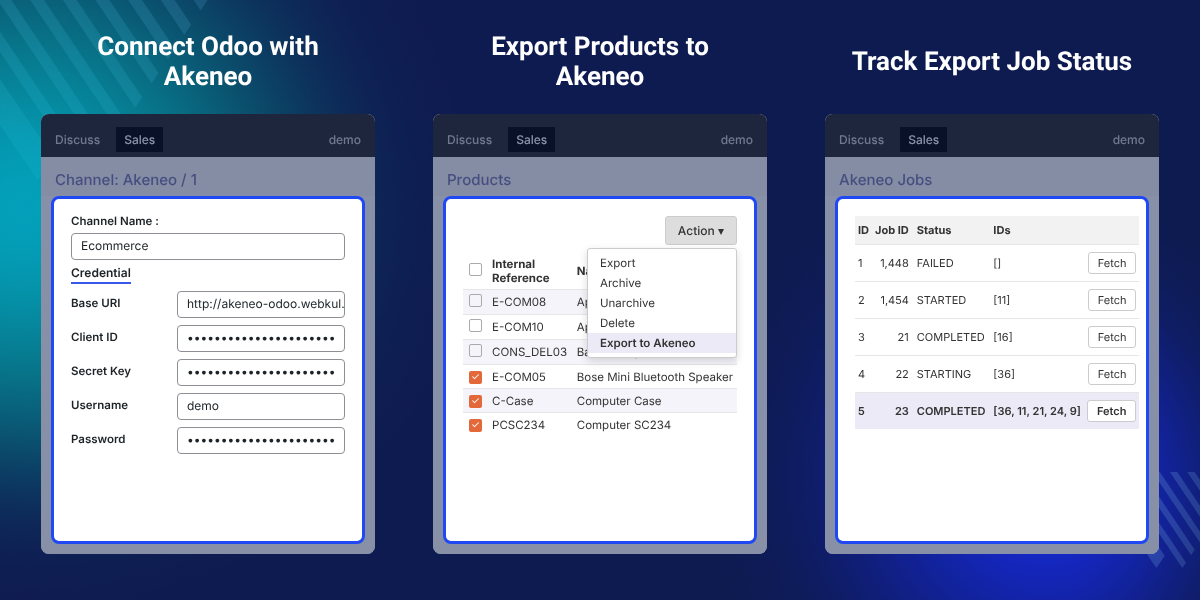
Highlighted Features of Odoo to Akeneo Product Export Connector
Akeneo API Connection
Save the Base URI, Client ID, Secret Key, Username, and Password of your PIM in Odoo.
One-Click Product Export
Send Odoo products to Akeneo PIM from the Action menu of the product list.
Bulk or Selective Export
Tick many products for a bulk export, or pick only a few for a selective export.
Export Job Tracking
Fetch each job status in Odoo and see if it is Starting, Started, Completed, or Failed.
Why Do We Need Odoo to Akeneo Product Export Connector?
Odoo to Akeneo Product Export Connector fills a gap in Odoo. Odoo has no built-in way to send its products to Akeneo PIM.
Odoo holds product records for sales, stock, and invoices. Without a connector, teams rebuild each product in the PIM by hand.
Typing the same data twice costs time and invites mistakes. This connector sends selected Odoo products to Akeneo in one action.
Each export gets a job that the team can check later. The product team can then enrich the data in the PIM for each sales channel.
In practice, one export of five products creates one job. Its IDs column lists all five product IDs, so no lookup is needed.
Also, if you want to sell Odoo products on many online stores, you can check our extension Odoo Multi Channel Sale.
Odoo Akeneo Integration Use Cases
-
Start a New PIM Catalog
Stores that adopt a new PIM can move their current Odoo product catalog into it in bulk.
-
Send New Products Only
Teams that add products in Odoo can export just the new items to the PIM for enrichment.
-
Check Failed Exports
Admins can spot a Failed job in the Odoo Jobs list and open its Job URL in the PIM to review the export.
-
Enrich Data for Sales Channels
Product teams can improve Odoo product data in the PIM before they share it with online stores.
Akeneo Credentials Setup in Odoo
Akeneo credentials link Odoo to your Akeneo PIM. Admins open Sales > Akeneo > Configuration and add the details to an Akeneo channel.
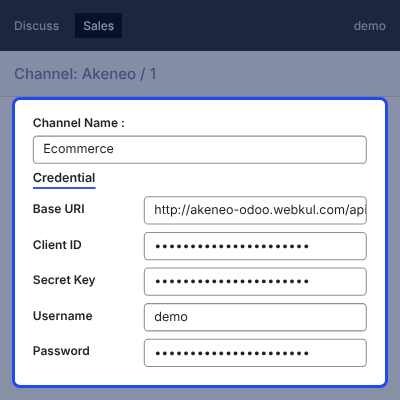
- Open the Akeneo channel, such as Ecommerce, from the Channel: Akeneo screen.
- Enter the Channel Name shown at the top of the setup form.
- Add the Base URI of the Akeneo API under the Credential tab.
- Enter the Client ID and Secret Key of the Akeneo API connection.
- Add the Akeneo Username and Password, then click Save.

Test the Akeneo Connection
The Test Connection button checks the saved Akeneo credentials. Admins confirm the link works before the first product export.
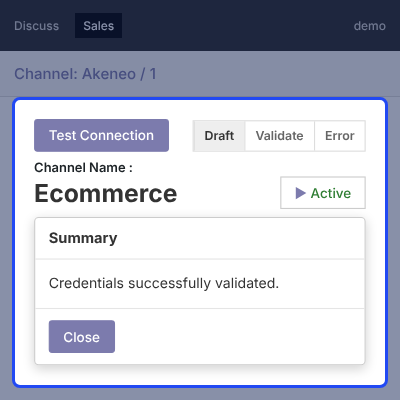
- Click Test Connection at the top of the Akeneo channel form.
- See the Credentials successfully validated message when the details are right.
- Follow the channel state in the Draft, Validate, and Error status bar.
- Check the Active button to confirm the channel is in use.
- Click Edit to change the credentials and test again.

Export Odoo Products to Akeneo
Odoo products move to Akeneo from the Odoo product list. Admins can export many products at once or pick only a few.
Once the products reach the PIM, you can add more tools from our range of Akeneo Extensions.
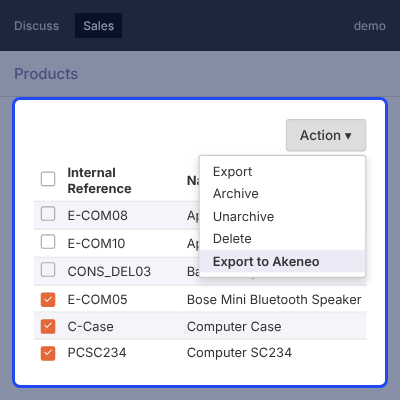
- Go to Sales > Catalog > Products and open the list view.
- Tick the checkbox of each product that should go to Akeneo.
- Open the Action menu and click Export to Akeneo.
- Read the Successfully exported selected products message in the pop-up.
- Get a new export job for each action, ready to track in Odoo.

Track Akeneo Export Job Status
The Akeneo Jobs screen in Odoo lists every product export job. Admins fetch the latest status of a job from the PIM with one click.
To send exported products on to e-commerce channels on a schedule, you can check Akeneo Cron Scheduler.
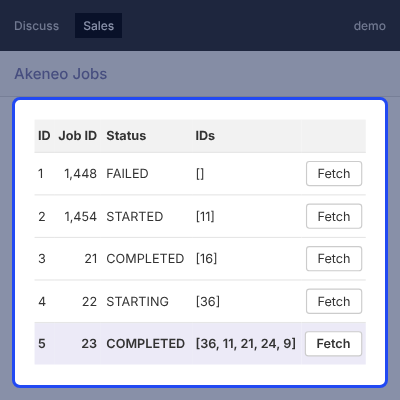
- Open Sales > Akeneo > Jobs to see all export jobs.
- View the ID, Job ID, Job URL, and Status of each job.
- Check the IDs column for the Odoo products in each job.
- Click Fetch to pull the current job status from Akeneo.
- See the job move from Starting to Started, then to Completed or Failed.

Complete Odoo to Akeneo Product Export Connector Feature List
Akeneo Connection
- Set up Akeneo from Sales > Akeneo > Configuration in Odoo
- Save Base URI, Client ID, Secret Key, Username, and Password under the Credential tab
- Test the saved Akeneo API details with the Test Connection button
- Follow the channel state through Draft, Validate, and Error
Product Export
- Export Odoo products to Akeneo PIM from the product list Action menu
- Export products in bulk or select only the products you need
- Get a pop-up message that confirms the selected products were exported
- Enrich exported products in Akeneo and share them with each sales channel
Job Tracking
- Create one Akeneo job for every export action from Odoo
- List every job with its ID, Job ID, Job URL, status, and product IDs
- Fetch the latest job status from Akeneo with one click
- Mark each job as Starting, Started, Completed, or Failed
Compatibility and Setup
- Works on the Odoo end with Odoo Akeneo Connector installed on the Akeneo end
- Supports Akeneo Community, Growth, Flexibility, and Serenity editions
- Installs as the odoo_akeneo folder in the Odoo add-ons path
Akeneo Odoo Connector Support -
For any query or issue please create a support ticket here http://webkul.uvdesk.com
You may also check our other top-quality Odoo Extensions.
Specifications
Specification
Detailed technical features and requirements to help you understand the module’s capabilities and ensure smooth integration with your system.
Cloud Hosting
Detailed technical features and requirements to help you understand the module’s capabilities and ensure smooth integration with your system.
Move to Cloud Today
We’re partnered with top-tier, trusted providers!
Default Configuration Details of Server
RAM 1 Core
Processor 30 GB
Hard Disk
Database
Want to know more how exactly we are going to power up your eCommerce Website with Cloud to fasten up your store
* Server Configuration may vary as per application requirements.


