USD
  • EUR
  • INR
  • USD
Cart
Cart 0
  • You have no items in your shopping cart.
    Cart
    Cart 0
    • You have no items in your shopping cart.
    Hire a Developer
    ×
    Contact Us!
    Send Again
    Close
    Please Login to Write Your Review

    CS-Cart Advanced Notification

    CS-Cart Advanced Notification is a storefront notification system for CS-Cart. Send order updates, shipment alerts, and account notifications to customers, vendors, and staff in real time.


    • Storefront notifications for CS-Cart and Multi-Vendor stores.

    • Send order updates to customers inside the storefront.

    • Notify customers about shipments, returns, and account changes.

    • Receive admin updates for orders, reviews, and registrations.

    • Vendor alerts for new orders, status changes, and discussions.

    • Create custom templates with images and page links.

    • Send targeted alerts to selected customers.

    • Let customers manage alert settings from their account.

    • Set a timeout period to mark older notifications as seen.

    Screenshots
    CS-Cart Advanced Notification CS-Cart Advanced Notification CS-Cart Advanced Notification CS-Cart Advanced Notification CS-Cart Advanced Notification CS-Cart Advanced Notification CS-Cart Advanced Notification CS-Cart Advanced Notification CS-Cart Advanced Notification
    Show More Hide All
    $59.00

    * Required Fields

    Add To Cart
    $59.00
    Configure and Buy
    • Description
    • Reviews
    • FAQ
    • Customers ()
    • Specifications
    • Cloud Hosting
    • Changelog

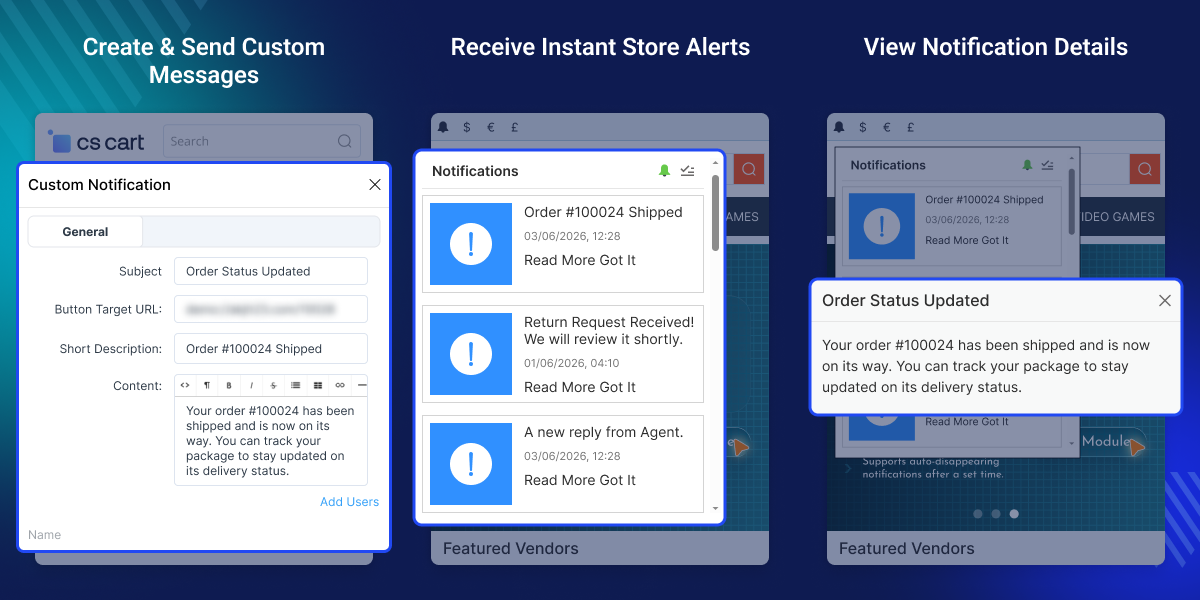
    CS-Cart Advanced Notification adds a storefront notification system to your CS-Cart store. Customers see order updates, shipment alerts, and account changes directly in the store without checking their inbox.

    The notification panel appears as a bell icon in the storefront. Customers can open it, read alerts, and manage their notification preferences. Store owners get backend updates for key store activity. New orders, RMA requests, registrations, reviews, and discussion posts are all visible from one place.

    For Multi-Vendor stores, vendors get their own notification stream. New orders, status changes, and order discussion messages go straight to the relevant vendor.

    The module also lets you send custom notifications to specific customers. Add a subject, description, content, and a page link, then select the users and send.

    You can also use CS-Cart Web Push Notification to send browser notifications to customers even when they are not actively browsing your store.
    CS-Cart Advanced Notification

    Highlighted Features

     Storefront Notification Panel

    A bell icon appears in the storefront. Customers can open it to read updates, view details, and manage their settings.

     Order and Shipment Updates

    Customers receive updates when an order status changes or when a shipment is created. This keeps them informed while the order is being processed.

     Admin Alerts for Store Activity

    Store staff receive updates for new orders, return requests, registrations, reviews, and discussion posts.

     Vendor Alerts for Multi-Vendor Stores

    Vendors receive updates for new orders, order changes, and discussion messages linked to their products.

     Custom Message Templates

    Create templates with a subject, description, content, image, and URL. Send them to selected customers from the Marketing panel.

     Alert Timeout Settings

    Choose how long messages stay active. Older items are marked as seen once the timeout period ends.

    Why Do We Need CS-Cart Advanced Notification?

    CS-Cart Advanced Notification addresses a common gap in how stores communicate with customers and staff. Most CS-Cart stores rely on email to keep customers updated. Customers miss order updates, shipment alerts, and account changes if they do not check their inbox regularly.

    On the backend, store teams have to check multiple sections to stay on top of new orders, reviews, and return requests. There is no single place that shows all of it. This module brings those updates directly into the storefront.

    Customers see alerts in a notification panel without leaving the store or opening email. Admin and vendor notifications surface everything in one stream. Staff can act faster and customers stay informed at every stage.

    Stores handling regular order volume and support requests save time by having all activity visible from one place. Less manual checking, fewer missed updates.

    Stores that also rely on mobile communication can combine this module with CS-Cart Twilio SMS Notification to keep customers informed across multiple channels.

    Use Cases

    Reducing Order Related Support Queries

    Customers get notified when an order status changes or a shipment is created. Stores with high order volume see fewer inbound queries.

    Keeping Multi-Vendor Sellers Responsive

    Vendors get notified when new orders come in. They also get alerts when customers post in order discussions. Sellers can respond without waiting on admin.

    Staying on Top of Store Activity

    Store staff get backend alerts for new orders, RMA requests, reviews, and registrations as they happen.

    Sending Direct Messages to Customers

    Store staff can send custom messages to specific customers. Useful for account updates, service announcements, and direct store communication.

    Order and Account Updates for Customers

    Customers view store alerts from a bell icon in the storefront. They can open, read, and dismiss each message.
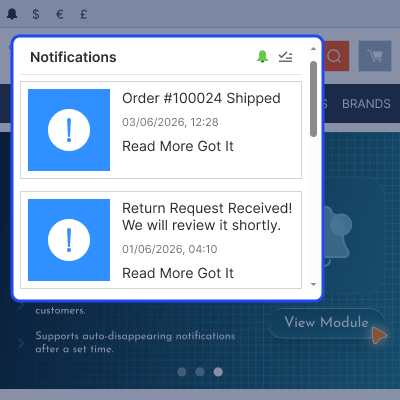
    • Keep customers informed without email.
    • Follow order and shipment progress.
    • View return requests and account updates.
    • Read replies from order discussions.
    • Track user group changes.
    • Receive gift certificate alerts.
    Order and Account Updates for Customers

    Create and Send Custom Messages

    Store staff can create and send custom notifications to specific customers. Each message includes a subject, short description, content, and a destination URL.
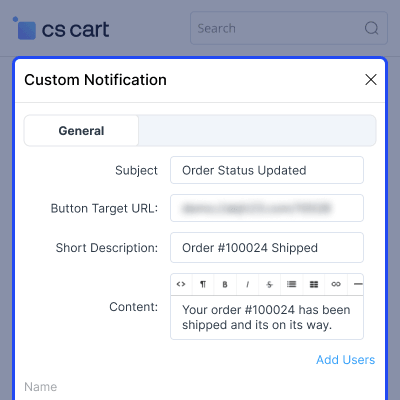
    • Create messages for selected customers.
    • Add a subject and short description.
    • Include detailed message content.
    • Add images to improve visibility.
    • Link customers to a specific page.
    • Send targeted customer updates.
    Create and Send Custom Messages

    Manage Store Alerts

    Store staff can view all notifications from one place. Each entry includes the title, description, destination URL, and creation date.
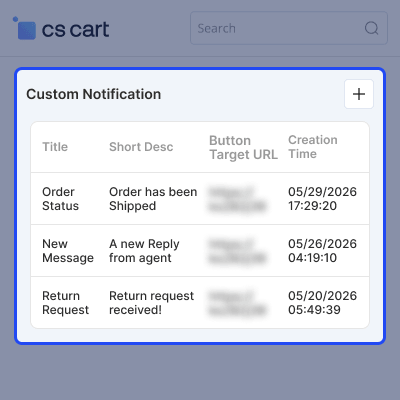
    • View all notifications in one place.
    • Review message details quickly.
    • Check linked pages and URLs.
    • Browse notification records.
    • See when messages were sent.
    Manage Store Alerts

    Configure Customer Alert Triggers

    Store owners choose which customer events create alerts. Each trigger can be turned on or off from the add-on settings.
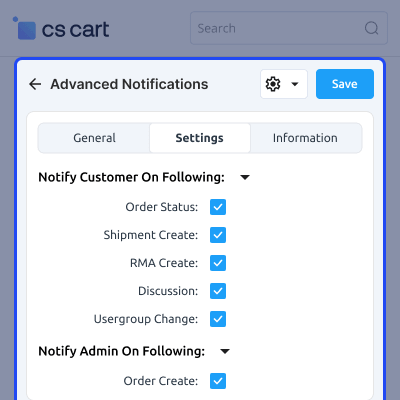
    • Control which events send alerts.
    • Enable or disable triggers as needed.
    • Send updates for order changes.
    • Notify customers about shipment activity.
    • Track returns and discussion updates.
    • Support user group related alerts.
    Configure Customer Alert Triggers

    Admin Alerts and Timeout Settings

    Store staff choose which store events create backend alerts. A timeout value controls when alerts are marked as seen.
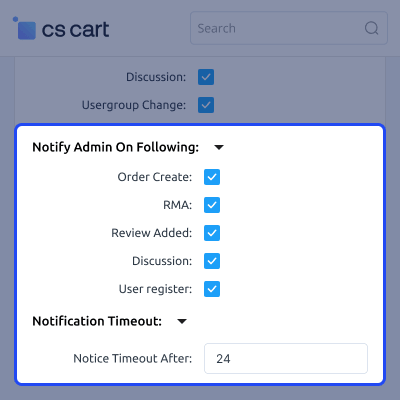
    • Receive alerts for key store activity.
    • Track new orders and registrations.
    • Monitor reviews and discussion posts.
    • Stay informed about return requests.
    • Set how long alerts remain active.
    • Mark older alerts as seen automatically.
    Admin Alerts and Timeout Settings

     CS-Cart Advanced Notification Support -

    For any query or issue please create a support ticket here http://webkul.uvdesk.com/

    You may also check our other top-quality CS-Cart Extensions.

    Specifications

    Product Version1.2
    Released8 years ago
    Last UpdatedJune 12, 2026 (1 day ago)
    Supported VersionsCS-Cart  CS-Cart Multivendor  4.16.x  4.17.x  4.18.x  4.19.x  4.20.x  
    Write a review

    Frequently Asked Questions

     Can I send a custom notification to a specific customer?
    Store staff can send custom notifications to selected customers from the admin panel.
     
     What information can I add to a custom notification?
    Add a subject, description, content, image, and page link.
     
     Can customers turn off alerts?
    Customers can manage alert settings from the storefront panel and stop alerts when needed.
     
     How long do notifications stay visible?
    Store owners set the timeout period in hours. After that, alerts are marked as seen.
     
     Does CS-Cart Advanced Notification module notify customers automatically?
    The module can send alerts when order updates, shipment events, and other store activities take place.
     
     Does this module work with CS-Cart Multi-Vendor?
    The module supports both CS-Cart and CS-Cart Multi-Vendor editions.
     
     Do vendors receive notifications on Multi-Vendor stores?
    Vendors receive alerts for new orders, status updates, and customer messages.

    Move to Cloud Today

    AWS Free tier hosting for one year by amazon web services, for more details please visit AWS Free Tier.

    GCP Free tier hosting for one year with 300 credit points by google cloud platform, for more details please visit GCP Free Tier.

    Azure free tier hosting for one year with 25+ always free services, for more details please visit Azure Free Tier.

    In our default configuration we will provide tremendous configuration for your eCommerce Website which is fast to load and response.

    Default Configuration Details of Server

    • 1 GB RAM
    • 1 Core Processor
    • 30 GB Hard Disk
    • DB with 1 GB RAM and 1 Core Processor

    * Server Configuration may vary as per application requirements.

    Want to know more how exactly we are going to power up your eCommerce Website with Cloud to fasten up your store. Please visit the Cloudkul Services.

    Get Started with Cloud
    • - Feature Add (+)
    • - Feature remove (-)
    • - Bug Fixed (!)
    • - Modification (*)
    Version 1.2
    • + Add a separate configuration for vendors that allows the admin to manage and control vendor-specific notifications independently.
    • ! Fixed the wrong discussion notification appearing for any type of object ID.
    • ! Fixed product messages keep adding due to no object type check.
    • ! Fixed order creation notification issue when two different vendors product in a cart.
    version 1.1
    • ! Fixed php notices
    • + Added theme patch for uni theme
    • * Change the location of notification icon to side bar
    • ! Fixed the git issues.
    Version version_1.0
    • * Compatible with cs-cart version 4.15.x.
    • + Vendor will also recieve the notification for Order Create and RMA for their orders.
    • ! Git Issues fixed. ! Fixed order communication issue.
    • ! Fixed suggestions and issues.


