USD
  • EUR
  • INR
  • USD
Cart
Cart 0
  • You have no items in your shopping cart.
    Cart
    Cart 0
    • You have no items in your shopping cart.
    Hire a Developer
    ×
    Contact Us!
    Send Again
    Close
    Please Login to Write Your Review

    CS-Cart Aramex Shipping Method

    CS-Cart Aramex Shipping Method connects your store with Aramex to show live shipping rates, create shipments, print shipping labels, and schedule pickups.


    • Show live Aramex rates at checkout for customer orders.

    • Let admin and vendors create shipments with Aramex.

    • Print order labels directly from the store dashboard.

    • Use Aramex for local and global order delivery.

    • Set up and manage shipment pickup requests with ease.

    • Offer cash on delivery through Aramex shipping services.

    • Add extra fees to delivery rates when needed.

    • Fill city details at checkout based on customer location.

    Screenshots
    CS-Cart Aramex Shipping Method CS-Cart Aramex Shipping Method CS-Cart Aramex Shipping Method CS-Cart Aramex Shipping Method CS-Cart Aramex Shipping Method CS-Cart Aramex Shipping Method CS-Cart Aramex Shipping Method CS-Cart Aramex Shipping Method
    Show More Hide All
    $79.00

    * Required Fields

    Add To Cart
    $79.00
    Configure and Buy
    • Description
    • Reviews
    • FAQ
    • Customers ()
    • Specifications
    • Cloud Hosting
    • Changelog

    CS-Cart Aramex Shipping Method connects your store with Aramex shipping services and shows live shipping rates during checkout. It helps sellers manage deliveries from one place.

    Store admins and vendors can create shipments directly from the CS-Cart backend. This cuts manual work and helps process orders faster each day. Shipping labels can be created in the store, making order packing easier. This helps teams handle shipments with less effort.

    Customers can choose local and international delivery options. They can view carrier delivery charges before placing an order. Pickup requests can be created and planned from the store panel. This saves time and helps manage deliveries more smoothly.

    Sellers can offer cash on delivery and add extra shipping charges when needed. City auto-fetch also reduces manual address entry during checkout.

    Check out our CS-Cart Aramex Connect Shipping module, which helps manage shipping for Australia and New Zealand.
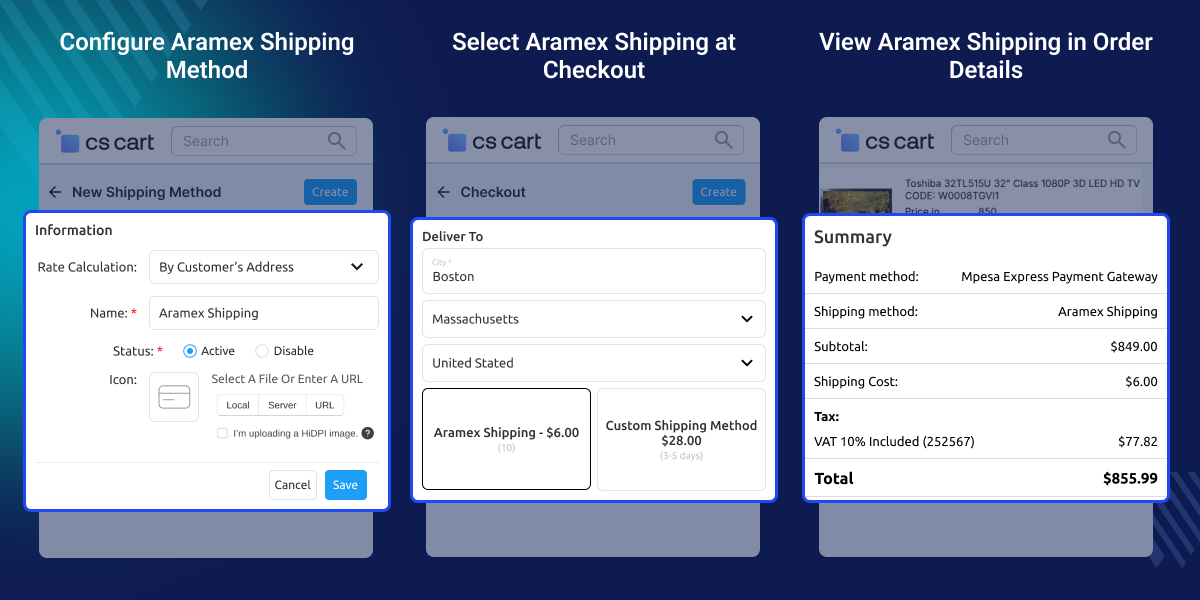
    CS-Cart Aramex Shipping Method

    Highlighted Features

     Real-time Shipping Rate

    The admin and vendor can easily configure the calculation of shipping rates in real-time through Aramex.

     Additional Charges Option

    The admin can set additional charges on the shipping rates for customers.

     Pickup Option

    The admin or vendor can create and schedule the pickup from Aramex for customers' orders.

     Create Shipment and Generate Shipping Label

    After receiving the order, the admin or vendor can create a shipment for the customer's order and generate the shipping label.

    Why do we need CS-Cart Aramex Shipping Method?

    CS-Cart stores often need delivery costs that match carrier rates. Manual pricing can cause wrong charges and may lead customers to leave their carts. Many stores do not have a direct way to connect with Aramex. As a result, creating orders for dispatch and printing labels can take extra time.

    Managing orders for multiple vendors becomes harder when delivery tasks are handled outside the store panel. CS-Cart Aramex Shipping Method brings rates, order dispatch, labels, and pickup requests into one place. This helps teams work faster and with fewer manual steps.

    Customers can see accurate delivery costs during checkout. Sellers can offer local, global, and cash on delivery options from the same setup. Used in day-to-day eCommerce operations, this add-on helps store owners save time, reduce effort, and handle orders more smoothly.

    If you want to display shipping costs on the product page, then you need to check out our CS-Cart Product Page Shipping Cost (Need to purchase separately). It can help to save time and build good relationships with customers. Resulting, the store owner facilitates fast delivery services to their customers. This module helps to increase eCommerce sellers to expand their reach.

    Use Cases

    These are some common business scenarios where this shipping integration can simplify order fulfillment and shipping management.

    • Multi-Vendor Marketplaces

      Vendors can create shipments and handle orders on their own.

    • International eCommerce Stores

      Show shipping costs and send orders to other countries.

    • Local Delivery Businesses

      Show clear shipping costs for local customer orders.

    • Cash on Delivery Stores

      Offer cash on delivery for eligible customer orders.

    • High-Volume Online Retailers

      Print labels and handle more orders in less time.

    • Businesses Using Pickup Services

      Set pickup requests from the store panel with ease.

    CS-Cart Aramex Shipping Method Configuration

    After installation, the admin can configure and enter Aramex account details, such as email, password, account pin, account number, entity, and country code.
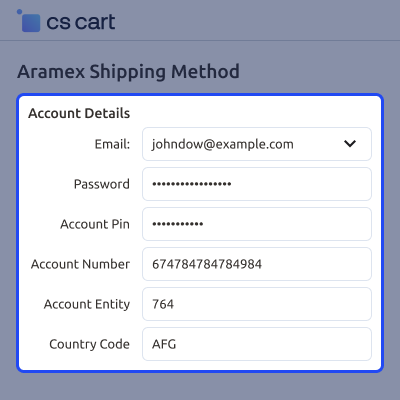
    • The admin can allow fetching cities from customers' countries on checkout or customer address pages.
    • The admin can choose domestic and express shipping. The admin needs to select the country code.
    • Which they choose during the creation account on Aramex.
    CS-Cart Aramex Shipping Method Configuration

    Creation of New Shipping Method

    The admin can configure new shipping methods according to their conditions.
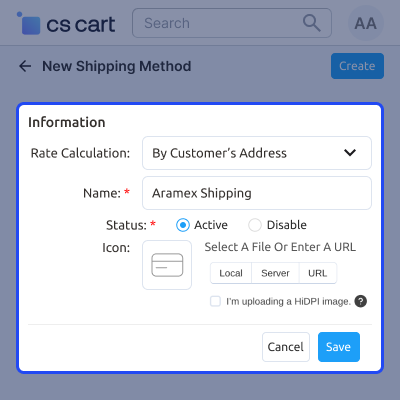
    • The admin can choose a rate calculation method, such as manual or real-time.
    • The admin can decide shipping method name.
    • Shipping method status enabled or disabled by the admin.
    • The admin can enter the delivery time.
    Creation of New Shipping Method

    Vendor End Management

    The vendor can also check and manage the Aramex shipping method, Such as shipping methods, rate areas, and store and pickup points.
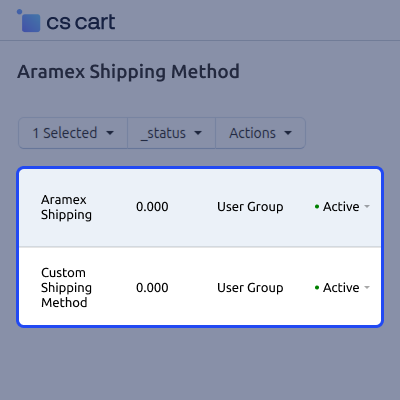
    • The vendor can view all shipping methods from the list.
    • The vendor can add a store location for pickup orders from Aramex.
    • Edit and delete the store and pick up points from the list by the vendor.
    Vendor End Management

     CS-Cart Aramex Shipping Method Support -

    For any query or issue please create a support ticket here http://webkul.uvdesk.com/

    You may also check our other top-quality CS-Cart Modules.

    Specifications

    Product Version4.1.0
    Released9 years ago
    CategoryCS-CartShipping
    Last UpdatedJune 23, 2026 (12 days ago)
    Supported VersionsCS-Cart Multivendor  4.16.x  4.17.x  4.18.x  
    Rating 5.0
    based on 1 reviews

    Recent Reviews

    Write a review

    Very Happy with Work

    Posted On - February 7, 2025

    The Webkul developer we worked with was very efficient and to the point with how the development went, with no attempts to drag the project out longer than happened naturally due to timezone communication delays. Very happy with his work.

    Frequently Asked Questions

     Do I need an Aramex account to use this add-on?
    Yes. You need an active Aramex account to connect your store with Aramex services. It is required for labels, pickups, and shipment creation.
     
     Can vendors manage Aramex shipping from their own panel?
    Vendors can manage Aramex shipping from their account. They can create shipments, generate labels, and manage pickup locations.
     
     How are shipping charges shown to customers?
    Customers can see live Aramex shipping rates during checkout. This helps them check delivery costs before placing an order.
     
     Can I add extra charges to the shipping cost?
    Store owners can add extra charges to shipping rates. These charges can be used for handling costs or other business needs.
     
     Does the add-on support international deliveries?
    Yes. Aramex supports both local and international deliveries. This helps stores serve customers across different regions.
     
     Can pickup requests be scheduled after creating a shipment?
    Pickup requests can be created after a shipment is generated. Sellers can also plan pickup times from the store panel.
     
     What information is required to connect Aramex with CS-Cart?
    You need your Aramex account details for setup. These include account number, PIN, entity, country code, and login details.
     
     Can shipping labels be generated for every shipment?
    Shipping labels can be created for generated shipments. This helps sellers pack and send customer orders more quickly.

    Move to Cloud Today

    AWS Free tier hosting for one year by amazon web services, for more details please visit AWS Free Tier.

    GCP Free tier hosting for one year with 300 credit points by google cloud platform, for more details please visit GCP Free Tier.

    Azure free tier hosting for one year with 25+ always free services, for more details please visit Azure Free Tier.

    In our default configuration we will provide tremendous configuration for your eCommerce Website which is fast to load and response.

    Default Configuration Details of Server

    • 1 GB RAM
    • 1 Core Processor
    • 30 GB Hard Disk
    • DB with 1 GB RAM and 1 Core Processor

    * Server Configuration may vary as per application requirements.

    Want to know more how exactly we are going to power up your eCommerce Website with Cloud to fasten up your store. Please visit the Cloudkul Services.

    Get Started with Cloud
    • + Features
    • - Bugs
    Version 4.1.0
    • + Updated changelog and readme.
    Version 4.1
    • - Fixed live mode location soap filename issue.
    Version 4.0
    • + Added fetch city button on register, checkout page.
    Version 3.0
    • - Fixed all the git issues
    Version 2.0
    • + Compatible with version 4.12.X.


