USD
  • EUR
  • INR
  • USD
Cart
Cart 0
  • You have no items in your shopping cart.
    Cart
    Cart 0
    • You have no items in your shopping cart.
    Hire a Developer
    ×
    Contact Us!
    Send Again
    Close
    Please Login to Write Your Review

    CS-Cart Custom Stock Status

    CS-Cart Custom Stock Status lets store owners display custom availability messages instead of default stock labels. Set quantity-based rules and show product availability more clearly.


    • Replace default stock labels with custom stock messages.

    • Show custom images for product stock availability.

    • Create stock status rules using quantity ranges.

    • Add unlimited custom stock status ranges.

    • Display inventory alerts based on available quantity.

    • Configure availability messages for individual products.

    • Apply availability updates across multiple products.

    • Change stock status using product option inventory.

    • Display inventory information directly on product pages.

    • Well integrated with CS-Cart Multi-Vendor.

    Additional Info

    Before installing the add-on, extract the downloaded package.

    • Install the License Manager add-on first.
    • Then install the required add-on.
    • Follow the license activation steps to generate your license key.

    Screenshots
    $49.00

    * Required Fields

    Add To Cart
    $49.00
    Configure and Buy
    • Description
    • Reviews
    • FAQ
    • Customers ()
    • Specifications
    • Cloud Hosting
    • Changelog

    CS-Cart Custom Stock Status lets store owners replace default stock labels with custom stock messages or images. This add-on helps display product availability in a clearer way.

    Store owners can create quantity-based rules. Different messages appear for different inventory levels and available quantities. This gives customers better stock information.

    Admin can set availability messages for individual products or update multiple products at once. This saves time when managing product stock status and inventory updates.

    This module also works with product option inventory. Stock status changes based on the selected options. If no rule matches, the default stock status appears. The add-on works with CS-Cart Multi-Vendor stores. Customers can view stock information before placing an order.

    You can also try CS-Cart Daily Deal Module to create limited-time offers and promote products. It helps create urgency and encourages customers to buy before deals expire.
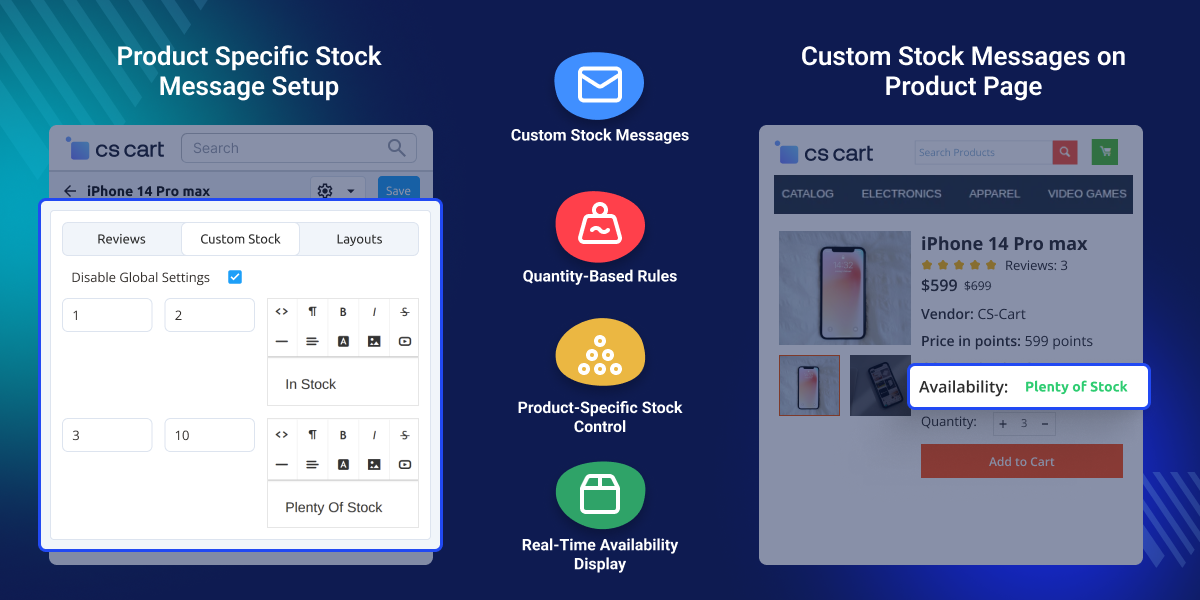
    edit

    Highlighted Features

     Personalized Message

    The custom message or image with the default in-stock or out-of-stock status.

     Quantity Specification

    The product quantity can be specified with the stock status, and the message will display.

     Global Update for Stock Status

    Using global updates, the stock status can be updated for multiple products at once.

     Stock Status Display

    Customers will be aware of the current stock status for any product.

    Why do we need CS-Cart Custom Stock Status?

    Default CS-Cart stock labels show basic stock details. They do not give enough product availability information. Customers want clear stock updates. They want to know the current inventory availability before they buy.

    Store owners also need more control. They may want different availability messages for different inventory levels. CS-Cart Custom Stock Status helps solve this problem. Store owners can create quantity-based rules for each product. They can show custom messages based on product inventory and stock quantity.

    The add-on can display inventory alerts when stock is low. It can also show messages for available stock or limited stock. Clear product availability helps customers make quick decisions. It also helps them understand product inventory before they place an order.

    The add-on supports better inventory management. It keeps inventory availability clear and easy to understand. This creates a better shopping experience for customers.

    You can also try CS-Cart Special Promotion Conditions to create targeted offers such as Buy X Get Y, new customer deals, and order-based discounts. It helps increase sales with smarter promotions.

    Use Cases of CS-Cart Custom Stock Status

     Low Stock Products

    Display inventory alerts when product quantities reach predefined limits.

     Fashion and Apparel Stores

    Show stock status for sizes and colors.

     Electronics Stores

    Display availability messages for products with limited inventory or incoming stock.

     Multi-Vendor Marketplaces

    Help vendors manage product stock status.

     Seasonal Product Sales

    Show stock messages during sales events.

     Stores With Product Options

    Update stock status using product options.

    Global Stock Settings

    Configure global quantity rules and availability messages from a single location. Display different messages for limited inventory, available products, or predefined quantity ranges.
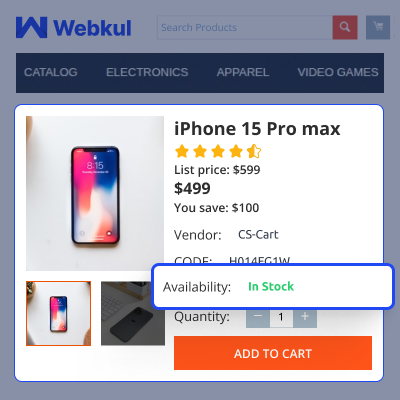
    • Create stock rules using quantity ranges
    • Set lower and upper stock limits
    • Add custom stock messages with editor support
    • Manage global product stock settings
    Global Stock Settings

    Custom Availability Messages on Product Pages

    Show custom stock messages on product pages to display product availability, delivery updates, low stock alerts, and other stock information based on product stock levels.
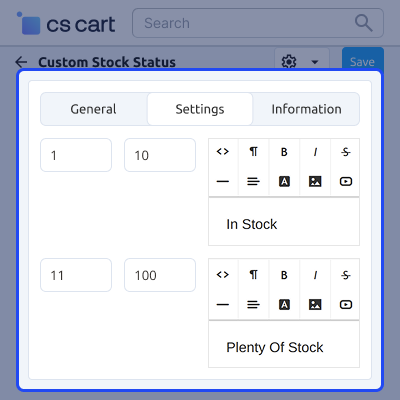
    • Show custom stock messages on product pages
    • Set stock status for individual products
    • Update product stock messages in bulk
    • Show default stock status when quantity is unavailable
    Custom Availability Messages on Product Pages

    Product-Specific Stock Messages

    Configure custom availability messages and quantity rules for individual products. Display different inventory messages based on product-specific requirements.
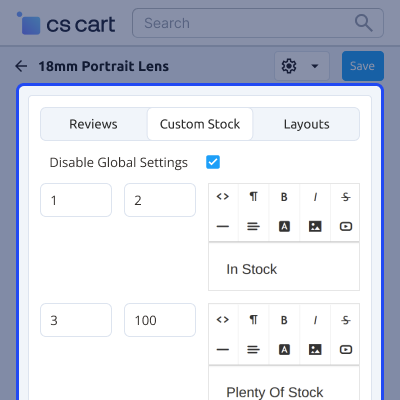
    • Override global stock settings for selected products
    • Set custom stock messages by quantity range
    • Create different stock messages for selected products
    • Show unique stock messages for each product
    Product-Specific Stock Messages

      Support for CS-Cart Custom Stock Status

    For any query or issue please create a support ticket here- http://webkul.uvdesk.com. Also, reach out to us for any CS-Cart customization development services.

    You may also check our other top-quality CS-Cart Modules.

    Specifications

    Product Version1.1
    Released9 years ago
    Last UpdatedJune 19, 2026 (15 days ago)
    Supported Versions4.14.x  4.15.x  4.16.x  4.17.x  CS-Cart  4.18.x  CS-Cart Multivendor  4.14.x  4.15.x  4.16.x  4.17.x  4.18.x  
    Write a review

    Move to Cloud Today

    AWS Free tier hosting for one year by amazon web services, for more details please visit AWS Free Tier.

    GCP Free tier hosting for one year with 300 credit points by google cloud platform, for more details please visit GCP Free Tier.

    Azure free tier hosting for one year with 25+ always free services, for more details please visit Azure Free Tier.

    In our default configuration we will provide tremendous configuration for your eCommerce Website which is fast to load and response.

    Default Configuration Details of Server

    • 1 GB RAM
    • 1 Core Processor
    • 30 GB Hard Disk
    • DB with 1 GB RAM and 1 Core Processor

    * Server Configuration may vary as per application requirements.

    Want to know more how exactly we are going to power up your eCommerce Website with Cloud to fasten up your store. Please visit the Cloudkul Services.

    Get Started with Cloud
    • - Feature Add (+)
    • - Feature remove (-)
    • - Bug Fixed (!)
    • - Modification (*)
    Version 1.1
    • ! When click on save button after fill the configuration details not working.
    • ! Text is not alligned correctly on the product page.
    • ! Language issue is coming when message is getting prefilled.
    • * Compatible with version 4.20.x
    Version 1.0
    • + Option for admin to set global settings to modify stock message.
    • + Option for admin to disable global setting for a particular product and set messages for individual product too.


