USD
  • EUR
  • INR
  • USD
Cart
Cart 0
  • You have no items in your shopping cart.
    Cart
    Cart 0
    • You have no items in your shopping cart.
    Hire a Developer
    ×
    Contact Us!
    Send Again
    Close
    Please Login to Write Your Review

    CS-Cart Point Of Sale System (POS)

    CS-Cart Point of Sale (POS) system connects physical stores with your online shop, synchronizing sales, inventory, and customer data across both channels in one unified retail system.


    • Real time inventory sync between physical stores and online CS-Cart store.

    • Offline billing mode with automatic data sync on reconnection.

    • Manage multiple POS outlets from one CS-Cart admin panel.

    • Assign sales agents to outlets and track individual performance.

    • Hold and resume active carts for faster checkout during peak hours.

    • Barcode scanner support for instant product search and billing.

    • Integrated customer profiles with full purchase history at checkout.

    • Process returns and replacements directly from the POS panel.

    • Create home delivery orders from the in store POS checkout.

    • Apply discounts and coupon codes at the POS checkout.

    • Progressive Web App, access POS on any tablet or browser, no install needed.

    Screenshots
    CS-Cart Point Of Sale System (POS) CS-Cart Point Of Sale System (POS) CS-Cart Point Of Sale System (POS) CS-Cart Point Of Sale System (POS) CS-Cart Point Of Sale System (POS) CS-Cart Point Of Sale System (POS) CS-Cart Point Of Sale System (POS) CS-Cart Point Of Sale System (POS) CS-Cart Point Of Sale System (POS) CS-Cart Point Of Sale System (POS)
    Show More Hide All
    $229.00

    * Required Fields

    Add To Cart
    $229.00
    Configure and Buy
    • Description
    • Reviews
    • FAQ
    • Customers ()
    • Specifications
    • Cloud Hosting
    • Changelog

    CS-Cart POS addon lets you run in store billing directly connected to your CS-Cart online store. Every sale made at the counter updates inventory, creates an order in store, and keeps customer records in sync, automatically.

    Most CS-Cart stores managing physical retail end up running two separate systems, one for in store billing and one for the online shop. That means manual stock updates, duplicate order records, and constant risk of overselling.

    This POS addon bridges that gap. Orders placed at the counter follow the same workflow as online purchases. Inventory adjusts across all channels in real time. There is no manual reconciliation.

    For stores with multiple outlets, each location can be managed independently from one admin panel. Staff access, product availability, and sales activity are tracked separately per outlet without switching between systems.

    The POS works in offline mode too. When internet connectivity drops, billing continues without interruption. All transactions sync automatically once the connection is restored, nothing is lost.

    On the shop floor, staff access the POS through a browser based Progressive Web App on any tablet or desktop. No native app installation is needed. Barcode scanning, cart holds, returns, and home delivery orders are all handled from the same interface.

    For faster checkout, adding CS-Cart Stripe POS Terminal integration handles secure card payments. This keeps your core setup the same while offering a professional payment experience.
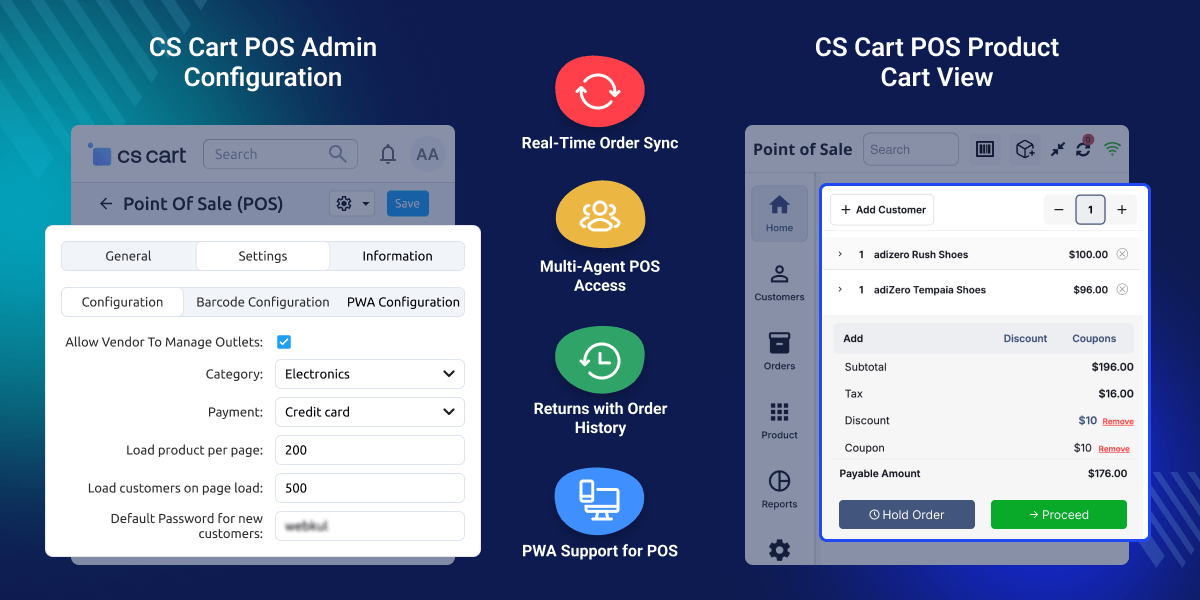
    CS-Cart POS System

    Highlighted Features of CS-Cart Point Of Sale System (POS)

     Live Inventory Sync

    Stock levels update instantly across your online and physical stores after every sale.

     All in One Orders

    Manage online and in store purchases together from a single dashboard.

     In Store to Home Delivery

    Let customers buy at the register and have the items shipped directly to their door.

     Offline Checkout

    Keep ringing up sales without WiFi. Your data syncs automatically when you reconnect.

     Multi Store Control

    Manage stock, staff, and products for all your physical locations from one place.

     Staff Tracking

    Assign cashiers to specific stores, set permissions, and track their individual sales.

     Store Specific Products

    Choose exactly which items are available to buy at each physical location.

     Hold and Resume Carts

    Pause a transaction to help the next person in line, then pick up right where you left off.

     Customer Profiles

    See a shopper's purchase history during checkout for faster, personalized service.

     Flexible Payments

    Accept cash, cards, and mobile payments quickly and easily at the register.

     Easy Returns

    Process refunds or exchanges at the counter while keeping your CS-Cart system updated.

     Barcode Scanning

    Instantly find and add products to the cart using any compatible scanner.

     Hardware Support

    Easily connect your receipt printers, cash drawers, and card readers.

     Tablet and Mobile Ready

    Run the POS right from your web browser. No app downloads are needed.

    Why Businesses Choose CS-Cart Point of Sale (POS) over Separate Retail Systems

    CS-Cart Point of Sale connects your online shop with your physical store. While standard CS-Cart is built only for online sales, it lacks a way to bill customers in a real shop.

    This often forces owners to use separate software for their counter. Running two systems makes it hard to manage your business because stock levels quickly get out of sync.

    Orders live in two different places, making it difficult to track your total revenue. Staff must update records by hand after every in store sale, which leads to errors as you grow.

    The addon solves this by putting your store directly in your main panel. Every in person sale becomes a CS-Cart order, and stock is taken from the same shared catalog.

    Customer records are shared across both channels for a better experience. Scaling your business is also simple with a range of extra tools designed for growth.

    You can use the CS-Cart POS app to let your team sell anywhere on the floor. This allows you to assist customers and close sales right where they stand.

    Use Cases for CS-Cart Point of Sale (POS) System

    Explore how the CS-Cart POS addon supports different retail business scenarios.

    • Omnichannel Retail Stores

      Manage physical and online stores from one place, with inventory, orders, and promotions syncing automatically across all channels.

    • Independent Retail Stores

      Handle in-store billing while keeping stock and orders synced to your CS-Cart shop, so all your sales stay organized in one place.

    • Busy Checkout Counters

      Speed up checkout during peak hours with a cart hold tool that lets staff pause a sale, serve another customer, and pick up right where they left off.

    • Pop-up Stores and Temporary Events

      Sell at events or temporary locations without internet access. Sales sync automatically once you're back online, so no data is lost.

    • Showrooms and Home Delivery

      Take orders in person and ship directly to customers using CS-Cart's delivery methods, perfect for showrooms where customers browse and choose home delivery.

    • Mobile Sales on the Shop Floor

      Complete sales anywhere on the floor using tablets or mobile devices, without customers having to visit the main counter.

     An Ultimate User Interface

    The POS system for CS-Cart provides an ultimate user experience by providing an eye-catching view of the POS panel. The design is responsive to the tab and desktop screens. Various buttons for various purposes are quite user-friendly and add charm to the system. Have a look at the POS design below.
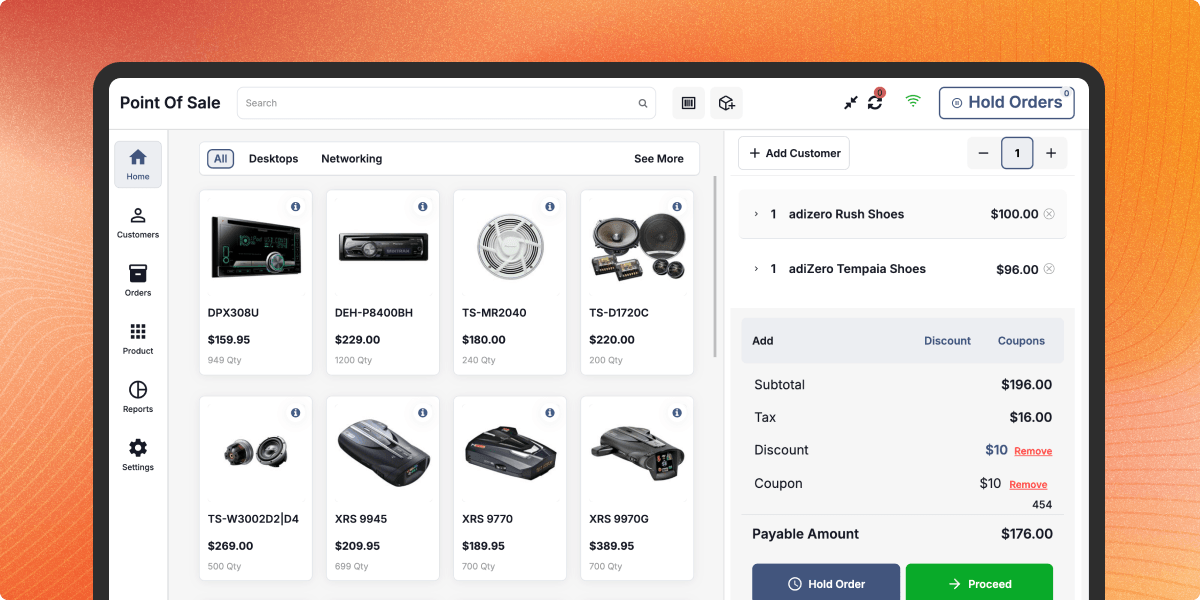
    Ultimate user interface

     Offline Mode

    POS System provides the most valuable and unique feature so that your sales agent, cashier, etc. can work on the POS system in offline mode also.
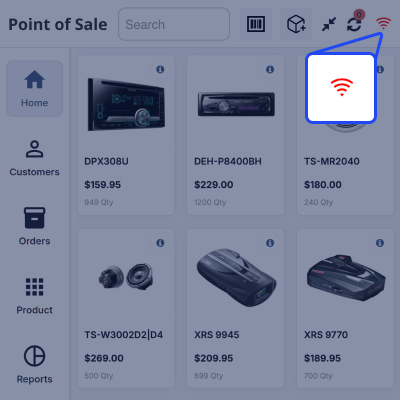
    • They can use all the functions and features of the POS in offline mode.
    • They can complete all the transactions without the use of the internet.
    • This feature will also benefit you when you have your store in a poor internet connectivity area or no internet area.

    Please Note - For now, you cannot apply coupons or gift certificates in Offline mode.

    Offline Mode

     Sales Agent Management

    The Admin can manage his Salesperson and track their performance by viewing their orders. Can even create a new Salesperson and assign them an Outlet.

    • Admin can create salesperson.
    • Admin can assign the outlet to the salesperson.
    • Admin can give the POS access to as many sales agents as he wants.
    Salesperson Management

     Separate POS Products Management

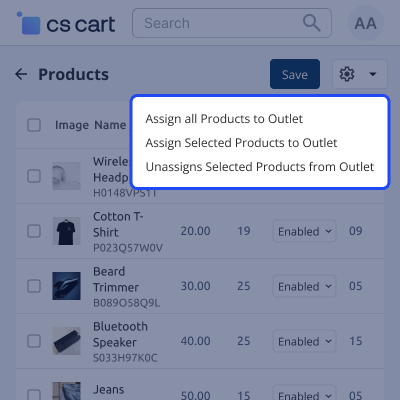
    Admin can manage their POS products separately. From the product listing panel, the admin can:

    • Enable or disable products for POS using the POS Status option.
    • Assign all products to an outlet or select specific products to assign/unassign from POS.
    • Admin can list the products only for POS.

     Multiple Cart System

    The Sales Agent can create multiple carts and can hold the transactions at that time. He can easily proceed to next the transactions without deleting the uncompleted order/hold order.
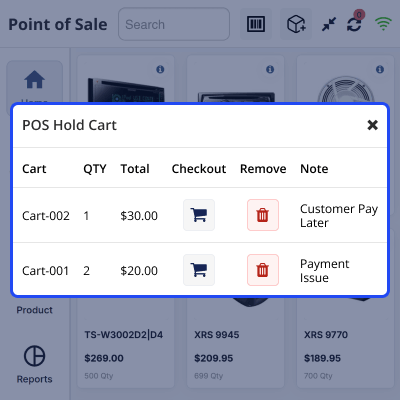
    • Multiple Carts Management.
    • Option to view & resume the held carts any time.
    • The agent can create carts as much as required.
    Multiple Cart System

     Easy Pay- Easy Checkout

    The most time-saving feature will provide your customer with a hassle-free shopping experience at the point of sale system.
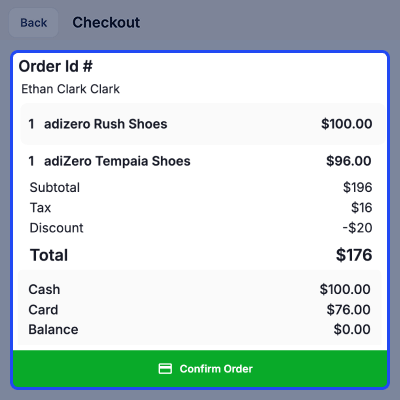
    • The POS user (Sales Agent) can easily manage the long customer queue so that the customers will not have to wait for a long time.
    • Simply scan the products and proceed to the checkout.
    Easy Pay- Easy Checkout

     Hardware Support

    Connecting your POS system with the below-mentioned hardware will help you speed up the checkout process on your offline stores and enhance the user experience.
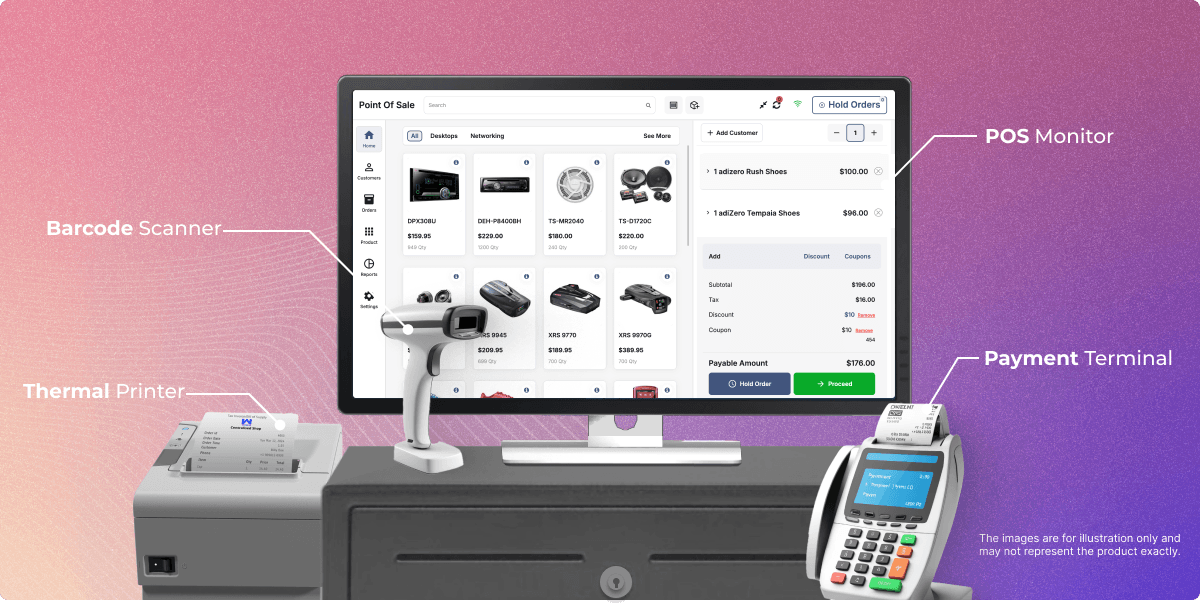
    • Barcode Scanner - Allow sales agents to add the products to the POS cart by scanning the barcode. Speed up and simplify the purchase process on your physical stores with barcode scanning. Connect barcode scanner with your POS device via Bluetooth, Bluetooth Dongle, OTG, or USB.
    • Printer - This extension automatically connects the POS system to the printer on page load. The sales agent can print the order receipt with the help of a printer. Connect the printer with your POS device via Bluetooth, Wi-fi, or USB port. Please note the printer should be compatible with POS.
    • Cash Drawer - Manage daily transactions of a POS outlet with the cash drawer. The cash drawer is not directly connected to a POS device. It is connected with a printer via RJ11/RJ12. The cash drawer will open on the command of invoice printing.
    • Payment Terminal - This device allows sales agents to accept various forms of payment, including credit/debit cards and mobile wallets, directly at the checkout. Connect the payment terminal to your POS system via Bluetooth, Wi-Fi, or USB.
    configuration

     Progressive Web App

    Now the user can use the web app of the POS panel.
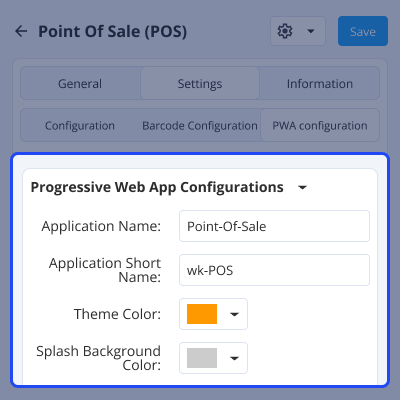
    • Customer can use their existing credentials to log in to the app.
    • It will work similarly to the POS panel.
    • The admin can configure the settings from their panel and it will reflect in the app.
    • The admin can set the name, short name, theme color, background color, app logo, and icon.
    • Also, need to enter the sender key for web push notifications.
    Progressive Web App

    CS-Cart Point Of Sale System (POS) Support -

    For any query or issue please create a support ticket here http://webkul.uvdesk.com/

    You may also check our other top-quality CS-Cart Extensions.

    Specifications

    Product Version3.4
    Released8 years ago
    Last UpdatedMarch 31, 2026 (9 days ago)
    Supported Versions4.14.x  4.15.x  4.16.x  4.17.x  4.18.x  CS-Cart  
    Rating 5.0
    based on 7 reviews

    Recent Reviews

    Write a review

    CS-Cart Add on Modification

    Posted On - September 9, 2024

    I recently worked with Webkul for the customization of my POS software, and I couldn't be more impressed. Their team was professional, responsive, and highly skilled. They understood my business needs and delivered a tailored solution that has streamlined my operations. The software works flawlessly, and their attention to detail was outstanding. I highly recommend Webkull for anyone in need of high-quality software development and customization services.

    Live Support and flexibility

    Posted On - September 2, 2024

    The support was able to assist with all open questions regarding the enhancements of my CS Cart platform. They recommended also further assistance and pricing per chat and email. @Himanshi Saini

    Excellent support and services

    Posted On - March 10, 2023

    They are amazing and fast at what you want. Sure I will do with them my other projects.

    CEO

    Posted On - February 28, 2023

    Amazing support from the team, they are patient and follow up on every detail to the end very humble in making me a happy customer.
    You will enjoy working with them.

    Their genuine desire to solve an issue and help me with their services have impressed me the most

    Posted On - January 21, 2023

    Although Webkul's developers do not require any work measures, they've successfully developed functional software, which has met the client's expectations. The client is pleased with the team's friendliness and passion for helping the internal team. They're responsive and supportive in the workflow.

    Load more reviews

    Frequently Asked Questions

     Does CS-Cart POS work with offline mode?
    Yes, CS-Cart POS can work in offline mode, when the POS connects to the internet, all data will be synchronized.
     
     Is it possible to assign multiple sales agents to a single outlet at the same time?
    Yes, multiple sales agents can be assigned to a single outlet at the same time.
     
     Is it possible to create multiple POS outlets and assign vendors to them?
    Yes, the admin can create multiple POS outlets and add specific products to each. Vendors can be assigned to multiple outlets, and a single outlet can also be shared by multiple vendors.
     
     Is the POS system compatible with a Bluetooth printer and a barcode scanner?
    The hardware connectivity is determined by the device. If the equipment supports Bluetooth printing, barcode scanning, and RFID card scanning, then the POS will as well.
     
     Is it possible for the sales agent to update the product price?
    Yes, the price of a product that has already been put to the cart can be changed by the sales agent. When the product is in the POS cart, the sales agent must tap on the pricing.
     
     Is it possible to use the credit balance when offline?
    Only in the online mode can the credit balance be used.
     How is the product inventory managed after it has been returned?
    After the return has been processed, the admin updates the product one by one.

    Move to Cloud Today

    AWS Free tier hosting for one year by amazon web services, for more details please visit AWS Free Tier.

    GCP Free tier hosting for one year with 300 credit points by google cloud platform, for more details please visit GCP Free Tier.

    Azure free tier hosting for one year with 25+ always free services, for more details please visit Azure Free Tier.

    In our default configuration we will provide tremendous configuration for your eCommerce Website which is fast to load and response.

    Default Configuration Details of Server

    • 1 GB RAM
    • 1 Core Processor
    • 30 GB Hard Disk
    • DB with 1 GB RAM and 1 Core Processor

    * Server Configuration may vary as per application requirements.

    Want to know more how exactly we are going to power up your eCommerce Website with Cloud to fasten up your store. Please visit the Cloudkul Services.

    Get Started with Cloud
    • + Features
    • - Bugs
    Version 3.4
    • ! Fixed outlet assignment issues.
    • + Added support for assigning multiple outlets to a company.
    • + Companies can now manage outlets and assign them to vendors.
    Version 3.3
    • + Search order id for order and return orders.
    • + Return order option on order details.
    • ! Fixed icon alignment issue.
    Version 3.2
    • + Compatible with version 4.18.x.
    • ! Fixed Coupon price issues on returned.
    Version 3.1
    • + Vendor can manage POS Outlet.
    • ! Fixed installation issue on ultimate version of CS-Cart.
    Version 3.1
    • ! Variation product price was incorrect.
    • ! Scanning barcode of variation product not working.
    Version 2.9.2
    • ! Order details are not getting displayed.
    Version 2.9.1
    • + Add a select box here to increase or decrease the quantity
    • + Add customer name to invoice
    Version 2.9
    • Login Page alligned to center.
    • Added Customer list to the sidenav.
    • Optimize Loading bar.
    • Cart empty background has been added.
    • On refreshing product, Only Product div will refresh.
    • Updated Cash drawer page.
    • Added customer name to invoice.
    • Improved quantity changer for cart.
    Version 2.8
    • The design of POS is now updated
    • The color of the background, active buttons, and inactive buttons will be managed at the backend.
    • Vendor Administrator image in multivendor or administrator in multistore can now be updated.
    • home delivery
    • cashier profile can be updated now
    • add product detail can now be seen
    • when a product is disabled from the store then it will not be shown in the POS outlet product section.
    • if no outlet is created and neither admin is assigned to any outlet then the account can not get logged in
    • Product filter and pagination at the pos product page
    • product, customer and all types of data will be loaded through the ajax
    Version 2.7
    • git issues resolved
    Version 2.6
    • git issues resolved
    Version 2.5
    • git issues resolved
    Version 2.4
    • PWA
    • The Backend POS products section is managed by Outlets.
    • Add the functionality of the Opening Drawer while initializing the POS.
    • return
    • cash and card + split payment
    • Products loaded through ajax
    • Customers added through pos can use the store and also