USD
  • EUR
  • INR
  • USD
Cart
Cart 0
  • You have no items in your shopping cart.
    Cart
    Cart 0
    • You have no items in your shopping cart.
    Hire a Developer
    ×
    Contact Us!
    Send Again
    Close
    Please Login to Write Your Review

    Odoo Backend Debranding

    Odoo Backend Debranding Module helps businesses remove default Odoo branding and apply their own company identity across the backend system to some extent.


    • Replace the backend logo with your company logo.

    • Update the browser tab title with your brand.

    • Remove Odoo branding from backend screens.

    • Clean the login page by removing platform name.

    • Rename “OdooBot” to a simple system name.

    • Remove “My Odoo.com Account” option.

    • Show your company name in outgoing emails.

    Screenshots
    Odoo Backend Debranding Odoo Backend Debranding Odoo Backend Debranding Odoo Backend Debranding Odoo Backend Debranding Odoo Backend Debranding
    Show More Hide All
    $30.00

    * Required Fields

    Add To Cart
    $30.00
    Configure and Buy
    • Description
    • Reviews
    • FAQ
    • Customers ()
    • Specifications
    • Cloud Hosting
    • Changelog

    Odoo Backend Debranding is a simple module that helps businesses white-label their Odoo and remove default Odoo branding from the backend.

    It allows you to change logos, system names, browser titles, and messages so the system looks like your own company software.

    Odoo Backend Debranding Module keeps everything clean and professional for internal users.

    Employees only see your company branding while working, which improves trust and gives a better system experience without any technical work.
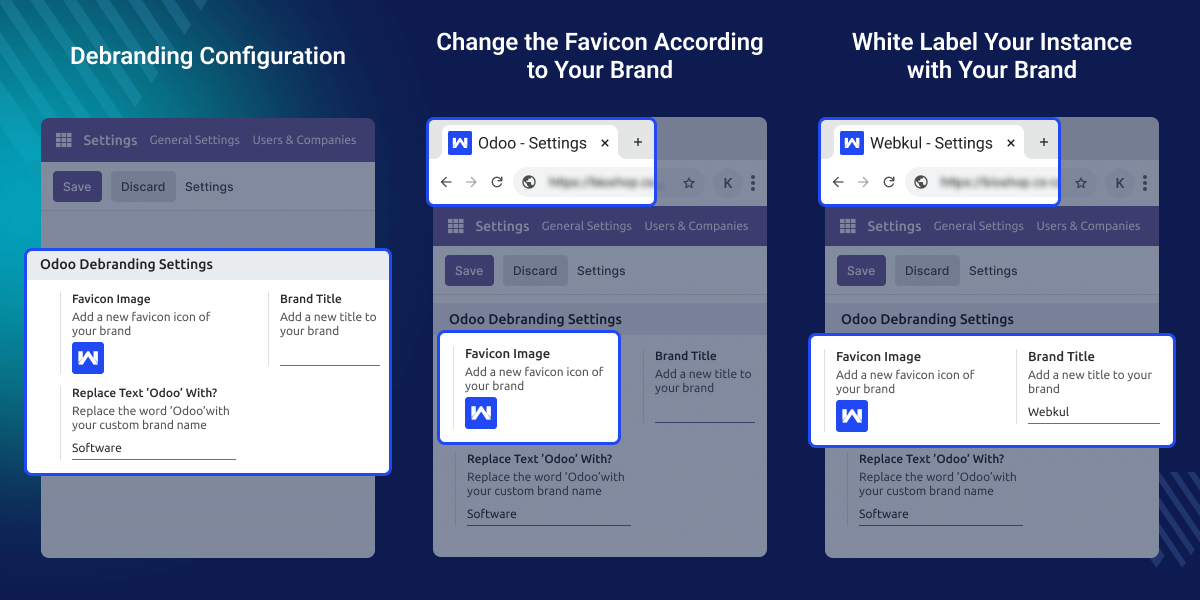
    Odoo Backend Debranding

    Why Do We Need Odoo Backend Debranding?

    Odoo Backend Debranding Module is needed when companies want their ERP to look like their own system. Default Odoo branding can confuse users or reduce brand identity. This module helps show a clean, company-owned system.

    For example, Odoo service providers. They can deliver a fully branded ERP to clients by removing all Odoo references and applying the client’s logo, name, and email branding.

    Highlighted Features of Odoo Backend Debranding

    White Label Experience

    Make Odoo look like your own company system with full white-labeling.

    System Name Control

    Change the name “OdooBot” to “System” or any custom name you prefer.

    Logo & Account Control

    Replace the Odoo logo with your company logo and remove the “My Odoo.com Account” option from the backend.

    Email Branding Support

    Show your company name in outgoing emails to keep branding consistent.

    Branding Configuration

    Odoo Backend Debranding Module allows you to white-label and apply your company branding in a few easy steps.
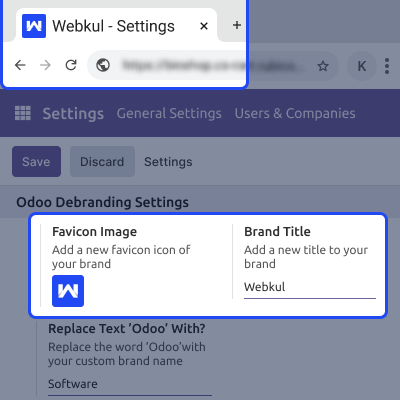
    • Change the browser title to the company name
    • Replace backend branding visuals
    • Apply white labeling easily
    • No technical steps needed
    Branding Configuration

    System Name & Message Control

    Odoo Backend Debranding Module helps you clean system text and messages so users only see neutral or company-specific names.
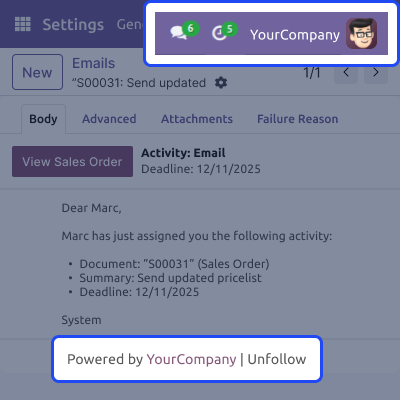
    • Rename “OdooBot” to the system name
    • Remove Odoo name from messages
    • White-label company name in emails.
    System Name & Message Control

    Logo & Login Cleanup

    Our module lets you clean the login screen and backend options to match your company branding. This improves user trust and system appearance.
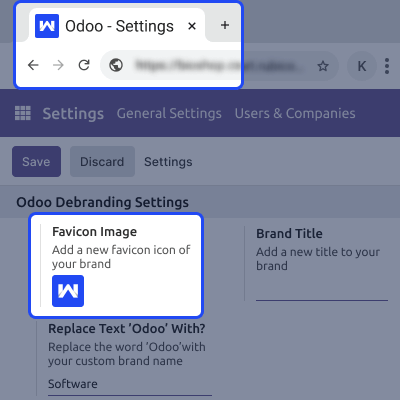
    • Change the favicon on browser.
    • Remove the platform name(Odoo) from the login
    • Remove the “My Odoo.com Account” option from Odoo
    Logo & Login Cleanup

    Odoo Backend Debranding -

    Webkul's dedicated support provides you with the customizations and troubleshooting solutions for Odoo Backend Debranding.

    For any query or issue please CREATE A TICKET HERE

    You may also check our other top-quality Odoo Plugins.

    Specifications

    Product Version1.0.1
    Released7 years ago
    CategoryOdoo AppsTool
    Last UpdatedDecember 24, 2025 (3 months ago)
    Supported Versions18.x  Odoo  11.x  12.x  13.x  14.x  15.x  16.x  17.x  19.x  
    Rating 5.0
    based on 2 reviews

    Recent Reviews

    Write a review

    Best Support Ever

    Posted On - November 22, 2021

    Best service and clear reply. lead our customer smile

    unbelievable support

    Posted On - February 2, 2019

    it is a great module, but support is the greatest it takes from me only 1 request and highly professional technical support response immediately

    FAQ's

      Can I fully remove Odoo branding from the backend?
    The module allows you to remove almost all Odoo branding from menus, messages, the login page, browser title, and notifications.
      Can I change the name “OdooBot”?
    Yes, You can rename “OdooBot” to “System” or any name you choose.
      Will this affect how Odoo works?
    No, The module only changes the look and text. All system features work the same.
      Can I show my company name in emails sent from Odoo?
    Yes, The module allows you to white-label your company name in outgoing emails.
      Can I change branding settings later?
    Yes, All branding options can be updated anytime from the settings.

    Move to Cloud Today

    AWS Free tier hosting for one year by amazon web services, for more details please visit AWS Free Tier.

    GCP Free tier hosting for one year with 300 credit points by google cloud platform, for more details please visit GCP Free Tier.

    Azure free tier hosting for one year with 25+ always free services, for more details please visit Azure Free Tier.

    In our default configuration we will provide tremendous configuration for your eCommerce Website which is fast to load and response.

    Default Configuration Details of Server

    • 1 GB RAM
    • 1 Core Processor
    • 30 GB Hard Disk
    • DB with 1 GB RAM and 1 Core Processor

    * Server Configuration may vary as per application requirements.

    Want to know more how exactly we are going to power up your eCommerce Website with Cloud to fasten up your store. Please visit the Cloudkul Services.

    Get Started with Cloud
    Not Available


