USD
  • EUR
  • INR
  • USD
Cart
Cart 0
  • You have no items in your shopping cart.
    Odoo Apps Extensions
    Cart
    Cart 0
    • You have no items in your shopping cart.
    Hire a Developer
    ×
    Contact Us!
    Send Again
    Close
    Please Login to Write Your Review
    Odoo SEO-URL Redirect/Rewrite For Blog

    Odoo SEO-URL Redirect/Rewrite For Blog

    x
    Free

    * Required Fields

    $25.00
    Add To Cart

    Odoo SEO-URL Redirect/Rewrite For Blog rewrites website blog and blog post URLs and adds redirects so old links keep working after a slug changes.


    • Rewrite the URL slug of any website blog or blog post.

    • Auto-create a permanent redirect when a slug is changed.

    • Bulk update slugs for many blogs or blog posts at once.

    • Add a custom suffix to blog and blog post URLs.

    • Remove the /blog controller for human-friendly links.

    • Set a default slug pattern for new blogs and posts.

    • Create manual 301, 302, or 308 redirects for blog pages.

    • Track every blog and blog post slug from one list view.


    Odoo SEO-URL Redirect/Rewrite For Blog
    Odoo SEO-URL Redirect/Rewrite For Blog
    $25.00
    Check How It Works

    Need Help Deciding?

    Support answers within one business day.

    Open a ticket
    $25.00
    Configure and Buy
    X
    • Description
    • Reviews
    • FAQ
    • Customers ()
    • Specifications
    • Cloud Hosting
    • Changelog

    Odoo SEO-URL Redirect/Rewrite For Blog lets admins rewrite the URL slug of any Odoo website blog or blog post. The new slug can read cleanly and match what buyers search for.

    Admins open the Blog URL Rewrites or Blog Post URL Rewrites list. They edit the SEO Url Key for a record and save it. Odoo creates a permanent redirect from the old slug automatically.

    A Pattern For Url Key value sets the default slug for new blogs and posts. This same bulk URL update also runs from the Update SEO URL action on existing records.

    Each Blog Seo Configuration and Blog Post Seo Configuration record carries a Use Web Server Rewrites switch. This switch drops the /blog or /blog/blog-name/post controller from the URL. Separately, a Use Suffix in URL switch appends a suffix such as .html.

    Website Redirects add manual entries for blog pages, from a 301 redirect or a 302 redirect to a 308 rewrite or a 404 response. A Create URL Rewrite field ties the redirect to the Blog or Blog Post model.

    The module requires and extends the parent Odoo SEO-URL Redirect/Rewrite module, which must already be installed on the website.
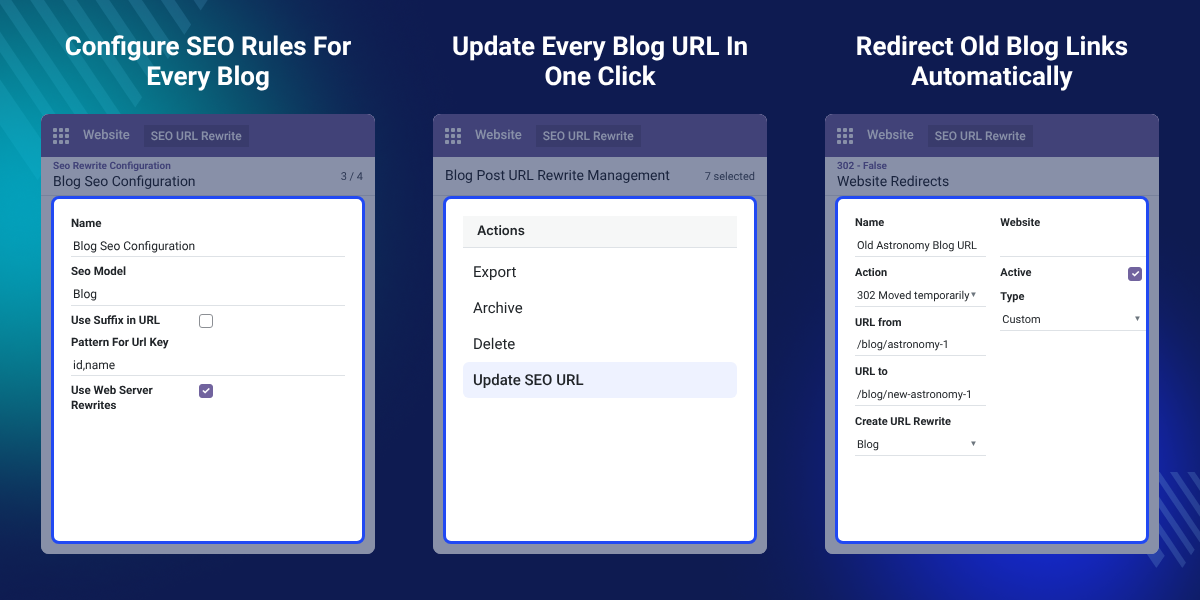
    Odoo SEO-URL Redirect/Rewrite For Blog

    Highlighted Features of Odoo SEO-URL Redirect/Rewrite For Blog

     Blog URL Rewriting

    Change the SEO Url Key of any website blog and let Odoo redirect the old link automatically.

     Blog Post URL Rewriting

    Rewrite the SEO Url Key of individual blog posts without breaking existing links.

     Bulk SEO URL Update

    Select multiple blogs or blog posts and apply the saved url key pattern from one Actions menu.

     Automatic Redirects

    Odoo creates a permanent redirect the moment a blog or blog post slug changes.

     Manual URL Redirects

    Add a 301 redirect, a 302 redirect, or another Website Redirect for a blog page from one list.

     Blog URL Suffixes

    Enable Use Suffix in URL to append text such as .html to blog and blog post links.

    Why Do We Need Odoo SEO-URL Redirect/Rewrite For Blog?

    Odoo generates blog and blog post URLs from the title by default. Long or awkward titles do not produce an SEO friendly blog URL that matches what people search for.

    Editing a blog or post title later changes its live URL. Visitors then hit a link that stops resolving. Without this module, an admin has to build a redirect by hand for every page that moved.

    Odoo SEO-URL Redirect/Rewrite For Blog lets admins set the SEO Url Key directly from the Blog URL Rewrites and Blog Post URL Rewrites lists. Odoo writes the redirect for them when the slug is saved.

    Every configuration record moves through a Draft, Ready, and Locked status. It also flags itself Missing seo url keys until every blog or post in that model has a slug set.

    Also, check our extension Odoo SEO-URL Redirect/Rewrite For Event. This sister module rewrites and redirects URLs for event pages the same way this module handles blog pages.

    Odoo Blog SEO URL Use Cases

    • Cleaning Up Legacy Blog URLs

      Rewrite slugs left over from an import or a theme migration into short, readable paths.

    • Migrating Blog Content to New Slugs

      Move a blog to a new slug structure while Odoo keeps the old URLs redirecting.

    • Standardizing New Blog Post Slugs

      Apply one Pattern For Url Key so every new post gets a consistent URL shape.

    • Removing Blog Controllers for Cleaner Links

      Switch on Use Web Server Rewrites to drop /blog or /blog/blog-name/post from public URLs.

    Blog & Blog Post SEO Configuration

    Blog & Blog Post SEO Configuration holds one record for the Blog model and one for the Blog Post model. It sits under Website > SEO URL Rewrite > Configuration > Seo Rewrite Configuration.
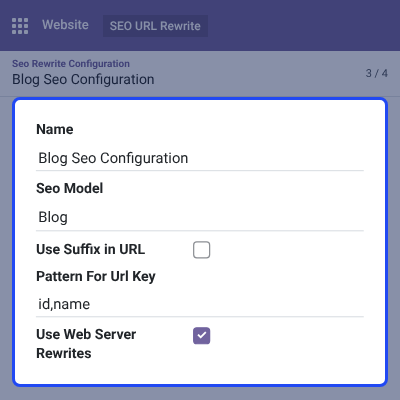
    • Set the Seo Model to Blog or Blog Post for each configuration record.
    • Enter a Pattern For Url Key, such as id,name, to build default slugs for new records.
    • Enable Use Web Server Rewrites to drop the /blog or /blog/blog-name/post controller from the URL.
    • Switch on Use Suffix in URL and set a Suffix Value, such as .html, for blog and blog post links.
    • Move a configuration from Draft to Ready to Locked as its slugs are generated.
    • Watch for the Missing seo url keys flag until every blog or post in that model has a slug.
    Blog & Blog Post SEO Configuration

    Blog URL Rewrites

    Blog URL Rewrites opens as an editable list, titled Blog URL Rewrite Management. This screen shows every website blog and its SEO Url Key on one screen.

    Additionally, check our extension Odoo Advance Website Blog Search to let visitors filter blog content by title, author, or tag.
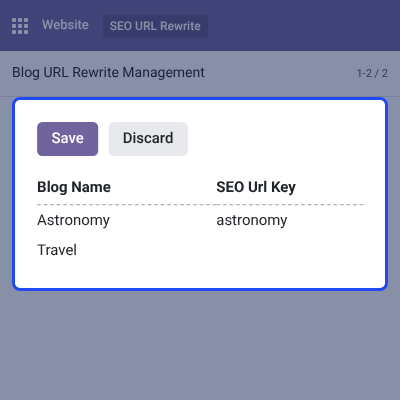
    • List every blog by its Blog Name in one screen.
    • Click a blog's SEO Url Key cell and type a new slug inline.
    • Save the list to apply the new slug to the blog's live URL.
    • Let Odoo write a permanent redirect from the old slug automatically.
    • Leave the SEO Url Key blank to keep a blog on its default, title-based slug.
    Blog URL Rewrites

    Blog Post URL Rewrites

    Blog Post URL Rewrites works the same way as the blog list. It is titled Blog Post URL Rewrite Management and covers every individual blog post.

    Additionally, check our extension Odoo Multi Website Blog Extension. This extension keeps each website's blogs separate when one Odoo instance runs more than one website.
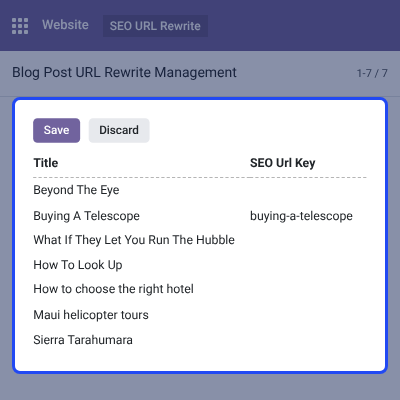
    • List every post by its Title alongside an editable SEO Url Key column.
    • Change a post's SEO Url Key inline and save to update its slug.
    • Trigger an automatic redirect from the post's old URL to the new one.
    • Manage every post's slug from one screen instead of opening each post.
    Blog Post URL Rewrites

    Bulk SEO URL Update

    Bulk SEO URL Update applies the configuration's Pattern For Url Key to many blogs or blog posts in one pass. This bulk URL update replaces editing each slug by hand.
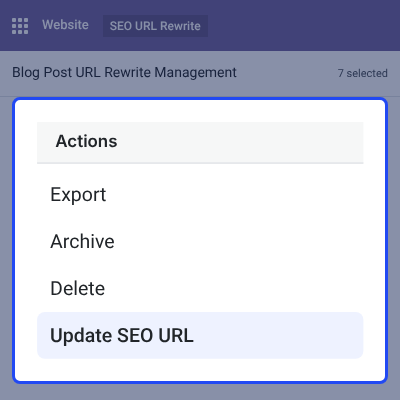
    • Select multiple rows in the Blog URL Rewrite Management or Blog Post URL Rewrite Management list.
    • Open the Actions menu on the selected records.
    • Choose Update SEO URL to regenerate slugs from the saved pattern.
    • Apply the update across an entire blog's posts after a migration or cleanup.
    Bulk SEO URL Update

    Website Redirects for Blog Pages

    Website Redirects create a manual link between an old blog URL and a new one. They cover moves that a simple slug rewrite does not.

    Additionally, check our extension Odoo SEO-URL Redirect/Rewrite For Brand. This sister module rewrites and redirects brand page URLs the same way this module handles blog URLs.
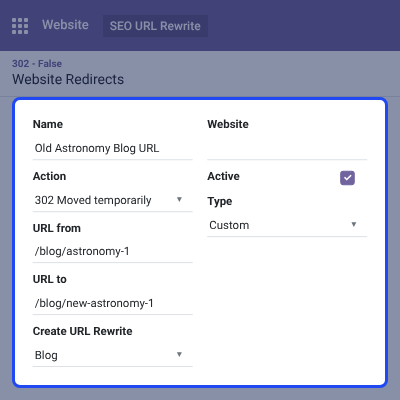
    • Set the Action to 301 Moved permanently, 302 Moved temporarily, 308 Redirect / Rewrite, or 404 Not Found.
    • Enter the existing URL from and the destination URL to.
    • Set Create URL Rewrite to Blog or Blog Post to tie the redirect to that model.
    • Read the Type field to tell a Custom, manually added redirect apart from one Odoo created automatically.
    • Toggle a redirect Active or turn it off without deleting the record.
    Website Redirects for Blog Pages

    Complete Odoo SEO-URL Redirect/Rewrite For Blog Feature List

    Blog & Blog Post URL Rewriting

    • Set the SEO Url Key for any blog or blog post from an editable list
    • Apply a Pattern For Url Key to auto-generate default slugs for new records
    • Move each Blog Seo Configuration or Blog Post Seo Configuration through Draft, Ready, and Locked status
    • Flag a configuration Missing seo url keys until every record in that model has a slug

    Redirect Management

    • Auto-create a permanent redirect whenever a blog or blog post slug changes
    • Add manual Website Redirects with 301, 302, 308, or 404 actions
    • Tie a redirect to the Blog or Blog Post model with the Create URL Rewrite field
    • Mark redirects Active or inactive, and tell Custom entries apart from System-generated ones

    SEO & URL Structure Controls

    • Turn on Use Web Server Rewrites to drop the /blog or /blog/blog-name/post controller
    • Turn on Use Suffix in URL and set a Suffix Value such as .html
    • Keep Blog and Blog Post SEO settings in separate configuration records

    Bulk & Automation Tools

    • Select multiple blogs or blog posts and run Update SEO URL from the Actions menu
    • Regenerate slugs for an entire blog after a migration or cleanup
    • Requires and extends the parent Odoo SEO-URL Redirect/Rewrite module

    Odoo SEO-URL Redirect/Rewrite For Blog Support -

    For any query or issue please create a support ticket here http://webkul.uvdesk.com

    You may also check our other top-quality Odoo Plugins.

    Specifications

    Product Version1.1.0
    Released8 years ago
    Last UpdatedOctober 7, 2026 (3 days ago)
    Supported Versions8.x  9.x  10.x  11.x  12.x  13.x  14.x  15.x  16.x  17.x  18.x  19.x  20.x  

    Ratings

    We'd love to hear your thoughts! Share your feedback and help us craft an even better experience tailored just for you.

    5.0
    1 Reviews
    based on verified customer feedback
    Write a review
    Mohamad Abuosbeh

    Excellent Work

    Posted On - July 11, 2024

    Webkul team are very competent, quickly responding to our queries.

    I would like to recommend them and i will expand the work there team.

    Frequently Asked Questions

     How does Odoo SEO-URL Redirect/Rewrite For Blog work?
    It adds an SEO Url Key field to every website blog and blog post. Admins rewrite that slug from an editable list, and Odoo creates a permanent redirect from the old URL automatically.
     
     What is the difference between a redirect and a rewrite in this module?
    A rewrite changes a blog or blog post's own SEO Url Key to a new slug. A Website Redirect points an existing old URL to a different destination URL, including pages outside that record.
     
     Does the module support bulk updates for blog URLs?
    Yes. Select multiple blogs or blog posts and choose Update SEO URL from the Actions menu. This bulk URL update applies the saved pattern to every selected record.
     
     Can I add a suffix to blog and blog post URLs?
    Yes. Switch on Use Suffix in URL on the Blog Seo Configuration or Blog Post Seo Configuration record. Set a Suffix Value, such as .html, and it appends to the URL.
     
     Does changing a blog's slug break the old URL?
    No. Odoo creates a permanent redirect from the previous SEO Url Key to the new one as soon as the slug is saved.
     
     Can I remove /blog from my website's blog URLs?
    Yes. Enable Use Web Server Rewrites on the Blog Seo Configuration record. This setting drops the /blog or /blog/blog-name/post controller from the public URL.
     
     Does the module support temporary redirects as well as permanent ones?
    Yes. The Website Redirects Action field offers 301 Moved permanently, 302 Moved temporarily, 308 Redirect / Rewrite, and 404 Not Found.
     
     Is the parent SEO-URL Redirect/Rewrite module required?
    Yes. Odoo SEO-URL Redirect/Rewrite For Blog extends the Odoo SEO-URL Redirect/Rewrite module and will not work without it installed.

    Specification

    Detailed technical features and requirements to help you understand the module’s capabilities and ensure smooth integration with your system.

    Cloud Hosting

    Detailed technical features and requirements to help you understand the module’s capabilities and ensure smooth integration with your system.

    Default Configuration Details of Server

    1 GB
    RAM
    1 Core
    Processor
    30 GB
    Hard Disk
    1 GB RAM & 1 Core Processor
    Database

    Want to know more how exactly we are going to power up your eCommerce Website with Cloud to fasten up your store

    * Server Configuration may vary as per application requirements.

    Change Logs

    Not Available


