USD
  • EUR
  • INR
  • USD
Cart
Cart 0
  • You have no items in your shopping cart.
    Odoo Apps Extensions
    Cart
    Cart 0
    • You have no items in your shopping cart.
    Hire a Developer
    ×
    Contact Us!
    Send Again
    Close
    Please Login to Write Your Review
    Odoo MailJet Connector

    Odoo MailJet Connector

    x
    Free

    * Required Fields

    $99.00
    Add To Cart

    Odoo MailJet Connector connects Odoo with Mailjet to sync contacts, manage email lists, and send emails from Mailjet.


    • Connect Odoo with your existing Mailjet account.

    • Sync Odoo contacts with Mailjet from the Odoo backend.

    • Manage contacts individually from the Odoo contact record.

    • Map Odoo contacts manually when only some records are needed.

    • View synced contact information directly inside Odoo.

    • Configure the Mailjet API credentials in the Odoo backend.

    • Set the list ID and list label for synced contacts.

    • Avoid duplicate contacts through unique email addresses.

    • Send emails to synced contacts through your email account.

    Odoo MailJet Connector
    Odoo MailJet Connector
    $99.00
    Check How It Works

    Need Help Deciding?

    Support answers within one business day.

    Open a ticket
    $99.00
    Configure and Buy
    X
    • Description
    • Reviews
    • FAQ
    • Customers ()
    • Specifications
    • Cloud Hosting
    • Changelog

    Odoo MailJet Connector connects your Odoo instance with Mailjet for easier contact and email management. It syncs Odoo contact data with your account, so contacts do not have to be added twice.

    You can sync contacts, map them manually, and view the details of individual contacts from Odoo. Admin add the list ID, list label, API key, and secret key in the Odoo backend.

    After authentication, contacts sync from the backend. Each contact uses a unique email address to prevent duplicates.

    Also, if you want to send pre-designed emails to customers at set times, then check Odoo Drip Mass Mailing.
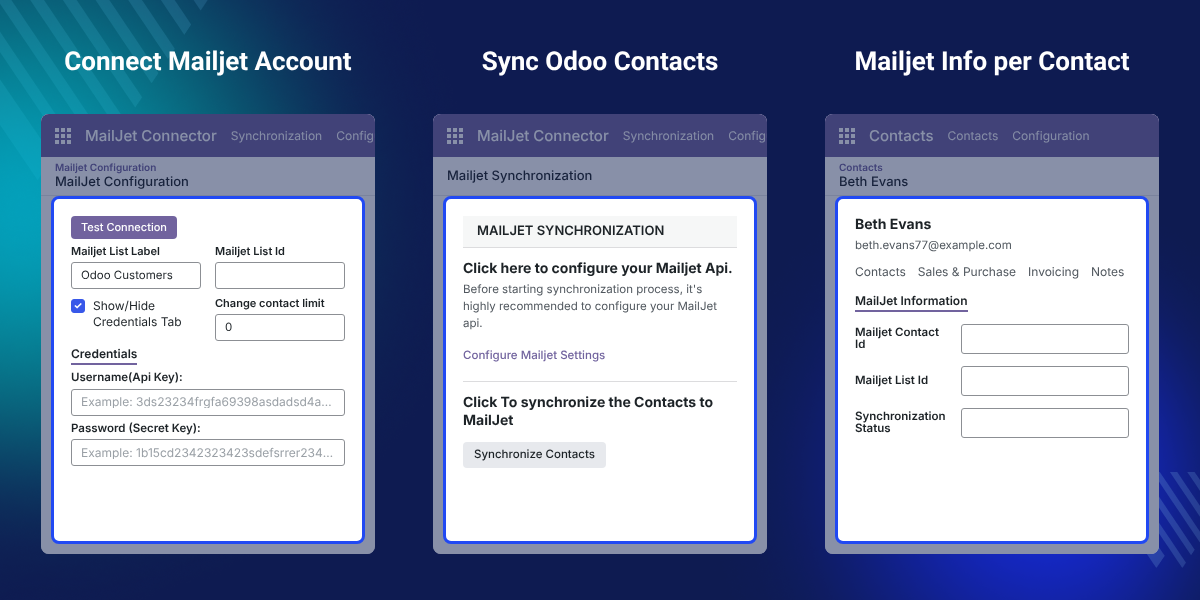
    Odoo MailJet Connector

    Highlighted Features of Odoo MailJet Connector

     Mailjet Account Integration

    Connect your existing Mailjet account with Odoo and manage the required settings from the backend.

     Odoo Contact Sync

    Sync Odoo contacts with your email account instead of adding each contact by hand.

     Individual Contact Management

    Manage single contacts and view their synced information directly from the Odoo contact record.

     Manual Contact Mapping

    Map Odoo contacts manually when you need control over which records you connect.

     Duplicate Contact Prevention

    Unique email IDs for every contact help avoid duplicate contact records in the contact list.

     Backend Configuration

    Configure the list ID, list label, and Mailjet API credentials from the Odoo backend.

    Why Do We Need Odoo MailJet Connector?

    Odoo MailJet Connector removes double data entry between Odoo and Mailjet by syncing contacts from the backend. Without it, managing customer contacts in Odoo and Mailjet separately means entering the same data twice.

    This repeated entry takes time and can create duplicate contact records. Default Odoo has no direct Mailjet connection, so teams must move contact data on their own.

    In practice, admins enter the API key, secret key, and list label once, then sync every contact from Odoo.

    Also, if you want to customize email marketing templates in Odoo, you can check our Odoo Email Marketing Theme.

    Use Cases

    • Customer Email Management

      Businesses sync customer contacts from Odoo to run their email communication.

    • Mailjet Contact Sync

      Sales and marketing teams move Odoo contact data without typing each contact again.

    • Contact List Management

      Admins configure the email list and review mapped contacts from Odoo.

    • Individual Contact Control

      Users connect only selected contacts when only specific Odoo records need syncing.

    Mailjet Contact Synchronization

    The connector syncs Odoo contacts to your email list. This cuts manual entry when customer details already live in Odoo.

    Admins start the sync from the Odoo backend and can still work with single records when needed.
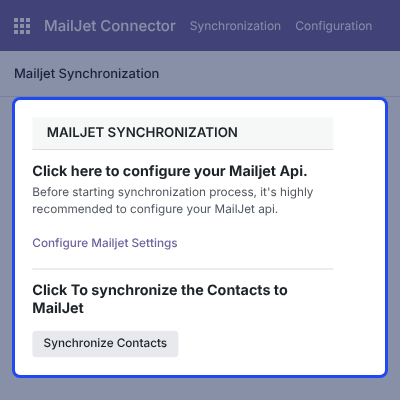
    • Sync Odoo contacts with the selected list.
    • Start contact sync from the Odoo backend.
    • Manage contacts individually.
    • View synced contact information in Odoo.
    • Reduce manual contact entry.
    Mailjet Contact Synchronization

    Mailjet API Configuration

    The settings authenticate your account with Odoo. Admins enter the list label, list ID, API key, and secret key.

    Once authenticated, Odoo uses this connection for contact sync and management.
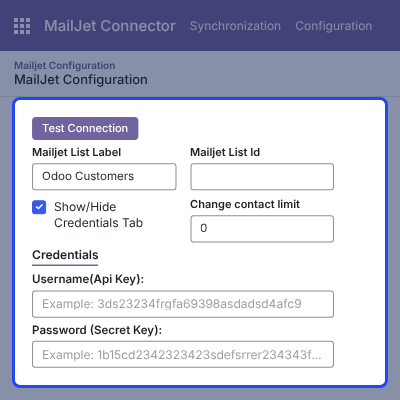
    • Add the Mailjet API credentials.
    • Enter the list ID for synced contacts.
    • Set the list label shown in Mailjet.
    • Authenticate the email account.
    • Manage all settings from Odoo.
    Mailjet API Configuration

    Manual Contact Mapping

    Some businesses need to connect specific Odoo contacts instead of syncing every record at once.

    Manual mapping lets users link chosen contacts and check their synced details, giving admins more control.
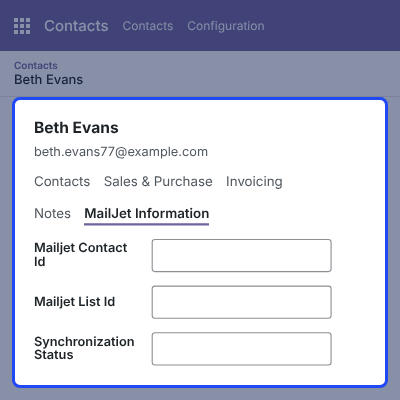
    • Map Odoo contacts manually.
    • Select the contacts to map.
    • Check mapped contact details.
    • Manage individual contact records.
    • Keep contact records organized.
    Manual Contact Mapping

    Contact Management and Duplicate Control

    The connector gives each contact a unique email ID. This prevents duplicate records when Odoo contacts sync.

    Users manage contacts one by one and open their synced information from the Odoo side.
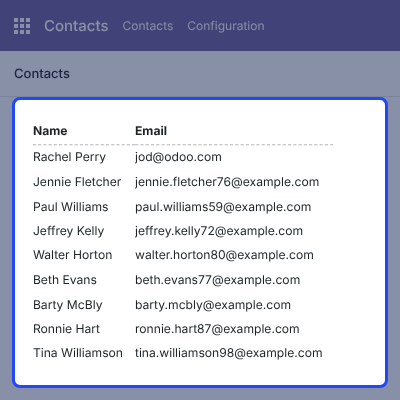
    • Match contacts by email ID.
    • Reduce duplicate contact records.
    • Manage contacts individually.
    • View synced contact information.
    • Keep Odoo and Mailjet data aligned.
    Contact Management and Duplicate Control

    Odoo Mailjet Connector -

    Webkul's dedicated support provides you with the customizations and troubleshooting solutions for Odoo Mailjet Connector.

    For any query or issue please CREATE A TICKET HERE

    You may also check our other top-quality Odoo Apps.

    Specifications

    Product Version1.0.0
    Released12 years ago
    CategoryOdoo Apps, Connectors, 
    Last UpdatedSeptember 25, 2026 (13 days ago)
    Supported Versions8.x  9.x  10.x  11.x  12.x  13.x  14.x  15.x  16.x  17.x  18.x  19.x  20.x  

    Ratings

    We'd love to hear your thoughts! Share your feedback and help us craft an even better experience tailored just for you.

    5.0
    1 Reviews
    based on verified customer feedback
    Write a review
    Lanre Ajayi

    I would like to applaud the great work…

    Posted On - December 9, 2020

    I would like to applaud the great work of Webkul. The technical teams are highly professional and the support team excellent. I am impressed with their services.

    Frequently Asked Questions

     What does Odoo MailJet Connector do?
    Odoo MailJet Connector connects Odoo with Mailjet and syncs Odoo contacts for easier Mailjet contact management.
     
     How are Odoo contacts synced with Mailjet?
    Admin sync Odoo contacts with Mailjet from the Odoo backend after configuring the Mailjet account.
     
     Can contacts be mapped manually?
    Yes, Users can map Odoo contacts manually and check the related Mailjet information for each mapped contact.
     
     How is the Mailjet account connected?
    Admin add the Mailjet API key, secret key, list ID, and list label in the Odoo backend.
     
     Does the connector help prevent duplicate contacts?
    Yes, Contacts use unique email IDs, which helps avoid duplicate records during contact management.
     
     Can users manage individual Mailjet contacts?
    Yes, This connector lets users manage individual contacts and view their Mailjet information from Odoo.
     
     Where are Mailjet settings managed?
    Admin manage Mailjet settings from the Odoo backend, including account credentials and list information.
     
     Is a Mailjet account required to use this connector?
    Yes, This connector links an existing Mailjet account with an Odoo instance for contact synchronization.

    Specification

    Detailed technical features and requirements to help you understand the module’s capabilities and ensure smooth integration with your system.

    Cloud Hosting

    Detailed technical features and requirements to help you understand the module’s capabilities and ensure smooth integration with your system.

    Default Configuration Details of Server

    1 GB
    RAM
    1 Core
    Processor
    30 GB
    Hard Disk
    1 GB RAM & 1 Core Processor
    Database

    Want to know more how exactly we are going to power up your eCommerce Website with Cloud to fasten up your store

    * Server Configuration may vary as per application requirements.

    Change Logs

    Not Available


