Shopify Odoo Connector syncs Shopify products, customers, orders, and stock into Odoo, so merchants run fulfilment, inventory, and accounting from one backend.
- Import and update Shopify store products in Odoo in real time.
- Sync stock both ways so Odoo updates as soon as an order is confirmed.
- Import Shopify orders into Odoo and handle fulfilment from one screen.
- Synchronize Shopify store customers to Odoo for marketing and discounts.
- Import Shopify collections into Odoo with a single click.
- Map Shopify store products to Odoo products using a CSV file.
- Map Shopify shipping methods with the matching Odoo shipping methods.
- Map Shopify taxes, payment methods, and currencies to Odoo equivalents.
- Send Odoo product changes back to Shopify through an 8-hour scheduler.
- Generate invoices and credit notes in Odoo for imported sales orders.
- Manage purchase and procurement orders in Odoo alongside store stock.
- Try the app for 7 days before starting the monthly subscription.
- Description
- Reviews
- FAQ
- Customers ()
- Specifications
- Cloud Hosting
- Changelog
Shopify Odoo Connector is a Shopify app that links your Shopify store to an Odoo database. It moves products, customers, collections, and orders into Odoo, so you do not type the same record twice.
You install the app from its landing page by entering your shop URL. After you buy the monthly plan, the app shows under Apps in Shopify admin as Odoo Connector.
New products, customers, collections, and orders can sync on their own. Stock updates from Odoo go back to Shopify, and Odoo can send order fulfilment and paid status too.
Default settings decide the Odoo company, warehouse, payment method, product category, product type, tracking, route, and invoicing policy that synced records get.
Mapping screens link Shopify products, taxes, payment methods, and currencies to their Odoo matches. The app supports Odoo 8.x to 18.x and offers a 7-day trial.
Additionally, if you want to assign synced orders to drivers and track deliveries from Odoo, then check Odoo Delivery Boy App.
Please Note: Shopify Odoo connector is a monthly subscription-based App with the renewal amount of $35.

Highlighted Features of Shopify Odoo Connector
Multiple Odoo Instances
Add more than one Odoo instance and give each one its own default and sync settings.
Automatic Order Sync
Send new Shopify orders, invoices, and shipments to Odoo without a manual import.
Bidirectional Inventory Sync
Push Odoo stock to Shopify six times a day on chosen slots, or on each stock change event.
Three Product Mapping Methods
Link products by syncing them, by manual mapping, or by a bulk CSV upload.
Tax and Payment Mapping
Match Shopify taxes, payment methods, and currencies to Odoo so order totals line up.
Odoo to Shopify Updates
Send order fulfilment and paid status from Odoo back to the matching Shopify order.
Why Do We Need Shopify Odoo Connector?
Shopify runs the storefront well, but it is not an ERP. Purchase, procurement, stock routes, and accounting all live in Odoo, and the two systems do not share data by default.
Without a link, the team copies each order, customer, and product into Odoo by hand. Stock goes out of step, taxes do not match, and delivery waits until someone keys the order in.
Shopify Odoo Connector gives you a direct Shopify Odoo integration. Orders reach Odoo as quotations or confirmed sales, with invoices and shipments, and Odoo stock flows back to Shopify.
A practical tip from setup: map products, taxes, and payment methods before the first order sync. The app also asks for port 443 when your Odoo URL uses https, and port 80 for http.
Also, if you want to publish Odoo products to more than one Shopify store from Odoo, you can check our extension Odoo Shopify Connector.
Shopify Odoo Connector Use Cases
-
Fulfil Orders from Odoo
Warehouse staff confirm delivery for Shopify orders in Odoo and the status goes back to the store.
-
Keep Store Stock Accurate
Stock bought or moved in Odoo shows on Shopify, which helps you avoid overselling or understocking.
-
Run Accounting in Odoo
Accountants raise invoices, register payments, and issue credit notes for Shopify sales inside Odoo. To pass that data on, check Odoo QuickBooks Online Connector.
-
Build One Customer List
Marketing teams use synced Shopify customers in Odoo for email campaigns and custom discounts. For Klaviyo lists, check Odoo Klaviyo Connector.
Shopify Odoo Connector Instance Setup
The Add Odoo Instance tab connects your Shopify store to an Odoo database. You can add several instances and see them all under Odoo Instances Listing.
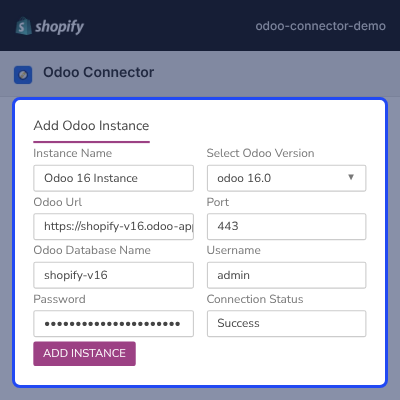
- Enter an Instance Name for the Odoo database.
- Select your Odoo Version from the drop-down.
- Add the Odoo URL and Port, using 443 for https and 80 for http.
- Enter the Odoo Database Name, Username, and Password.
- Click Add Instance, then activate it from Odoo Instances Listing.
- Check the green Connection Status that shows success.

Instance Default Settings for Odoo Sync
Instance Default Settings decide where synced Shopify data lands in Odoo. Every sync for the instance uses these values.
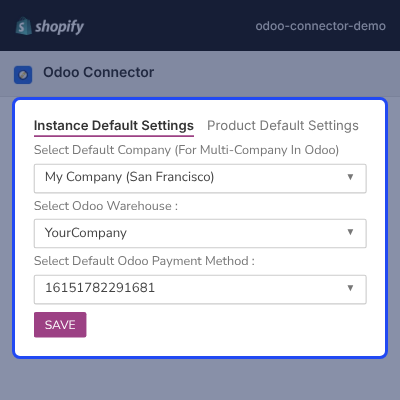
- Select the Default Company when Odoo runs more than one company.
- Select the Odoo Warehouse that synced products are stocked in.
- Select the Default Odoo Payment Method for invoices.
- Use the default payment method when a Shopify method is not mapped.
- Keep the company fixed, since changing it later is not advised.

Product Default Settings for Synced Products
Product Default Settings set the Odoo values each Shopify product gets when it syncs. You set them once per instance.
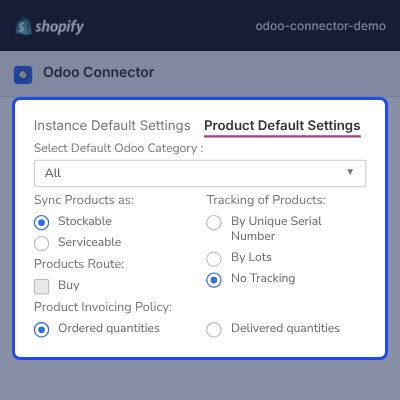
- Select the Default Odoo Category for synced products.
- Sync products as Stockable or Serviceable.
- Track products by Unique Serial Number, By Lots, or No Tracking.
- Pick the Products Route based on the Odoo modules you use.
- Set the invoicing policy to Ordered quantities or Delivered quantities.

Sync Shopify Orders to Odoo
The order sync settings control how Shopify orders reach Odoo. You can bring them in as draft quotations or as orders with invoices and shipments.
A time-based job can also retry same-day orders that failed on the first attempt.
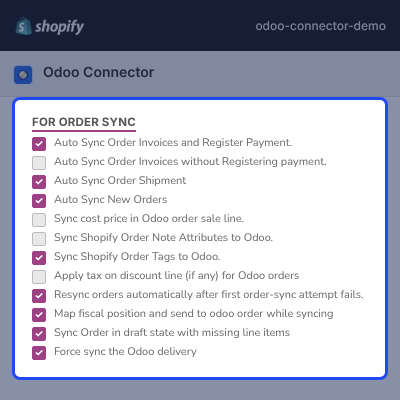
- Sync orders in draft state, even when some line items are not mapped.
- Auto sync invoices with or without registering the payment.
- Auto sync new orders and order shipments to Odoo.
- Send the Odoo cost price to the order sale line.
- Sync Shopify order tags and note attributes to Odoo.
- Apply tax on discount lines, map fiscal positions, and force sync the Odoo delivery.

Send Order Status from Odoo to Shopify
These options send order progress made in Odoo back to Shopify. Once enabled, that status stops updating from Shopify to Odoo.
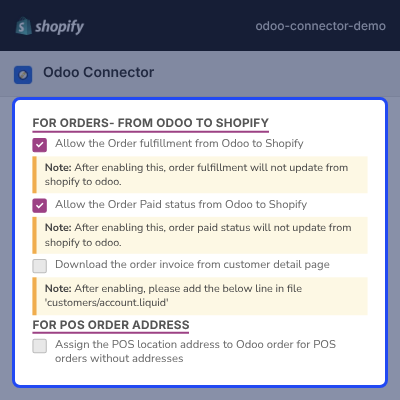
- Allow order fulfilment from Odoo to Shopify, run once a day.
- Allow order paid status from Odoo to Shopify, run every hour.
- Update partly paid and fully paid orders on Shopify.
- Let buyers download the Odoo invoice from their account page.
- Assign the POS location address to POS orders that have no address.

Product, Collection, and Customer Sync Settings
These settings keep the Odoo catalog and contact list up to date as the Shopify store changes. You choose what syncs on its own.
To sync Shopify variant prices, install Odoo Product Variant Extra Price in Odoo first.
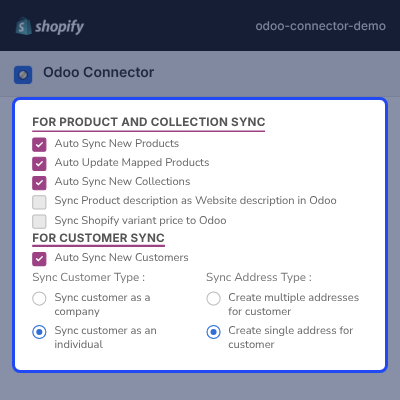
- Auto sync new products, new collections, and new customers.
- Auto update mapped products and pick the fields, such as title, weight, or image.
- Sync the product description as the Odoo website description.
- Sync the Shopify variant price to Odoo.
- Sync customers as a company or as an individual.
- Create multiple addresses or keep a single address per customer.

Bidirectional Inventory Sync from Odoo to Shopify
Bidirectional inventory sync sends Odoo stock levels to Shopify. You choose between fixed time slots and real-time event updates.
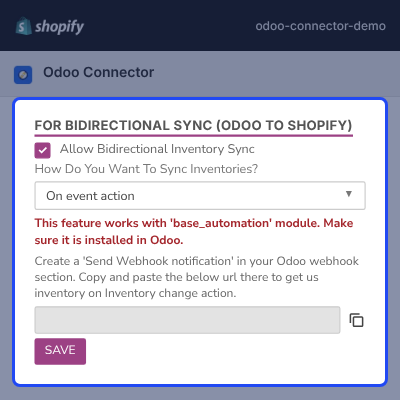
- Enable Allow Bidirectional Inventory Sync under Synchronize Settings.
- Run the stock update six times a day on selected time slots.
- Or pick On Event Action to sync each stock change in real time.
- Copy the webhook URL into an Odoo automation rule on the Quants model.
- Use native Odoo webhooks from Odoo 18, with the base_automation module.

Shopify to Odoo Product Mapping
Product Mapping links each Shopify product to the same product in Odoo. The Product Mapping page offers three ways to do it.
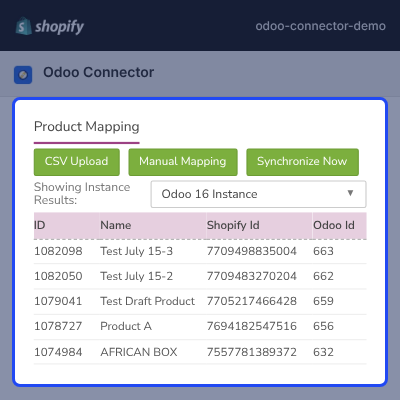
- Sync one product from the More actions menu on its Shopify page.
- Click Synchronize Now to sync unmapped products within a range.
- Use Manual Mapping to pair a Shopify product and variant with an Odoo product.
- Map products with no variants, listed as the product name with Default Title.
- Download the CSV format, fill it, and upload it to map products in bulk.
- Sync draft products without enabling Can be Sold in Odoo.

Shopify Tax Mapping with Odoo Taxes
Tax Mapping matches Shopify taxes with Odoo taxes so synced orders carry the right tax. The admin gets three options on the Tax Mapping page.
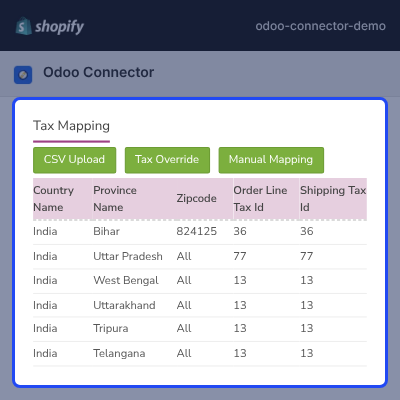
- Upload tax mapping in bulk with the CSV Upload option.
- Use Tax Override to set an Odoo tax by country, region, and collection.
- Use Manual Mapping to map by country, region, and zip code.
- Set the order line tax and the shipping tax for each rule.
- Download the CSV format and instructions before a bulk upload.

Order, Collection, Payment, and Currency Mapping
The mapping pages bring past records into Odoo and match store values that differ between the two systems. Most of them need only one click.
- Sync all Shopify collections to Odoo in a single click.
- Click Synchronize Now on Order Mapping and select a range.
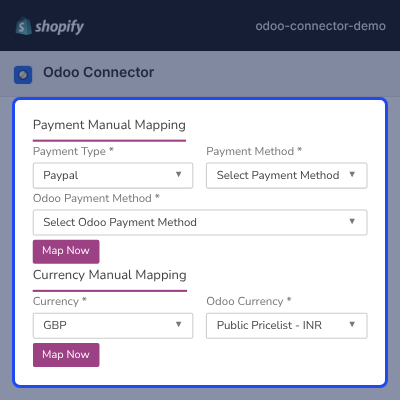
- Map a Shopify payment type and method to an Odoo payment method.
- Click Map Now to save each payment mapping.
- Map a Shopify Currency to the matching Odoo Currency.

Complete Shopify Odoo Connector Feature List
Connection & Setup
- Install the app from its landing page by entering your Shopify shop URL
- Add multiple Odoo instances with instance name, version, URL, port, database, username, and password
- Activate an instance and check its connection status in Odoo Instances Listing
- Support Odoo 8.x to 18.x on a $35 monthly subscription
- Set a default company, warehouse, and payment method for each instance
Product & Collection Sync
- Sync product cost, description, images, inventory, options, price, SKU, title, and weight
- Auto sync new products and auto update mapped products with the fields you pick
- Sync draft products without enabling Can be Sold in Odoo
- Set default category, stockable or serviceable type, tracking, route, and invoicing policy
- Sync product descriptions as Odoo website descriptions and sync Shopify variant prices
- Sync all collections in one click and auto sync new collections as Odoo categories
Order Sync
- Auto sync new orders, or sync past orders within a range with Synchronize Now
- Sync orders as draft quotations, including orders with unmapped line items
- Auto sync invoices with or without registering payment, and auto sync shipments
- Sync order tags, note attributes, and the Odoo cost price on sale lines
- Apply tax on discount lines, map fiscal positions, and manage prices excluding tax
- Retry failed same-day orders automatically and force sync the Odoo delivery
Odoo to Shopify Updates
- Send inventory to Shopify six times a day on selected slots, or on each stock event
- Send order fulfilment from Odoo to Shopify once a day
- Send order paid status from Odoo to Shopify every hour
- Let buyers download the Odoo order invoice from their Shopify account page
Customer Sync
- Auto sync new Shopify customers to Odoo
- Sync one customer from its Shopify page with Synchronize Customer to Odoo
- Sync customers as a company or as an individual
- Create multiple addresses or update a single address for each customer
- Assign the POS location address to POS orders without an address
Mapping Tools
- Map products by sync, by manual mapping, or by CSV upload
- Map taxes by CSV upload, tax override, or manual mapping with order line and shipping tax
- Map Shopify payment methods to Odoo payment methods
- Map Shopify currencies to Odoo currencies
Operations in Odoo
- Confirm Shopify order delivery and track fulfilment in the Odoo backend
- Generate invoices and credit notes for Shopify sales orders
- Manage purchase, procurement, and inventory for Shopify products
- Create and review Shopify order and sales reports in Odoo
Dedicated Support For Shopify Odoo Connector Module
Webkul's dedicated support provides you with the customizations and troubleshooting solutions for your Shopify Odoo Connector Module.
For any query or issue please CREATE A TICKET HERE
You may also check our other top-quality Shopify Apps.
Specifications
Servizio clienti competente e risolutivo
Servizio clienti davvero competente e risolutivo anche per supportare dove Odoo non sa come gestire la sincronizzazione con Shopify
Zuverlässige App und hervorragender Service
Wir verwenden die App seit 3 Jahren und sie ist sehr hilfreich und läuft bei uns Fehlerfrei. Webkul geht auch auf ALLE persönlichen Anforderungen der Systeme ein, für einen kleinen Aufpreis. (Felder mapping etc). Und der Service meldet sich immer innerhalb von max 24 Std mit einer Lösung zurück.
Great Odoo Modules
We use some odoo modules. Great development, good service.
Good Company with Experts
Webkul software is usually trusted and their team is always supportive.
Excellente application
Excellente application.
Elle permet de synchroniser commandes, stocks, clients, produits, descriptions. Tout fonctionne parfaitement bien.
Le service client est disponible et parfait.
Merci à tous
Mathilde Idkowiak
Frequently Asked Questions
Specification
Detailed technical features and requirements to help you understand the module’s capabilities and ensure smooth integration with your system.
Cloud Hosting
Detailed technical features and requirements to help you understand the module’s capabilities and ensure smooth integration with your system.
Move to Cloud Today
We’re partnered with top-tier, trusted providers!
Default Configuration Details of Server
RAM 1 Core
Processor 30 GB
Hard Disk
Database
Want to know more how exactly we are going to power up your eCommerce Website with Cloud to fasten up your store
* Server Configuration may vary as per application requirements.


