USD
  • EUR
  • INR
  • USD
Cart
Cart 0
  • You have no items in your shopping cart.
    Bagisto Laravel Extensions
    Cart
    Cart 0
    • You have no items in your shopping cart.
    Hire a Developer
    ×
    Contact Us!
    Send Again
    Close
    Please Login to Write Your Review
    Bagisto FedEx Shipping

    Bagisto FedEx Shipping

    x
    Free
    $99.00
    Add To Cart

    Bagisto FedEx Shipping adds live FedEx rates to Bagisto checkout and creates the shipment, label, and tracking number after an order is placed.


    • Show real-time FedEx shipping rates at Bagisto checkout.

    • Choose which FedEx services customers can see and pick.

    • Create FedEx shipment automatically on order placement.

    • Generate and store FedEx PDF shipping label.

    • Save FedEx tracking number against every shipment.

    • Schedule and cancel FedEx pickups from admin panel.

    • Handle international shipping with customs details included.

    • Test in FedEx sandbox mode before you switch to live.

    • Rate guest and registered customer carts the same way.

    • Set every option per sales channel, in 22 languages.

    Bagisto FedEx Shipping
    Bagisto FedEx Shipping
    $99.00
    Check How It Works

    Need Help Deciding?

    Support answers within one business day.

    Open a ticket
    $99.00
    Configure and Buy
    X
    • Description
    • Reviews
    • FAQ
    • Customers ()
    • Specifications
    • Cloud Hosting
    • Changelog

    Bagisto FedEx Shipping is a Bagisto extension that links a store to the FedEx API for rates, labels, tracking, and pickups. It swaps flat delivery charges for the price FedEx quotes.

    A customer enters a shipping address at checkout, and each enabled FedEx service comes back priced for that cart. First Overnight, Priority Overnight, FedEx 2 Day, Express Saver, and FedEx Ground can all appear together.

    Once the order goes through, Bagisto records the shipment without manual entry. This module then builds a FedEx PDF shipping label and saves the tracking number and carrier on that record.

    Admin can work from Configure >> Sales >> Shipping Methods >> FedEx Shipping. Account ID, Client ID, Client Secret, packaging type, drop off type, weight unit, and the service list all sit there.

    Rates use each product's weight and size, and fall back to default box sizes for products that carry none. Cross border parcels pick up the customs and invoice details FedEx asks for.

    Additionally, if you want a fallback method for regions FedEx does not reach, then check Laravel eCommerce Table Rate Shipping.
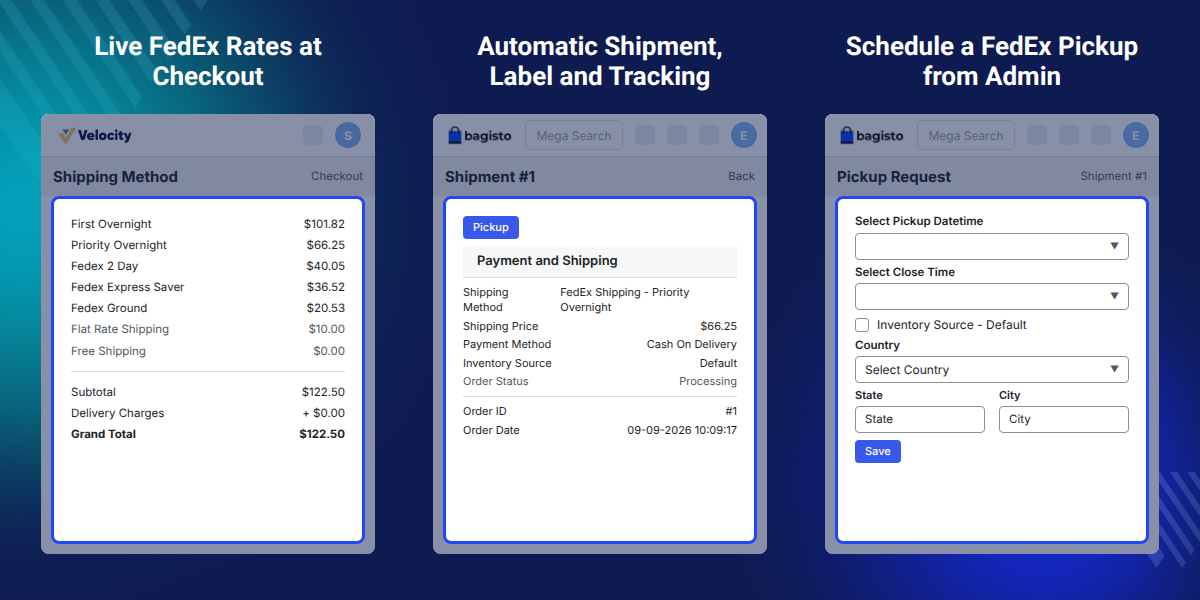
    Bagisto FedEx Shipping

    Highlighted Features

     Real Time FedEx Rates

    Quote every enabled FedEx service against the live cart weight, the product size, and the delivery address.

     Service Selection Control

    Pick FedEx services customers see at checkout, and add extra service types as a comma separated list.

     Automatic Label Generation

    Order placement builds a FedEx PDF shipping label and stores it against the shipment for printing.

     Tracking Number Sync

    Each shipment carries its FedEx tracking number and carrier, so shipped order emails already hold the details.

     FedEx Pickup Booking

    Book a FedEx pickup with a date and close time, check availability first, then cancel it when plans change.

     Sandbox and Live Modes

    Run FedEx sandbox mode while you test, then move Mode to Live once real shipments start going out.

    Why Do We Need Bagisto FedEx Shipping?

    Bagisto FedEx Shipping replaces flat rate and free shipping with carrier based pricing, so heavy orders to far postcodes can cost more than light local ones.

    Stores pay for that gap twice because they lose margin on under charged parcels and carts on over charged ones when buyers see a number that ignores distance.

    Bagisto FedEx Shipping asks FedEx for the price instead of guessing it. Rates follow the cart, and the same connection then produces the shipment, FedEx shipping label, and the tracking number.

    Savings show up after checkout because a team that once opened the FedEx portal, retyped the address, downloaded the label, and pasted the tracking number into Bagisto now finds all four on the order.

    Also, if you want sellers on a marketplace to run their own orders and dispatch, you can check our Laravel Multi Vendor Marketplace.

    Use Cases

    • Same Day Dispatch Stores

      Offer First Overnight and Priority Overnight at checkout, then book the FedEx pickup for the same evening.

    • Cross Border Sellers

      Quote International Priority and International Economy, and let customs details travel with each parcel.

    • High Volume Warehouses

      Print FedEx labels straight from the shipment screen instead of rekeying every order in the carrier portal.

    • Multi Channel Retailers

      Give each sales channel its own FedEx account, service list, and origin address from one Bagisto install.

    FedEx Account and API Configuration

    FedEx Shipping settings sit under Configure >> Sales >> Shipping Methods >> FedEx Shipping, with account, API keys, and origin details, while rating, labels, and tracking use key pairs from FedEx Developer Portal.
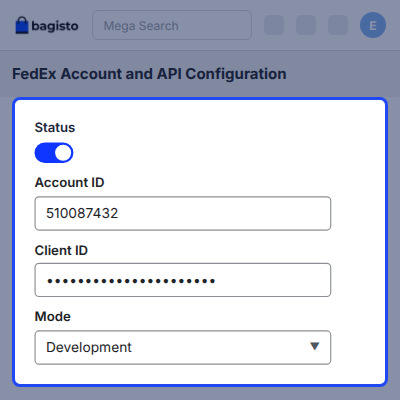
    • Turn the shipping method on or off through the Status field.
    • Set the Title and Description that customers read at checkout.
    • Enter the Account ID, which holds the FedEx account number.
    • Add Client ID and Client Secret for rates, labels, and pickups.
    • Add Track Client ID and Track Client Secret for tracking calls.
    • Choose Mode as Development for FedEx sandbox mode, or Live for real shipments.
    • Fill Shipper Email, Shipper Name, Phone Extension, and Phone Number.
    FedEx Account and API Configuration

    Packaging, Services and Box Dimensions

    Packaging settings tell FedEx what a parcel looks like and how it leaves the store. This Services multi select then decides which FedEx options reach the checkout page.
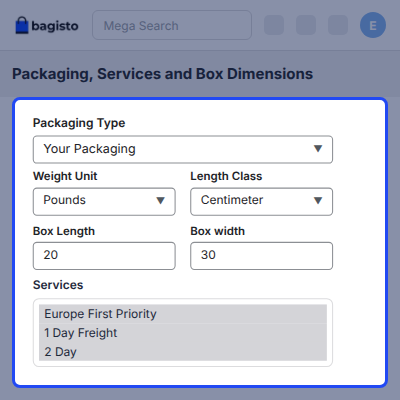
    • Pick a Packaging Type such as Your Packaging, FedEx Envelope, FedEx Pak, FedEx Box, FedEx Tube, or the 10kg and 25kg boxes.
    • Set a DropOff Type such as Regular Pickup, Request Courier, Drop Box, Business Service Center, or Station.
    • Choose Weight Unit as Pounds or Kilograms, and Length Class as Inches or Centimeters.
    • Select FedEx services you want to offer from the Services list.
    • Add more service types through the comma separated Additional Services field.
    • Enter default Box Length, Box Width, and Box Height as the fallback parcel size.
    Packaging Services and Box Dimensions

    Live FedEx Rates at Checkout

    Bagisto calls the FedEx Rate API as soon as a customer enters a delivery address at checkout. Each enabled FedEx service returns with its own price for that cart.
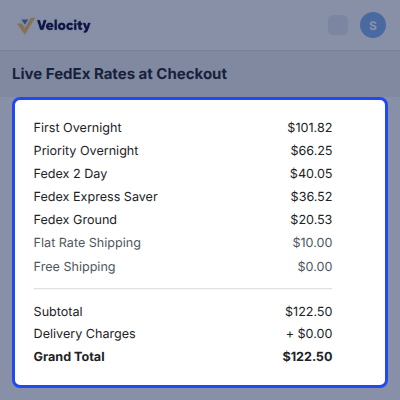
    • Quote every enabled FedEx service against the cart and the destination address.
    • Price on parcel weight, product size, and delivery location.
    • List services such as First Overnight, Priority Overnight, FedEx 2 Day, Express Saver, and FedEx Ground side by side.
    • Show the Title and Description from the admin panel as the method name.
    • Give guest and registered customers the same FedEx shipping rates.
    • Resolve the shipping origin per item from the channel inventory sources.
    Live FedEx Rates at Checkout

    Automatic FedEx Shipment, Label and Tracking

    A FedEx order creates its shipment in Bagisto the moment the customer places it, with no manual data entry. At the same time, the module builds a FedEx PDF shipping label and stores it.
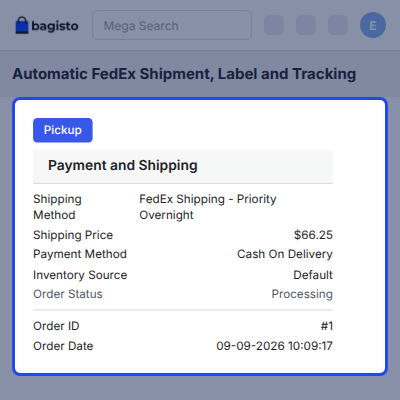
    • Create the FedEx shipment automatically on order placement.
    • Attach the FedEx PDF shipping label to that shipment.
    • Store the FedEx tracking number and the carrier name together.
    • Download the PDF label from the shipment screen for printing.
    • Open FedEx tracking from the shipment view, the customer order view, and the shipped order email.
    Automatic FedEx Shipment Label and Tracking

    Schedule a FedEx Pickup from Admin

    Admin can request a FedEx pickup for a shipment from inside the Bagisto admin panel. FedEx confirms availability at the origin address before the booking goes through.
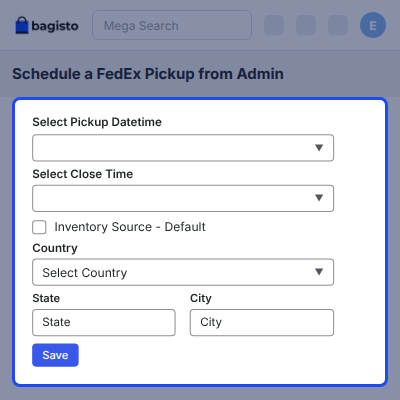
    • Request a FedEx pickup for a shipment without leaving the admin panel.
    • Choose the pickup date and the close time for the collection window.
    • Use the store default origin address, or enter a custom one.
    • Check pickup availability at the origin before you book.
    • Cancel a scheduled pickup that the store no longer needs.
    • Keep a record of every pickup request and cancellation.
    Schedule a FedEx Pickup from Admin

    International Orders and Multi Channel Shipping

    International shipping carries the customs and invoice details FedEx asks for, so a cross border parcel goes out the same way a home one does.
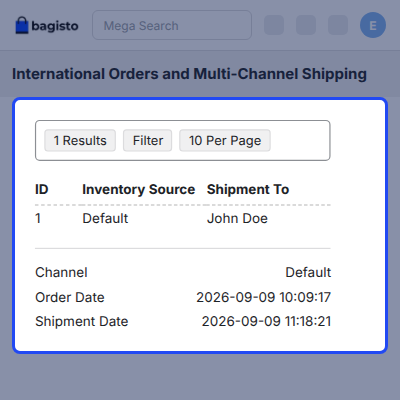
    • Attach customs and invoice details to every international parcel.
    • Quote services such as International Priority, International Economy, and International First.
    • Resolve the shipping origin per item from the channel inventory sources.
    • Give each sales channel its own FedEx credentials, service list, and shipper details.
    • Read weight and dimensions from the product, with the default box size as fallback.
    International Orders and Multi Channel Shipping

    Support

    For any query or issue, please create a support ticket here http://webkul.uvdesk.com/. You may also check our all Bagisto Extensions.

    Specifications

    Product Version2.4.10.0
    Released7 days ago
    CategoryBagisto Laravel
    Last UpdatedSeptember 15, 2026 (7 days ago)
    Supported VersionsBagisto  2.4.x  

    Ratings

    We'd love to hear your thoughts! Share your feedback and help us craft an even better experience tailored just for you.

    Write a review

    Frequently Asked Questions

     How does Bagisto FedEx Shipping work?
    Bagisto FedEx Shipping calls the FedEx API at checkout to return live prices for enabled services, then creates the shipment, PDF label, and tracking number after the order is placed.
     
     What do I need before I can use FedEx shipping in Bagisto?
    You need a FedEx account with API access, including the account number, Client ID, Client Secret, and separate Track Client ID and Track Client Secret from the FedEx Developer Portal.
     
     Which FedEx services can customers see at checkout?
    Only selected Services appear at checkout, including First Overnight, Priority Overnight, FedEx 2 Day, Express Saver, FedEx Ground, International Priority, Smart Post, and Additional Services.
     
     Does it create FedEx shipping label automatically?
    Yes, order placement builds a FedEx PDF shipping label and stores it with the shipment. Admins can download it from the shipment screen and print it.
     
     Where does the customer see FedEx tracking number?
    Customers find the tracking number on their order view and in the shipped order email. It links straight through to FedEx tracking, so nobody has to copy the number anywhere.
     
     Can I test FedEx shipping before taking real orders?
    Set Mode to Development to run FedEx sandbox mode with test credentials. Move Mode to Live once the store starts creating real shipments and labels.
     
     Can I schedule a FedEx pickup from Bagisto admin panel?
    Yes, request a pickup by choosing the pickup date and close time, then use the default origin or enter a custom address. FedEx confirms availability, and admin can cancel booked pickups later.
     
     Does it handle international shipping and customs?
    International shipments include required customs and commercial invoice details, with International Priority, International Economy, and International First available at checkout.
     
     What happens if a product has no weight or dimensions?
    Rating falls back to the default Box Length, Box Width, and Box Height from the configuration screen. While FedEx stays enabled, product length, width, and height become required fields so rates hold up.
     
     Can guest customers use FedEx shipping?
    Guest and registered customers both see FedEx services at checkout and pick from the same live rates. Shipment, label, and tracking follow the same path for either one.
     

    Specification

    Detailed technical features and requirements to help you understand the module’s capabilities and ensure smooth integration with your system.

    Cloud Hosting

    Detailed technical features and requirements to help you understand the module’s capabilities and ensure smooth integration with your system.

    Default Configuration Details of Server

    1 GB
    RAM
    1 Core
    Processor
    30 GB
    Hard Disk
    1 GB RAM & 1 Core Processor
    Database

    Want to know more how exactly we are going to power up your eCommerce Website with Cloud to fasten up your store

    * Server Configuration may vary as per application requirements.

    Change Logs

    • - Feature Add (+)
    • - Feature remove (-)
    • - Bug Fixed (!)
    • - Modification (*)
    Version 2.4.10.0
    • + [Compatibility] The module is compatible with Bagisto v2.4.10.0


