Laravel eCommerce Table Rate Shipping extension allows the admin to create custom offline shipping methods and provide shipping rates using a CSV file. Shipping rates are calculated based on the product price, country, state, zip range, postcode, and weight.
- Description
- Reviews
- FAQ
- Specifications
- Cloud Hosting
- Changelog
Laravel eCommerce Table Rate Shipping module allows the admin to create custom shipping methods. By using these methods the admin can easily set the custom superset rates and shipping rates of their products.
The entities involved in the calculation of the shipping cost depend upon- Country code, Region code, Weight, Zip Code Range, Numeric Zipcode, and Alphanumeric Zipcode.
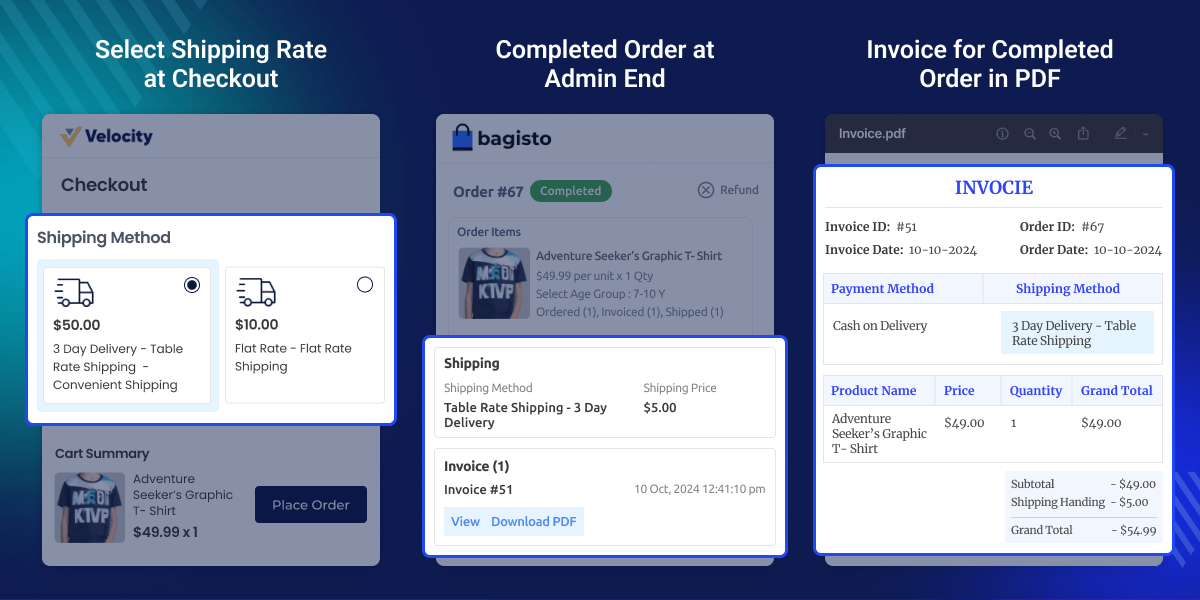
Highlighted Features of Laravel eCommerce Table Rate Shipping
Supersets/Shipping Methods
The admin can easily add the superset methods to customize shipping.
Adding Shipping Rates/Uploading CSV
The admin can add the shipping rates by uploading the CSV file.
Shipping Rate For Specific Country
The admin can easily set the shipping rate for a specific country by using the county code.
Alpha Numeric Zip Code
This module supports alpha-numeric zip codes.
Shipping Rates Calculation
The shipping rates will be calculated based on the zip code and the weight of the product.
Support Unicode Transformation Format - 8
Table rate shipping support UTF - 8 which provides multi-language support.
Why Should we use Laravel eCommerce Table Rate Shipping Extension?
Table rate shipping is an integral part of Bagisto shipping management, Shipping is an integral, and a must-have feature for any e-commerce, table rate shipping give admin tons of options from managing order to invoice generation.
By using these methods the admin can easily set the custom superset rates and shipping rates of their products.
Module Layout
The admin can easily configure this module by navigating to configure>>sales>>shipping methods>>table rate shipping.
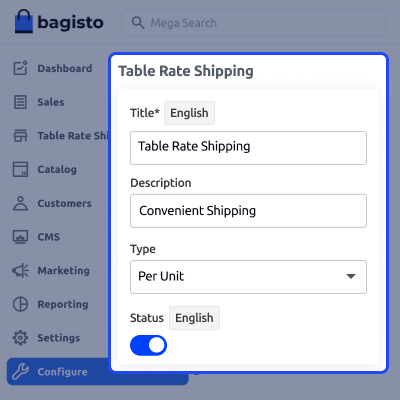
- Table Rate Shipping module allows the admin to create custom superset rates and shipping rates for their product.
- The shipping price is calculated based on CSV entered by admin.
- The admin can add superset methods.
- The admin can assign shipping rates.

Create Custom Shipping Methods/Supersets
The admin can add the superset rates for their customers. If there are two or more shipping methods available to a customer, in this case, the superset rate will get priority.
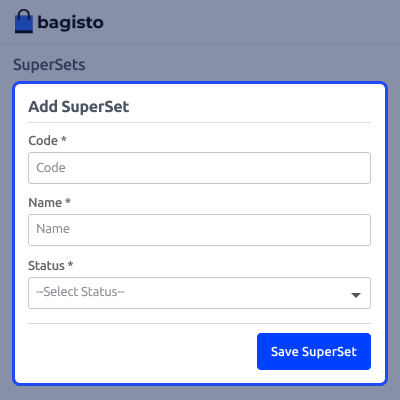
- Enter the price range (Price from, Price to).
- Select the shipping type as - fixed or free.
- Select the superset method.
- The admin can also create superset rates.
- Set the price of the shipping method.
- The admin can edit/delete superset rates.

Manage Shipping Rules/Superset Rates
Under the table rate shipping, the admin can easily add the custom shipping methods to manage the shipping CSV.
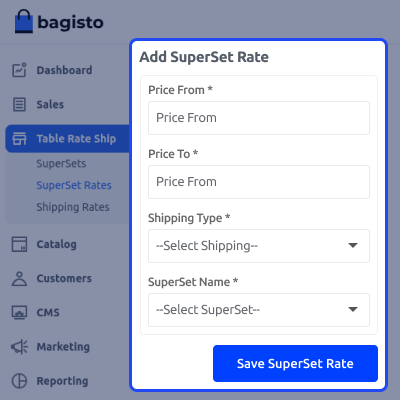
- Enter the unique code of superset.
- Enter the superset name.
- Select the superset status active/inactive.
- The admin can edit/delete the supersets.
- By choosing these supersets methods admin can add their custom superset rates and shipping rates.

Upload Shipping Matrix Rates/CSV
Under the “table rate shipping,” the admin will upload the CSV file containing “country code,” “zip from," “zip to,” “price”, “weight from,” “weight to” and "alphanumeric code".
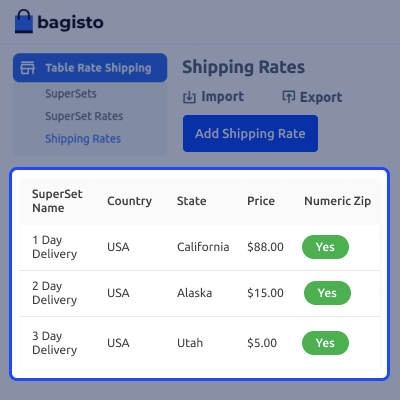
- The admin can upload the table rate shipping via the CSV file.
- The admin can easily download the sample CSV file.
- The admin can give the superset method names for Table rate shipping.
- CSV file support alphanumeric zip codes.
- The admin can also export the table rate shipping in CSV or XLS format.

Customer Checkout Process
After the successful installation of the module by the admin, the table rate shipping method will be displayed to the customer at the checkout page.
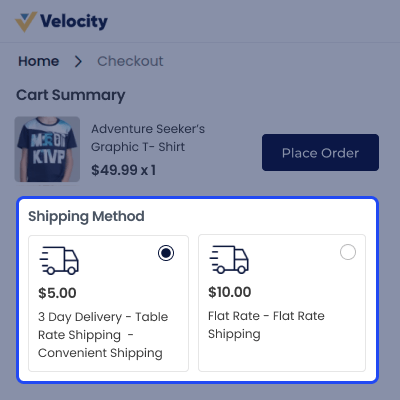
- The shipping price is calculated based on CSV file containing “country code”, "region" “zip from”, “zip to”, “price”, “weight from”, “weight to”.
- The customer will have the table rate shipping methods on checkout if their shipping address matches the CSV ( zip code, country, weight).
- If the multiple shipping methods are matched with the customer's Zip code and weight, in this case, all the matched table rate shipping methods will be displayed to the customer at the checkout page.

Creating Invoice and Shipment
The admin can easily create an invoice and shipment for the order that has been placed. Under the sales option, the admin can perform the following actions:-
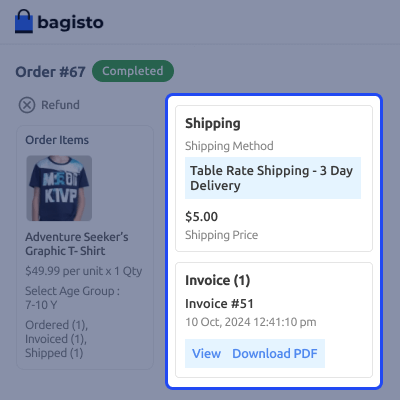
- The admin can easily create the invoice for the orders from their dashboard.
- The admin can set the tracking id and shipping detail.
- The admin can download and print the invoice.
- The admin will provide the carrier title details.
- The admin will select the inventory source of the product.

Features List
- Admin can add shipping rates using CSV file for table rates.
- Admin can create sub-methods for Table Rate Shipping.
- The admin can create Super Shipping Set.
- The shipping cost is calculated based on the product price.
- Shipping will be calculated based on the Postcode and the Weight of the product.
- The Admin can confirm the order and can set the tracking ID for the order.
- Shipping rates will populate based on CSV during checkout.
- Option to export a shipping CSV file from the back-end.
- Ability to download Invoice & Shipping slip easily.
- The codes are open, so it can be customized easily.
- Table Rate Shipping supports alphanumeric zip codes.
Support
For any issue related to this module, please create a support ticket here at - https://webkul.uvdesk.com/en/customer/create-ticket/ or send an email to [email protected]
You may also check our quality Bagisto Extensions.
Specifications
Frequently Asked Questions
Specification
Detailed technical features and requirements to help you understand the module’s capabilities and ensure smooth integration with your system.
Cloud Hosting for Websites & Applications
Power your website or application with flexible, scalable cloud infrastructure designed for performance and growth.
Move Your Website or Application to the Cloud
Get started with Cloudkul hosting tailored to your needs.
Configure Your Cloud Server
Choose server resources based on your workload, expected traffic, and performance requirements.
Start with the cloud resources your project needs today and adjust your server configuration as your business grows.
Explore flexible cloud hosting plans and choose your ideal configuration.
* Starting price is indicative. Final pricing and available server resources depend on the selected hosting configuration and requirements.
Change Logs
- + Features
- - Bugs
- * Added compatibility with Bagisto 2.5.0, running on Laravel 13 and PHP 8.4.
- * Added
booleancasts to the status and zip range fields of supersets, superset rates, and shipping rates to meet Bagisto 2.5.0 requirements for PostgreSQL compatibility. - ! Fixed a class name case mismatch in the superset rate model that could prevent it from loading on case-sensitive file systems.
- ! Fixed a PHP warning during checkout when the cart had no shipping address.
- * Updated module requirements to PHP
^8.4andkonekt/concord^1.18. - * Renamed admin route names to snake_case, such as
admin.tablerate.shipping_rates.mass_delete, without changing admin URLs or view render event names. - * Renamed the translation keys
per_unitandper_ordertoper-unitandper-order, and aligned all 22 language files with the English file. - * Updated admin screens to use Tailwind CSS 4 class names.
- + Compatible with Bagisto v2.4.10
- - Fixed a bug where DataGrid Edit/Delete actions would fail to render or function correctly when using non-English locales. Vue templates now safely check for action.index.
- + Compatible with Bagisto v2.4.2.
- + Compatible with Bagisto v2.1.2.
- + Compatible with Bagisto v2.0.0.
- + Compatible with Bagisto v1.4.3.
- + Compatible with Bagisto v1.3.3.
- + Compatible with Bagisto v1.3.2.
- + Compatible with Bagisto v1.3.1.
- + Admin can add shipping rates using CSV file for table rates.
- + Admin can create sub-methods for Table Rate Shipping.
- + The admin can create a Super Shipping Set.
- + Shipping cost be calculated based on the product price.
- + Shipping will be calculated based on the Postcode and the Weight of the product.
- + The Admin can confirm the order and can set the tracking ID for the order.
- + Shipping rates will populate based on CSV during checkout.
- + Option to export shipping CSV file from the back-end.
- + Ability to download Invoice & Shipping slip easily.
- + The codes are open, so it can be customized easily.
- + TableRate Shipping supports alphanumeric zip codes.