USD
  • EUR
  • INR
  • USD
Cart
Cart 0
  • You have no items in your shopping cart.
    Cart
    Cart 0
    • You have no items in your shopping cart.
    Hire a Developer
    ×
    Contact Us!
    Send Again
    Close
    Please Login to Write Your Review

    Laravel eCommerce RMA

    Laravel eCommerce RMA allows customers to create an RMA request for a product return, exchange, refund, or cancellation of an order.


    A complete return merchandise authorization, return authorization, and return goods authorization system to manage Bagisto online store customers' return orders.


    • Customers can request RMA to cancel an order.

    • Customers can generate RMA for Return/Exchange.

    • Admin will create RMA reasons. Admin can see the list of all the RMAs.

    • Guest users can request an RMA to cancel an order.

    • Guest users can generate RMA for Return/Exchange.

    • Dynamic selection of items for an order for making an RMA request.

    Screenshots
    Laravel eCommerce RMA Laravel eCommerce RMA Laravel eCommerce RMA Laravel eCommerce RMA Laravel eCommerce RMA Laravel eCommerce RMA Laravel eCommerce RMA Laravel eCommerce RMA Laravel eCommerce RMA Laravel eCommerce RMA Laravel eCommerce RMA Laravel eCommerce RMA
    Show More Hide All
    $0.00
    $0.00
    Configure and Buy
    • Description
    • Reviews
    • FAQ
    • Customers ()
    • Specifications
    • Cloud Hosting
    • Changelog

    This module provides a seamless process for customers to return their products to the store and get a refund or replacement for the return made. The store admin can manage all the RMA requests placed by customers from the backend.

    Detailed statistics on RMA requests for a refund, replacement, or cancellation help the store admin build a strategy to reduce returns on the store.A hassle-free return process helps the store admin retain existing customers and attract potential customers to the store as well.
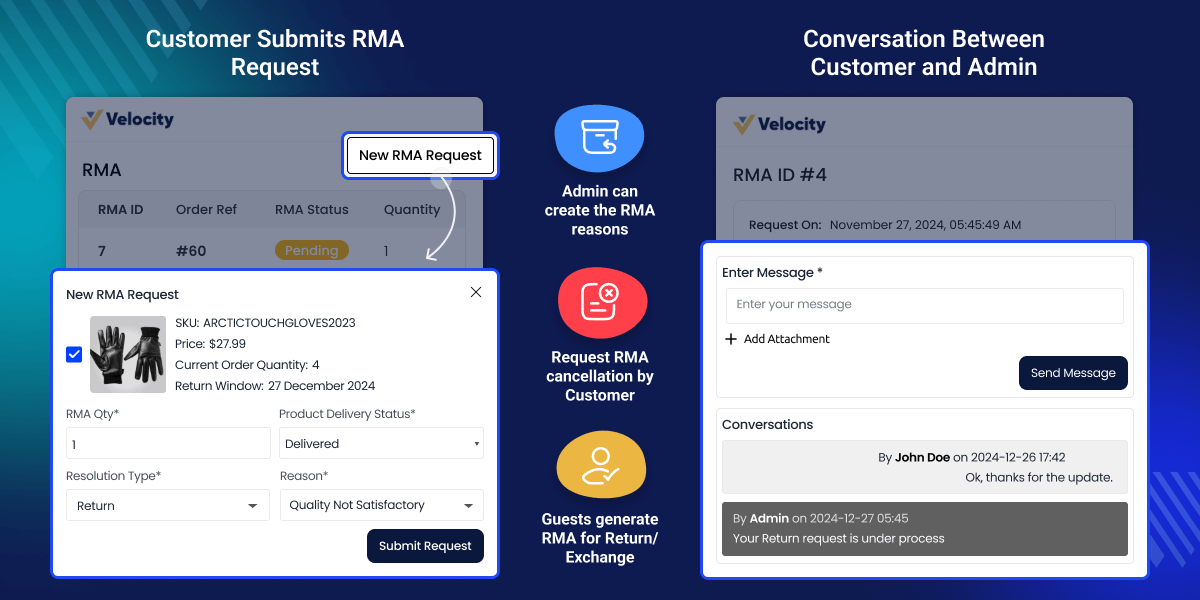
    Laravel eCommerce RMA

    Highlighted Features

     RMA Request Creation

    Customers can easily create RMA requests from their profile.

     RMA Reason Creation

    The admin can create RMA reasons for the customers.

     RMA Request Visibility

    The admin can easily view all RMA requests generated by the customers.

     Days Allowed To Generate RMA Request

    The admin can set the “Default Allowed Days” to create RMA requests for their customers.

     Allow Guest Users

    The admin can also allow guest users to create an RMA request. Guest users need to input their order id and email id to generate RMA request.

     Customer And Admin Communication

    The module allows the customer and admin communication regarding the RMA request.

     Dynamic selection of items

    Customers can select multiple items when creating an RMA request

     Admin can solve the requested RMA for products.

    Admin can refund individually for a particular item requested in the RMA.

    What is the need for RMA?

    This feature can help to improve the customer's satisfaction.RMA provides the freedom to the customer to replace, refund, and cancel the orders. Some of the main advantages of RMA are:-

    • Increases customer satisfaction.
    • Increases customer's trust for the eCommerce store.
    • Increases the sale of an eCommerce store.
    • Increases the value of an eCommerce store.

    What is the difference between Exchange order and Replace order?

    • Exchange:- Under the exchange, the product will be exchanged with the new identical product with different sizes and colors.
    • Replace:- The product will be replaced with a new identical one if the previously delivered product is damaged or spoiled.

    Creating RMA Request

    Customers can create the RMA request for the refund, replace and cancel the orders if they are not satisfied with the order delivered to them within a limited period.
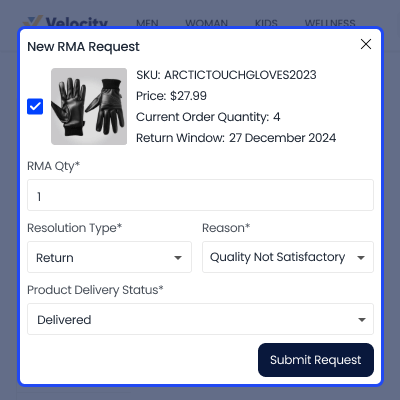
    • The customer can select RMA reasons from the drop-down.
    • The customer can add additional information and images for the wrongly delivered products.
    • The customer can also select the order status from the drop-down.
    • The customer and select any product if there is more than one product.
    Creating RMA Request

    RMA List

    Whenever a customer will create an RMA request the admin will get the notification about the RMA request through an email. The admin can see the list of RMA request in the admin panel.
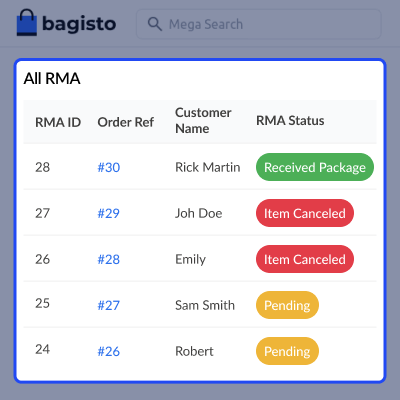
    • The admin can see all the RMA request under the RMA section.
    • The admin can view the details of all RMA requests by selecting any RMA request from the RMA list.
    • The admin can easily check all the details regarding RMA requests such as customer name, order reference, RMA status, and RMA request date.
    • The admin can also filter the RMA request by RMA Id, Customer name, RMA request date, and order reference.
    RMA List

    Response to RMA

    By selecting any RMA from the RMA list, the admin can view the complete information regarding an RMA request including the messages sent by the customers. The admin can also see the images of the product if the customer has sent the images of the product under this section.
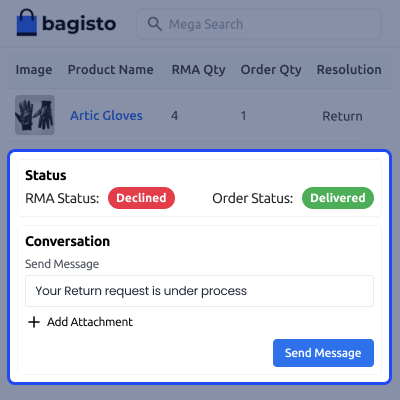
    • The admin can change the status of the RMA request.
    • The admin can send a message to the customer regarding the RMA.
    • The admin can also check the order information regarding, order id, product price, and quantity.
    • The resolution type for the order requested by the customer is also visible to the admin.
    Response to RMA

    Chat Board

    One of the important features of the RMA module is that the customer and admin can chat with each other regarding the RMA request through messages.

    This feature is very beneficial for the customer as well as for the admin also.
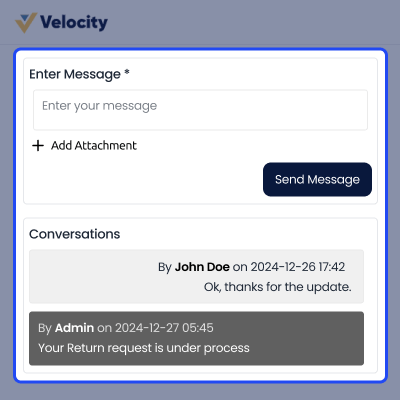
    • All Conversations between the admin and customer are visible with respective dates and times.
    • All conversations can be seen between the admin and customer by selecting a particular RMA.
    Chat Board

    RMA Email Notification

    Once the RMA has been requested by the customer for any particular product, the customer and admin both will get the RMA notification on the generation of the RMA request.
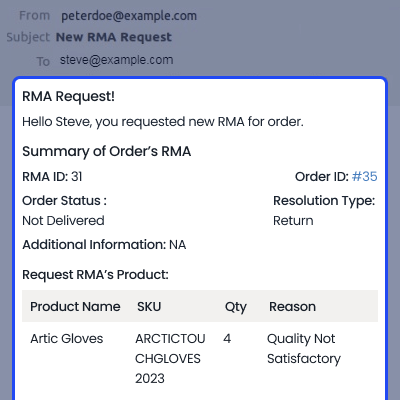
    • The guest user will also get the notification for RMA generation through email.
    • The RMA email notification consists of the entire details about the RMA.
    • The customer will get a notification at the time of the RMA status change
    RMA Email Notification

    Complete Features List

    • Customers can request RMA to cancel an order.
    • Customers can generate RMA for Return/Exchange.
    • The customer will be able to send a message over the request of RMA.
    • Admin will create RMA reasons.
    • Admin will be able to send a message over the request of RMA.
    • Admin can see the list of all the RMA.
    • Admin can solve the Requested RMA for products.
    • Guest users can request an RMA to cancel an order.
    • Guest users can generate RMA for Return/Exchange.
    • Admin can set “Default Allowed Days” to create RMA by buyer.
    • Customer will be able to send message over the request of RMA.
    • Dynamic selection of items for an order for making RMA request.
    • Admin will be able to send message over the request of RMA.
    • The admin can see the list of all the RMA.
    • Admin can solve the Requested RMA for products.
    • Guest user can request a RMA to cancel order.
    • The guest user can generate RMA for Return/Exchange.
    • Admin can set “Default Allowed Days” to create RMA by buyer.
    • Supported product types are Bundle product, Grouped product, Configurable product, Simple product.

     Support

    For any issue related to this module, please create a support ticket here at - https://webkul.uvdesk.com/en/customer/create-ticket/ or send an email to [email protected]

    You may also check our quality Bagisto Extensions.

    Specifications

    Product Version2.3.6
    Released5 years ago
    CategoryBagisto Laravel
    Last UpdatedOctober 14, 2025 (4 months ago)
    Supported VersionsBagisto  2.x.x  
    Write a review

    Frequently Asked Questions

     Who Can request RMA?
    The guest user, as well as registered customers, can request RMA
     
     Can the admin also decline the RMA request?
    Yes, the admin can also decline the RMA request according to the requirement.
     
     Is the message option also available between the customer and the admin?
    Yes, the message option is also available between the admin and the customer.
     
     Can the admin create RMA reasons?
    Yes, the admin can also create RMA reasons.
     
     Can the admin set the “Default Allowed Days” to create RMA requests for their customers?
    Yes, the admin can set the "Default allowed Days" to create RMA requests for their customers.

    Move to Cloud Today

    AWS Free tier hosting for one year by amazon web services, for more details please visit AWS Free Tier.

    GCP Free tier hosting for one year with 300 credit points by google cloud platform, for more details please visit GCP Free Tier.

    Azure free tier hosting for one year with 25+ always free services, for more details please visit Azure Free Tier.

    In our default configuration we will provide tremendous configuration for your eCommerce Website which is fast to load and response.

    Default Configuration Details of Server

    • 1 GB RAM
    • 1 Core Processor
    • 30 GB Hard Disk
    • DB with 1 GB RAM and 1 Core Processor

    * Server Configuration may vary as per application requirements.

    Want to know more how exactly we are going to power up your eCommerce Website with Cloud to fasten up your store. Please visit the Cloudkul Services.

    Get Started with Cloud
    • - Feature Add (+)
    • - Feature remove (-)
    • - Bug Fixed (!)
    • - Modification (*)
    v2.2.3 (5th August, 2025) - Release
    • + Compatible with Bagisto v2.3.6
    v2.2.3 (29th January, 2025) - Release
    • + Compatible with Bagisto v2.2.3
    • ! After an RMA is created by the user, the admin should be restricted from generating the invoice, shipment, or refund
    • ! Encountering an RMA issue with configurable products
    v2.1.2 (22nd November, 2024) - Release
    • + Compatible with Bagisto v2.1.2
    • + Print RMA details feature has been added
    • + The return/exchange window is now visible on the "New RMA" page when creating a new RMA
    • + Buyers and admins can communicate using the RMA system
    • + The Return Policy page is displayed to customers
    • + Admins can use the "Return Quantity" option to restock RMA quantities in their store
    • + Specific file extensions are now allowed in RMA configuration to support certain image types
    • ! Multiple critical bugs have been fixed
    • ! Issues related to flow and functionality of the RMA process have been resolved
    • ! UI-related issues have been fixed
    v2.0.x - Release
    • + Compatible with Bagisto v2.0.0
    • ! Issues raised on Git have been fixed
    v1.4.4 (22nd September, 2022) - Release
    • + Compatible with Bagisto v1.4.4
    • ! Issues raised on Git have been fixed


