USD
  • EUR
  • INR
  • USD
Cart
Cart 0
  • You have no items in your shopping cart.
    Bagisto Laravel Extensions
    Cart
    Cart 0
    • You have no items in your shopping cart.
    Hire a Developer
    ×
    Contact Us!
    Send Again
    Close
    Please Login to Write Your Review
    Bagisto Multi-Tenant SaaS Mobile App

    Bagisto Multi-Tenant SaaS Mobile App

    x
    Free

    * Required Fields

    $1,199.00
    Add To Cart

    Bagisto Multi-Tenant SaaS Mobile App lets tenants request branded Android and iOS store apps. Super admins review requests and deliver finished builds.


    • Let tenants request an Android app, iOS app, or both with their own name and logo.

    • Review every tenant app request in one super admin list with search and filters.

    • Check app details, generated images, and store accounts in one request.

    • Open Create App Request to book a build with the mobile team.

    • Mark requests as Completed with download links and e-mail the tenant.

    • Generate all 15 splash screen sizes from one PNG uploaded by the tenant.

    • Reopen one field for correction while the request stays Open.

    • Keep Apple, Google Play, and Firebase credentials encrypted on the request.

    • Allow one open request per platform and unique Application IDs across tenants.

    • Message tenants on each request and attach files in the shared thread.

    Additional Info

    Note: An additional $100 Per Tenant will be charged for each tenant added to the system.

    Bagisto Multi-Tenant SaaS Mobile App
    Bagisto Multi-Tenant SaaS Mobile App
    $1,199.00
    Check How It Works

    Need Help Deciding?

    Support answers within one business day.

    Open a ticket
    $1,199.00
    Configure and Buy
    X
    • Description
    • Reviews
    • FAQ
    • Customers ()
    • Specifications
    • Cloud Hosting
    • Changelog

    Bagisto Multi-Tenant SaaS Mobile App lets tenants request a branded app for their store. Each request collects an app name, logo, splash image, platform IDs, and store account details.

    Tenants submit one form through My Apps. The request appears as Open and locks, though the super admin can reopen one field for a correction. Tenants can withdraw an Open request.

    The super admin reviews each request in All Requests and selects Create App Request to book the build with the mobile team. Both sides can discuss the request in its Messages thread.

    When the build is ready, the super admin adds the platform links and marks the request Completed. The tenant gets an e-mail alert and finds the links under Your App is Ready.

    Tenants can share the links with customers or upload the build through their own store accounts. The app supports Flutter shopping features such as RTL layouts and multiple currencies.

    Tenant requests run inside the Laravel e-Commerce Multi Company SaaS Module, where each merchant gets a separate storefront and admin panel.
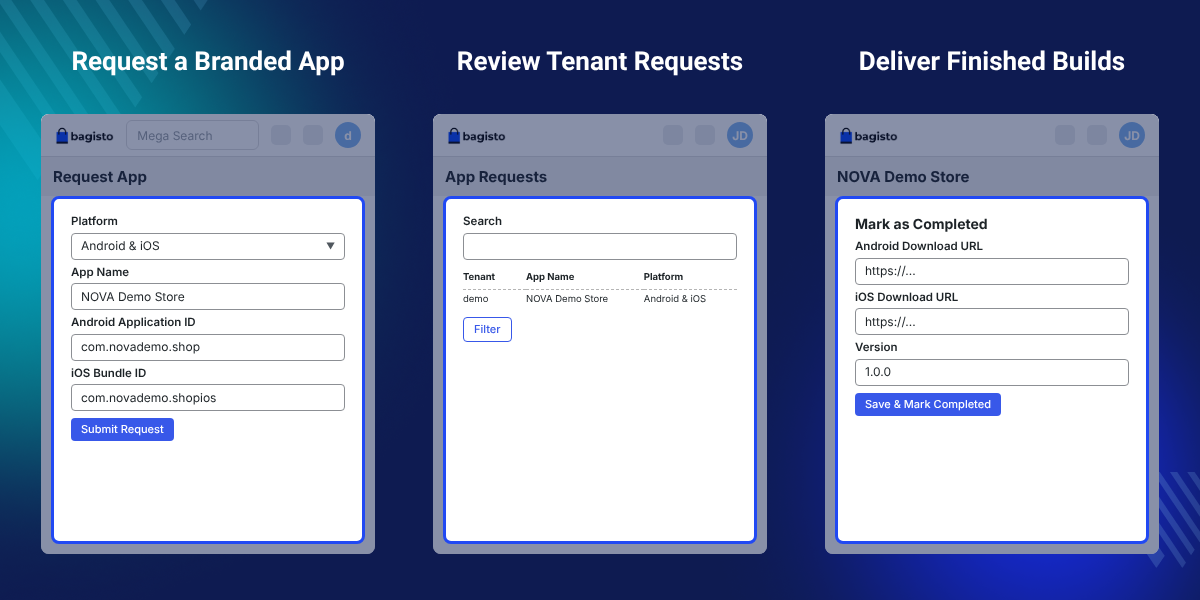
    Bagisto Multi-Tenant SaaS Mobile App

    Highlighted Features of Bagisto Multi-Tenant SaaS Mobile App

     Branded App per Tenant

    Each tenant gets an Android app, an iOS app, or both, with their own name, logo, splash screen, and app IDs.

     One-Page App Request

    Tenants send branding and store account details in a single form that hides sections a platform does not need.

     Request Review

    Review each Open request, ask for a field correction, or create the mobile team's build request.

     Automatic Splash Sizes

    One splash PNG of at least 1536 × 2688 pixels produces all 15 sizes that Android and iOS builds need.

     Field-Level Corrections

    Reopen only the wrong field, such as a bundle ID, and keep the rest of the request locked.

     Native Flutter Shopping App

    Shoppers browse categories, search, reorder, and switch to dark mode in an app that syncs with the store.

    Why Do We Need Bagisto Multi-Tenant SaaS Mobile App?

    Most merchants on a SaaS store platform sell through a website, and some through Laravel eCommerce Multi Tenant SaaS POS Module in a shop. Few can build a mobile app alone.

    Building apps for tenants by hand is slow for the platform owner. Logos, splash files, app IDs, and store logins arrive by e-mail, and wrong details often surface late.

    This SaaS add-on collects the details through one form. Super admins review the Open request, book the build with the mobile team, and add links when the app is ready.

    One practical detail saves the most time. A single splash PNG gives 7 Android and 8 iOS sizes, each named by its exact pixels, so nobody resizes images by hand.

    Also, if tenants need an installable web storefront, you can check our extension Laravel eCommerce Multi-Tenant SaaS PWA.

    Bagisto Multi-Tenant SaaS Mobile App Use Cases

    • Add a Mobile Channel to Your SaaS

      Platform owners add a white label mobile app to the store service. To manage merchant plans too, check Laravel eCommerce SaaS Subscription.

    • Review Before Development

      Super admins check logos, app IDs, and accounts before opening the mobile team's build request.

    • Launch Apps Without a Mobile Team

      Super admins book the build with the mobile team, so platform owners do not need an in-house app team.

    • Let Tenant Customers Shop on Phones

      Shoppers browse, search, and reorder from the phone. For text alerts too, tenants can add Bagisto SaaS SMS Notifications.

    • Serve RTL and Multi-Currency Stores

      Tenants who sell in right-to-left languages or in several currencies get an app with RTL layouts and multi-currency support.

    • Onboard Individual Developer Accounts

      Small merchants with Individual Apple or Google Play accounts can still request an app. The account type shows the release limits early.

    Tenant App Request Form

    Merchants ask for a mobile app through the Tenant App Request Form. Tenants open Mobile App Requests > My Apps and select Request App in the top right.
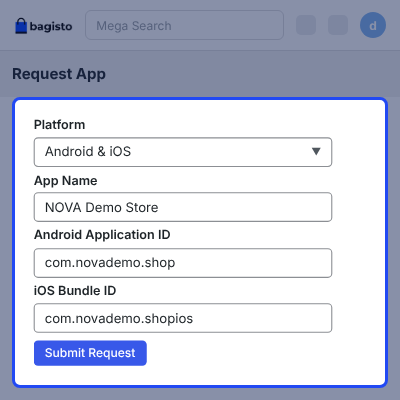
    • Choose Android, iOS, or Android & iOS as the app platform.
    • Enter the App Name that shows under the app icon.
    • Add an Android Application ID such as com.yourbrand.shop.
    • Add an iOS Bundle ID such as com.yourbrand.shopios.
    • See every past request and its status in the My Apps list.
    • Keep entries after a refused submit, with the reason shown under the field.
    Tenant App Request Form

    App Logo and Splash Image Sizes

    App Logo and Splash Image uploads set the look of the tenant app. The form checks each file at upload, so wrong sizes never reach app development.
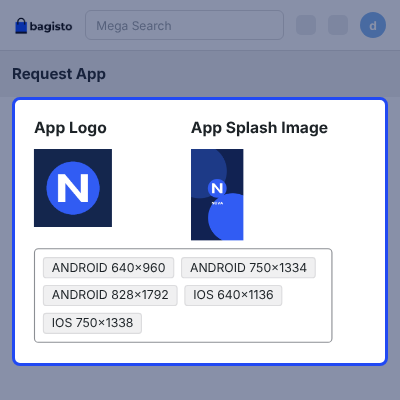
    • Upload the App Logo as a PNG of exactly 512 × 512 pixels.
    • Refuse a logo of the wrong size at upload time.
    • Upload one App Splash Image as a PNG of at least 1536 × 2688 pixels.
    • Generate the 15 required splash sizes from that single file.
    • Show every generated size as a grey chip under the splash upload.
    App Logo and Splash Image Sizes

    Apple, Google Play, and Firebase Account Details

    Store account sections collect the logins needed to publish the tenant app. Each section has a one-line hint and a More info link to the provider guide.
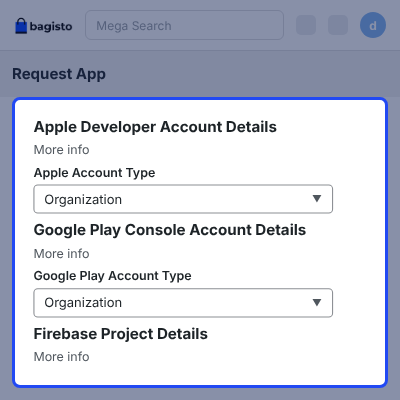
    • Enter the Apple Developer Account type and login credentials.
    • Enter the Google Play Console Account type and login credentials.
    • Add the Firebase Project details.
    • Pick Organization or Individual as the account type for Apple and Google Play.
    • Plan for Google Play asking Individual accounts for a 14-day closed test with 12 testers.
    • Show credentials only as Stored after submit, so they can be replaced but not read back.
    Apple, Google Play, and Firebase Account Details

    Review Tenant App Requests

    Super admins review app requests from every tenant under Mobile App Requests > All Requests. They can check each request before booking the build.
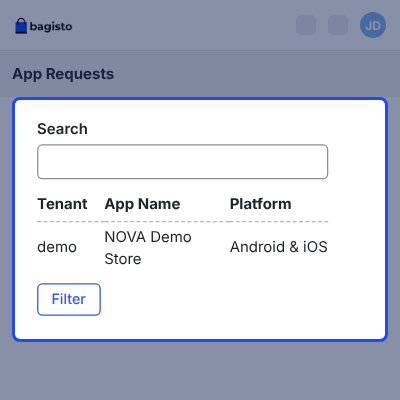
    • See the tenant name and domain, with search, filters, and pagination.
    • Open a request with the View (eye) icon.
    • Check the app name, platform, app IDs, generated images, and credential groups.
    • Download all images as a ZIP with android/ and ios/ folders.
    • Use Request a Correction on one field while the request stays Open.
    • Use Cancel with a reason if the request cannot go ahead.
    Review Tenant App Requests

    Send Tenant App Requests for Development

    Super admins select Create App Request to open the Webkul mobile team's build form in a new tab. The request screen holds the artwork and account details the team needs.
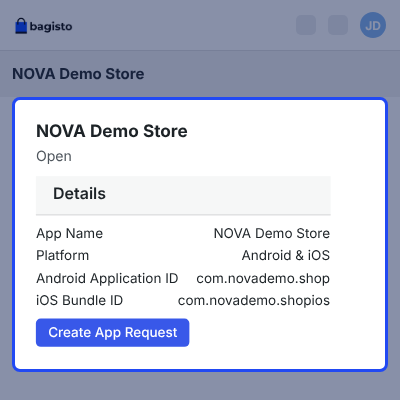
    • Open an Open request and select Create App Request.
    • Use Download images (ZIP) for the platform artwork.
    • Reveal each credential group with Show only when the team needs it.
    • Copy requested credentials from the panel; they are not e-mailed.
    Send Tenant App Requests for Development

    Message Tenants About App Requests

    Each app request has a Messages thread shared by the tenant and super admin. They can use it for questions and updates while the request is Open.
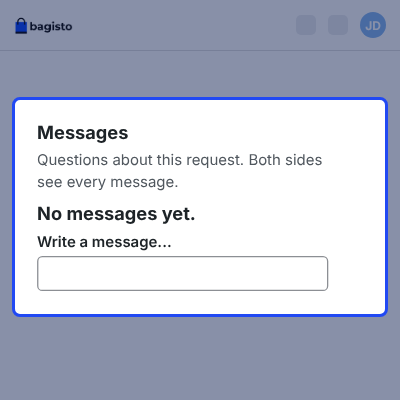
    • See who sent each message and when.
    • Attach up to five files of 10 MB each per message.
    • Use PNG, JPG, PDF, ZIP, TXT, JSON, CSV, DOC, DOCX, XLS, or XLSX files.
    • E-mail the other side when a message arrives; keep attachments in the panel.
    • Read the thread after completion or cancellation, when replies close.
    Message Tenants About App Requests

    Mark App Requests as Completed

    Mark as Completed closes a request once the finished build is ready. Super admins add the build links, and the tenant gets an e-mail alert.
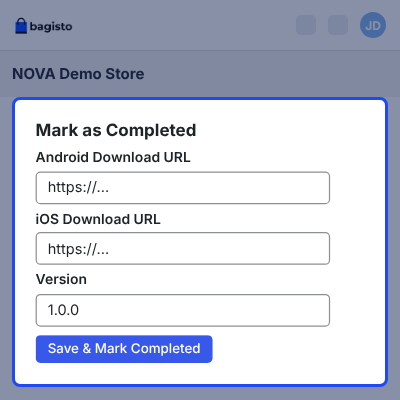
    • Paste the build URL and an optional version.
    • Add one URL per platform, or two when the request covers Android and iOS.
    • Use an .apk or .aab file for Android and an App Store link for iOS.
    • Show the links to the tenant under Your App is Ready, labelled by platform.
    • Disable earlier download links whenever new links are issued.
    • Let tenants share the links or upload the build through their own store account.
    Mark App Requests as Completed

    Shopping Features in the Tenant Mobile App

    Tenant customers get a branded shopping app built in Flutter for Android and iOS phones and tablets. It is the same app as the Bagisto Laravel Native Mobile App, set up for the tenant store.

    The app syncs with the tenant store in real time, so catalogs added with Laravel eCommerce SaaS Bulk Upload show up for shoppers too.
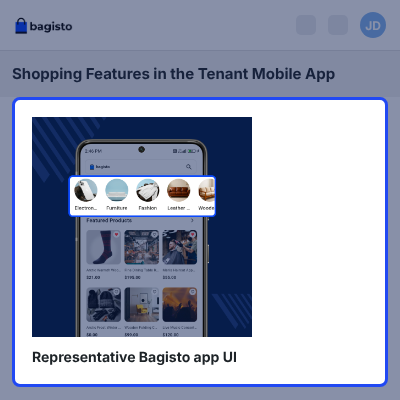
    • Sign up, log in, and save a default address.
    • Browse categories and subcategories with horizontal category navigation.
    • Find products faster with search suggestions.
    • Shop in many languages, including RTL layouts, and in multiple currencies.
    • Apply offers and coupons, and reorder past orders.
    • Switch the app to a dark theme with a single tap.
    Shopping Features in the Tenant Mobile App

    Complete Bagisto Multi-Tenant SaaS Mobile App Feature List

    Tenant App Requests

    • Request an Android app, an iOS app, or both from the tenant admin panel
    • Track every request and its status under Mobile App Requests > My Apps
    • Fill in one page that hides the sections a chosen platform does not need
    • Lock the form after submission, with no draft saving
    • Allow only one open request per platform for each tenant
    • Keep each request visible only to the tenant that raised it and the super admin
    • Let tenants withdraw an Open request with Delete in My Apps

    Branding & Image Generation

    • Set the App Name shown under the app icon
    • Upload a 512 × 512 PNG logo, with wrong sizes refused at upload
    • Generate 15 splash sizes from one PNG of at least 1536 × 2688 pixels
    • Download a ZIP with 7 Android and 8 iOS splash sizes named by their pixels
    • Include a logo folder in each platform folder and a README.txt with request details

    Store Accounts & Credential Security

    • Collect Apple Developer, Google Play Console, and Firebase project details
    • Record Organization or Individual account types for Apple and Google Play
    • Link each account section to the provider documentation with a More info link
    • Store credentials encrypted and show them only as Stored
    • Keep Application IDs unique across every tenant on the platform

    Super Admin Review & Requests

    • Review requests from all tenants with tenant name, domain, search, and filters
    • Open any request with the View (eye) icon to check app details and generated images
    • Use Create App Request to open the mobile team's build form
    • Reopen a single field for correction while the request stays Open
    • Cancel with a reason and free the platform for a new request

    App Development & Completion

    • Download the artwork ZIP and reveal credentials with Show when needed
    • Mark requests Completed with one download URL per platform and an optional version
    • Deliver .apk or .aab files for Android and an App Store link for iOS
    • E-mail tenants on completion, correction, and cancellation
    • Show the finished build links on the request under Your App is Ready

    Request Messages

    • Share a Messages thread between the tenant and super admin
    • Attach up to five files of 10 MB each to a message
    • E-mail the other side about a new message without sending attachments
    • Keep completed and canceled threads readable after replies close

    Shopper App Features

    • Give tenant customers a native Flutter app for Android and iOS phones and tablets
    • Support many languages with RTL layouts and multiple currencies
    • Offer category and subcategory browsing with search suggestions
    • Let shoppers apply offers and coupons and reorder past purchases
    • Support all product types, configurable product details, and inclusive or exclusive tax
    • Include a dark theme, a default address, and a contact us page

     Support

    For any issue related to this module, please create a support ticket here at - https://webkul.uvdesk.com/en/customer/create-ticket/ or send an email to [email protected]

    You may also check our quality Bagisto Extensions.

    Specifications

    Product Version1.0
    Released4 days ago
    Last UpdatedOctober 30, 2026 (4 days ago)
    Supported VersionsBagisto  2.x.x  

    Ratings

    We'd love to hear your thoughts! Share your feedback and help us craft an even better experience tailored just for you.

    Write a review

    Frequently Asked Questions

     How does Bagisto Multi-Tenant SaaS Mobile App work?
    Bagisto Multi-Tenant SaaS Mobile App lets a tenant submit one app request with branding and store account details. The super admin reviews it, books the build through Create App Request, then marks it Completed with links on the request.
     
     Who will generate the mobile app for each tenant?
    The Webkul mobile team develops each tenant app after the super admin opens Create App Request and books the build. Platform owners do not need an in-house mobile team.
     
     What statuses can a tenant app request have?
    An app request can be Open, Completed, or Canceled. Open means submitted, Completed means the build links are ready, and Canceled means the platform stopped the request with a reason.
     
     Can a tenant request both an Android and an iOS app?
    Yes. A tenant can choose Android, iOS, or Android & iOS. A request for both platforms gets two download links, one for Android and one for iOS.
     
     What images does a tenant need to upload?
    A tenant uploads an app logo as a PNG of exactly 512 × 512 pixels and one splash image as a PNG of at least 1536 × 2688 pixels. All 15 splash sizes are generated from that one file.
     
     Can a tenant edit an app request after submitting it?
    No. A submitted app request locks. Only a field the super admin flags for correction reopens, and the rest stays locked.
     
     Can two tenants use the same Application ID?
    No. Application IDs are real store identifiers, so each one must be unique across every tenant on the platform. A duplicate ID shows the message This application ID is already in use.
     
     How are tenant store account credentials protected?
    Apple, Google Play, and Firebase credentials are encrypted and shown as Stored by default. The super admin can reveal a group with Show when the mobile team needs it; credentials are never e-mailed.
     
     Can a tenant use an Individual Google Play or Apple account?
    Yes. Google Play may require a closed test with 12 testers for 14 days before production for Individual accounts. Individual Apple accounts cannot add team members, so development works from the Apple ID itself.
     
     What happens when an app request is canceled?
    The tenant gets an e-mail, and the cancellation reason appears on the request. Cancellation frees the platform, so the tenant can raise a new request for it.
     
     Which features do tenant customers get in the mobile app?
    Tenant customers get a native Flutter app with category browsing, search suggestions, coupons, reorder, multiple languages with RTL, multiple currencies, and a dark theme.

    Specification

    Detailed technical features and requirements to help you understand the module’s capabilities and ensure smooth integration with your system.

    Cloud Hosting

    Detailed technical features and requirements to help you understand the module’s capabilities and ensure smooth integration with your system.

    Default Configuration Details of Server

    1 GB
    RAM
    1 Core
    Processor
    30 GB
    Hard Disk
    1 GB RAM & 1 Core Processor
    Database

    Want to know more how exactly we are going to power up your eCommerce Website with Cloud to fasten up your store

    * Server Configuration may vary as per application requirements.

    Change Logs

    Not Available