USD
  • EUR
  • INR
  • USD
Cart
Cart 0
  • You have no items in your shopping cart.
    Cart
    Cart 0
    • You have no items in your shopping cart.
    Hire a Developer
    ×
    Contact Us!
    Send Again
    Close
    Please Login to Write Your Review

    Bagisto SaaS Google Font Manager

    Bagisto SaaS Google Font Manager lets each SaaS tenant customise Google Fonts for the Admin Panel and Storefront without affecting other tenant websites.


    • Manage Google Fonts independently for every Bagisto SaaS tenant.

    • Apply separate fonts to the Admin Panel and Storefront.

    • Keep font settings isolated across tenant stores.

    • Search Google Fonts from a built in searchable library.

    • Choose from a wide collection of Google Web Fonts.

    • Enable or disable Google Fonts whenever needed.

    • Apply selected fonts automatically after configuration.

    • Configure website fonts without writing any code.

    • Manage website typography through a simple admin panel.

    • Create a consistent brand identity with custom fonts.

    • Improve readability across the Admin Panel and Storefront.

    Screenshots
    Bagisto SaaS Google Font Manager Bagisto SaaS Google Font Manager Bagisto SaaS Google Font Manager Bagisto SaaS Google Font Manager Bagisto SaaS Google Font Manager Bagisto SaaS Google Font Manager
    Show More Hide All
    $99.00
    Add To Cart
    $99.00
    Configure and Buy
    • Description
    • Reviews
    • FAQ
    • Customers ()
    • Specifications
    • Cloud Hosting
    • Changelog

    Bagisto SaaS Google Font Manager lets every SaaS tenant personalise fonts with Google Fonts. Each store's font settings remain separate and never affect other tenant stores.

    Store owners can change website fonts in just a few clicks using a simple settings page. They can search Google Fonts and select the one that matches their brand. Every tenant has separate font settings. Changes made in one store never appear in another store, making it suitable for multi company SaaS platforms.

    Using the right fonts helps create a professional website that matches the business identity and makes content easier for customers to read. This extension is a good choice for SaaS businesses, marketplaces, and agencies that manage multiple online stores and want an easy way to manage website fonts.

    Additionally, to build a multi-tenant eCommerce platform where merchants create and manage their own online stores, check out Laravel e-Commerce Multi Company SaaS Module.
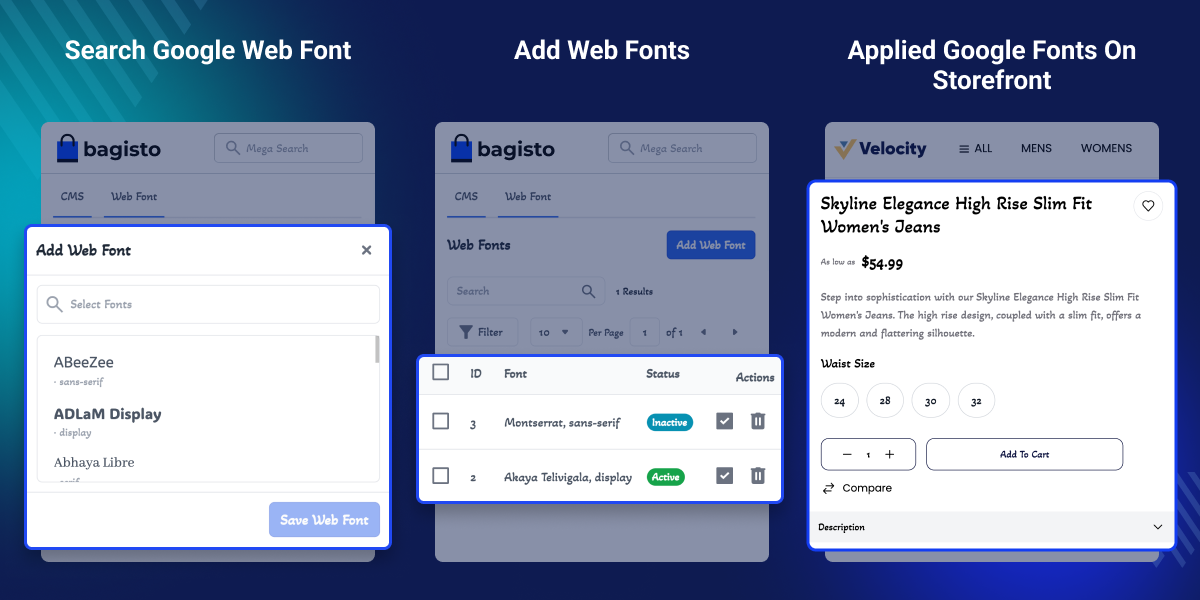
    Bagisto SaaS Google Font Manager

    Highlighted Features of Bagisto SaaS Google Font Manager

     Independent Tenant Fonts

    Each SaaS tenant manages Google Fonts without affecting other tenant websites.

     Separate Admin & Storefront Fonts

    Apply different Google Fonts to the Admin Panel and Storefront independently.

     Search Google Fonts

    Find and select Google Fonts quickly using the searchable font list.

     One Click Font Control

    Enable or disable custom Google Fonts whenever your website needs a change.

     No Code Configuration

    Manage website typography from the admin settings without editing CSS or code.

     Consistent Website Typography

    Apply selected fonts across configured areas for a consistent website appearance.

     Better Brand Identity

    Match website fonts with your business branding for a more consistent look.

     Improved Readability

    Use suitable Google Fonts to make storefront and admin content easier to read.

    Why Do We Need Bagisto SaaS Google Font Manager?

    Bagisto SaaS Google Font Manager helps every tenant use their own Google Fonts instead of sharing the same website typography. This gives each business more control over its website branding.

    By default, SaaS platforms often provide limited typography options. Store owners may need code or CSS changes to customise fonts, making updates slower and less flexible.

    The module removes these limitations by letting tenants configure Google Fonts through a simple tenant interface. Each tenant's font settings remain separate and never affect other stores.

    This flexibility helps businesses maintain consistent branding, improve readability, and manage website typography without technical knowledge.

    Apart from this, to accept secure online payments through the ABA gateway across SaaS stores, check out Laravel eCommerce SaaS ABA Payment.

    Use Cases

    • Franchise Businesses

      Allow each franchise store to choose Google Fonts that match its local brand while using the same SaaS platform.

    • Web Design Agencies

      Manage multiple client stores with different Google Fonts without affecting other websites.

    • Multi Brand Companies

      Give every online store its own typography to maintain a distinct brand identity.

    • B2B SaaS Marketplaces

      Let every seller or tenant customise website fonts with isolated font settings.

    • Business Rebranding

      Change website typography during a rebrand without editing code or affecting other stores.

    • Stores With Different Admin Teams

      Choose Admin Panel fonts that improve readability for teams managing daily operations.

    Searchable Google Fonts Library

    Bagisto Google Font Manager helps you quickly search and choose Google Fonts from a searchable list without browsing hundreds of font options manually.
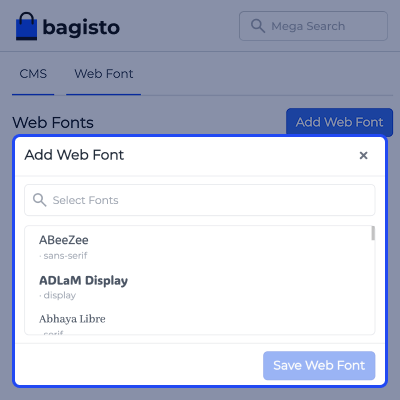
    • Search Google Fonts with a built in search box
    • Browse a large collection of Google Web Fonts
    • View font families before selecting them
    • Select and save fonts through a simple interface
    Searchable Google Fonts Library

    Storefront Font Application

    Bagisto Font Customisation applies selected Google Fonts only to each tenant's storefront, helping businesses match their brand identity, improve content readability and shopping experience without modifying theme files or CSS.

    • Apply Google Fonts to the storefront
    • Display selected fonts across storefront pages
    • Keep storefront fonts separate for each tenant
    • Maintain consistent website typography
    Storefront Font Application

    Manage Saved Google Fonts

    Bagisto Store Typography helps you view all saved Google Fonts in one place and manage their status from a single screen, making it easy to organise, activate, or remove fonts as your website grows.
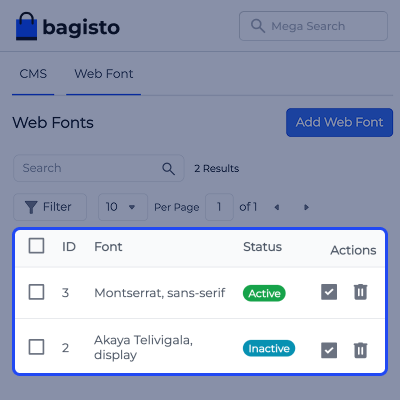
    • View all saved Google Fonts in a single list
    • Search and filter font records quickly
    • Activate or deactivate fonts with one click
    • Remove fonts that are no longer required
    • Manage website typography without writing code
    • Organise font settings from one central screen
    Manage Saved Google Fonts

    Google Fonts Configuration

    Bagisto Google Fonts Extension helps to configure Google Fonts for the Admin Panel, Storefront, or both from a single settings page, giving every tenant full control over website typography.
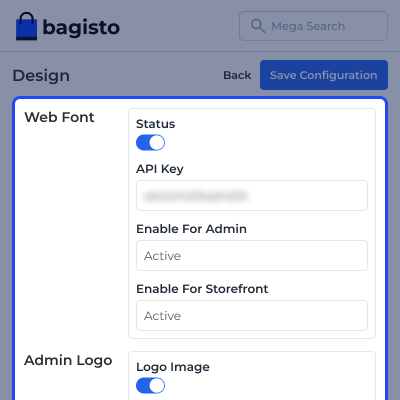
    • Enable or disable Google Fonts anytime
    • Add your Google Fonts API key
    • Apply fonts to the Admin Panel only
    • Apply fonts to the Storefront only
    • Use the same font for both areas if required
    Google Fonts Configuration

    Support

    For any query or issue, please create a support ticket here http://webkul.uvdesk.com/. You may also check our all Bagisto Extensions.

    Specifications

    Product Version2.4.6
    ReleasedToday
    CategoryBagisto Laravel
    Last UpdatedJuly 17, 2026 (Today)
    Supported VersionsBagisto  2.4.x  
    Write a review

    Frequently Asked Questions

     Why should I use Google Fonts instead of the default fonts?
    Google Fonts provide a wider range of font styles, helping you match your store's branding and improve content readability.
     
     Can I use different fonts for the Storefront and Admin Panel?
    Yes, you can assign different Google Fonts to the Storefront and Admin Panel, or use the same font for both. Font settings are managed independently based on your preference.
     
     Can I change Google Fonts after my website is live?
    Yes, you can update, replace, or switch Google Fonts at any time through the configuration settings without affecting your existing store configuration.
     
     How do I find a specific Google Font in Bagisto Store Typography?
    Yes, this extension provides a searchable Google Fonts list, allowing you to quickly find and select the font that best suits your store.
     
     Can I switch back to the default fonts in Bagisto Google Fonts Extension?
    Yes, you can disable Google Fonts whenever required and revert to the default fonts without affecting your existing store configuration or tenant settings.
     
     Who can benefit from Bagisto SaaS Google Font Manager?
    It is ideal for SaaS businesses, agencies, marketplaces, franchises, and companies managing multiple online stores with separate branding.

    Move to Cloud Today

    AWS Free tier hosting for one year by amazon web services, for more details please visit AWS Free Tier.

    GCP Free tier hosting for one year with 300 credit points by google cloud platform, for more details please visit GCP Free Tier.

    Azure free tier hosting for one year with 25+ always free services, for more details please visit Azure Free Tier.

    In our default configuration we will provide tremendous configuration for your eCommerce Website which is fast to load and response.

    Default Configuration Details of Server

    • 1 GB RAM
    • 1 Core Processor
    • 30 GB Hard Disk
    • DB with 1 GB RAM and 1 Core Processor

    * Server Configuration may vary as per application requirements.

    Want to know more how exactly we are going to power up your eCommerce Website with Cloud to fasten up your store. Please visit the Cloudkul Services.

    Get Started with Cloud
    • - Feature Add (+)
    • - Feature remove (-)
    • - Bug Fixed (!)
    • - Modification (*)
    Version 2.4.6
    • + Compatible with Bagsito v2.4.x


