USD
  • EUR
  • INR
  • USD
Cart
Cart 0
  • You have no items in your shopping cart.
    Cart
    Cart 0
    • You have no items in your shopping cart.
    Hire a Developer
    ×
    Contact Us!
    Send Again
    Close
    Please Login to Write Your Review

    CS-Cart Cloudflare Turnstile CAPTCHA

    CS-Cart Cloudflare Turnstile replaces Google CAPTCHA to protect login, registration, checkout, contact, review, and custom forms from bots and spam.


    • Replace Google CAPTCHA with Cloudflare Turnstile protection.

    • Secure login, registration, and checkout forms from bots.

    • Enable Turnstile on selected CS-Cart storefront forms.

    • Configure site key, secret key, theme, and widget size.

    • Support multiple storefronts with MultiShop compatibility.

    • Track completed Turnstile verifications and solve rates.

    • Protect custom forms, reviews, subscriptions, and order tracking.

    • Fully integrated with CS-Cart and Multi Vendor stores.

    Screenshots
    CS-Cart Cloudflare Turnstile CAPTCHA CS-Cart Cloudflare Turnstile CAPTCHA CS-Cart Cloudflare Turnstile CAPTCHA CS-Cart Cloudflare Turnstile CAPTCHA CS-Cart Cloudflare Turnstile CAPTCHA CS-Cart Cloudflare Turnstile CAPTCHA
    Show More Hide All
    $99.00

    * Required Fields

    Add To Cart
    30 Days Refund*
    Only One Time Payment
    $99.00
    Configure and Buy
    • Description
    • Reviews
    • FAQ
    • Customers ()
    • Specifications
    • Cloud Hosting
    • Changelog

    CS-Cart Cloudflare Turnstile protects your online store from bots, spam, and fake submissions. It replaces Google CAPTCHA with Cloudflare Turnstile to secure customer forms with simple verification.

    The add on is made for CS-Cart and Multi Vendor stores. It helps prevent fake registrations, spam messages, and automated bot submissions on important store forms.

    Admins can enable Turnstile on login, registration, checkout, password reset, contact, vendor application, reviews, subscriptions, and custom forms. They can choose where the widget appears.

    This module supports Cloudflare site and secret keys. Admins can also set the widget theme, size, and other display options from the admin panel. MultiShop support lets each storefront use its own settings.

    Cloudflare analytics show challenges issued, visitor solve rate, and API solve rate. These reports help admins check widget activity and improve form security for real users.

    Apart from this, the admin can add CS-Cart CyberSource Payment Gateway ( Secure Acceptance ) to accept payments securely without any risk.
    CS-Cart Cloudflare Turnstile CAPTCHA

    Highlighted Features

     CAPTCHA Replacement

    Cloudflare turnstile is the replacement for the Google CAPTCHA verification tab.

     Dark CAPTCHA Theme

    The admin can set the theme of the CAPTCHA as light or dark.

     Set Cloudflare Turnstile Size

    Admin can also set the CAPTCHA size as normal or compact according to the website requirements.

     User Tracking with Cloudflare Analytics

    With the help of Cloudflare turnstile, the admin can view the user activity by the website analytics.

      Set Various Storefronts

    The admin can set the Cloudflare widget on various CS-Cart pages like the CS-Cart customer profile page, checkout page, login page, and more.

     Prevent Attacks

    It’s a replacement for a CAPTCHA, but it also secures your website similarly to Google's CAPTCHA.

    Why do we need the CS-Cart Cloudflare turnstile plugin?

    CAPTCHA stands for Completely Automated Public Turing Test to Tell Computers and Humans Apart. Many people get irritated because of reattempting CAPTCHA verification. Sometimes it takes more than 30 seconds to complete the process, which is not worth to user's time.

    Cloudflare turnstile is the solution to this problem. It will save the user's time and prevent your website from hackers. Users don't need to choose the images or alphanumeric codes to complete the verification.

    CS-Cart Cloudflare turnstile plugin provides this verification on various pages like the CS-Cart vendor registration page, checkout page, and more.

    Use Cases

    Secure Customer Login and Registration

    Protect login and registration forms from bots and spam while allowing genuine customers to sign in and create accounts with simple verification.

    Protect Checkout Forms

    Add Cloudflare Turnstile to the checkout page to reduce automated order attempts and fake checkout submissions.

    Secure Customer Forms

    Protect contact, call request, review, subscription, and custom forms from spam and automated bot activity.

    Protect Vendor Registration

    Add Cloudflare Turnstile to vendor registration forms to help reduce fake registrations and automated submissions.

    Multi-Store Protection

    Use Cloudflare Turnstile across multiple storefronts and configure protection settings based on the needs of each store.

    Cloudflare Analytics

    View challenge statistics, visitor solve rates, and API solve rates to monitor Turnstile activity and performance.

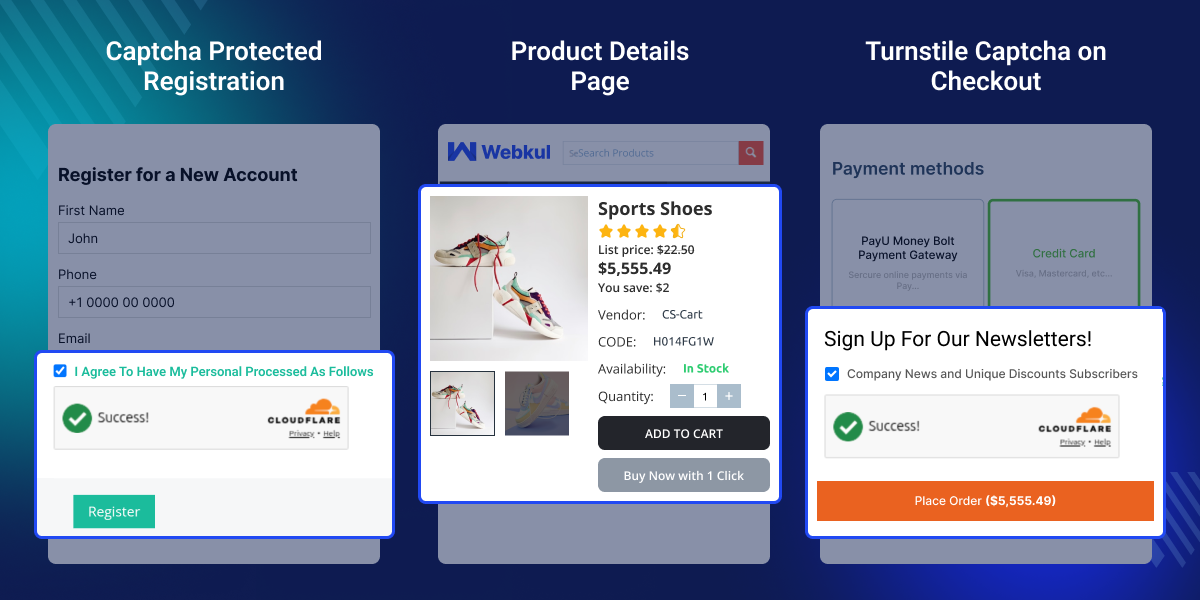
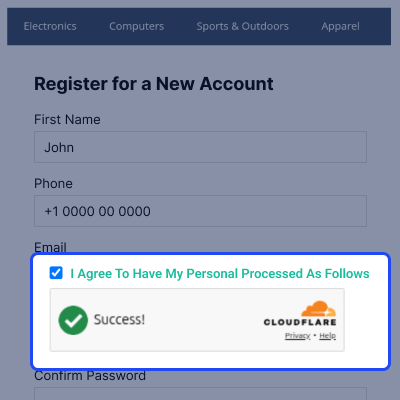
    CAPTCHA Protected Registration

    Cloudflare Turnstile protects the registration form from spam, bots, and automated sign-ups. The widget verifies users with minimal interaction, providing a faster registration process while reducing unwanted account creation.
    • Protect the registration form from automated submissions.
    • Display Turnstile during account registration.
    • Verify users without image or text-based CAPTCHAs.
    • Reduce spam registrations and bot activity.
    • Provide a faster registration experience.
    • Support the CS-Cart registration page.
    CAPTCHA Protected Registration

    Turnstile Configuration Settings

    Configure Cloudflare Turnstile from the CS-Cart admin panel. Manage API credentials, widget appearance, and supported forms from one place to match your store's security requirements.
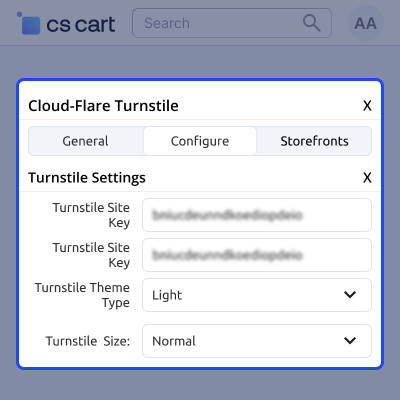
    • Enter the Site Key and Secret Key.
    • Choose the Light or Dark theme.
    • Select the Normal or Compact widget size.
    • Enable Turnstile for supported forms.
    • Manage all settings from one configuration page.
    • Update the configuration anytime.
    Turnstile Configuration Settings

    Turnstile Protected Checkout

    Cloudflare Turnstile protects the checkout page from bots and automated order submissions. This helps reduce fraudulent orders while providing customers with a smooth checkout experience.

    • Display Turnstile on the checkout page.
    • Verify customers before order submission.
    • Protect against spam and automated requests.
    • Remove image and text-based CAPTCHA challenges.
    • Provide a faster checkout experience.
    • Support the CS-Cart checkout process.
    Turnstile Protected Checkout

     Cloudflare Turnstile CAPTCHA: Support

    For any query or issue please create a support ticket here http://webkul.uvdesk.com.You may also check our other top-quality CS-Cart Add-ons.

    Specifications

    Product Version1.0
    Released3 years ago
    CategoryCS-Cart
    Last UpdatedJuly 3, 2026 (4 days ago)
    Supported Versions4.14.x  4.15.x  4.16.x  4.17.x  CS-Cart  4.18.x  
    Write a review

    Frequently Asked Questions

     Who can configure the Cloudflare Turnstile settings?
    Store administrators can configure the Cloudflare Turnstile module from the CS-Cart admin panel.
     
     Is a Cloudflare account required?
    Yes, you need a Cloudflare account to generate the Site Key and Secret Key required for the Turnstile integration.
     
     Will the Turnstile widget appear on every storefront page?
    No, the widget appears only on the forms and pages that the administrator enables from the module settings.
     
     Which forms can use Cloudflare Turnstile?
    You can enable Turnstile on login, registration, checkout, password reset, profile, reviews, subscriptions, custom forms, vendor applications, order tracking, and other supported pages.
     
     Does the module support CS-Cart Multi Vendor?
    Yes, this module is compatible with both CS-Cart and CS-Cart Multi Vendor stores.
     
     Can I change the Turnstile widget theme and size?
    Yes, the administrator can choose between light and dark themes and set the widget size to either normal or compact.
     
     Does the module support multiple storefronts?
    Yes, the module supports CS-Cart Multi-Storefront, allowing you to configure Cloudflare Turnstile separately for different storefronts.

    Move to Cloud Today

    AWS Free tier hosting for one year by amazon web services, for more details please visit AWS Free Tier.

    GCP Free tier hosting for one year with 300 credit points by google cloud platform, for more details please visit GCP Free Tier.

    Azure free tier hosting for one year with 25+ always free services, for more details please visit Azure Free Tier.

    In our default configuration we will provide tremendous configuration for your eCommerce Website which is fast to load and response.

    Default Configuration Details of Server

    • 1 GB RAM
    • 1 Core Processor
    • 30 GB Hard Disk
    • DB with 1 GB RAM and 1 Core Processor

    * Server Configuration may vary as per application requirements.

    Want to know more how exactly we are going to power up your eCommerce Website with Cloud to fasten up your store. Please visit the Cloudkul Services.

    Get Started with Cloud
    • - Feature Add (+)
    • - Feature remove (-)
    • - Bug Fixed (!)
    • - Modification (*)
    Version 1.0
    • added new addon
    • turnstile pages on many forms


