USD
  • EUR
  • INR
  • USD
Cart
Cart 0
  • You have no items in your shopping cart.
    Cart
    Cart 0
    • You have no items in your shopping cart.
    Hire a Developer
    ×
    Contact Us!
    Send Again
    Close
    Please Login to Write Your Review

    CS-Cart Multi Vendor Request for Quote

    CS-Cart Multi Vendor Request for Quote enables the buyers to request a quotation from the sellers for any product from their end.


    • Buyers can send quote requests for marketplace products.

    • Customers can request quotes for custom product needs.

    • Vendors can approve or reject product quote requests.

    • Sellers can update prices during quote negotiation.

    • Buyers and sellers can chat for price discussion.

    • RFQ forms support quantity, pricing, and validity date.

    • Customers can upload files for custom product quotes.

    • Vendors can manage requests from the RFQ dashboard.

    • Email updates are sent for all quotation activities.

    • Admin can enable RFQ for all store products at once.

    Screenshots
    CS-Cart Multi Vendor Request for Quote CS-Cart Multi Vendor Request for Quote CS-Cart Multi Vendor Request for Quote CS-Cart Multi Vendor Request for Quote CS-Cart Multi Vendor Request for Quote CS-Cart Multi Vendor Request for Quote CS-Cart Multi Vendor Request for Quote CS-Cart Multi Vendor Request for Quote CS-Cart Multi Vendor Request for Quote CS-Cart Multi Vendor Request for Quote CS-Cart Multi Vendor Request for Quote CS-Cart Multi Vendor Request for Quote
    Show More Hide All
    $99.00

    * Required Fields

    Add To Cart
    $99.00
    Configure and Buy
    • Description
    • Reviews
    • FAQ
    • Customers ()
    • Specifications
    • Cloud Hosting
    • Changelog

    CS-Cart Request for Quotation provides the customers with the functionality to raise a quotation request for the store products. Customers can request products that are not available in the store.

    The sellers are authorized to accept or reject the quotation requests. They can also negotiate the product price by updating the quotation. The customers can view the negotiated price by the sellers on their dashboard. The buyers can again negotiate by sending an updated quote request.

    If the customers are satisfied with the offered quotation, then they can make an order for the product at the finalized price. The customers and the sellers will receive an email every time for quotation-related activities.

    Additionally, Pair CS-Cart Multi-Vendor Request for Quote with CS-Cart Multi-Vendor FAQ to help customers get quick answers before requesting product quotations.
    CS-Cart Multi-Vendor Request for Quote

    Highlighted Features

     Product Quotation Request

    The customers can raise a price request for the store products.

     RFQ Seller Bid

    The sellers can also create a product bid on the price from their end if they want to negotiate.

     Customer-Seller Chat Option

    Customers and sellers can send messages regarding quotation requests.

     Request Approval & Rejection

    The vendors can approve or reject the price request sent by the customers.

     RFQ for Customized Products

    The product RFQ can also be raised by the customers for the personalized product.

     Email Notifications for RFQ Updates

    The vendors and shoppers both will receive emails related to RFQ updates.

    What is the Need for CS-Cart Request for Quotation module?

    CS-Cart Request for Quotation is handy to send a price request for both the available products and products that are not available in the store. It helps the buyers and the sellers to sell and purchase the products at a reasonable cost decided by both parties. The vendors and buyers can bid on the RFQ to negotiate for a desired price.

    In this way, both can make a fair deal for the products. Similarly, the buyers can send quotation requests for custom products and the products available according to the need, price, and quantity. The buyers can send the RFQ to all the sellers at the same time.

    Apart from this, Buyers and sellers can manage quotation activities more efficiently when CS-Cart RFQ is used with CS-Cart Multi-Vendor Bridge

    Use Cases

    CS-Cart Multi-Vendor Request for Quote lets buyers ask sellers for product prices before buying. It helps stores manage bulk orders, custom products, and price negotiation.

    • Bulk Product Orders

      Buyers can request better prices when ordering products in large quantity.

    • Custom Product Requests

      Customers can send custom product details and ask vendors for pricing.

    • Product Price Negotiation

      Buyers and sellers can discuss prices before the final purchase.

    • Compare Seller Quotes

      Customers can check quotes from many sellers in one place.

    • Buyer and Seller Chat

      Buyers and vendors can chat about product pricing and updates.

    • Requests for New Products

      Customers can request products that are not available in the store.

    RFQ Generation at Customer End

    The buyers can quote for any product from their dashboard with the Request a Quotation option. The customers have to fill out a form to raise a request by filling in the below details:
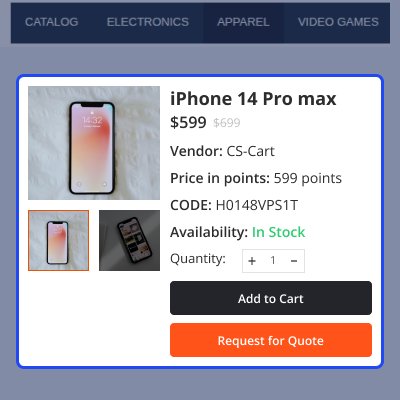
    • Email address, product quantity, validity date, and the price which he wants to quote.
    • The generated RFQs will be visible to the customers at their account in the quotation section.
    • The customers can view all the RFQs and also send requests for any product with Add Quotation button.
    • The status of the requested quotation will be tracked with the RFQ ID.
    RFQ Generation at Customer End

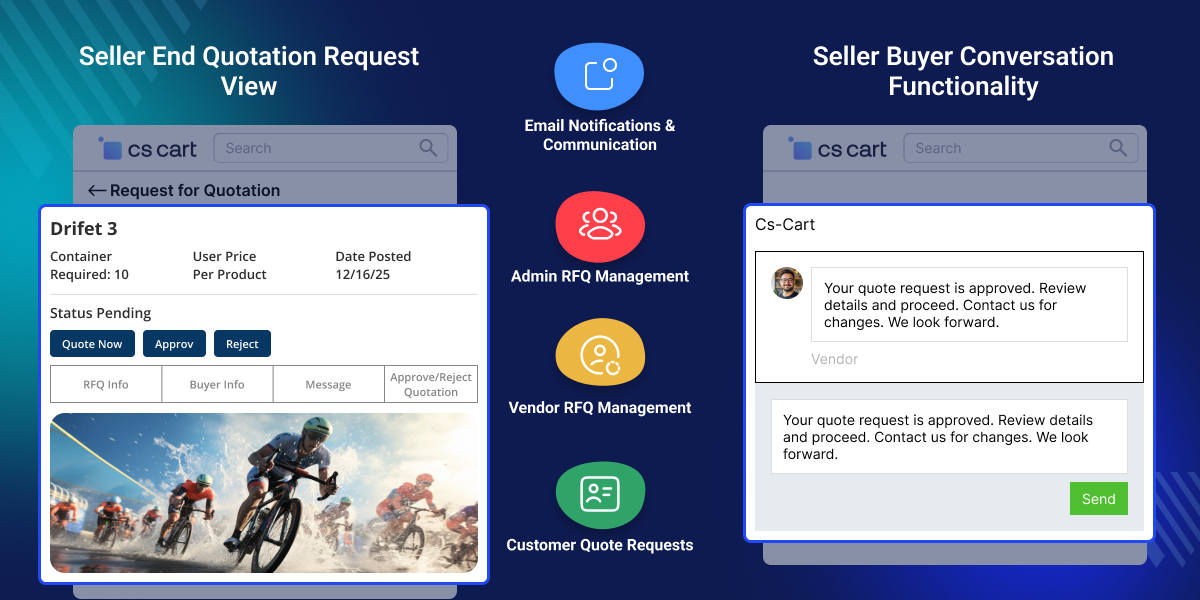
    Seller-End Quotation Request View

    The vendors have the authority to approve, reject or update the quotation from their end. They can view all the RFQs on their RFQ board and the below details will be displayed.
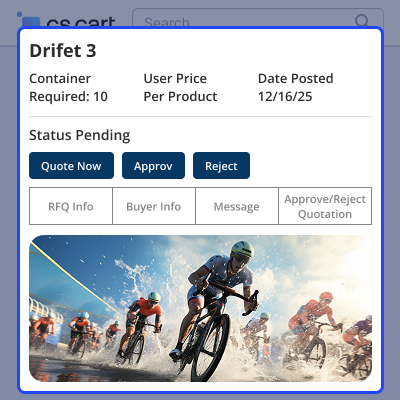
    • The RFQ details will be visible to the seller in the RFQ information tab.
    • The buyer information and message sent by the buyer will also display to the vendor.
    • The Approve/ Reject Quotation tab contains the details like; product name, quantity, and price with the approve and reject button.
    • The vendor can view the progress of the quotation request from the RFQ board.
    • The seller can quote by entering the new price for the product with the quantity, validity date, and description.
    Seller-End Quotation Request View

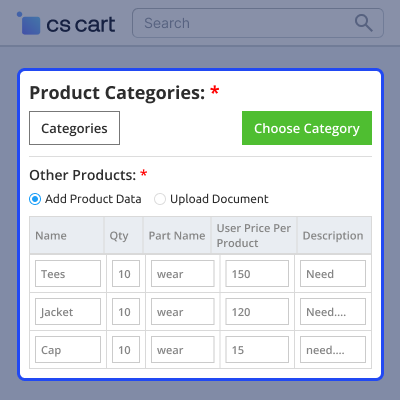
    Custom Product RFQ Generation

    • The customers can upload a document to add the product or they can upload the product details in CS-Cart with add product data option.
    • All the vendors of the CS-Cart store can view the quote request for the new product once the product gets created.
    • Available vendors can also quote from their end to negotiate for the requested price.
    • The buyer can view the updated quote in their dashboard in the quotes comparison section and can compare the quotes.
    edit

    Seller- Buyer Conversation Functionality

    The vendors and buyers can communicate with the help of messages with the CS-Cart chat support feature available to the extension.
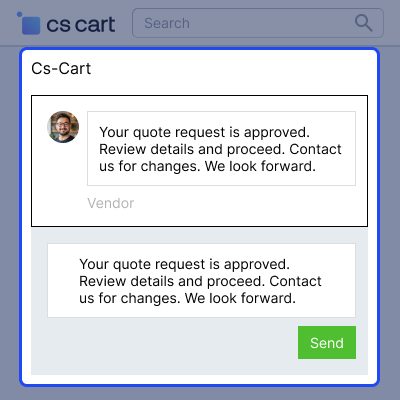
    • The sellers can send messages to the customers and see the messages sent by the customer.
    • The buyers can add the product to the cart to purchase and they can update the quote if they want to negotiate again for the same product.
    • The module allows buyers and sellers to chat with each other for instant decision-making.
    • The buyers and sellers both will get notified through email for every update on the RFQ.
    Seller- Buyer Conversation Functionality

    Notifications via Email

    CS-Cart Multi-Vendor Request for Quote sends email notifications to sellers and customers for Marketplace Request For Quote. The admin can manage the following email templates for the following events:
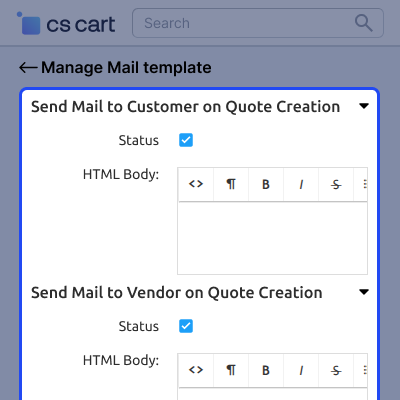
    • A new RFQ is created by the customer.
    • The customer sends a reply to the seller.
    • The seller sends a reply to the customer.
    • Seller approves, rejects, or updates the quote.
    • On customer approval, the seller receives a mail
    Notifications via Email

     Support

    For any query or issue please create a support ticket here http://webkul.uvdesk.comYou may also check our other top-quality CS-Cart Add-ons.

    Specifications

    Product Version2.4
    Released3 years ago
    CategoryCS-CartOrderMarketplace
    Last UpdatedJune 3, 2026 (1 month ago)
    Supported Versions4.16.x  4.17.x  CS-Cart  4.18.x  CS-Cart Multivendor  4.16.x  4.17.x  4.18.x  
    Rating 5.0
    based on 1 reviews

    Recent Reviews

    Write a review

    Excelente

    Posted On - April 14, 2026

    He estado probando el módulo RFQ para OpenCart Multi Vendor y en general estoy muy satisfecho con su funcionalidad y flexibilidad.

    El addon cumple muy bien con lo que se necesita en un marketplace: permite a los clientes solicitar cotizaciones para productos (incluso personalizados) y facilita la negociación directa con los vendedores, lo cual es clave para compras al por mayor o pedidos especiales.

    Uno de los puntos más fuertes es la comunicación entre cliente y vendedor. La posibilidad de discutir los detalles antes de cerrar una cotización ayuda a evitar errores y mejora la conversión.

    Desde el panel de administración, también resulta muy útil poder controlar opciones como cantidades mínimas, aprobación automática o manual, y la personalización de correos electrónicos.

    Además, la función de “Buying Leads” es un gran agregado, ya que permite a los clientes solicitar productos que no están publicados, generando nuevas oportunidades de negocio.

    El soporte técnico ha sido rápido y resolutivo ante los inconvenientes reportados, lo cual es muy importante en entornos en producción. No dude en comprar, el equipo de Webkul además de ser expertos, son muy amables y flexibles.

    Frequently Asked Questions

     Can multiple sellers respond to the same custom product request?
    Yes, available marketplace vendors can view a custom product RFQ and submit their own quotations to the buyer.
     
     How can buyers compare quotations from different vendors?
    Customers can review and compare received quotations from multiple sellers before making a purchase decision.
     
     What details can buyers include in a quotation request?
    Buyers can add quantity, expected price, validity date, messages, and file attachments while creating an RFQ.
     
     Can sellers change their quotation after receiving a request?
    Vendors can update their offered price and send a revised quotation during the negotiation process.
     
     What happens after both parties agree on a price?
    Once the quotation is finalized, the buyer can proceed with purchasing the product at the agreed price.
     
     Can marketplace owners choose who manages RFQ requests?
    Depending on the module settings, quotation requests can be managed by vendors or directly by the marketplace admin.
     
     Are quotation requests tracked after submission?
    Each RFQ is assigned an ID, allowing buyers and sellers to track its status and progress easily.
     
     Does the module support communication during price negotiation?
    Buyers and sellers can exchange messages through the built-in chat system to discuss pricing and quotation details.

    Move to Cloud Today

    AWS Free tier hosting for one year by amazon web services, for more details please visit AWS Free Tier.

    GCP Free tier hosting for one year with 300 credit points by google cloud platform, for more details please visit GCP Free Tier.

    Azure free tier hosting for one year with 25+ always free services, for more details please visit Azure Free Tier.

    In our default configuration we will provide tremendous configuration for your eCommerce Website which is fast to load and response.

    Default Configuration Details of Server

    • 1 GB RAM
    • 1 Core Processor
    • 30 GB Hard Disk
    • DB with 1 GB RAM and 1 Core Processor

    * Server Configuration may vary as per application requirements.

    Want to know more how exactly we are going to power up your eCommerce Website with Cloud to fasten up your store. Please visit the Cloudkul Services.

    Get Started with Cloud
    • - Feature Add (+)
    • - Feature remove (-)
    • - Bug Fixed (!)
    • - Modification (*)
    Version 2.4
    • * Updated UI compatibility for CS-Cart/Multi-Vendor 4.19
    • ! Fixed order status not updating to Success/Complete after approved RFQ order
    • ! Fixed product description formatting and images removed after save
    • ! Fixed multiple orders placed using the same approved quote
    • ! Fixed approved RFQ price not showing at checkout
    • ! Fixed customer decreasing quantity during checkout after RFQ approval
    Version 2.3
    • + Permission from admin to vendor quote transfer completed
    Version 2.2
    • ! Fixed extra button show on product grid
    • * Add mail template feature
    Version 2.1
    • + Added feature to add enable or disable the quotation Request for all product.
    • ! Fixed quotation status not getting updated on admin side.
    Version 1.1
    • + Added functionality for mail template.
    Version 1.0
    • - Git issues resolved.
    • + Now customers can quote for a product from the store and a custom product.


