USD
  • EUR
  • INR
  • USD
Cart
Cart 0
  • You have no items in your shopping cart.
    Cart
    Cart 0
    • You have no items in your shopping cart.
    Hire a Developer
    ×
    Contact Us!
    Send Again
    Close
    Please Login to Write Your Review

    CS-Cart Scratch Card Add-on

    CS-Cart Scratch Card Add-on lets store owners reward customers with points, wallet balance, and gift coupons through CS-Cart Scratch Card Rewards displayed on the storefront and checkout page.


    • Reward customers through interactive scratch cards.

    • Offer reward points through scratch card campaigns.

    • Give wallet balance rewards after card scratching.

    • Generate gift certificate coupon rewards instantly.

    • Set minimum order values for reward eligibility.

    • Configure reward points and wallet balance limits.

    • Display scratch cards directly on checkout pages.

    • Restrict scratch rewards to logged-in customers.

    • Manage vendor-specific reward eligibility settings.

    • Prevent repeated use of the same scratch card.

    • Create special rewards for first-time customers.

    • Configure high-value rewards using thresholds.

    Screenshots
    CS-Cart Scratch Card Add-on CS-Cart Scratch Card Add-on CS-Cart Scratch Card Add-on CS-Cart Scratch Card Add-on CS-Cart Scratch Card Add-on CS-Cart Scratch Card Add-on
    Show More Hide All
    $99.00

    * Required Fields

    Add To Cart
    30 Days Refund*
    Only One Time Payment
    $99.00
    Configure and Buy
    • Description
    • Reviews
    • FAQ
    • Customers ()
    • Specifications
    • Cloud Hosting
    • Changelog

    CS-Cart Scratch Card Add-on lets store owners reward customers with virtual scratch cards. Customers can scratch a card and win reward points, wallet balance, or gift certificate coupons.

    This shows interactive scratch cards on the storefront and checkout page, making CS-Cart Gamified Promotions easy to run. This makes shopping more fun and gives customers a reason to buy.

    Store owners can create reward campaigns based on a minimum order value. Customers can claim rewards only when they meet the conditions set by the admin. This add-on can generate gift certificate coupons through scratch cards.

    Customers can use these coupons on future purchases, which can help bring them back to the store. Admin can set limits for reward points and wallet balance. This helps control reward costs during promotional campaigns.

    Vendors can choose which products qualify for rewards. They can also set order value limits for those products. This gives them more control over reward offers. This add-on can reward first-time customers. This can encourage new buyers to place their first order.

    One-time claim rules stop users from claiming the same reward more than once. This helps keep reward campaigns fair for everyone.

    For better stock management, use the CS-Cart Purchase Order add-on to create suppliers, generate purchase orders, and maintain a steady product supply.
    CS-Cart Scratch Card Add-on

    Reward Features for Customer Engagement

     Fun Scratch Cards

    Customers can scratch a virtual card and see their reward right away.

     Reward Points

    Give reward points that customers can use on future orders.

     Wallet Rewards

    This CS-Cart Wallet Reward System lets stores add wallet balance rewards through scratch cards.

     Gift Coupons

    CS-Cart Gift Certificate Rewards help stores offer coupons that customers can use on future purchases.

     Scratch Cards at Checkout

    Show scratch cards on the checkout page so customers can join easily.

     Rewards for New Customers

    Give special rewards to customers on their first order.

    Why Use a Scratch Card Reward System in CS-Cart?

    Regular discounts and coupon offers may not keep customers interested for long. When shoppers see the same deals again and again, they may stop paying attention to them.

    The default CS-Cart system does not include scratch card rewards. This makes it difficult to run CS-Cart Gamified Promotions that keep customers interested and encourage participation.

    This makes it harder for store owners to run fun and engaging reward campaigns. Managing rewards by hand can take a lot of time. Store owners also need a simple way to set reward rules, order limits, and customer conditions.

    This add-on solves these problems with virtual scratch cards. Customers can get rewards instantly, while store owners can manage all campaign settings from the admin panel.

    This add-on supports reward points, wallet balance, and gift certificate coupons. Store owners can also create special campaigns for new customers and larger orders. Interactive reward campaigns can encourage more customer participation. They can also help increase repeat purchases and customer loyalty.

    You may also like the CS-Cart Buy Now Button add-on which adds a Buy Now button to product pages for quicker purchases.

    Scratch Card Reward Campaign Use Cases

    • First Order Rewards

      Give points, wallet money, or coupons after a customer's first order. This can encourage them to shop again.

    • Checkout Rewards

      Show scratch cards during checkout. Customers can win a reward and feel more confident about completing their order.

    • Festival and Holiday Offers

      Run scratch card campaigns during festivals, holidays, and special sales. Customers can win surprise rewards while shopping.

    • Loyalty Rewards

      Reward existing customers after eligible orders. These CS-Cart Customer Loyalty Rewards can encourage repeat purchases and customer retention.

    • Rewards for Large Orders

      Give bigger rewards to customers who spend a set amount. This can help increase order value.

    • Vendor Product Promotions

      Let vendors offer rewards on selected products. This can help promote specific items in the store.

    • Gift Coupon Campaigns

      Give gift coupons through scratch cards. Customers can use them on future purchases.

    • Bring Back Old Customers

      Offer instant rewards to customers who have not shopped for a while. This can encourage them to return to the store.

    Scratch Card General Configuration

    This section allows administrators to control global settings for the Scratch Card reward system, including reward types, limits, eligibility rules, and vendor permissions.
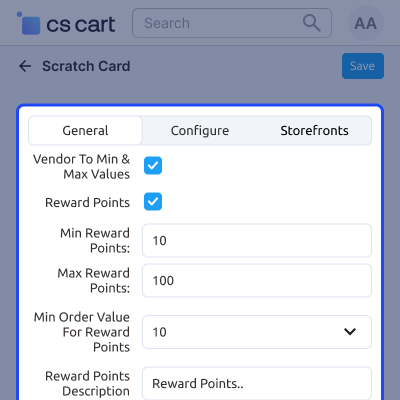
    • Allow vendors to configure reward limits.
    • Enable or disable scratch card reward types.
    • Control overall reward system behavior.
    • Set global restrictions for campaigns.
    • Manage scratch card configuration easily.
    • Define system-wide reward rules.
    Scratch Card General Configuration

    New User Reward Configuration

    This section allows administrators to define special scratch card rewards exclusively for new users, helping improve first-time engagement and conversions.
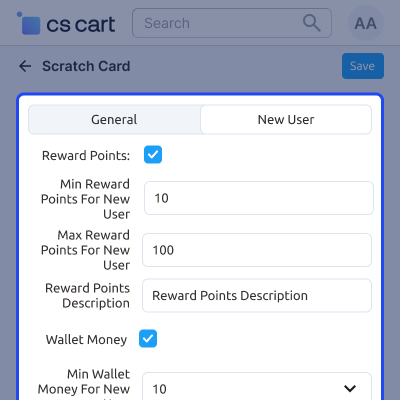
    • Reward points and wallet rewards can be customized specifically for new customers.
    • Set separate reward limits for new user campaigns.
    • Encourage first-time purchases with exclusive incentives.
    • Control reward distribution for onboarding users.
    • Improve new user conversion rate.
    • Create targeted welcome reward programs.
    New User Reward Configuration

    Gift Certificate Setup & Configuration

    This section allows administrators to create and manage gift certificates that can be sent to customers as part of Scratch Card rewards or promotional campaigns.
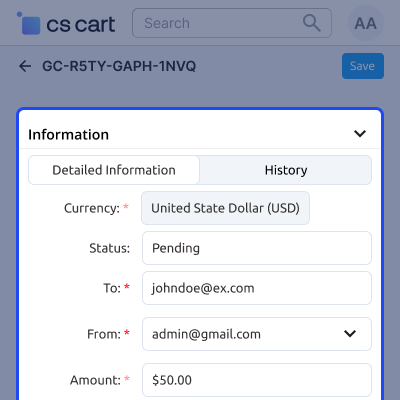
    • Gift certificates can be issued manually or automatically through scratch card rewards.
    • Define recipient details and message before sending.
    • Set certificate value within allowed limits.
    • Choose delivery method via email or postal mail.
    • Attach free products with gift certificates.
    • Manage promotional gift certificate campaigns.
    • Increase customer engagement through gifting options.
    Gift Certificate Setup & Configuration

    Scratch Card Reward Result

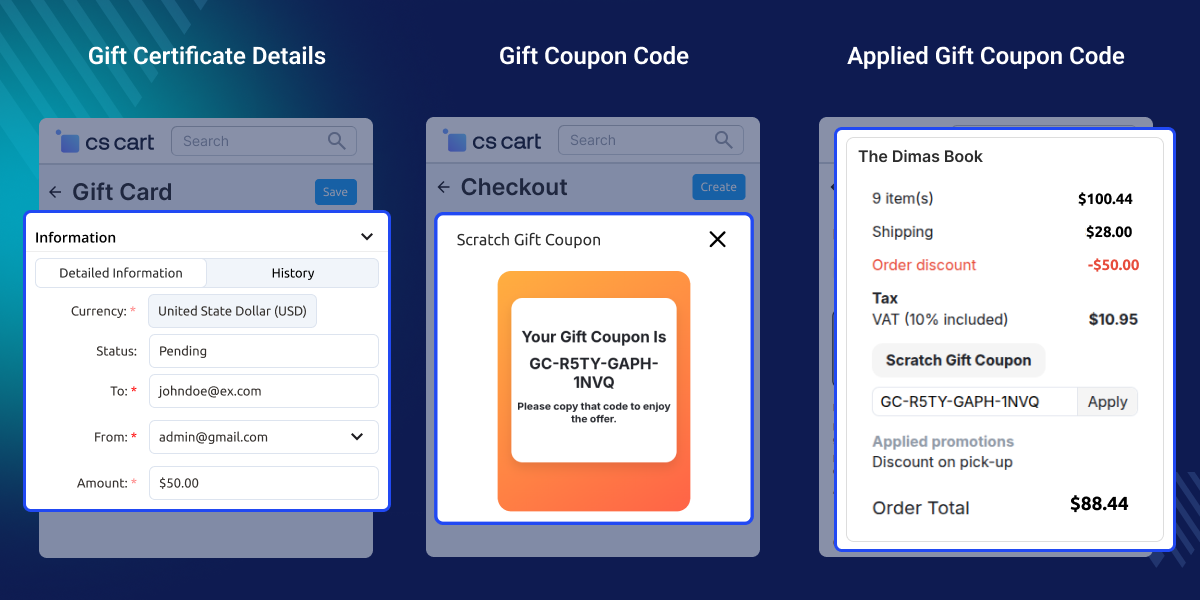
    This section represents the customer-facing view after scratching a gift coupon on the checkout page.
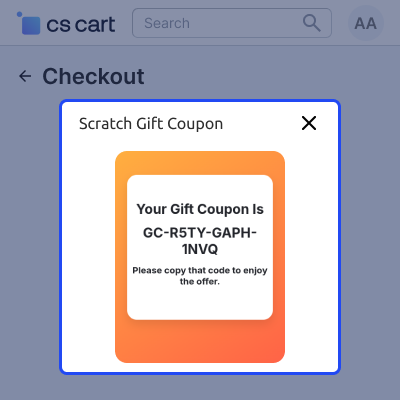
    • The coupon code is generated instantly after scratching.
    • Customers can copy the code and apply it at checkout.
    • Displays reward confirmation after successful scratch.
    • Ensures smooth coupon redemption process.
    • Encourages immediate purchase completion.
    • Improves user engagement during checkout.
    Scratch Card Reward Result

     Support

    For any query or issue please create a support ticket here http://webkul.uvdesk.comYou may also check our other top-quality CS-Cart Add-ons.

    Specifications

    Product Version1.0
    ReleasedToday
    CategoryCS-Cart
    Last UpdatedJune 23, 2026 (Today)
    Supported VersionsCS-Cart  CS-Cart Multivendor  4.18.x  4.19.x  4.20.x  
    Write a review

    Frequently Asked Questions

     Can customers receive different types of rewards?
    Yes, customers can win reward points, wallet balance, or gift coupons through scratch cards. This gives stores different ways to reward customers.
     
     Can I limit the reward amount?
    Admins can set limits for reward points and wallet rewards. This helps control reward costs and campaign spending.
     
     Does the add-on support gift certificates?
    This add-on can create gift coupon codes and give them through scratch cards. Customers can use these coupons on future orders.
     
     Can rewards be shown during checkout?
    Yes, scratch cards can appear on the checkout page. Eligible customers can reveal rewards before they place an order.
     
     Can I set a minimum order value?
    Yes, admins can set a minimum order amount. Customers must meet this amount before they can receive rewards.
     
     Are scratch cards available to guest users?
    No, scratch card rewards are available only to logged-in customers. This helps manage rewards and prevent misuse.
     
     Can a customer use the same scratch card twice?
    No, each customer can use a scratch card only once. This helps prevent repeat claims and keeps rewards fair.
     
     Does this add-on support vendor-level settings?
    Yes, vendors can set reward rules and product requirements. This gives them more control over reward campaigns.
     
     Can I reward first-time customers?
    This add-on supports rewards for first-time buyers. This can help attract new customers and encourage future orders.
     
     Can higher-value rewards be offered?
    Yes, admins can set reward levels based on order amounts. Customers can unlock bigger rewards when they meet the required amount.
     
     How does this add-on help increase sales?
    Scratch card rewards make shopping more engaging. They can encourage repeat purchases and help increase order completion rates.
     
     Is this add-on suitable for promotional campaigns?
    Yes, this add-on can be used for holiday offers, loyalty programs, checkout rewards, customer acquisition campaigns, and retention activities.
     
     How do CS-Cart Gamified Promotions work?
    The add-on uses virtual scratch cards to give rewards. Customers can scratch a card, win a reward, and take part in store promotions.

    Move to Cloud Today

    AWS Free tier hosting for one year by amazon web services, for more details please visit AWS Free Tier.

    GCP Free tier hosting for one year with 300 credit points by google cloud platform, for more details please visit GCP Free Tier.

    Azure free tier hosting for one year with 25+ always free services, for more details please visit Azure Free Tier.

    In our default configuration we will provide tremendous configuration for your eCommerce Website which is fast to load and response.

    Default Configuration Details of Server

    • 1 GB RAM
    • 1 Core Processor
    • 30 GB Hard Disk
    • DB with 1 GB RAM and 1 Core Processor

    * Server Configuration may vary as per application requirements.

    Want to know more how exactly we are going to power up your eCommerce Website with Cloud to fasten up your store. Please visit the Cloudkul Services.

    Get Started with Cloud
    • - Feature Add (+)
    • - Feature remove (-)
    • - Bug Fixed (!)
    • - Modification (*)
    Version 1.0
    • + The Scratch Card Add-on introduces a mechanism to distribute reward points and wallet balance to users through an interactive scratch interface.
    • + The add-on also supports the generation and distribution of gift certificate coupon codes via the scratch card functionality.
    • + The maximum limit for reward points and wallet balance is configurable through the add-on settings in the admin panel.
    • + The admin can define a minimum order value threshold, which determines user eligibility for receiving reward points and wallet rewards.
    • + The add-on integrates with the checkout process, allowing users to scratch and retrieve gift certificate coupon codes directly on the checkout page.
    • + User authentication required customers must be logged in to access and use the scratch card rewards, ensuring secure and personalized benefits.
    • + Vendors can configure minimum and maximum product-level thresholds to control eligibility for reward distribution
    • + Scratch cards are non-reusable per user; once claimed, the same user cannot use the same scratch card again.
    • + The admin can define a maximum reward threshold, beyond which users become eligible for higher-value rewards (reward points or wallet balance).
    • + The system supports configuration of additional rewards for new customers (first-time users).


