USD
  • EUR
  • INR
  • USD
Cart
Cart 0
  • You have no items in your shopping cart.
    CS-Cart Extensions
    Cart
    Cart 0
    • You have no items in your shopping cart.
    Hire a Developer
    ×
    Contact Us!
    Send Again
    Close
    Please Login to Write Your Review
    CS-Cart Telegram Order Notification

    CS-Cart Telegram Order Notification

    x

    * Required Fields

    $49.00
    Add To Cart
    30 Days Money Back Guarantee*
    Only One Time Payment

    CS-Cart Telegram Order Notification sends real-time store alerts to customers, vendors, and admins through a Telegram bot connected to the store.


    • Send Telegram alerts for new orders, payments, and order status changes.

    • Add a View Invoice button to customer order notifications.

    • Notify vendors about product orders, approvals, and disapprovals.

    • Send alerts for new return requests and return status changes.

    • Let customers connect Telegram from My Account or the checkout page.

    • Connect multiple admin Telegram accounts to receive store alerts.

    • Send promotional messages with a link and image to connected users.

    • Create custom notification templates with predefined event variables.

    • Enable or disable each notification event from the admin panel.

    • Track every sent message and its status in the Telegram Logs.

    CS-Cart Telegram Order Notification
    CS-Cart Telegram Order Notification
    $49.00
    30-Day Refund Policy.
    Check How It Works

    Need Help Deciding?

    Support answers within one business day.

    Open a ticket
    $49.00
    Configure and Buy
    30 Days Money Back Guarantee*
    Only One Time Payment
    X
    • Description
    • Reviews
    • FAQ
    • Customers ()
    • Specifications
    • Cloud Hosting
    • Changelog

    CS-Cart Telegram Order Notification is a CS-Cart add-on that sends store events to customers, vendors, and admins as Telegram messages.

    Admins add a Telegram Bot Token and Bot Username. Users then press Start in the bot chat to link their Telegram account with the store.

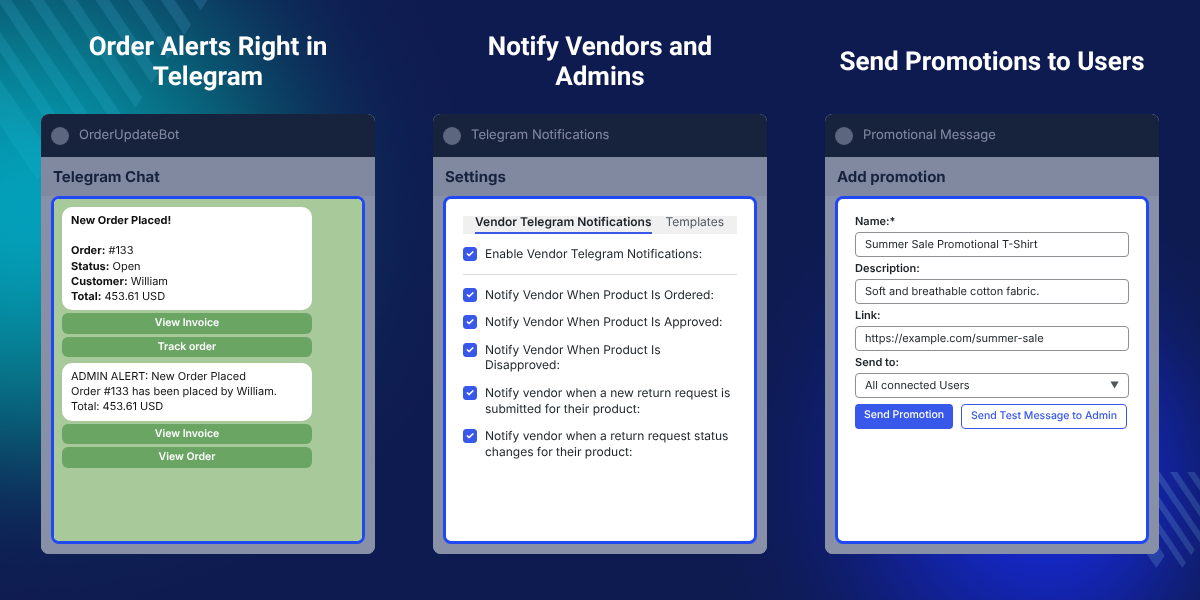
    New orders, received payments, status updates, returns, and product approvals then reach the right person as a Telegram message.

    Each event has its own checkbox for customers, admins, and vendors. Custom templates set the message text with predefined event variables.

    Admins can also send promotions to all connected users and check every delivery in the logs. Admin and vendor alerts use the Queue Handler add-on.

    Additionally, if you want customers to request returns and replacements from the storefront, then check CS-Cart Advanced RMA.
    CS-Cart Telegram Order Notification

    Highlighted Features of CS-Cart Telegram Order Notification

     Real-Time Order Alerts

    Shoppers, sellers, and the store team get Telegram messages for new orders, payments, and status changes.

     Invoice and Tracking Buttons

    Order messages carry View Invoice and Track order buttons, and the invoice PDF arrives in the chat.

     Vendor Product Alerts

    Vendors hear about orders for their products and about every product approval or disapproval.

     Return Request Alerts

    New return requests and return status changes reach the customer, the vendor, and the admin.

     One-Click Account Connection

    Users link Telegram with a Connect Telegram button and can reconnect or disconnect at any time.

     Telegram Promotions

    Admins create a promotion with a name, description, link, and image, then send it to connected users.

    Why Do We Need CS-Cart Telegram Order Notification?

    CS-Cart Telegram Order Notification brings store updates into Telegram, so buyers, sellers, and store staff read them on their phones.

    A default CS-Cart order notification goes out by email. Those emails can land in spam or wait unread, so customers ask and vendors ship late.

    This CS-Cart Telegram integration sends each alert to the phone. Customers track orders, and vendors see new sales the moment they happen.

    Admins stay informed too. Several admin Telegram IDs can receive the same order, product, and return alerts, so no team member misses an event.

    In practice, a customer links an account in three steps: click Connect Telegram, open the bot, and press Start in the bot chat.

    Also, if you want to reach shoppers with browser alerts as well, you can check our add-on CS-Cart Web Push Notification.

    For stock alerts sent to admins and vendors, you can also look at CS-Cart Low Stock Notification.

    If your team prefers SMS for order alerts, check CS-Cart MSG91 SMS Notification.

    To send order and status updates on WhatsApp too, you can check CS-Cart WhatsApp Order Notification.

    CS-Cart Telegram Alerts Use Cases

    • Instant Order Updates for Shoppers

      Shoppers get order, payment, and status messages in Telegram and open the invoice from the chat.

    • Faster Vendor Fulfilment

      Marketplace sellers learn about a new order for their product at once and start packing sooner.

    • Store Monitoring on Mobile

      Store owners away from the desk watch new orders, new vendor products, and returns from the phone.

    • Product Approval Feedback

      Vendors know right away when the admin approves or disapproves a product, so fixes happen faster.

    Telegram Bot Configuration in CS-Cart

    Telegram Configuration links the CS-Cart store with your Telegram bot. Admins open it from Telegram Notifications > Settings > General.
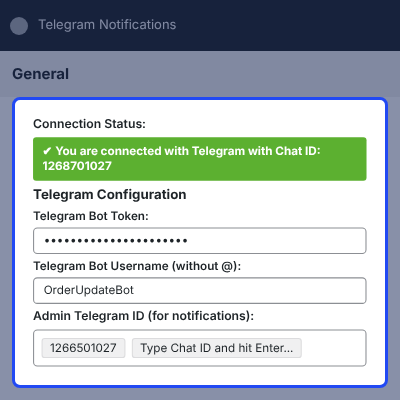
    • See the Connection Status and the connected Chat ID at the top of the screen.
    • Enter the Telegram Bot Token generated for the store bot.
    • Add the Telegram Bot Username without the @ symbol.
    • Enter one or more Admin Telegram IDs to receive store alerts.
    • Type each Chat ID and press Enter to add another admin account.
    Telegram Bot Configuration in CS-Cart

    Customer Order Notifications on Telegram

    Customer Notifications decide which store events reach shoppers in Telegram. Each event has its own checkbox.
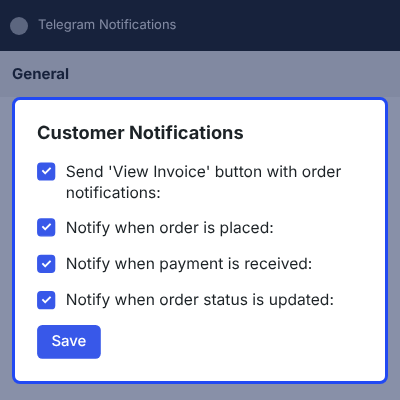
    • Send the View Invoice button with order notifications.
    • Notify customers when they place an order.
    • Send a message when payment is received for the order.
    • Alert customers when the order status is updated.
    • Notify customers when their profile information is updated.
    • Confirm return request submission and every return status change.
    Customer Order Notifications on Telegram

    Admin Telegram Notifications

    Admin Telegram Notifications keep store owners updated on orders, vendor products, and returns. The admin tab lists four alerts.
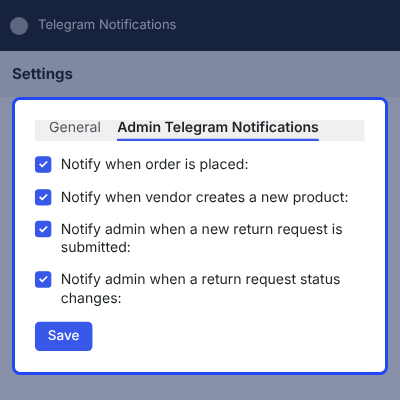
    • Notify the admin when a new order is placed.
    • Alert the admin when a vendor creates a new product.
    • Send a message when a new return request is submitted.
    • Notify the admin when a return request status changes.
    • Deliver each alert to every Admin Telegram ID in the settings.
    Admin Telegram Notifications

    Vendor Telegram Notifications

    Vendor Telegram Notifications send marketplace sellers alerts about their own products. One master checkbox turns them on for all vendors.
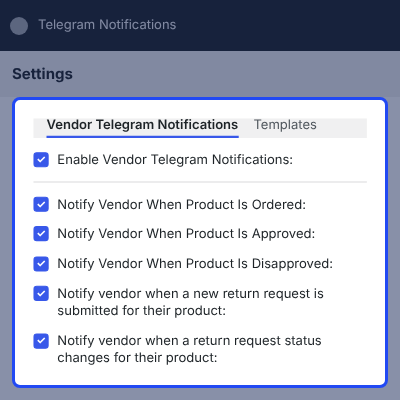
    • Enable Vendor Telegram Notifications for the marketplace.
    • Notify the vendor when a customer orders their product.
    • Alert the vendor when the admin approves a product.
    • Inform the vendor when the admin disapproves a product.
    • Send return request and return status alerts for vendor products.
    Vendor Telegram Notifications

    Connect Telegram Account to the Store

    Admins, vendors, and customers link their own Telegram account with the store bot. A green Telegram Connected label confirms the link.
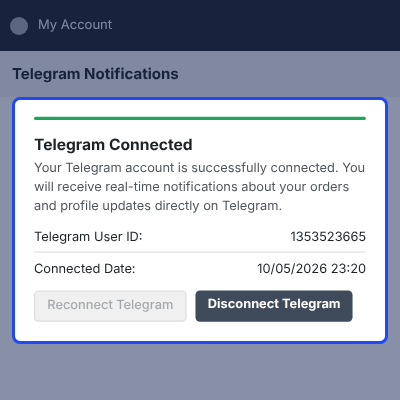
    • Customers connect from My Account > Telegram Notification.
    • Shoppers can also click Connect Telegram on the checkout page.
    • Vendors connect from Seller Information in the Vendor Panel.
    • Admins manage their link from Telegram Notifications > Manage Connection.
    • Reconnect Telegram or Disconnect Telegram at any time.
    • See the Telegram User ID and the connected date of the account.
    Connect Telegram Account to the Store

    Promotional Messages on Telegram

    Promotional Message lets admins build a promotion and send it straight to Telegram users. It sits under Telegram Notifications > Promotional Message.
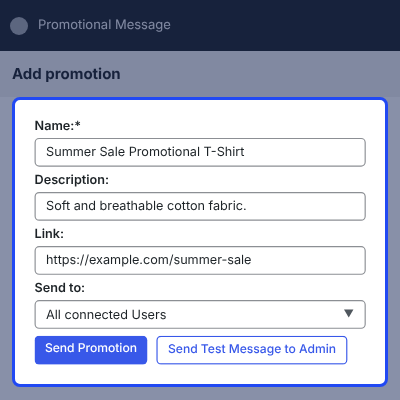
    • Enter a Name for the promotion.
    • Write a short Description with the text editor.
    • Add a Link to the promoted product or page.
    • Upload an Image from Local, Server, or URL.
    • Send the promotion to All connected Users.
    • Check the message first with Send Test Message to Admin.
    Promotional Messages on Telegram

    Connected Telegram Customers

    Connected Customers lists every user who linked Telegram with the store. Admins open it from Telegram Notifications > Telegram Customers.
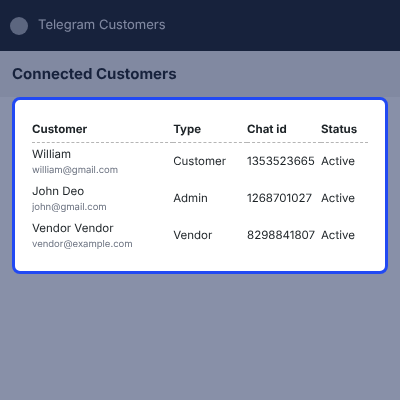
    • See the Customer name and email of each connected user.
    • Check the user Type: Customer, Admin, or Vendor.
    • View the Customer Telegram chat ID of every account.
    • Read the Active status and the connection Date.
    Connected Telegram Customers

    CS-Cart Telegram Order Notification Logs

    Telegram Logs record every message the add-on sends. Admins find failed alerts and check the exact text a user received.
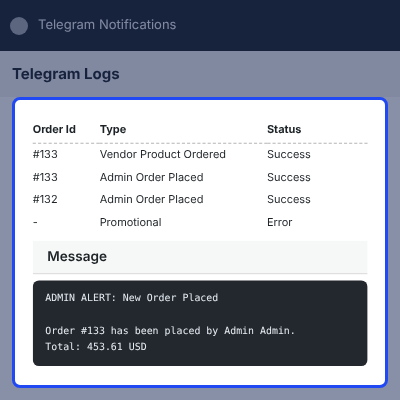
    • See the Date and time of each message.
    • View the Customer and the linked Order Id.
    • Read the Type, such as Admin Order Placed or Vendor Product Ordered.
    • Check the full Message text with order ID, product, and total.
    • Spot failed sends with the Success or Error status.
    CS-Cart Telegram Order Notification Logs

    Complete CS-Cart Telegram Order Notification Feature List

    Order and Payment Alerts

    • Send Telegram alerts for order placement, received payments, and order status updates
    • Attach View Invoice and Track order buttons to customer order messages
    • Deliver the order invoice PDF inside the Telegram chat
    • Notify the admin and the vendor about each new order

    Returns and Account Alerts

    • Notify the customer, the vendor, and the admin about new return requests
    • Send return status change alerts to every party of the return
    • Notify customers when their profile information is updated

    Multi-Vendor Notifications

    • Turn vendor alerts on or off with one master setting
    • Inform vendors about product orders, approvals, and disapprovals
    • Alert the admin when a vendor creates a new product
    • Let vendors connect Telegram from Seller Information in the Vendor Panel

    Admin Management

    • Configure the Telegram Bot Token, Bot Username, and multiple Admin Telegram IDs
    • Enable or disable each notification event for customers, admins, and vendors
    • Create custom notification templates with predefined event variables
    • View connected users with type, chat ID, status, and connection date
    • Check every sent message with its type, text, and Success or Error status

    Customer Experience

    • Connect Telegram from My Account or directly on the checkout page
    • Reconnect or disconnect the Telegram account at any time
    • Open Telegram Web, the desktop app, or the mobile app from one button

    Promotions and Requirements

    • Send promotional messages with a name, description, link, and image
    • Test a promotion with a message to the admin before sending it
    • Process admin and vendor alerts through the Queue Handler add-on

     Support

    For any query or issue please create a support ticket here http://webkul.uvdesk.com. You may also check our other top-quality CS-Cart Add-ons.

    Specifications

    Product Version1.0
    Released4 days ago
    CategoryCS-Cart, 
    Last UpdatedOctober 9, 2026 (4 days ago)
    Supported VersionsCS-Cart  CS-Cart Multivendor  4.16.x  4.17.x  4.18.x  4.19.x  4.20.x  

    Ratings

    We'd love to hear your thoughts! Share your feedback and help us craft an even better experience tailored just for you.

    Write a review

    Frequently Asked Questions

     What does CS-Cart Telegram Order Notification do?
    CS-Cart Telegram Order Notification sends store events to customers, vendors, and admins as Telegram messages. It covers orders, payments, status changes, returns, profile updates, and product approvals.
     
     What do I need to set up the Telegram bot?
    You need a Telegram Bot Token and the Bot Username without the @ symbol. Add at least one Admin Telegram ID to receive store alerts.
     
     How do customers connect their Telegram account?
    Customers go to My Account > Telegram Notification, or click Connect Telegram on the checkout page. They then press Start in the bot chat.
     
     Can vendors receive Telegram notifications?
    Yes. Vendors connect Telegram from Seller Information in the Vendor Panel. They get alerts for product orders, approvals, disapprovals, and returns on their products.
     
     Can more than one admin receive the alerts?
    Yes. The Admin Telegram ID field accepts several chat IDs. Every listed admin gets the same Telegram alerts.
     
     Is any other add-on required?
    Yes. The Queue Handler add-on is required to send Telegram notifications to admins and vendors. Admins run pending jobs from Website > Queue Handler.
     
     Can I turn off a single notification?
    Yes. Every customer, admin, and vendor event has its own checkbox in the add-on settings. Clear the checkbox and save to stop that alert.
     
     Can I change the text of the Telegram messages?
    Yes. The Templates tab lets admins create custom notification templates. Each template uses predefined event variables for order and product details.
     
     How do I know if a message failed?
    Open Telegram Notifications > Telegram Logs. Each message shows a Success or Error status with its full text.
     
     Does the CS-Cart Telegram Notification add-on work on mobile and desktop?
    Yes. On a mobile device, the Connect Telegram button opens the Telegram app. On desktop, it opens Telegram Web or the Telegram desktop app.

    Specification

    Detailed technical features and requirements to help you understand the module’s capabilities and ensure smooth integration with your system.

    Cloud Hosting

    Detailed technical features and requirements to help you understand the module’s capabilities and ensure smooth integration with your system.

    Default Configuration Details of Server

    1 GB
    RAM
    1 Core
    Processor
    30 GB
    Hard Disk
    1 GB RAM & 1 Core Processor
    Database

    Want to know more how exactly we are going to power up your eCommerce Website with Cloud to fasten up your store

    * Server Configuration may vary as per application requirements.

    Change Logs

    • - Feature Add (+)
    • - Feature remove (-)
    • - Bug Fixed (!)
    • - Modification (*)
    Version 1.0
    • + Added new project with basic add-on code.
    • + Added real-time Telegram order notifications for customers and admins.
    • + Added promotional notifications with optional Queue Handler support.
    • + Added order status tracking and notification updates.
    • + Added vendor communication for product orders and product approval/disapproval.
    • + Added return request and return status notifications for customers, vendors, and admins.
    • + Added customer profile update notifications.
    • + Added support for multiple admin Telegram accounts.
    • + Added Telegram account connection for customers and vendors.
    • + Added storefront-wise Telegram notification configuration.
    • + Added admin controls for vendor promotional notification permissions.
    • + Added dynamic notification templates with configurable event variables.
    • + Added configurable notification settings for customers, vendors, and admins.
    • + Added search/filter functionality for connected Telegram users.
    • + Integrated embedded License manager.


