- Description
- Reviews
- FAQ
- Customers ()
- Specifications
- Cloud Hosting
- Changelog
ERPNext Multi Website helps you run multiple stores from a single ERPNext site. Each one keeps its own domain and its own products, while your team still works from a single ERPNext site.
This module removes the friction of running multiple stores from different systems. You get one place to manage products, prices, and orders, but each storefront still feels built just for its own customers.
Every region can carry its own currency, its own price list, and its own shipping rules, benefiting businesses that sell across borders.
If your business already runs on ERPNext and you are ready to sell through more than one storefront, this is the module you need.
No new servers and no duplicate systems. Just one backend, many stores, and a lot less work to keep them all running smoothly.
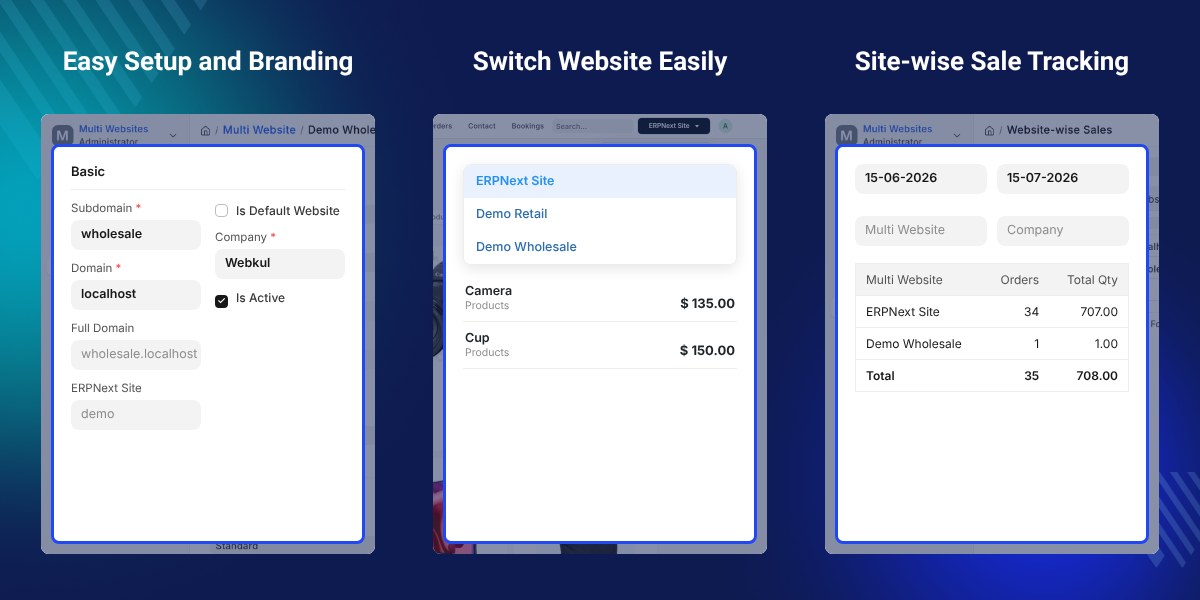
Highlighted Features of ERPNext Multi Website
Many Stores, One Backend
Run several Webshop stores from a single ERPNext site. Add a new brand or region with ease.
Custom Domains and Branding
Give each store its own domain or subdomain. Add your own logo, favicon, banner, colors, font, and theme too.
Product Control Per Store
ERPNext Multi Website lets you pick which products show up where. Change the name, image, description, or price.
Pricing and Currency Per Store
Set a different price list and currency for each store. Currency exchange support keeps the math right.
Checkout Rules Per Store
Pick a payment gateway and shipping rules for each store. Add Cash on Delivery as a backup where needed.
Sales Get Tagged Automatically
Every order, invoice, and customer gets tagged to the store it came from. No manual sorting required.
Why do we need ERPNext Multi Website?
Selling through multiple stores in ERPNext can get messy sometimes. You end up copying data by hand or running extra instances just to keep things separate.
This increases the team's administrative time juggling between multiple stores and keeping the stores running.
This module fixes that at the root. Every store gets a real identity, its own domain, look, products, and prices. But the backend stays as it is.
Your team still works inside one ERPNext site. Your customers see a store built for them. And if you want to build product packs for your users, check out ERPNext Website Product Pack.
Use Cases
-
Multi Brand Retailers
With this module, a company with two or three brand names can give each one its own domain, its own banner, and its own product list. All from one backend.
-
Regional and Multi-Currency Stores
A business selling across countries can run one store per region. Each with local currency, local prices, and its own shipping rules.
-
B2B and B2C Split Selling
A seller with both wholesale and retail buyers can split the two fully. Different price lists. Different customer groups. Different checkout rules.
-
Multi-Location Businesses
A franchise network can give each location its own store and site-specific branding. Head office still sees everything through one shared report.
Storefront Setup and Branding
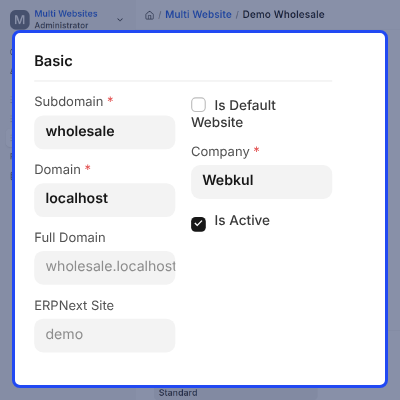
Getting a new store live does not mean touching code or setting up a new server.
- Add a new website record with its own domain or subdomain.
- Set the default website, company, and language for that store.
- Turn on maintenance mode for one site. The others stay untouched.
- Upload a unique logo, favicon, and banner for each store.
- Apply your own colors, font, theme, custom CSS, and HTML.
Product and Catalog Management
Not every product belongs on every store. This module respects that.
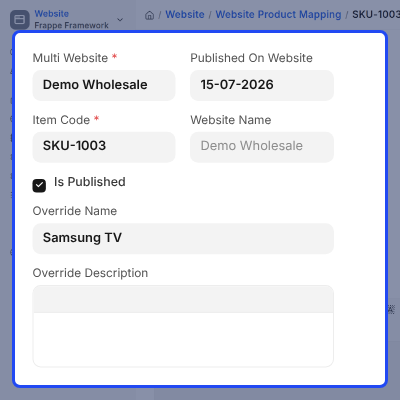
- Publish products one by one to the stores where they belong.
- Control visibility so hidden items never show by mistake.
- Change the product name, image, or description per store.
- Hide or show pricing on a per-store basis.
- Sync Item and Website Item mapping across your catalog.
Pricing, Currency, and Checkout Setup
Every store can run its own rules without touching another one.
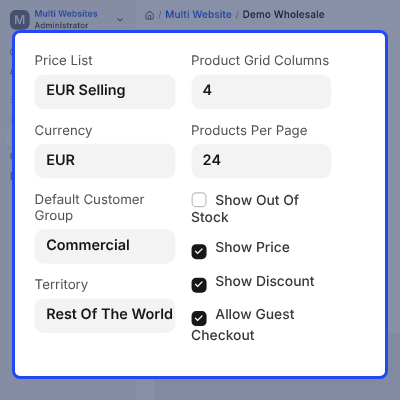
- Assign a price list, currency, and warehouse to each store.
- Use currency exchange and inverse rate support for accurate math.
- Fall back to manual pricing when auto conversion is not available.
- Set separate payment gateways and shipping rules per store.
- Turn on Cash on Delivery as a backup where it makes sense.
Sales Tracking, Migration, and Reporting
Running many stores should never mean losing sight of your numbers.
- Tag every customer, quote, and order to its source store on its own.
- Carry that tag through invoices, delivery notes, and payment requests too.
- Bring in old Webshop orders and linked records into the new setup.
- Move over past invoices, deliveries, and customers with no manual work.
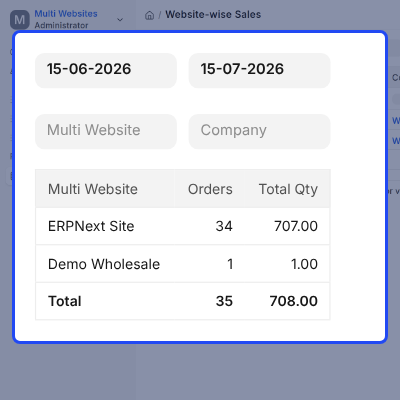
- Check performance store by store with a clear sales report.
Support
For any query or issue, please create a support ticket here: CREATE A TICKET HERE
You may also check our other top-quality ErpNext Modules.
Specifications
FAQs
Specification
Detailed technical features and requirements to help you understand the module’s capabilities and ensure smooth integration with your system.
Cloud Hosting
Detailed technical features and requirements to help you understand the module’s capabilities and ensure smooth integration with your system.
Move to Cloud Today
We’re partnered with top-tier, trusted providers!



Default Configuration Details of Server
RAM 1 Core
Processor 30 GB
Hard Disk
Database
Want to know more how exactly we are going to power up your eCommerce Website with Cloud to fasten up your store
* Server Configuration may vary as per application requirements.
