- Description
- Reviews
- FAQ
- Customers ()
- Specifications
- Cloud Hosting
- Changelog
ERPNext Website Product Pack gives store owners a simple way to bundle products in packs. Once an Item is marked as a pack, its components sit inside an editable table. Giving store managers full control to edit or update product information inside the pack.
Each pack component stores item, item name, warehouse, quantity, sequence, UOM, selling rate, and more. For item-based packs, rates are either pulled directly from the store's selling price list or calculated using the selected pricing method.
A pack ribbon appears in the published packs listing on the storefront to help identify shoppers' product packs. This module keeps pack data intact through Quotation, Sales Order, Delivery Note, Sales Invoice, and POS Invoice rows.
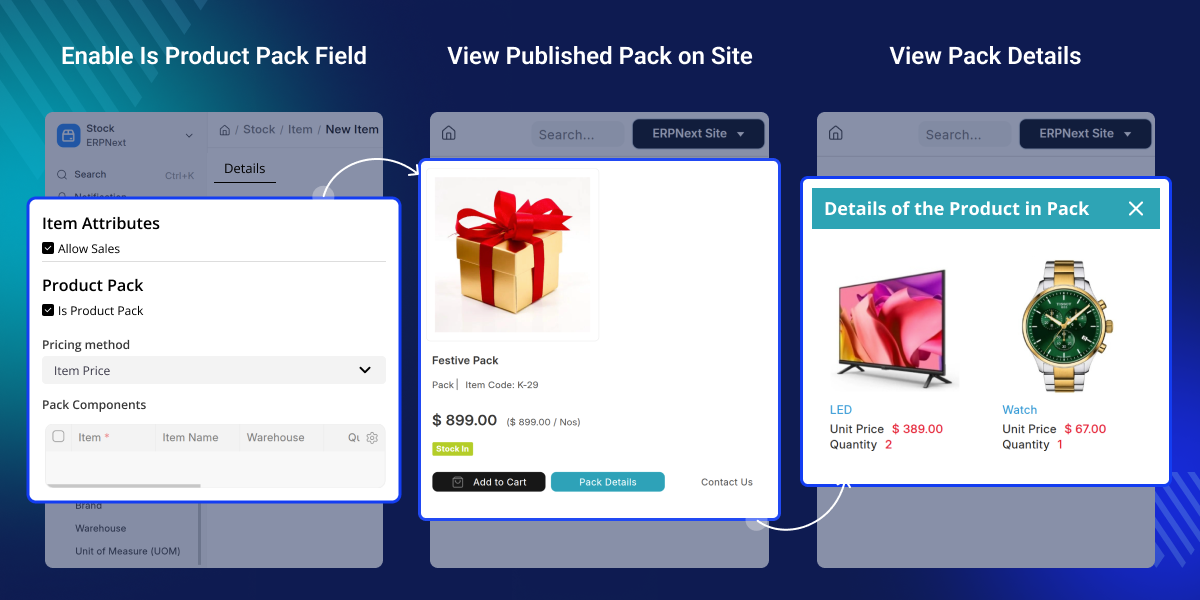
Highlighted Features of ERPNext Website Product Pack
Item-Based Product Packs
Mark any ERPNext Item as a product pack and build it from existing catalog items in a few clicks.
Flexible Pack Pricing
Price a pack using the Item Price, a discount percentage, or a flat discount amount, whichever fits.
Pack Ribbon Display
A ribbon on product cards and listing rows instantly tells shoppers they are looking at a bundle deal.
Dedicated Product Packs Page
A page lists every published pack with its image, item count, price, and discount, ready for browsing.
One-Click Add to Cart
Packs go straight into the cart, and quantities update automatically if the same pack is added again.
Full Transaction Metadata
Pack Name and Reference travel with the order through Quotation, Delivery Note, Sales Invoice, and POS Invoice.
Customer Order Pack Insights
Customers can clearly see pack names, pack quantities, and pack rates in their order history.
Sales Order Row Expansion
Pack rows can be broken down into component items within a Sales Order.
Why do we need ERPNext Website Product Pack?
Selling combo offers in ERPNext means there are no independent parent or child item prices and no clear way to track what actually sold as a pack once the order moves to invoicing.
ERPNext Website Product Pack solves this by giving bundles a proper identity inside ERPNext. A pack behaves like any other sellable item, but beneath the surface, it maintains a full record of its components, pricing logic, and stock position.
It rides along through every document in the sales cycle, right up to the final invoice and the customer's own order history. The result is a bundling experience that feels native to ERPNext and makes combo deals easy for the customers to spot, understand, and buy - creating better ERPNext product branding.
Use Cases
Combo Deals for Retail Webshops
A store selling skincare, accessories, or grocery items can group frequently bought-together products into a single discounted pack.
Kit Selling for Wholesale and B2B Buyers
A B2B seller can bundle spare parts, tools, or starter kits into a single pack while maintaining full visibility into component stock and rates for every order.
Pack Setup and Component Management
Setting up a pack occurs directly on the Item itself, so there is nothing new to learn for teams already working in ERPNext.
- Mark any Item as a product pack with a single checkbox.
- Add as many component items as the pack needs.
- Set quantity, UOM, warehouse, and sequence for each component.
- Flag components as mandatory or default-selected.
- Pull standard and selling rates straight from the price list.
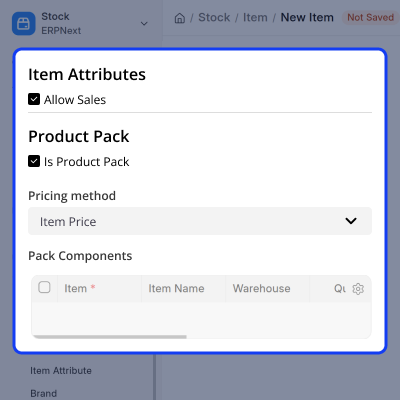
Pricing, Storefront Display, and Cart
Once a pack is ready, ERPNext Website Product Pack takes care of how it looks and behaves on the live Webshop.
- Choose Item Price, Discount Percentage, or Discount Amount for pricing.
- Show a Pack ribbon on cards and listing rows automatically.
- List published packs on a dedicated Product Packs page.
- Let customers view full pack details before buying.
- Add the pack to the cart, with quantity merging on repeat adds.
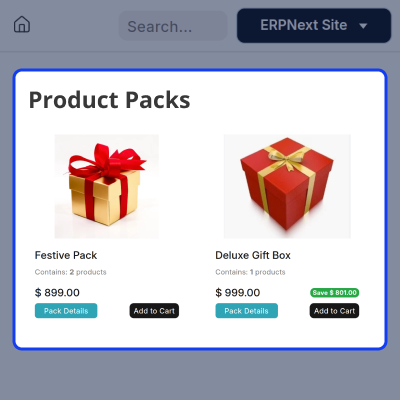
Sales Transactions and Order Visibility
This module keeps every document in sync with what was actually sold, so nothing gets lost between the cart and the final invoice.
- Preserve the Pack Name on Quotation, Sales Order, Delivery Note, Invoice, and more.
- Expand pack rows into components within Sales Orders when needed.
- Show a clear (pack) tag in the customer's Orders list.
- Display pack quantity and pack rate on order detail pages.
- Check component-level product stock availability for any pack.
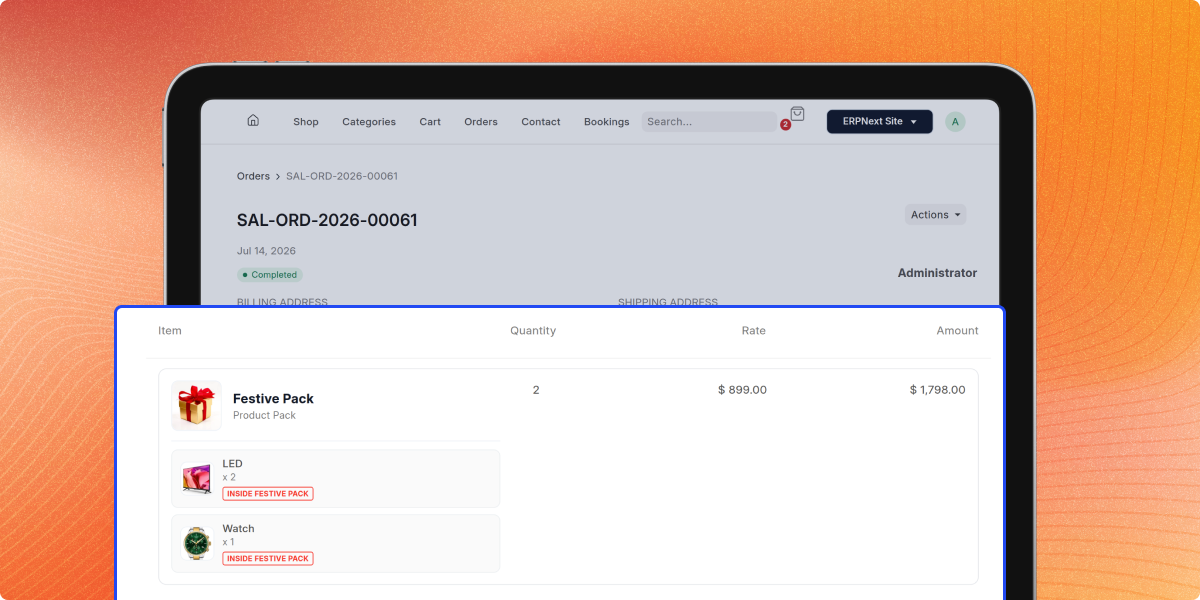
Support
For any query or issue, please create a support ticket here CREATE A TICKET HERE
You may also check our other top-quality ERPNext Modules.
Specifications
FAQs
Specification
Detailed technical features and requirements to help you understand the module’s capabilities and ensure smooth integration with your system.
Cloud Hosting
Detailed technical features and requirements to help you understand the module’s capabilities and ensure smooth integration with your system.
Move to Cloud Today
We’re partnered with top-tier, trusted providers!



Default Configuration Details of Server
RAM 1 Core
Processor 30 GB
Hard Disk
Database
Want to know more how exactly we are going to power up your eCommerce Website with Cloud to fasten up your store
* Server Configuration may vary as per application requirements.
