- Description
- Reviews
- FAQ
- Customers ()
- Specifications
- Cloud Hosting
- Changelog
ERPNext Product Review After Purchase module helps online stores collect real reviews from real buyers, without any manual follow-up work.
Once a customer completes an order, this module quietly waits for the set number of days, then sends a friendly email asking them to share their thoughts.
Each email carries a secure, one-time link, so only the actual buyer of that item can open it and leave a review for that exact product.
Store owners can choose what starts this process, a delivered order, a paid invoice, or a completed sales order, whichever matches their business flow best.
If a customer forgets to reply, this module can send a gentle reminder email after a few more days, so more genuine reviews keep coming in.
Every review submitted through this flow lands in the same Item Review list that the store already uses, and it carries a Verified Purchase badge for extra trust.
A simple report shows how many requests were sent, how many got a reply, and what the overall review rate looks like for the store.
Store owners get more honest reviews, shoppers get more confidence, and the whole process runs on its own once it is set up.
If you would like to add and manage FAQs for your products on your website, you can also check our ERPNext Website Product FAQ module.
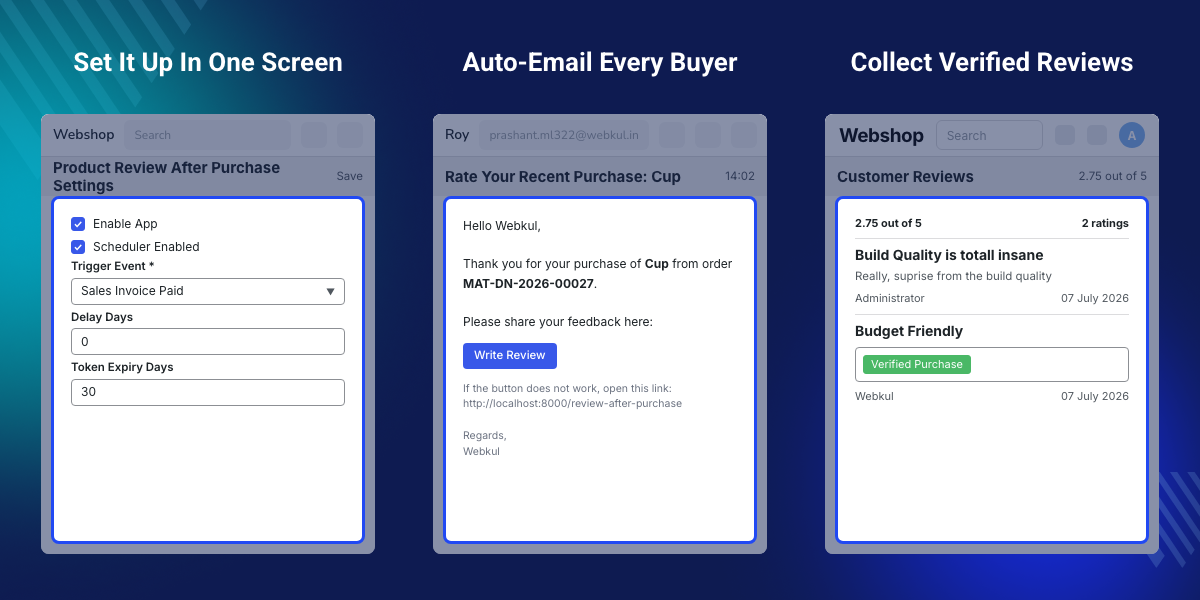
Highlighted Features of ERPNext Product Review After Purchase
Automatic Review Requests
This module watches completed orders and sends a review request email on its own, right on schedule.
Secure Review Links
Every review link is unique to one customer and one order, keeping the review process safe and fair.
Verified Purchase Check
This module checks the order first, so only real buyers of that item can leave a review for it.
Reminder Emails
A friendly follow-up email goes out if a customer has not replied yet, gently asking for their feedback.
Review Submission Page
Customers open one simple page, add a rating and a few words, and their review is saved right away.
Review Report
One clean report shows pending, sent, and completed reviews, along with the overall review rate.
Why Do We Need ERPNext Product Review After Purchase?
Most online stores rely on customers to remember and choose to leave a review on their own, and this rarely happens without a nudge.
A default store setup has no built-in way to ask for a review after an order, check if the reviewer is a real buyer, or follow up automatically.
Without this, stores end up with very few reviews, and some of the reviews they do get come from people who never actually bought the product.
ERPNext Product Review After Purchase solves this by sending timely, automatic review requests and confirming every reviewer against a real purchase record.
In practice, stores that ask for reviews at the right moment, right after a good delivery experience, tend to collect more honest, useful feedback over time.
If you would like to manage your customers’ addresses conveniently, you can also check our ERPNext Website Customer Address Book module.
Use Cases
New Store Building Trust
A new store can use timely review requests to gather its first genuine, verified reviews and build early trust with new shoppers.
High Order Volume Stores
Busy stores can let the scheduler handle review requests, reminders, and retries on its own, without adding extra manual work for the team.
Brands Focused On Social Proof
Brands that rely on shopper trust can highlight Verified Purchase badges to show that reviews come from real, confirmed buyers only.
Stores Tracking Review Performance
Teams that want to measure feedback can use the built-in report to track how many requests turn into completed, published reviews.
Automatic Review Emails After Purchase
This module watches your store's orders and sends a review request email once a purchase is confirmed and the set delay has passed.
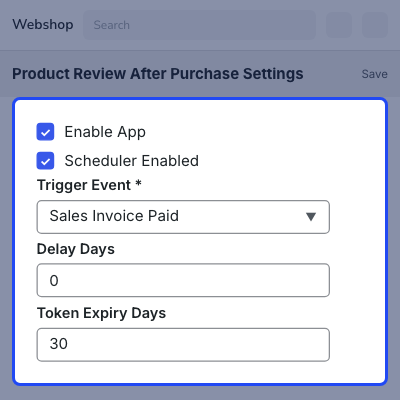
Store owners choose exactly which order event starts the process, whether that is a delivery, a paid invoice, or a completed sales order.
- Starts the review request from a Delivery Note, Sales Invoice, or Sales Order event
- Waits for a configurable number of delay days before sending the first email
- Uses a saved Email Template, or a simple default review message
- Fills each email with the buyer's name, item name, and order number
- Sends reminder emails automatically if reminders are turned on
- Runs on an hourly schedule so no request is ever missed
Verified Purchase Validation
Before any review gets saved, this module double-checks that the customer named in the request truly bought the exact item they are reviewing.
This keeps the review section honest and stops old or shared links from being used to post reviews for products the customer never purchased.
- Confirms the customer matches the original purchase document
- Confirms the item being reviewed was part of that same order
- Blocks review links that have expired or already been used
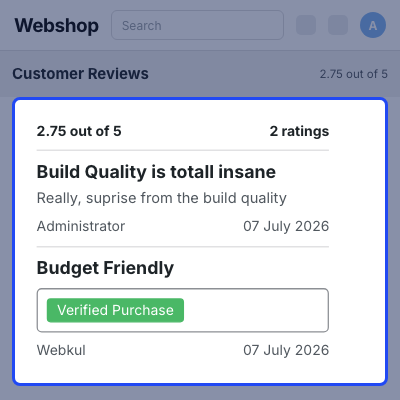
- Marks confirmed reviews with a visible Verified Purchase badge
- Shows the badge automatically on the store's review listings
- Keeps every review request tied to one specific order and item
Reminders And Retries
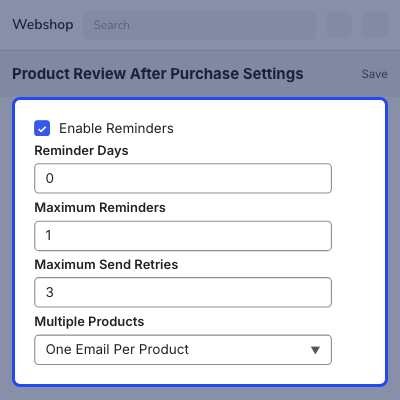
Not every customer replies to the first email, so this module can send a polite reminder after a few extra days if reminders are switched on.
If an email fails to send the first time, this module tries again automatically, up to a limit the store owner sets in advance.
- Sends reminder emails on a configurable schedule
- Limits the number of reminders sent per review request
- Retries failed emails up to a set maximum number of attempts
- Tracks every retry and reminder inside the request record
- Expires requests automatically once the review link runs out
- Keeps a clear status for every pending or completed request
Review Submission And Reporting
Customers land on one simple, guest-friendly page where they can rate the product and add a short comment, all in a few clicks.
Store owners get a single summary report showing exactly how the review program is performing across all their orders.
- Offers one easy review page for star rating and comments
- Saves every review straight into the existing Item Review list
- Marks the request as completed the moment a review comes in
- Shows pending, sent, and failed request counts in one report
- Calculates an overall review rate for the whole store
- Helps teams spot and fix any drop in review replies quickly

Support
For any query or issue, please create a support ticket here CREATE A TICKET HERE
You may also check our other top-quality ErpNext Modules.
Specifications
FAQs
Specification
Detailed technical features and requirements to help you understand the module’s capabilities and ensure smooth integration with your system.
Cloud Hosting
Detailed technical features and requirements to help you understand the module’s capabilities and ensure smooth integration with your system.
Move to Cloud Today
We’re partnered with top-tier, trusted providers!



Default Configuration Details of Server
RAM 1 Core
Processor 30 GB
Hard Disk
Database
Want to know more how exactly we are going to power up your eCommerce Website with Cloud to fasten up your store
* Server Configuration may vary as per application requirements.
