- Description
- Reviews
- FAQ
- Customers ()
- Specifications
- Cloud Hosting
- Changelog
ERPNext Website Customer Group lets one Webshop serve several audiences. A guest, a retail buyer and a trade buyer can each see a different catalogue, price and menu on the same site.
Every rule lives on the standard ERPNext Customer Group form. The app adds a Website Customer Group section below Credit Limits. The store team keeps working in a familiar Customer Group record.
One group is marked as the guest customer group for visitors who have not signed in. A second group is the default for signed-in shoppers whose own Customer Group has no Webshop rules.
Product visibility is set by item or by item group, with an option to include child groups. A hidden product drops out of the Webshop listing, and its product page returns Not Found.
Each group can carry its own website price list. The Webshop cart and quotation use that price list. A trade buyer sees trade rates, while a guest sees retail prices on the same item.
Customer Group rules also replace the Webshop menu, block or open web pages, and supply banners, featured products and homepage content. The store can rename a product or hide its price for one group only.
ERPNext Website Customer Group also checks that only one group is the guest group and only one is the default group. Stores selling bundles can pair it with ERPNext Website Product Pack to show packs per Customer Group.
Trade buyers who reorder often benefit from ERPNext Website Customer Address Book, which lets each Webshop customer keep saved delivery addresses beside their own website price list.
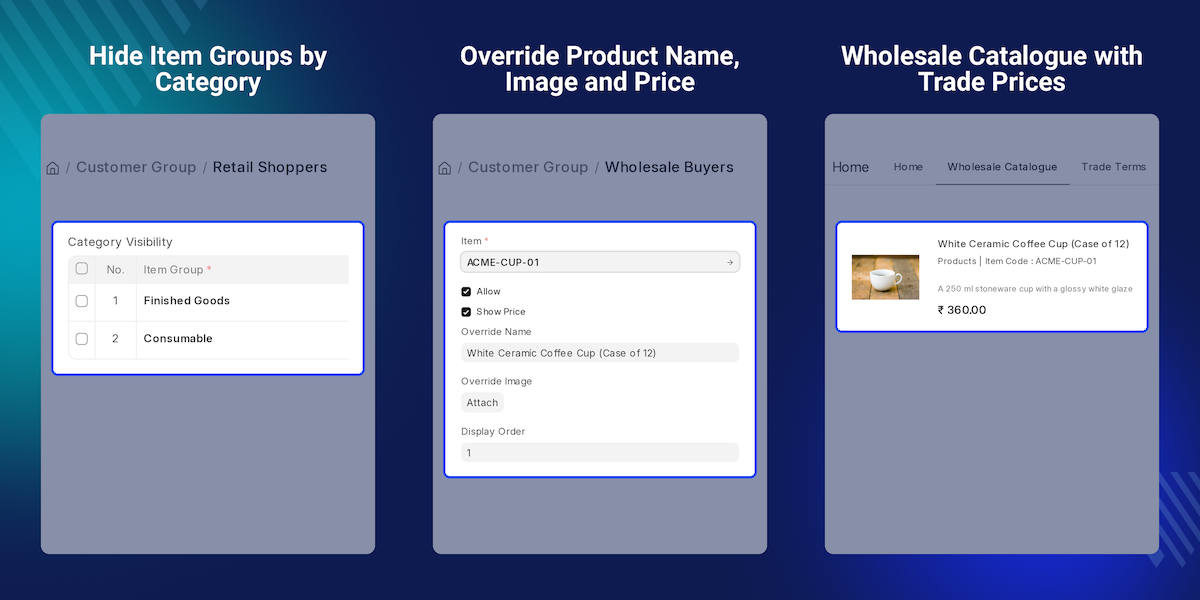
Highlighted Features of ERPNext Website Customer Group
Guest Customer Group
ERPNext Website Customer Group shows visitors who have not signed in the catalogue, menu and prices of one chosen group.
Default Registered Group
Signed-in shoppers with no Webshop rules of their own fall back to one default Customer Group.
Auto Assign On Signup
A new customer created without a group is placed in the guest or default group automatically.
Product and Category Visibility
Allow or hide single items or whole item groups, including child groups, for each audience.
Group Price Lists
Each group can use its own website price list in the Webshop listing, cart and quotation.
Per-Group Product Overrides
Show a different product name or image, or hide the price of one product, for one group.
Group Menus and Pages
Replace the top menu and block or open web pages for each Customer Group.
Customer Group-wise Sales Report
Compare Webshop cart orders, customers, quantity and totals for each Customer Group.
Why Do We Need ERPNext Website Customer Group?
Many stores sell to more than one audience. Retail visitors and trade accounts each expect their own products and prices. Yet a standard Webshop shows every Customer Group the same catalogue.
ERPNext already sorts customers into a Customer Group for pricing and reports. By default, that Customer Group does not change what a shopper sees on the Webshop. Trade prices and trade-only items stay hidden from everyone or open to everyone.
The usual workarounds grow costly. A store runs a second site or manages product visibility by hand before each campaign. Some email trade buyers a price sheet that soon drifts from the website price list.
ERPNext Website Customer Group closes that gap. The store team sets product visibility, a website price list, menus and pages on each Customer Group. The Webshop applies them as each shopper browses.
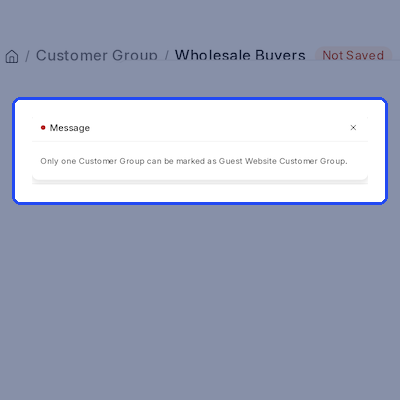
In practice, two groups both marked as the guest customer group is the mistake that confuses shoppers most. ERPNext Website Customer Group blocks that save, so each visitor always lands in one clear Customer Group.
Use Cases
-
Retail and Trade on One Site
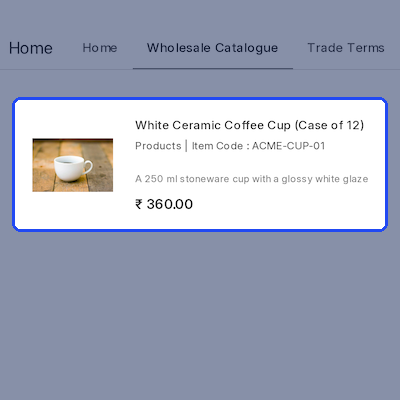
A homeware brand shows retail prices to guests while signed-in trade accounts see case packs at wholesale rates, all from one ERPNext Website Customer Group setup.
-
Hiding Internal Items
A shop keeps raw materials and test items in ERPNext. ERPNext Website Customer Group hides those item groups from guests so only finished products appear.
-
Trade-Only Content
A distributor publishes a Wholesale Terms page and a trade menu that only its trade Customer Group can open, while guests get Not Found.
-
Quote-Only Products
A supplier lists a high-value item for trade buyers with the price hidden and a new name such as Bulk Quote, so buyers ask for a quote.
Guest and Default Customer Groups
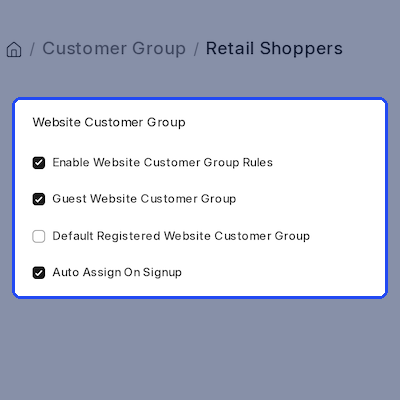
ERPNext Website Customer Group decides which Customer Group applies on every Webshop request. Visitors who have not signed in get the guest customer group the store team has marked.
A signed-in shopper uses the Customer Group of their own customer record when it has Webshop rules. Otherwise the default registered Customer Group applies, so no shopper ends up without rules.
- Guest Website Customer Group checkbox on the Customer Group form.
- Default Registered Website Customer Group for signed-in shoppers.
- Enable Website Customer Group Rules switch on each group.
- Only one guest group and one default group can be saved.
- Customer link found through the shopper's contact record.
Automatic Group Assignment
When a new customer is created without a Customer Group, ERPNext Website Customer Group fills it in. A guest signup gets the guest customer group, and a signed-in creation gets the default group.
The store team controls this with Auto Assign On Signup on each Customer Group. A customer who already has a Customer Group keeps it, so manual choices on the Customer form are never overwritten.
- Auto Assign On Signup checkbox, ticked by default.
- Runs when a Customer record is created or saved.
- Uses the guest group for guest signups.
- Uses the default registered group for signed-in users.
- Leaves an existing Customer Group unchanged.
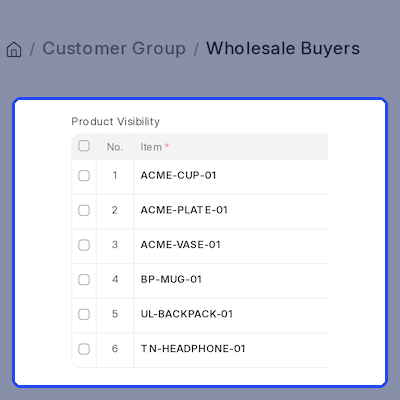
Product and Category Visibility
ERPNext Website Customer Group adds Product Visibility and Category Visibility tables to each Customer Group. A row can allow or hide one item, or a whole item group with its child groups.
When a Customer Group allows some products or categories, its shoppers see only those. When it only hides items, everything else stays visible. Hidden products leave the Webshop listing and their pages return Not Found.
- Allow or hide single items in Product Visibility.
- Allow or hide item groups in Category Visibility.
- Include Descendants covers child item groups.
- Hidden item pages and category pages return Not Found.
- Featured products follow the same visibility rules.
Group Pricing and Product Overrides
Each Customer Group can carry a Website Price List. ERPNext Website Customer Group applies it in the Webshop listing, cart and quotation, so every group pays its own rate.
A Product Visibility row can also give an item an Override Name or Override Image for that Customer Group. Clearing Show Price hides one Webshop price, and Hide Website Prices hides every price for the group.
- Website Price List per Customer Group.
- Hide Website Prices for a whole group.
- Show Price switch on each product row.
- Override Name and Override Image per group.
- Discount / Pricing Rules table with an Enabled switch.
Group Menus, Pages and Content
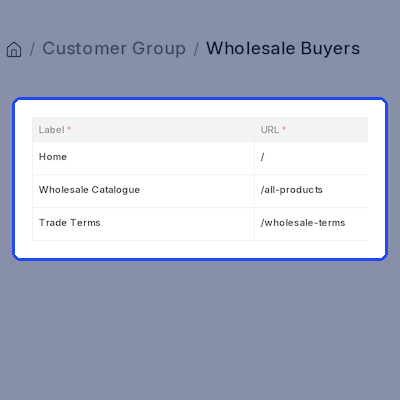
ERPNext Website Customer Group can replace the Webshop top menu for a group. Each Website Navigation Menu row has a label, URL, display order and options for a dropdown parent, right alignment or a new tab.
The Website CMS Pages table allows or blocks Webshop pages by route. Promotional banners, featured products and homepage content are stored per Customer Group and passed to the website theme for display.
- Website Navigation Menu rows replace the top menu.
- Parent Label builds dropdown menus.
- Website CMS Pages allows or blocks routes.
- Banners with title, image, URL, HTML and order.
- Homepage route and content for each group.
Customer Group-wise Sales Report
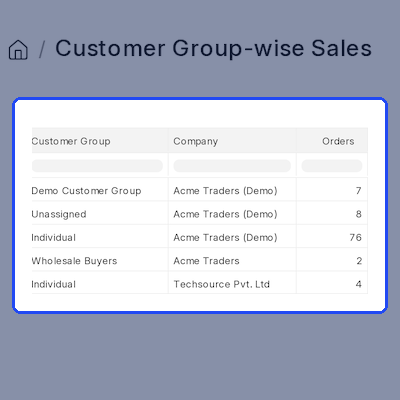
ERPNext Website Customer Group adds the Customer Group-wise Sales report. It totals Sales Orders placed through the Webshop cart for each Customer Group and company.
The report shows orders, customers, total quantity, net total and grand total. Filters cover From Date, To Date, Customer Group and Company. Sales Managers and Website Managers can open it to compare Webshop results.
- Counts Webshop cart Sales Orders per group.
- Shows distinct customers per Customer Group.
- Totals quantity, net total and grand total.
- Filters by date range, Customer Group and company.
- Open to System, Sales and Website Managers.
Support
For any query or issue, please create a support ticket here: CREATE A TICKET HERE
You may also check our other top-quality ErpNext Modules
Specifications
Frequently Asked Questions
Specification
Detailed technical features and requirements to help you understand the module’s capabilities and ensure smooth integration with your system.
Cloud Hosting
Detailed technical features and requirements to help you understand the module’s capabilities and ensure smooth integration with your system.
Move to Cloud Today
We’re partnered with top-tier, trusted providers!



Default Configuration Details of Server
RAM 1 Core
Processor 30 GB
Hard Disk
Database
Want to know more how exactly we are going to power up your eCommerce Website with Cloud to fasten up your store
* Server Configuration may vary as per application requirements.
