USD
  • EUR
  • INR
  • USD
Cart
Cart 0
  • You have no items in your shopping cart.
    Cart
    Cart 0
    • You have no items in your shopping cart.
    Hire a Developer
    ×
    Contact Us!
    Send Again
    Close
    Please Login to Write Your Review

    Laravel Marketplace MangoPay Payment Gateway

    Laravel Marketplace MangoPay Payment Gateway brings MangoPay to your marketplace. Accept secure payments. Release funds after orders. Manage payouts, refunds, and payment records with ease.


    • Accept CB, VISA, and Mastercard with 3D Secure.

    • Hold customer funds in escrow.

    • Release escrow after order fulfillment.

    • Split order payments between admin and sellers based on commission.

    • Support full and partial refunds.

    • Add and manage bank account details.

    • Upload KYC documents for verification.

    • View payment and payout transactions.

    Screenshots
    Laravel Marketplace MangoPay Payment Gateway Laravel Marketplace MangoPay Payment Gateway Laravel Marketplace MangoPay Payment Gateway Laravel Marketplace MangoPay Payment Gateway Laravel Marketplace MangoPay Payment Gateway Laravel Marketplace MangoPay Payment Gateway Laravel Marketplace MangoPay Payment Gateway Laravel Marketplace MangoPay Payment Gateway Laravel Marketplace MangoPay Payment Gateway
    Show More Hide All
    $0.00
    $0.00
    Configure and Buy
    • Description
    • Reviews
    • FAQ
    • Customers ()
    • Specifications
    • Cloud Hosting
    • Changelog

    Laravel Marketplace MangoPay Payment Gateway adds MangoPay to your Bagisto marketplace. Customers can pay with CB, VISA, and Mastercard using 3D Secure. The module provides a safe payment process and supports guest checkout.

    The admin can configure the payment method, create a MangoPay wallet, and add bank account details. Escrow payments keep funds secure until the order is fulfilled. The admin can then release funds and split each payment between the admin and seller.

    The module supports full and partial refunds through MangoPay. Admins and sellers can view payment and payout transactions from their panels. Sellers can also add bank details and upload KYC documents to receive payouts.

    Customers are redirected to the secure MangoPay payment page and can review their order details after a successful payment. This helps marketplaces manage payments, payouts, and refunds from one solution.

    Also, you can check Laravel eCommerce DHL Shipping addon to connect your Laravel store with DHL shipping services for fast and reliable rate calculation.
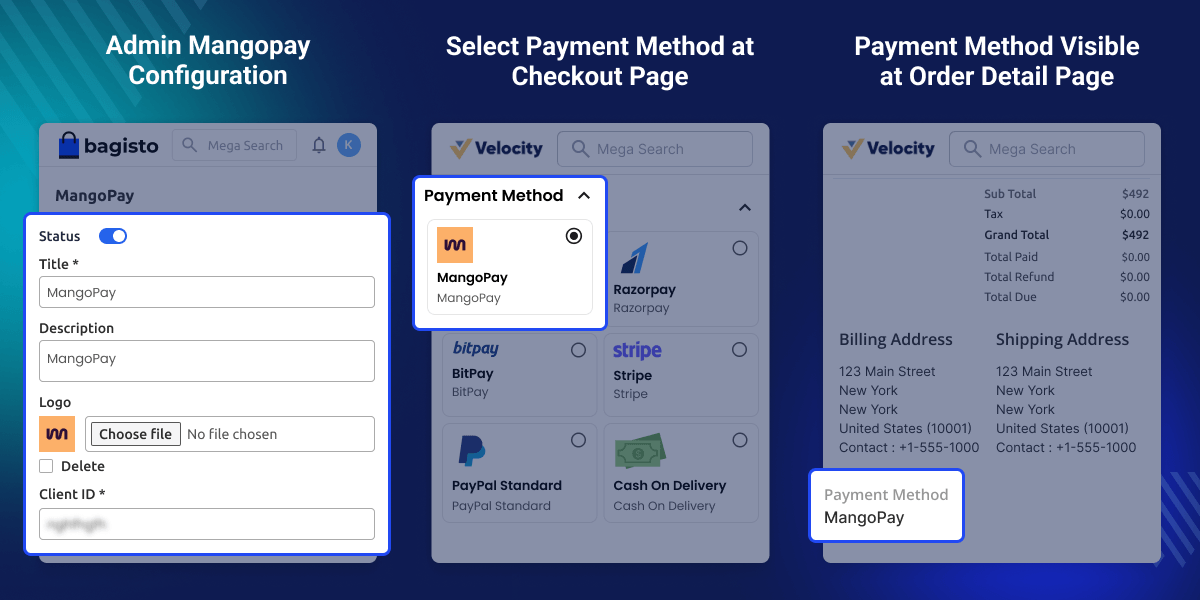
    Laravel Marketplace MangoPay Payment Gateway

    Highlighted Features of Marketplace MangoPay Payment Gateway

     Accept Secure Card Payments

    Accept CB, VISA, and Mastercard with 3D Secure for safe online payments.

     Escrow-Based Payment Flow

    Hold payments securely until the admin releases the funds.

     Automatic Payment Split

    Split each payment between the admin and seller automatically.

     Refund Management

    Create full or partial refunds through MangoPay with ease.

     Bank Details and KYC

    Manage bank details and complete KYC for seller payouts.

     Payment and Payout Tracking

    View payment, commission, and payout transactions from one place.

    Why do we need this Laravel Marketplace MangoPay Payment Gateway?

    Managing payments in a multi-vendor marketplace is not always simple. Store owners need a secure way to collect customer payments, split earnings, and handle refunds. A basic payment gateway cannot manage these marketplace-specific tasks.

    Laravel Marketplace MangoPay Payment Gateway helps you manage the full payment flow. It keeps funds safe until the order is complete. The admin can then release the payment and split the amount between the admin and seller. It also supports refunds, bank details, KYC, and payment records.

    The module helps reduce manual work and keeps payments easy to manage. Admins and sellers can track every payment from one place. This gives better control over payouts and helps run the marketplace with confidence.

    Additionally, try Laravel Marketplace Multi Shipping to support different shipping methods for each seller. It lets buyers and sellers manage shipping with ease.

    MangoPay Payment Gateway Configuration

    Set up MangoPay from the Bagisto admin panel to accept customer payments. Turn the payment method on or off, add your account details, and customize the payment settings for checkout.
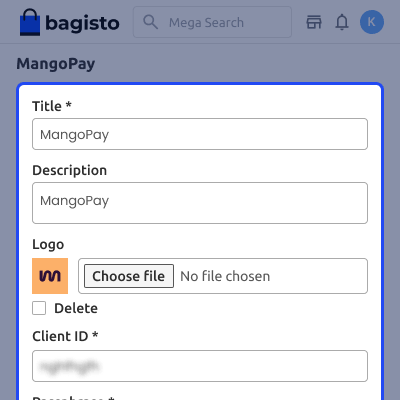
    • Enable or disable the MangoPay payment method.
    • Set the payment title shown at checkout.
    • Add a short payment description.
    • Upload a custom payment method logo.
    • Enter the MangoPay Client ID and Passphrase.
    • Set the payment method sort order.
    MangoPay Payment Gateway Configuration

    Manage Escrowed Payments

    View all escrowed payments from the admin panel. Check the payment status and release funds after the order is fulfilled. This helps keep seller payouts under control.
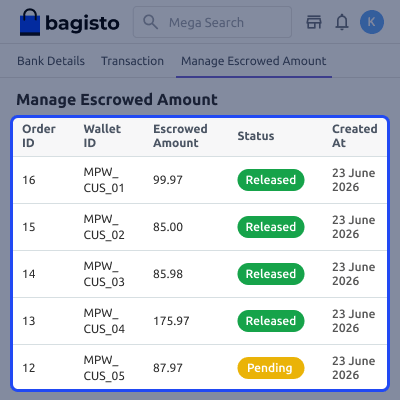
    • View all escrowed order payments.
    • Check the escrow payment status.
    • See the escrow amount for each order.
    • View the linked wallet ID.
    • Release funds after order fulfillment.
    • Transfer the seller amount and admin commission.
    Manage Escrowed Payments

    Transaction Management

    View all payment transactions from the admin panel in one place. Check transaction details, commission amounts, payment messages, and status to keep payment records easy to track.
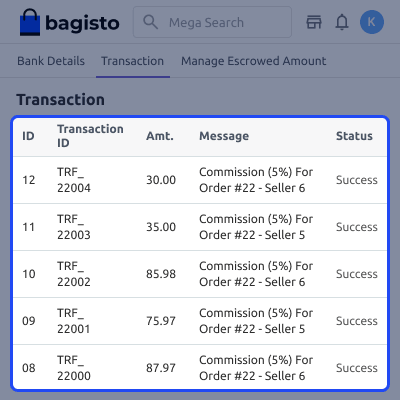
    • View all payment transactions.
    • Check the transaction ID.
    • See the commission amount.
    • View the payment message.
    • Check the transaction status.
    • Track admin commission transfers.
    Transaction Management

    Bank Account Management

    Add your bank account details from the admin panel to receive commission payouts. Choose the account type and save the required banking information in one place.
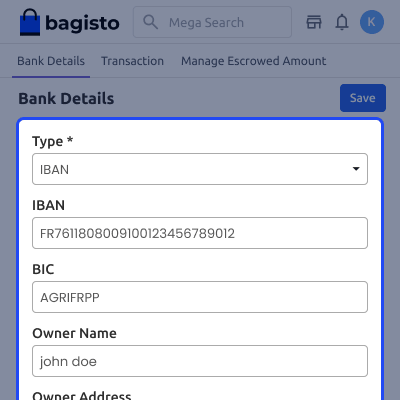
    • Add bank account details for payouts.
    • Select the supported bank account type.
    • Enter the IBAN and BIC details.
    • Add the account owner name.
    • Enter the account owner address.
    • Save and update bank details anytime.
    Bank Account Management

    MangoPay Admin Wallet

    Create a MangoPay wallet from the admin panel to receive marketplace commission payments. The wallet links your MangoPay account with your marketplace.
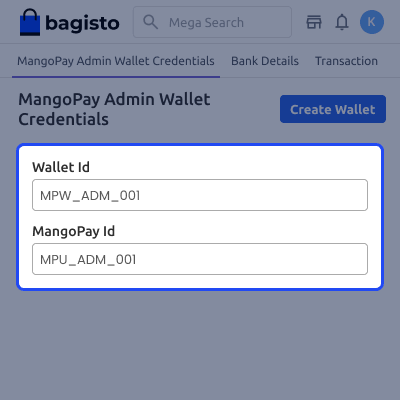
    • Create the admin MangoPay wallet.
    • Register the admin as a Legal User.
    • Generate a unique Wallet ID.
    • Store the MangoPay account ID.
    • Link the wallet to commission payouts.
    • View wallet details from the admin panel.
    MangoPay Admin Wallet

     Support

    For any issue related to this module, please create a support ticket here or send an email to [email protected]

    You may also check our quality Bagisto Extensions.

    Specifications

    Product Version2.4.x
    Released5 years ago
    Last UpdatedJuly 2, 2026 (18 days ago)
    Supported VersionsBagisto  2.4.x  
    Write a review

    Frequently Asked Questions

     Do I need the Bagisto Multi-Vendor Marketplace module to use this extension?
    Yes, this module is an add-on and requires the Bagisto Multi-Vendor Marketplace module to work.
     
     Which payment cards does MangoPay support?
    The module supports CB, VISA, and Mastercard with 3D Secure through MangoPay.
     
     Can customers use MangoPay without creating an account?
    Yes, the module supports guest checkout, so eligible customers can pay without creating an account.
     
     Is KYC verification required for sellers?
    Yes, sellers must upload the required KYC documents before receiving payouts through MangoPay.
     
     Does the module support full and partial refunds?
    Yes, the admin can create full or partial refunds through the payment gateway, depending on the order.
     
     Where can admins and sellers track payment and payout records?
    Admins and sellers can view their payment and payout transactions from their respective account panels.

    Move to Cloud Today

    AWS Free tier hosting for one year by amazon web services, for more details please visit AWS Free Tier.

    GCP Free tier hosting for one year with 300 credit points by google cloud platform, for more details please visit GCP Free Tier.

    Azure free tier hosting for one year with 25+ always free services, for more details please visit Azure Free Tier.

    In our default configuration we will provide tremendous configuration for your eCommerce Website which is fast to load and response.

    Default Configuration Details of Server

    • 1 GB RAM
    • 1 Core Processor
    • 30 GB Hard Disk
    • DB with 1 GB RAM and 1 Core Processor

    * Server Configuration may vary as per application requirements.

    Want to know more how exactly we are going to power up your eCommerce Website with Cloud to fasten up your store. Please visit the Cloudkul Services.

    Get Started with Cloud
    • + Features
    • - Bugs
    Version 2.4.x
    • + Added full compatibility with Bagisto v2.4.x.
    • + Updated routes to align with the latest Bagisto architecture.
    • + Refactored service providers for improved compatibility and maintainability.
    • + Updated database migrations to support current Bagisto standards.
    • + Revised configuration files and package structure.
    • + Updated language files and translations.
    • + Modernized package codebase to match current Bagisto and Laravel conventions.
    • + Improved overall package stability and long-term maintainability.
    Version 1.3.1
    • + Admin must register himself on Mangopay website to get Client Id and Passphrase.
    • + Enable/disable the payment solution.
    • + Set Bagisto Marketplace Mangopay Payment Gateway module title.
    • + Provide secure, trusted, and fast payment to the customers.
    • + The customer can select the Mangopay payment method available on the checkout page.
    • + Check placed order details like invoices and transactions.
    • + Accepts all the cards that Mangopay supports.
    • +Supports Refund


