USD
  • EUR
  • INR
  • USD
Cart
Cart 0
  • You have no items in your shopping cart.
    Magento 2 Extensions
    Cart
    Cart 0
    • You have no items in your shopping cart.
    Hire a Developer
    ×
    Contact Us!
    Send Again
    Close
    Please Login to Write Your Review
    Instagram Feed for Magento 2

    Instagram Feed for Magento 2

    x
    Free

    * Required Fields

    $179.00
    Add To Cart
    30 Days Money Back Guarantee*

    Magento 2 Instagram Feed turns your Instagram account into a shoppable gallery on your storefront. Posts, Reels, and tagged media sync on a schedule you set.


    • Sync Instagram posts, Reels, and tagged media through Meta OAuth or a manual access token.

    • Approve, reject, hide, pin, and reorder media before it reaches the storefront.

    • Tag products on posts manually, or confirm tags the module suggests from hashtags and captions.

    • Show posts as a grid or slider, with options for columns, spacing, and autoplay.

    • Place feeds on the home page, category pages, product pages, CMS pages, or the cart page.

    • Track impressions, clicks, and conversions for every feed and post.

    • Mirror media to your own storage so the storefront never hotlinks Instagram.

    • Upload or import media directly for posts that never came from Instagram.

    Instagram Feed for Magento 2
    Instagram Feed for Magento 2
    $179.00
    30 Days Refund
    GraphQL Compatible
    Check How It Works
    $179.00
    Configure and Buy
    30 Days Money Back Guarantee*
    X
    • Description
    • Reviews
    • FAQ
    • Customers ()
    • Specifications
    • Cloud Hosting
    • Changelog

    Magento 2 Instagram Feed connects your Instagram Business or Creator account to your store. A cron job pulls posts, Reels, and tagged media on the schedule you set. Each file is mirrored to your own media folder, so nothing hotlinks back to Instagram.

    You control every post before it goes live, since the Media Library holds each item until you approve it. Approve, reject, hide, pin, or reorder any post from the Media Library. Tag products on a post yourself, or confirm tags the module suggests from hashtags and captions.

    You can build as many feeds as you need, and each feed picks its own source, layout, and placement, so a branded grid on the home page and a shoppable slider on product pages can run side by side. Every feed tracks impressions, clicks, and conversions, so you know which posts and products actually perform.

    Also, check out Magento 2 Social Selling - Shop on Instagram to push your Magento catalog onto Instagram as a shop.
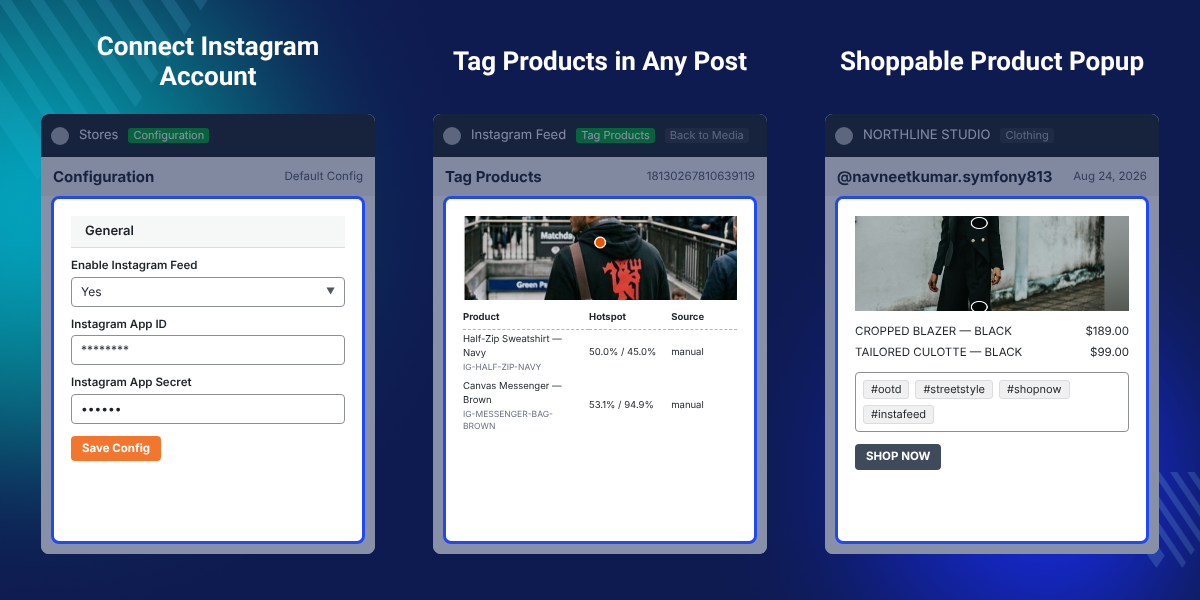
    Magento 2 Instagram Feed

    Highlighted Features

     Meta OAuth or Manual Token Connection

    Connect an Instagram Business or Creator account through Meta OAuth, or paste a long-lived access token if you skip the Meta app.

     Scheduled Media Sync

    Pull posts, Reels, and tagged media on a cron schedule you set.

     Moderated Media Library

    Approve, reject, hide, pin, and reorder media before it goes live. Tag products manually, or confirm the tags the module suggests from hashtags and captions.

     Grid and Slider Feeds

    Build named feeds with their own layout, store scope, and source, while collecting impressions, clicks, and conversions from every feed.

    Why Use This Extension?

    Adobe Commerce has no native way to pull Instagram content into your store. Without this extension, you either embed Instagram's own widget, which sends shoppers off-site, or you copy images in by hand. Instagram Feed for Magento 2 keeps the whole shopping journey on your store.

    Shoppers browse your Instagram content, tap a tagged product, and add it to cart without leaving the page. Also, check out Facebook Wall Post for Magento 2 to bring your Facebook Page, Profile, or Group feed into your storefront.

    Use Cases

    • Home Page Gallery

      Show a branded grid of your latest approved posts on the home page to build trust with new visitors.

    • Shoppable Product Pages

      Tag products in your posts, and show only the matching posts on that product's page.

    • Customer Photo Wall

      Pull tagged media from customers, moderate it in the Media Library, and feature the best posts in a slider.

    • Campaign Landing Pages

      Curate a set of pinned posts for a seasonal campaign, and place the feed on a CMS page.

    Module Setup

    After installing Magento 2 Instagram Feed, go to Stores > Configuration > Webkul > Instagram Feed. Set your Meta App ID and secret, choose a sync frequency, and turn on analytics collection.
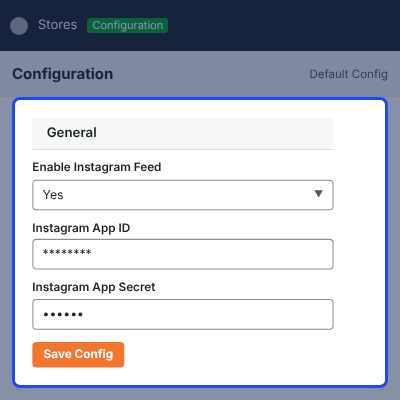
    • Enable or disable this module
    • Set the Meta App ID and Meta App Secret
    • Choose sync frequency and media per sync
    • Turn on auto approve or auto-tagging
    • Enable analytics collection
    Module Setup

    Curate the Media Library

    Go to Instagram Feed > Media Library to review synced media before it goes live. Nothing reaches the storefront until you approve it here.
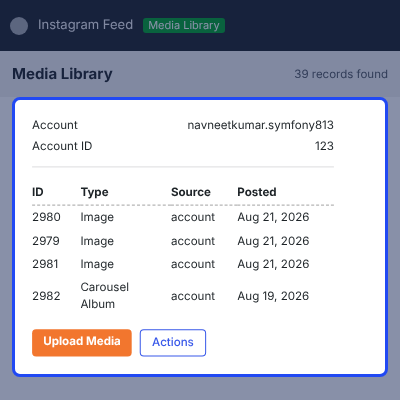
    • Approve, reject, hide, pin, or delete any media item
    • Pinned media sorts to the front of every feed it appears in
    • Use mass actions to approve, reject, hide, or delete media in bulk
    Curate the Media Library

    Tag Products

    Open a media row to tag products for that post. Tagged posts power the shoppable overlays and the product and category context feeds.
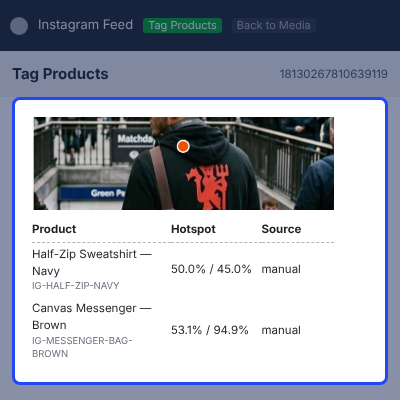
    • Search and tag products manually
    • Confirm tags the module suggests from hashtags and captions
    • Manual tags always outrank derived tags
    Tag Products

    Create and Place a Feed

    Go to Instagram Feed > Feeds > Add Feed to build a new feed. Each feed controls its own layout, store scope, and placement across your site.
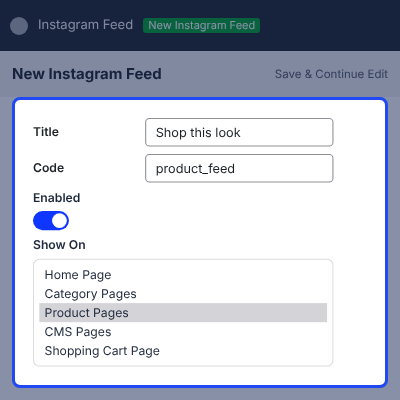
    • Pick a grid or slider layout
    • Choose the store views the feed applies to
    • Select the feed's sources, including product or category context
    • Preview the feed before saving
    • Place it as a widget from Content > Widgets, or add the layout block with the feed code
    Create and Place a Feed

    Read Analytics

    Go to Instagram Feed > Analytics to review feed performance. Use these numbers to see which posts and products drive engagement.
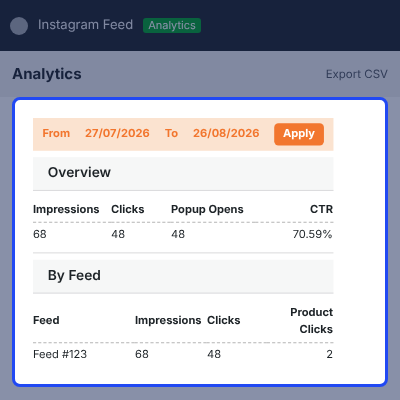
    • View impressions, clicks, and conversions per feed
    • Break down results by individual media item
    • Export analytics data
    Read Analytics

    Support

    For any query or issue, please create a support ticket here http://webkul.uvdesk.com/

    You may also check our top-quality Magento 2 Extensions.

    Specifications

    Product Version4.0.0
    Released2 days ago
    CategoryMagento 2Social Media
    Last UpdatedAugust 31, 2026 (2 days ago)
    Supported VersionsMagento  2.4.x  

    Ratings

    We'd love to hear your thoughts! Share your feedback and help us craft an even better experience tailored just for you.

    Write a review

    Frequently Asked Questions

     What does Magento 2 Canva Connector do?

    This extension connects Magento with Canva and lets admins create, edit, and import product images into the Magento product gallery.

     
     Can I design Magento product images in Canva?

    Yes, admins can open Canva from the Magento product workflow and use an existing product image as the base for a new design.

     
     Can I import Canva designs into Magento?

    Yes, finished Canva designs can be exported and added to the selected Magento product gallery through this extension.

     
     Can I replace existing Magento product images?

    Yes, admins can enable image replacement and replace old product images with new designs from Canva.

     
     Can I assign Canva images to Magento image roles?

    Yes, imported designs can be assigned to Base Image, Small Image, and Thumbnail roles from the product image settings.

     
     Which image formats does the extension support?

    This add-on supports JPG, PNG, and WebP formats for Canva designs that admins import into Magento product galleries.

     
     Does the extension require a Canva account?

    Yes, a Canva account is needed to create and edit designs through the Canva integration.

    Specification

    Detailed technical features and requirements to help you understand the module’s capabilities and ensure smooth integration with your system.

    Cloud Hosting

    Detailed technical features and requirements to help you understand the module’s capabilities and ensure smooth integration with your system.

    Default Configuration Details of Server

    1 GB
    RAM
    1 Core
    Processor
    30 GB
    Hard Disk
    1 GB RAM & 1 Core Processor
    Database

    Want to know more how exactly we are going to power up your eCommerce Website with Cloud to fasten up your store

    * Server Configuration may vary as per application requirements.

    Change Logs

    • - Feature Add (+)
    • - Feature remove (-)
    • - Bug Fixed (!)
    • - Modification (*)
    Version 4.0.0
    • Compatible with Magento 2.4.9 and PHP 8.5.
    • Connect Instagram Business and Creator accounts through Meta OAuth.
    • Connect an account manually with a long-lived access token.
    • Automatic refresh of long-lived tokens before they expire, with the remaining days shown on the account grid.
    • Account grid listing username, account type, provider, status, token expiry and last sync time.
    • Disconnect or delete an account, and sync a single account on demand.
    • Sync posts, Reels, carousels and tagged (UGC) media on a configurable cron schedule.
    • Posts Per Account limit on every sync.
    • Sync log recording the result of each account synchronisation.
    • Store Media Locally option that mirrors Instagram media into Magento media storage, with per-item mirror status.
    • Keep Posts For (days) retention that purges expired posts automatically.
    • Media library grid with thumbnail, account, media type, source, caption, likes, comments, post date, moderation status, hidden and pinned state.
    • Approve, reject, hide, show, pin, unpin and delete media, individually or as a mass action.
    • Upload Media button on the Media Library grid for local file upload and URL import.
    • Uploaded media is linked rather than downloaded when Store Media Locally is off.
    • Manual product tagging with product search from the media grid, including per-slide tagging of carousel posts.
    • Automatic product tagging from SKUs found in captions.
    • Automatic product tagging from hashtag-to-SKU rules.
    • Publish tag suggestions without review, or hold them for confirmation in the media library.
    • Category tags derived from tagged products, with a sync-category-tags CLI command.
    • Feeds built from Account, Tagged (UGC), Uploaded Media, Manual, Mixed, Product Context or Category Context sources.
    • Source rules that select which accounts and posts a feed draws from.
    • Grid, Slider, Masonry and Highlight feed layouts.
    • Feeds rendered as a widget, as a layout block, or auto-placed on the Home, Category, Product, CMS and Shopping Cart pages.
    • Placement Container setting that chooses the container an auto-placed feed renders into.
    • Store view scoping and a sort order per feed.
    • Feed grid listing title, code, layout, source type, status, store view and sort order, with enable, disable, delete and mass delete.
    • Fixed columns per breakpoint, or automatic columns driven by a minimum tile width.
    • Row limit, gap, corner radius, aspect ratio and full-width settings.
    • Slider speed and a Load More control.
    • Caption, profile picture, username, like count and Instagram hover link toggles per feed.
    • Show Product Name On Tile setting for shoppable tiles.
    • Only Shoppable filter that limits a feed to posts with tagged products.
    • Post Order setting that ranks posts by engagement instead of recency.
    • Post limit per feed.
    • Click behaviour per feed: open the popup, open on Instagram, go to the tagged product, or do nothing.
    • Media popup with swipe and keyboard navigation, carousel slides and video playback.
    • Popup product cards overlaid on the media, below it, in a side panel, or hidden.
    • Instagram-style product tags in the popup that link through to the product.
    • Follow button in the popup, centred on the media or in the details bar.
    • Autoplay video in feeds.
    • Posts pin and reorder panel on the feed edit page.
    • Live preview of the feed being edited, rendered from its current source rules.
    • Instagram media in the product gallery, ordered alongside the catalog images.
    • Autoplay Video and Loop Video settings for Instagram video in the product gallery.
    • Cron that refreshes expiring Instagram CDN URLs used by product galleries.
    • Storefront analytics for impressions, clicks, popup opens, product clicks, add to carts, orders, revenue and conversion rate.
    • Analytics dashboard with a date range and breakdowns by feed, post and product.
    • Analytics CSV export.
    • Analytics events collected asynchronously through the message queue.
    • Content Security Policy entries for the Instagram and Facebook CDNs.
    • Separate ACL resources for accounts, feeds, media, product gallery, analytics and configuration.


