USD
  • EUR
  • INR
  • USD
Cart
Cart 0
  • You have no items in your shopping cart.
    Magento 2 Extensions
    Cart
    Cart 0
    • You have no items in your shopping cart.
    Hire a Developer
    ×
    Contact Us!
    Send Again
    Close
    Please Login to Write Your Review
    Magento 2 Multi Vendor Page Builder
    Magento 2 Multi Vendor Page Builder
    x
    Free

    * Required Fields

    $199.00
    Add To Cart

    Magento 2 Multi Vendor Page Builder extension allows the vendors to manage and update their profile page using the frontend view's drag and drop method.


    • Can change the layout of Profile Page.

    • Separate Page to Update the content of Profile Page.

    • Drag and Drop for changing the order of the blocks.

    • View all the changes live from a customer perspective.

    • Option to reset the seller profile layout to default.

    • The extension is compatible with the Hyva Theme.

    Magento 2 Multi Vendor Page Builder
    Magento 2 Multi Vendor Page Builder
    $199.00
    Magento Technology Partner Awards
    Hyvä Theme Compatible
    GraphQL Compatible
    Check How It Works
    $199.00
    Configure and Buy
    X
    • Description
    • Reviews
    • FAQ
    • Customers ()
    • Specifications
    • Cloud Hosting
    • Changelog

    This Adobe Commerce module allows vendors to change the profile page in the page builder by dragging and dropping items. Vendors may see all of the changes in real time from the customer's perspective and save all of the changes made in the page builder by clicking the save button.

    This is an add-on to Webkul's Magento 2 Multi-Vendor Marketplace, so you need to install Marketplace modules first.
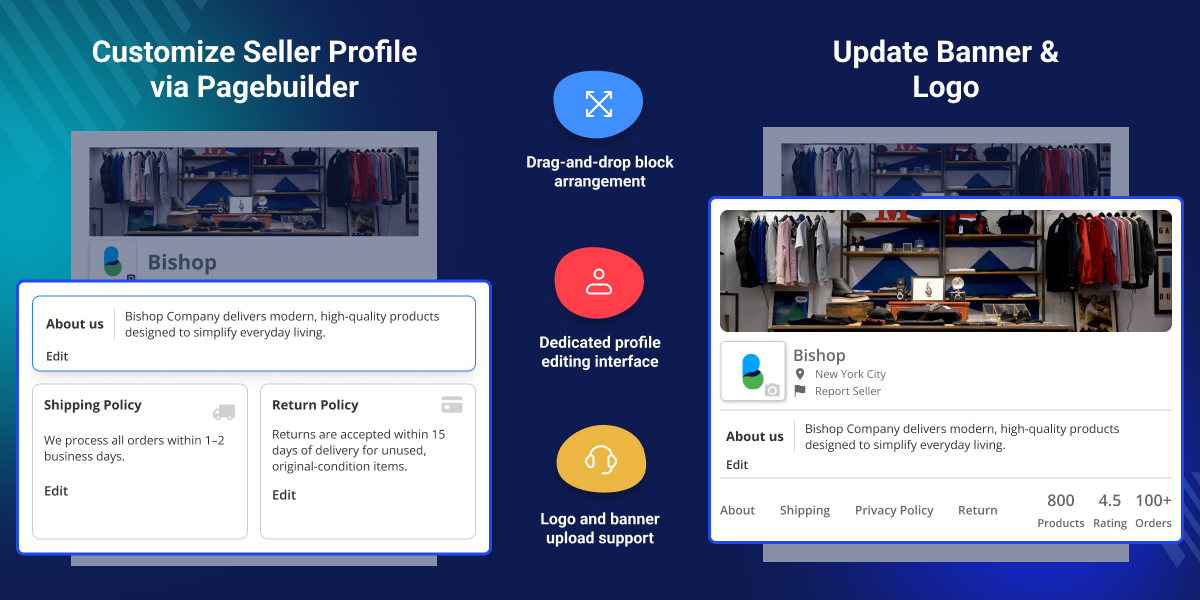
    Multi Vendor Page Builder for Magento 2

    Highlighted Features Multi Vendor Page Builder for Magento 2

     Drag & Drop Page

    Drag and edit with a few simple clicks.

     Live Changes

    View all of the changes in real-time from the perspective of a customer.

     Profile Page

    Update the content of the Profile Page on a separate page.

     Layout Change

    The layout of the Profile Page can be changed.

     Hyva Theme Compatible

    This extension is fully compatible with the Hyva Theme.

     Change the Order of Blocks

    Change the order of the blocks by dragging and dropping them.

    Why should you choose Multi Vendor Page Builder for Adobe Commerce extension?

    It's never been easier to add new pages to your store! This Magento 2 Page Builder extension was created to suit the needs of merchants who do not have any coding abilities and who want to be able to develop and manage any form of page. With this solution, you may edit the seller profile pages manually on the front end by dragging and dropping them.

    • Save time and money.
    • Keep the site's pace consistent.
    • Increase sales by creating appealing store pages.

    Drag and Drop Interface

    Create the page you desire, or easily alter it by dragging and dropping elements. With an intuitive drag-and-drop page builder, you can easily create and manage profile pages.
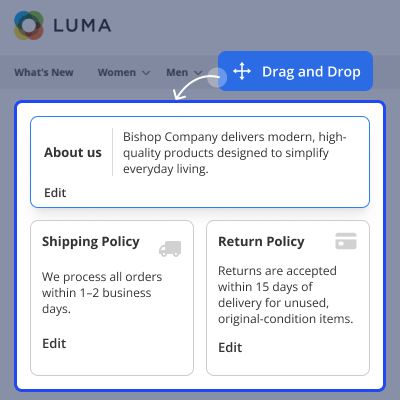
    • The Magento 2 Page Builder extension is entirely compatible with others. They'll function well together to give your profile page the highest possible performance and efficiency.
    • There's no need to waste time storing and uploading any longer. You can save after dragging and dropping.
    Drag and Drop Interface

    Banner & Log Editor

    Sellers can easily update their shop banner and profile photo directly from the Page Builder interface. By simply dragging and dropping the respective blocks, they can upload new images and instantly preview how their store will appear to customers.
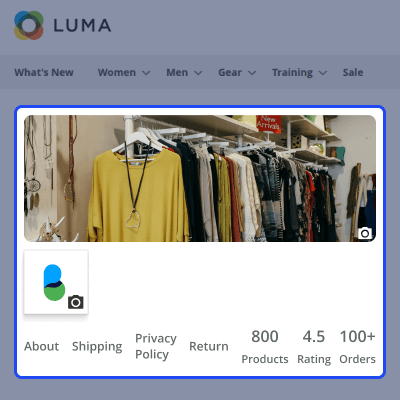
    • Sellers can update their shop banner and profile photo using the Page Builder.
    • This seamless process helps vendors personalize their storefront without needing any technical skills.
    Banner & Log Editor

    Fast and Easy to Use

    Manage seller profile page without any technical skills with the help of the intuitive interface. With the drag-and-drop tool, you can move things around. With a few simple clicks, you may drag and drop.
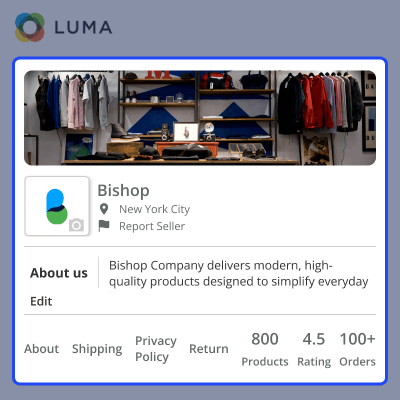
    • The Profile Page's layout can be changed. On a different page, change the content of the Profile Page.
    • Drag and drop the blocks to rearrange their position.
    Fast and Easy to Use

    Support

    For any query or issue please create a support ticket here http://webkul.uvdesk.com/.

    You may also check our quality Magento 2 Extensions.

    Specifications

    Product Version5.0.4
    Released4 years ago
    Last UpdatedJuly 10, 2026 (17 days ago)
    Supported VersionsMagento  2.0.x  2.1.x  2.2.x  2.3.x  2.4.x  

    Ratings

    We'd love to hear your thoughts! Share your feedback and help us craft an even better experience tailored just for you.

    5.0
    1 Reviews
    based on verified customer feedback
    Write a review
    Kasuka

    Excellent

    Posted On - September 24, 2021

    Excellent module and webkul is the most admiring professional service provider company. I genuinely recommend webkul for any one who would like to have online business extensions. Moreover, there customer service is more than Amazing.

    Frequently Asked Questions

     What is Page Builder in Magento 2?
    Page Builder is a Magento plugin that allows you to drag and drop items onto the seller profile page to alter it.
     
     Is it possible for the seller to change the appearance of the profile page?
    Yes, the layout of the Profile Page can be changed by the seller.
     
     Is it possible for the seller to rearrange the blocks?
    Yes, the seller has the ability to rearrange the blocks.
     
     Is it possible to witness all of the changes in real-time from the perspective of a customer?
    Yes, we can see all of the changes in real-time from the perspective of the customer.
     
     Is it possible for the vendor to change the description?
    Yes, the vendor has the ability to change the description.

    Specification

    Detailed technical features and requirements to help you understand the module’s capabilities and ensure smooth integration with your system.

    Cloud Hosting

    Detailed technical features and requirements to help you understand the module’s capabilities and ensure smooth integration with your system.

    Default Configuration Details of Server

    1 GB
    RAM
    1 Core
    Processor
    30 GB
    Hard Disk
    1 GB RAM & 1 Core Processor
    Database

    Want to know more how exactly we are going to power up your eCommerce Website with Cloud to fasten up your store

    * Server Configuration may vary as per application requirements.

    Change Logs

    • + Features
    • - Bugs
    Version 5.0.4
    • + Compatible with Magento 2.4.9 and PHP 8.5
    Version 5.0.3
    • + Compatible with Magento ^2.4.8 and PHP 8.4
    • + Compatible with Magento ^2.4.7 and PHP 8.3
    Version 5.0.2-p1
    • + Added functionality of upload logo and banner on edit profile at page builder
    Version 5.0.2
    • + Compatible with Magento ^2.4.6
    Version 5.0.1
    • + Added a button to set seller profile as default.
    Version 5.0.0
    • + Compatibility with Magento ^2.4.x and Marketplace 5.0.x.
    • + Seller can change the layout of Profile Page.
    • + Separate Page to Update the content of Profile Page.
    • + Drag and Drop for changing the sort order of the blocks.
    • + Admin can enable/disable this module from configuration section.
    Version 4.0.4
    • + Compatible with Magento 2.4.9 and PHP 8.5
    Version 4.0.3
    • + Compatible with Magento ^2.4.8 and PHP 8.4
    • + Compatible with Magento ^2.4.7 and PHP 8.3
    Version 4.0.2-p1
    • + Added functionality of upload logo and banner on edit profile at page builder.
    Version 4.0.2
    • + Compatible with Magento ^2.4.6 and above.
    Version 4.0.1
    • + Added a button to set seller profile as default.
    Version 4.0.0
    • + Compatibility with Magento 2.4.x. EE and Marketplace 4.0.x
    • + Seller can change the layout of Profile Page.
    • + Separate Page to Update the content of Profile Page.
    • + Drag and Drop for changing the sort order of the blocks.
    • + Admin can enable/disable this module from the configuration section.


