Odoo Access Control Management
Odoo Access Control Management makes things easier and safer. It restricts users and keeps everything secure by controlling who can access what.
- Module restricts specific users from accessing the menus and submenus of any module.
- You can restrict model-wise access rights for users.
- Additionally, it blocks XMLRPC.
- It allows for restriction developer mode.
- You can restrict the import-export feature for any user.
- Odoo Access Control Management can hide the chatter.
- Limit user access to all model Operations.
- Description
- Reviews
- FAQ
- Customers ()
- Specifications
- Cloud Hosting
- Changelog
Odoo Access Control Management helps you restrict who can access what.
This tool is vital for keeping data safe and ensuring everything is secure. It makes operations smoother for today's businesses.
It's not about access; it's also about making things work better and safer in this digital world. It allows constraint of access to various access.
To manage the password within odoo ERP you check our Odoo Password Manager.

Highlighted Features of Odoo Access Control Management
Hide Menu/Submenu Access Right
- It Restricts the user-wise access rights to hide navigation menus and submenus.
Hide Chatter
- Users can restrict model-wise access rights with the help of this module.
Disable Developer Mode:
- Odoo Access Control Management allows for restriction developer mode.
Hide the import/export feature
- You can restrict the import-export feature for any user.
Hide Features/fields
- This module Limits the ability of any user to hide the features or fields.
Why do we need Odoo Access Control Management
In this fast-paced world, everyone wants ease to restrict access to sensitive data. It secures spaces to provide security in minutes.
In a business, providing different access to users is very Hectic, but not anymore. Odoo access control management restricts the access rights given to the users.
Moreover, for evaluating employee performance, you can check odoo Employee Evaluation Management.
Hide Menu
Choose the menu you want to hide from the add line menu in a user profile, then make sure the parent menu is hidden as well.
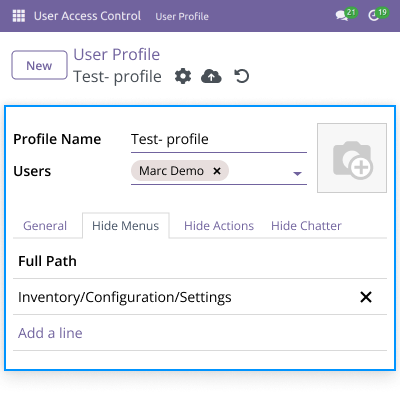
- Hide the menu for selected users in the user profile.
- When you hide the parent menu, the child menu will be hidden too.
- From the add line menu, select the menu to hide.

Hide Actions
Users can choose a particular model by restricting the following operations.
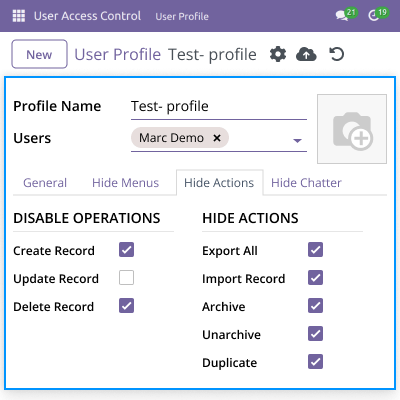
- It will restrict operations such as record creation, updates, and deletions.
- It also conceals operations such as export, import, archive/unarchive, and duplicates.

Hide Chatter
Odoo Access Control Management allows users to hide chatter access, including other operations as well.
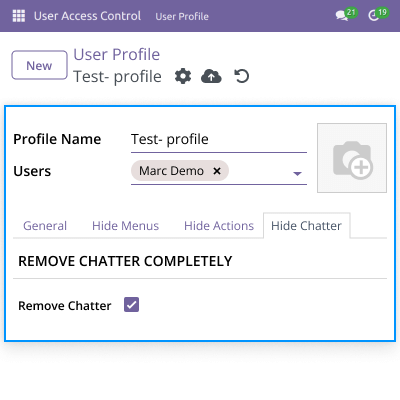
- With this option, It allows you to hide the chatter.
- Admin can remove chatter access like sending messages, log notes, activities, and attachments.

General Settings
Restrict Installing, updating, and uninstalling modules for unauthorized users.
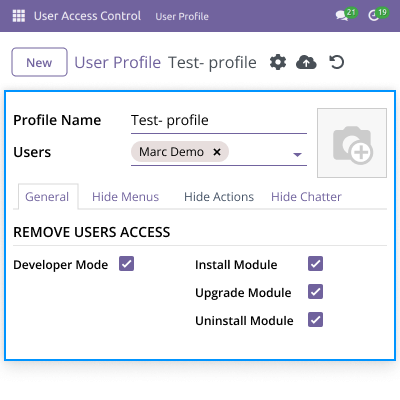
- Others can't use developer mode unless the admin prohibits them.
- It also means they can't install, upgrade, or uninstall modules.

Odoo Access Control Management
Webkul's dedicated support will provide you with customizations and troubleshooting solutions for Odoo Access Control Management.
For any query or issue please CREATE A TICKET HERE
You may also check our other top-quality Odoo Plugins.
Specifications
Frequently Asked Questions
Move to Cloud Today
AWS Free tier hosting for one year by amazon web services, for more details please visit AWS Free Tier.
GCP Free tier hosting for one year with 300 credit points by google cloud platform, for more details please visit GCP Free Tier.
Azure free tier hosting for one year with 25+ always free services, for more details please visit Azure Free Tier.
In our default configuration we will provide tremendous configuration for your eCommerce Website which is fast to load and response.
Default Configuration Details of Server
- 1 GB RAM
- 1 Core Processor
- 30 GB Hard Disk
- DB with 1 GB RAM and 1 Core Processor
* Server Configuration may vary as per application requirements.
Want to know more how exactly we are going to power up your eCommerce Website with Cloud to fasten up your store. Please visit the Cloudkul Services.
Get Started with Cloud


