Odoo Mass Register Expenses Payment lets admins post approved expense entries and register payments for several staff in a single bulk action.
- Select multiple approved expenses and register their payments in one action.
- Post the journal entry only for approved expenses.
- Register payments only against posted journal entries, never unapproved ones.
- Review each expense's complete breakdown from the expense report.
- Track the full payment transaction history for every registered entry.
- Generate accurate, up-to-date financial data for expense reporting.
- Simplify expense payment reporting across the business.
- Save admin time on repetitive, one-by-one expense payment entry.
- Description
- Reviews
- FAQ
- Customers ()
- Specifications
- Cloud Hosting
- Changelog
Odoo Mass Register Expenses Payment helps with employee expense reimbursement. It posts approved expense entries and registers payments in bulk.
Admins open My Expenses, select the posted entries, and register payment for the whole batch in one action.
Each run updates the payment history and creates the invoice for every expense paid.
Only approved, posted expenses are eligible for bulk payment registration.
The module works with the standard Odoo Expenses workflow and supports Odoo 8.x through 20.x.
Additionally, if you want to confirm and compute employee payslips in bulk, check Odoo Payslip Extra Tools.
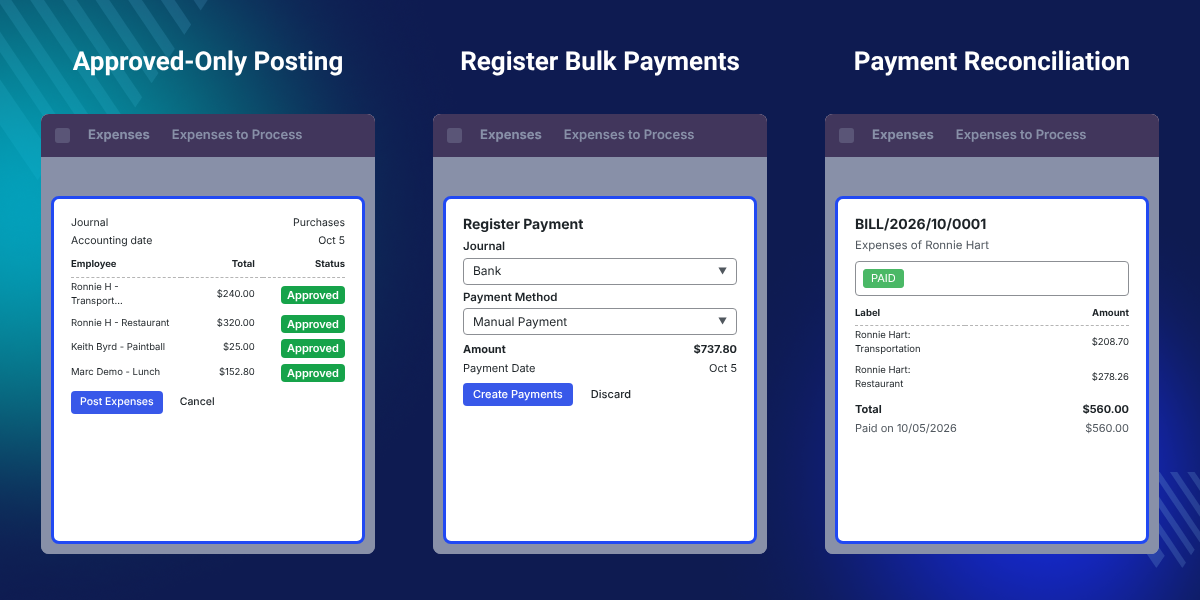
Highlighted Features of Odoo Mass Register Expenses Payment
Bulk Payment Registration
Select several approved expenses and register their payments together in a single action.
Approved-Only Posting
Only approved expenses can be posted to the journal, so unapproved entries never reach payment at any stage.
Simplified Expense Reporting
Expense payment reports stay simple, since each bulk run is recorded as one clean set.
Accurate Financial Data
Bulk posting keeps the expense ledger accurate, since payments register only against posted journal entries.
Payment Tracking and Reconciliation
Review the payment history to track and match each paid expense.
Full Admin Access Control
Admins keep full access rights over which approved expenses get posted and paid.
Why Do We Need Odoo Mass Register Expenses Payment?
Odoo Mass Register Expenses Payment exists because Odoo's standard Expenses app registers payments one at a time.
That is slow when several staff submit expenses the same week.
Paying expenses one by one costs the finance team time and raises the risk of posting an entry that was never approved.
The module removes both problems by posting only approved entries and registering their payments together in one run.
The module checks each entry's approval status under Expenses to Process before that entry can ever reach the posting stage.
Also, if you want to control which admins can post and pay expenses, check our extension Odoo User Security Roles.
Teams that need deeper financial reports once payments are posted can check our extension Odoo Accounting Web Report.
Teams that also track employee performance over time can check our extension Odoo Employee Evaluation Management.
Bulk Expense Payment Use Cases in Odoo
The module fits travel and office expense tracking, large payment runs, and month-end checks alike.
-
Travel Expense Reimbursements
Finance teams pay several staff's travel claims from one trip in a single bulk run.
-
Office Supply Expense Tracking
Admins post and pay routine office supply expenses together instead of approving each purchase on its own.
-
High-Volume Payment Runs
Companies with many staff settle a full batch of approved expense payments without opening each record.
-
Month-End Expense Reconciliation
Accounts teams check the payment history and invoices for every expense paid that month.
Register a New Expense in Odoo
Register a New Expense in Odoo starts the process. Employees open My Expenses and create a new entry for every cost they want reimbursed.
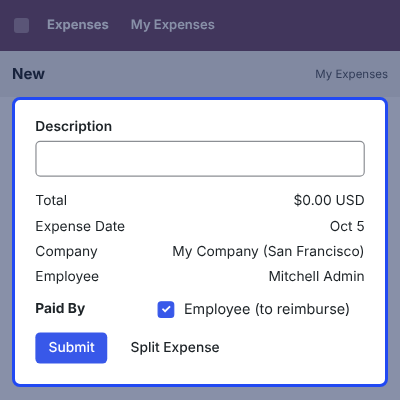
- Log in to the Odoo instance and go to the Expenses app.
- Open My Expenses to see every expense already submitted.
- Click NEW to start a fresh expense entry.
- Fill in all the required fields for the expense.
- Save the entry once every detail is correct.
- The form stays open until the entry is saved.

Approved Expense Posting in Odoo
Approved Expense Posting in Odoo selects which entries move toward payment. Only expenses that pass approval reach the posting stage.
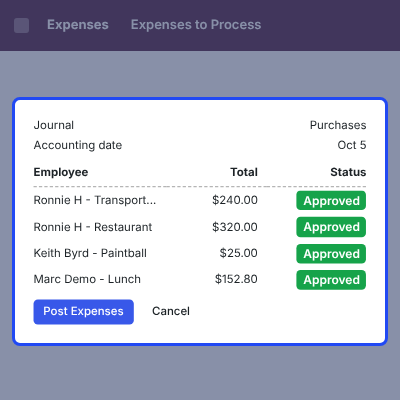
- Select the expense that needs to be submitted for payment.
- Only expenses that are approved are accepted for posting.
- Post the journal entry for the approved expense.
- Entries that are not approved stay out of the posting queue.
- Entries stay in draft until they pass this check.

Track Expense Approval Status and Reports
Track Expense Approval Status and Reports shows where each submission stands. Admins check this before registering any payment.
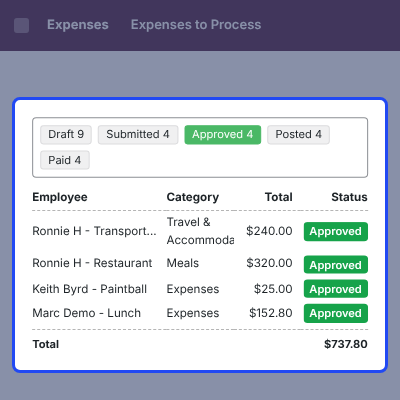
- Open Expenses to Process under My Expenses to check the approval status.
- Click a report entry to open its complete expense breakdown.
- Review every expense line before it goes to payment.
- Confirm the posted status for each entry.
- Reopen any entry that still needs a fix.

Register Bulk Expense Payments
Register Bulk Expense Payments is the module's main screen. Admins select several posted entries and register all their payments together.
This replaces registering each expense payment on its own, one record at a time.
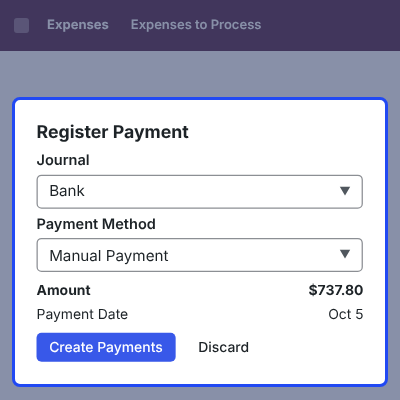
- Select multiple posted expense entries at once.
- Register the payment for every selected entry in a single action.
- Only entries already posted are eligible for payment.
- Save time compared to processing each expense payment separately.
- Admins skip opening each record one by one.

Expense Payment Reconciliation and Invoice History
This step closes the workflow. Admins confirm that each paid entry went through correctly.
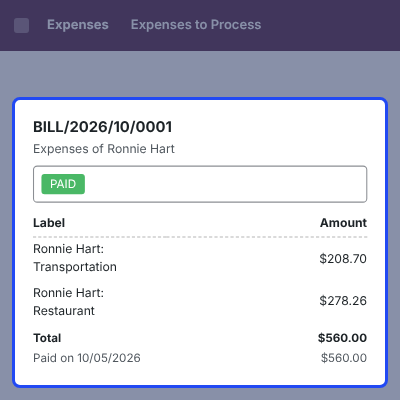
- Review the recorded payment transaction history for every registered entry.
- Open the invoice generated for each completed payment.
- Use the invoice to confirm the expense payment was successful.
- Match the transaction history against the original expense report.
- Keep every invoice on file for later audits.

Complete Odoo Mass Register Expenses Payment Feature List
Bulk Payment Processing
- Select multiple approved expenses and register their payments in one bulk action
- Post the journal entry for several approved expenses together
- Register payments for a full batch of posted entries instead of one at a time
- Cut down the manual work of processing expense payments individually
Approval and Posting Controls
- Post only approved expenses
- Register payments only against already-posted entries
- Keep unapproved expenses out of the payment queue
- Check each entry's approval status under Expenses to Process before posting
Reporting and Financial Data
- Generate accurate financial data for every registered expense payment
- Simplify financial reporting across the business
- Review the full payment transaction history for completed payments
- Open the invoice for each payment to confirm it was successful
Admin and Access Management
- Give admins full access rights over which expenses get posted and paid
- Automate the bulk payment workflow for repeat use
- Use a simple interface for selecting and paying expenses
- Review the complete breakdown of an expense before registering its payment
- Keep the same screen layout for every single run
Odoo Mass Register Expenses Payment -
Webkul's dedicated support provides you with the customizations and troubleshooting solutions for Odoo Mass Register Expenses Payment.
For any query or issue please CREATE A TICKET HERE
You may also check our other top-quality Odoo Apps.
Specifications
Specification
Detailed technical features and requirements to help you understand the module’s capabilities and ensure smooth integration with your system.
Cloud Hosting
Detailed technical features and requirements to help you understand the module’s capabilities and ensure smooth integration with your system.
Move to Cloud Today
We’re partnered with top-tier, trusted providers!
Default Configuration Details of Server
RAM 1 Core
Processor 30 GB
Hard Disk
Database
Want to know more how exactly we are going to power up your eCommerce Website with Cloud to fasten up your store
* Server Configuration may vary as per application requirements.


